Ọrọ Iṣaaju
This manual provides comprehensive instructions for the installation, operation, and maintenance of your ACTi A422 4MP Outdoor Network Bullet Camera. Please read this manual thoroughly before using the product to ensure proper setup and functionality. The ACTi A422 is designed for secure monitoring of outdoor environments, featuring high-resolution video capture, night vision capabilities, and advanced analytics.
Alaye Aabo
- Ensure all power connections comply with local electrical codes.
- Ma ṣe fi kamẹra han si awọn iwọn otutu to gaju tabi ọriniinitutu ti o kọja awọn ipo iṣẹ ti pato.
- Avoid direct exposure of the lens to strong light sources for extended periods.
- Lo awọn ẹya ẹrọ nikan nipasẹ olupese.
- Ge asopọ agbara kuro ṣaaju ṣiṣe eyikeyi itọju tabi awọn ilana fifi sori ẹrọ.
- The camera enclosure is IP68 and IK10 rated for outdoor use and vandalism resistance; however, avoid intentional physical damage.
Package Awọn akoonu
Jẹrisi pe gbogbo awọn ohun kan wa ninu package:
- ACTi A422 4MP Outdoor Network Bullet Camera (1 unit)
- Ohun elo iṣagbesori (awọn skru, awọn ìdákọró)
- Quick Bẹrẹ Itọsọna
- Ohun elo Asopọ Omi ti ko ni omi
Ọja Pariview
The ACTi A422 is a robust bullet-style network camera designed for outdoor surveillance. It features a durable metal enclosure and advanced imaging capabilities.
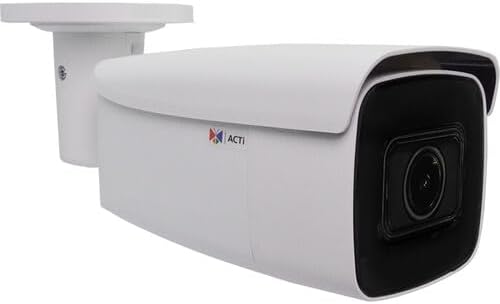
Figure 1: ACTi A422 4MP Outdoor Network Bullet Camera. This image displays the white bullet camera with its integrated mounting bracket, showcasing the main camera body and the dark lens housing.
Awọn eroja pataki:
- Lẹnsi kamẹra: 2.7-13.5mm varifocal lens with 102.8 to 32.4° horizontal field of view.
- Awọn LED IR: Three infrared LEDs for night vision up to 279 feet.
- Iṣagbesori Akọmọ: Integrated for wall mounting.
- Àjọlò Port: RJ-45 port for network and Power over Ethernet (PoE) connection.
- Iṣagbewọle Olohun/Ijade: Fun ibaraẹnisọrọ ohun afetigbọ ọna meji.
- Iho kaadi MicroSD: Supports Kingston or SanDisk microSD cards up to 256GB for local storage.
- Bọtini atunto: Fún àtúnṣe ilé iṣẹ́.
Ṣeto
1. Iṣagbesori Kamẹra
- Yan Ibi kan: Select a suitable wall or surface for mounting, ensuring a clear field of view and access to network cabling.
- Awọn iho iho: Use the mounting template (if provided) to mark and drill pilot holes for the mounting screws.
- Ṣe aabo kamẹra naa: Attach the camera's mounting bracket to the surface using the provided screws and anchors.
- Ṣatunṣe Igun: Tú àwọn skru àtúnṣe lórí àtẹ̀gùn náà láti gbé kámẹ́rà náà sí ibi tí ó yẹ. viewing angle, then tighten securely.
2. Nẹ́tíwọ́ọ̀kì àti Agbára Ìsopọ̀
The ACTi A422 supports Power over Ethernet (PoE), simplifying installation by delivering both power and data through a single Ethernet cable.
- So okun Ethernet pọ: Connect one end of an Ethernet cable to the camera's RJ-45 port. Use the waterproof connector kit for outdoor installations to protect the connection.
- Connect to PoE Switch/Injector: So awọn miiran opin ti awọn àjọlò USB to a PoE-sise nẹtiwọki yipada tabi a Poe injector.
- Jẹrisi Asopọmọra: Once connected, the camera will power on and attempt to obtain an IP address from your network's DHCP server.
3. Iṣeto ni ibẹrẹ
Wọle si kamẹra naa web interface for initial setup and configuration.
- Iwari Kamẹra: Use ACTi's IP Utility software or a network scanner to find the camera's IP address on your network.
- Wiwọle Web Ni wiwo: Ṣii a web browser (Internet Explorer 11, Chrome, Edge, or Safari are compatible) and enter the camera's IP address in the address bar.
- Wo ile: Enter the default username and password (refer to the Quick Start Guide for default credentials). It is highly recommended to change the default password immediately for security.
- Eto ipilẹ: Configure network settings (if not using DHCP), date/time, and user accounts.
Ṣiṣẹ kamẹra
Video and Image Settings
- Ipinnu: The camera supports up to 2688 x 1520 resolution at 30 fps.
- Funmorawon: Utilizes H.265 video compression for efficient storage and bandwidth usage.
- Image Enhancements: Adjust white balance, brightness, contrast, sharpness, saturation, backlight compensation (BLC), and strong light suppression (HLC) via the web interface. The camera also features 150 dB Wide Dynamic Range (WDR) and 2D-DNR/3D-DNR for clear images in challenging lighting.
- Corridor Mode: Supports 90, 180, and 270° rotation for optimized vertical viewawọn agbegbe ing.
- Iboju-ara ikọkọ: Configure up to four configurable regions to mask out sensitive areas from surveillance.
Alẹ Iranran
The camera is equipped with three IR LEDs and an IR cut filter for automatic day/night switching, providing clear surveillance up to 279 feet in low-light or no-light conditions.
Deep Learning Analytics
The ACTi A422 includes built-in deep learning analytics for enhanced monitoring:
- Iwari oju
- Tamperin erin
- Object-based Motion Detection
- Object Line Crossing Detection
- Object Enter Area Detection
- People Line Crossing Detection
- People Enter Area Detection
- Vehicle Line Crossing Detection
- Vehicle Enter Area Detection
These analytics can be configured to trigger alarms or recordings based on specific events within the camera's field of view.
Audio and Storage
- Audio Ọna Meji: Connect external microphone and speaker to enable two-way audio communication.
- Ibi ipamọ agbegbe: Insert a Kingston or SanDisk microSD card (up to 256GB) into the onboard slot for local video recording.
Eto Integration
The camera is fully compatible with ACTi software and complies with ONVIF profiles G, M, S, and T, ensuring broad compatibility with various surveillance devices and Network Video Recorders (NVRs).
Itoju
- Ninu: Nigbagbogbo nu awọn lẹnsi kamẹra ati ile pẹlu asọ, damp asọ. Yago fun abrasive ose tabi epo.
- Awọn igbesoke famuwia: Periodically check the ACTi website for firmware updates. Auto firmware upgrades are supported. Keeping the firmware updated ensures optimal performance and security.
- Ayẹwo USB: Periodically inspect all cables and connections for wear or damage, especially for outdoor installations.
Laasigbotitusita
| Isoro | Owun to le Fa | Ojutu |
|---|---|---|
| Ko si agbara/Kamẹra ko tan | No PoE connection; faulty Ethernet cable; PoE switch issue. | Verify Ethernet cable connection; ensure PoE switch/injector is active; try a different port or cable. |
| Ko le wọle si web ni wiwo | Incorrect IP address; network connectivity issue; firewall blocking. | Confirm IP address using ACTi IP Utility; check network cables; temporarily disable firewall for testing; ensure browser compatibility. |
| Didara aworan ti ko dara | Dirty lens; improper focus; lighting conditions; incorrect image settings. | Clean the lens; adjust focus via web interface; configure image enhancement settings (WDR, BLC); ensure adequate lighting. |
| Analytics not triggering | Incorrect analytics configuration; environmental factors. | Review and adjust analytics settings (detection zones, sensitivity); ensure clear view without obstructions. |
Awọn pato
- Awoṣe: A422
- Sensọ aworan: 1/2.7" Onitẹsiwaju wíwo CMOS
- Ipinnu fidio: 2688 x 1520 (4MP) at 30 fps
- Lẹnsi: 2.7-13.5mm Varifocal
- Aaye ti View (Horizontal): 102.8° si 32.4°
- Iran Alẹ: 3 IR LEDs, up to 279 ft (85m)
- Imọlẹ ti o kere julọ: 0.005 lux (color), 0 lux (IR on)
- Fidio funmorawon: H.265, H.264, MJPEG
- Ohun: Two-way (input/output)
- Ibi ipamọ: MicroSD card slot (up to 256GB, Kingston/SanDisk recommended)
- Oju-ọna Nẹtiwọọki: RJ-45 Ethernet (10/100 Mbps)
- Agbara: Agbara lori Ethernet (PoE)
- Idaabobo Ibẹrẹ: IP68-rated (Dust and Water Resistant)
- Vandal Resistance: IK10-rated
- Iwọn Iṣiṣẹ: -40°C si 60°C (-40°F si 140°F)
- Awọn iwọn: 6.7 x 2.8 x 2.8 inches (170 x 71 x 71 mm)
- Ìwúwo: 1.2 poun (0.54 kg)
- ONVIF Compliance: Profiles G, M, S, T
- Atupale: Face detection, tampering detection, object-based motion detection, object/people/vehicle line crossing/enter area detection.
Atilẹyin ọja ati Support
For warranty information and technical support, please refer to the official ACTi website or contact your authorized ACTi dealer. Keep your purchase receipt as proof of purchase for warranty claims.


