1. Ifihan
Thank you for choosing the Mesqool CR1025 Clock Radio. This device combines an alarm clock, Bluetooth speaker, FM radio, night light, and phone charger into one compact unit. This manual provides detailed instructions for setup, operation, and maintenance to ensure optimal performance and user experience.

Figure 1: Mesqool CR1025 Clock Radio
2. Ọja Ipariview
2.1 Key Awọn ẹya ara ẹrọ
- Apẹrẹ alapọ: Alarm Clock, Bluetooth Speaker, FM Radio, Night Light, and Phone Charger.
- Bluetooth 5.0: For stable and quick wireless audio streaming.
- Redio FM: 87.5MHz-108.0MHz frequency range with 20 preset stations.
- Imọlẹ Adijositabulu: 5 levels for the LED display.
- Iwọn ti o le ṣatunṣe: 16 levels (45dB to 116dB).
- Akoko oorun: Allows automatic shutdown of audio playback.
- Iṣẹ́ lẹ́ẹ̀kọ̀ọ̀kan: 9-minute delay for alarms.
- Batiri Afẹyinti: Retains time and alarm settings during power outages.
- Awọn ibudo gbigba agbara USB meji: Type-C and USB-A for device charging.
- Ilana akoko: 12-hour and 24-hour display options.
- Akoko Ifipamọ Oju-ọjọ (DST): Quick adjustment feature.

Àwòrán 2: Iṣẹ́ 5-nínú-1
2.2 Package Awọn akoonu
- Mesqool CR1025 Clock Radio
- Adapter agbara
- Okun USB
- CR2032 Lithium Battery (pre-installed or separate for backup)
- Afowoyi Olumulo (iwe-ipamọ yii)

Nọmba 3: Awọn akoonu Package
3. Awọn iṣakoso ati Ifihan
Familiarize yourself with the buttons and ports on your Mesqool CR1025 Clock Radio.
3.1 Top Panel idari
- Sleep Timer Knob: Rotate to set sleep timer duration. Press to confirm.
- Bọtini Itaniji: Press to set or activate/deactivate alarms.
- Time/12/24 Button: Press to set time. Hold to switch between 12/24-hour format.
- Dimmer/DST Button: Press to adjust display brightness. Hold to activate/deactivate Daylight Saving Time.
- Bọtini SINOOZE/Imọlẹ: Press to snooze alarm or turn night light on/off.
- Preset/Pair Button: Press to cycle through FM presets. Hold to enter Bluetooth pairing mode.
- Play/Mode Button: Press to play/pause in Bluetooth mode. Hold to switch between FM/Bluetooth modes.
- Power/Scan Knob: Rotate to adjust volume. Press to power on/off. Hold to auto-scan FM stations.
3.2 Ru Panel Ports
- DC NINU: Ibudo titẹ agbara.
- Ijade USB-A: Fun gbigba agbara awọn ẹrọ ita.
- Ijade Iru-C: Fun gbigba agbara awọn ẹrọ ita.
4. Eto
4.1 Asopọ agbara
- Connect the power adapter to the DC IN port on the back of the clock radio.
- So adapter agbara sinu ibudo ogiri deede. Ifihan naa yoo tan imọlẹ.

olusin 4: Power Asopọmọra
4.2 Battery Backup
The CR2032 battery provides backup for time and alarm settings during a power outage. The display will not show time, and alarms will not sound until power is restored.
- Ensure the battery insulator tab is removed if the battery was pre-installed.
- If replacing, open the battery compartment on the bottom and insert a new CR2032 battery with the correct polarity.
4.3 Ṣiṣeto Aago naa
- Tẹ mọlẹ Time/12/24 bọtini titi ti wakati awọn nọmba filasi.
- Yiyi awọn Agbara/Ayẹwo bọtini lati ṣatunṣe wakati.
- Tẹ awọn Time/12/24 bọtini lẹẹkansi lati jẹrisi wakati naa, awọn nọmba iṣẹju naa yoo si tan imọlẹ.
- Yiyi awọn Agbara/Ayẹwo bọtini lati ṣatunṣe awọn iṣẹju.
- Tẹ awọn Time/12/24 button to save the time setting.
4.4 12/24-Aago kika
Láti yípadà láàrín àwọn ọ̀nà ìgbà wákàtí méjìlá sí wákàtí mẹ́rìnlélógún, tẹ ẹ̀rọ náà Time/12/24 button briefly while the time is displayed.

Figure 5: 12H/24H and DST Display
4.5 Akoko Ifipamọ Oju-ọjọ (DST)
To activate or deactivate DST, press and hold the Dímẹ́rà/DST button. The 'DST' indicator will appear or disappear on the display.
5. Awọn ilana Iṣiṣẹ
5.1 Eto Itaniji
- Tẹ mọlẹ Itaniji bọ́tìnì títí tí àwọn nọ́mbà wákàtí ìkìlọ̀ yóò fi tàn.
- Yiyi awọn Agbara/Ayẹwo bọtini lati ṣatunṣe wakati itaniji.
- Tẹ awọn Itaniji bọtini lẹẹkansi lati jẹrisi wakati naa, awọn nọmba iṣẹju naa yoo si tan imọlẹ.
- Yiyi awọn Agbara/Ayẹwo bọtini lati ṣatunṣe awọn iṣẹju itaniji.
- Tẹ awọn Itaniji bọtini lati fi akoko itaniji pamọ.
- Lati mu itaniji ṣiṣẹ/mu ma ṣiṣẹ, tẹ awọn Itaniji bọtini ni soki. Aami itaniji yoo han/farahan loju iboju.
5.2 Iṣiṣẹ Snooze
Nigbati itaniji ba dun, tẹ bọtini naa SNOOZE / LIGHT button to activate the 9-minute snooze function. The alarm will sound again after 9 minutes. This can be repeated up to 9 times. To stop the alarm completely, press the Itaniji bọtini.

Figure 6: Snooze Function
5.3 FM Radio isẹ
- Tẹ awọn Play/Mode bọtini lati yipada si FM Redio mode.
- Ṣiṣayẹwo aifọwọyi: Tẹ mọlẹ Agbara/Ayẹwo knob to automatically scan and save available FM stations (up to 20 presets).
- Itọsọna Afowoyi: Briefly rotate the Agbara/Ayẹwo bọtini lati ṣatunṣe igbohunsafẹfẹ naa.
- Yan Awọn tito tẹlẹ: Tẹ awọn Ṣíṣe àtúntò/Sọpọ̀ bọtini lati yipo nipasẹ awọn ibudo ti a fipamọ.
- Atunse iwọn didun: Yiyi awọn Agbara/Ayẹwo knob to adjust the volume (16 levels).

Àwòrán 7: Àwọn Ẹ̀yà Rédíò FM
5.4 Iṣẹ́ Agbọrọsọ Bluetooth
- Tẹ awọn Play/Mode button to switch to Bluetooth mode. The 'BT' icon will flash on the display.
- On your mobile device, enable Bluetooth and search for 'CR1025'.
- Select 'CR1025' to pair. Once connected, the 'BT' icon will stop flashing.
- Play audio from your device. Use the Play/Mode bọtini lati mu ṣiṣẹ / da duro.
- Atunse iwọn didun: Yiyi awọn Agbara/Ayẹwo koko lati ṣatunṣe iwọn didun.

olusin 8: Bluetooth 5.0 Asopọmọra
Iṣẹ́ ìmọ́lẹ̀ alẹ́ 5.5
Tẹ awọn SNOOZE / LIGHT button to turn the night light on or off. The night light provides a soft, warm glow.

Figure 9: Warm Night Light
5.6 Ifihan Imọlẹ Atunse
Tẹ awọn Dímẹ́rà/DST button repeatedly to cycle through 5 levels of display brightness, from off to brightest.
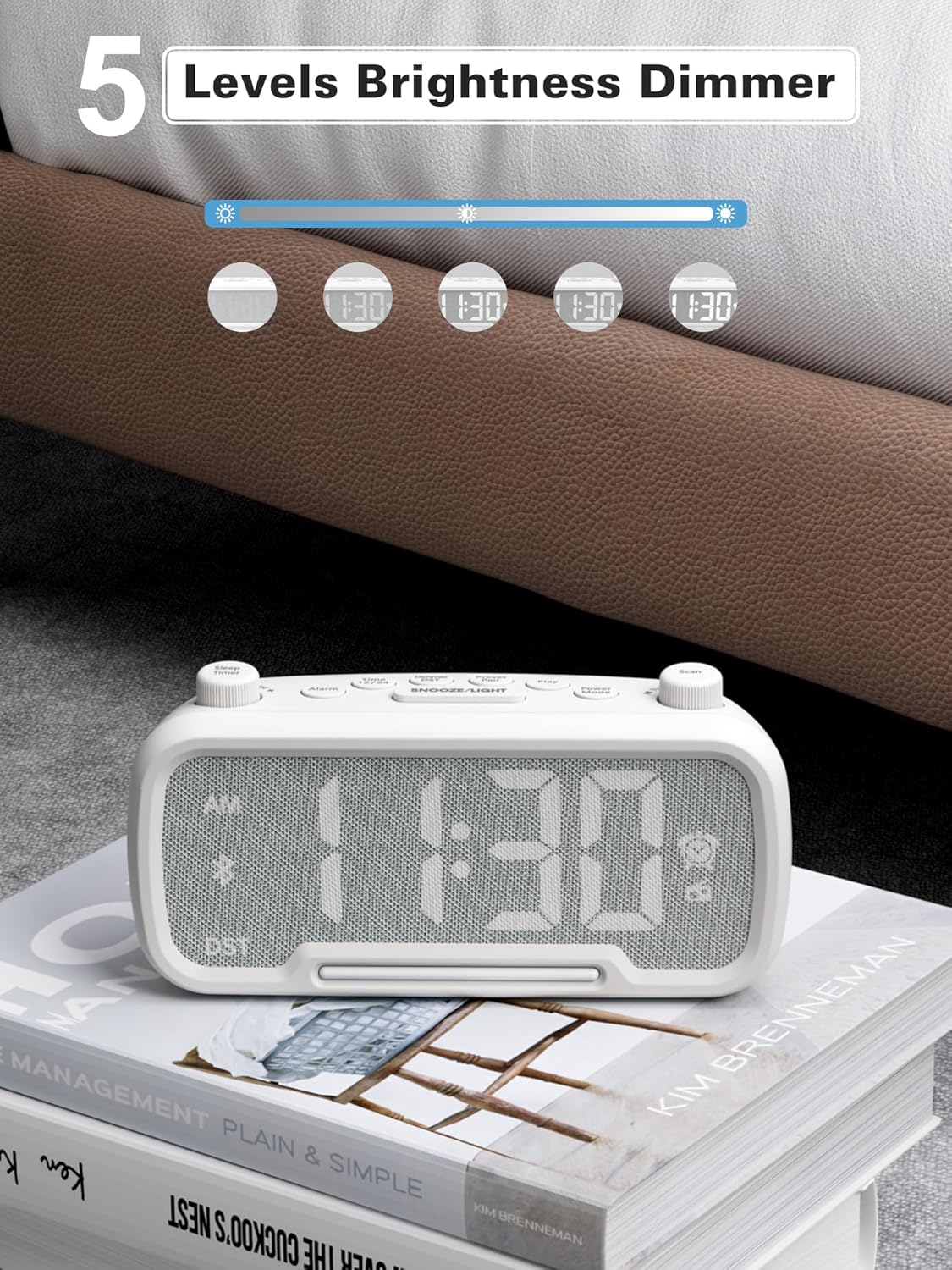
Figure 10: 5 Levels Brightness Dimmer
5.7 Aago orun
The sleep timer allows you to set a duration after which the radio or Bluetooth audio will automatically turn off.
- While playing FM radio or Bluetooth audio, rotate the Aago orun knob to select the desired sleep duration (e.g., 15, 30, 60, 90 minutes).
- The display will show the remaining sleep time. The audio will turn off automatically when the timer expires.
5.8 Gbigba agbara foonu
The clock radio features two USB charging ports (Type-C and USB-A) for convenient charging of your mobile devices.
- Connect your device's charging cable to either the USB-A or Type-C port on the back of the clock radio.
- Connect the other end of the cable to your mobile device. Charging will begin automatically.

Figure 11: Dual USB Charging Ports
6. Itọju
- Sọ ẹyọ kuro pẹlu asọ ti o gbẹ. Ma ṣe lo abrasive ose tabi epo.
- Keep the unit away from direct sunlight, heat sources, and moisture.
- Rii daju pe fentilesonu to dara ni ayika ẹyọ naa.
- Tí a kò bá lo ẹ̀rọ náà fún ìgbà pípẹ́, yọ ọ́ kúrò nínú ihò agbára.
7. Laasigbotitusita
| Isoro | Owun to le Fa | Ojutu |
|---|---|---|
| Ko si agbara/Ifihan ti a ti pa | Adaparọ agbara ko sopọ tabi aṣiṣe. | Ensure power adapter is securely plugged into the unit and wall outlet. Check outlet functionality. |
| Itaniji ko dun | Itaniji ko mu ṣiṣẹ tabi ṣeto ti ko tọ. | Verify alarm time is set and the alarm icon is visible on the display. Check alarm volume. |
| Gbigba redio FM ti ko dara | Ifihan agbara tabi kikọlu. | Adjust the unit's position. Try auto-scanning again. |
| Bluetooth ko so pọ | Ẹ̀rọ náà kò sí ní ipò ìsopọ̀ tàbí ó jìnnà jù. | Ensure the clock radio is in Bluetooth mode (BT icon flashing). Move device closer. Forget device on phone and re-pair. |
| USB gbigba agbara ko ṣiṣẹ | Cable faulty or device incompatible. | Try a different USB cable. Ensure the clock radio is powered on. |
8. Awọn pato
- Awoṣe: CR1025
- Iṣagbewọle agbara: AC 100-240V, 50/60Hz
- Batiri Afẹyinti: 1 x CR2032 (pẹlu)
- Igbohunsafẹfẹ FM: 87.5 - 108.0 MHz
- Ẹya Bluetooth: 5.0
- Ijade USB: USB-A, Type-C (Charging only)
- Ṣe afihan Imọlẹ: 5 ipele
- Awọn ipele Iwọn: Awọn ipele 16 (45dB - 116dB)
- Awọn iwọn: 5.9 x 3.81 x 8.4 cm (2.32 x 1.5 x 3.31 inches)
- Ìwúwo: 216 g (0.48 lbs)
olusin 12: Awọn iwọn Ọja
9. Atilẹyin ọja ati Support
Mesqool products are designed and manufactured to the highest quality standards. For warranty information, technical support, or customer service inquiries, please refer to the contact information provided on the product packaging or visit the official Mesqool webojula.
Webojula: Mesqool Official Store


