1. Ifihan
O ṣeun fun riraasing the MISTRAL Horizon Twilight MHV7123DR-TL 7-inch DC High Velocity Fan. This manual provides essential information for the safe operation, installation, and maintenance of your fan. Please read it thoroughly before use and retain it for future reference.

Aworan 1.1: Iwaju view of the MISTRAL Horizon Twilight MHV7123DR-TL fan, showcasing its compact design and the fan head with the Mistral logo. A remote control is visible to the right of the fan.
2. Awọn ilana aabo
Lati dinku eewu ina, mọnamọna, tabi ipalara, nigbagbogbo tẹle awọn iṣọra aabo ipilẹ wọnyi:
- Rii daju pe ipese agbara voltage matches the rating label on the fan.
- Má ṣe lo afẹ́fẹ́ pẹ̀lú okùn tàbí plug tó ti bàjẹ́. Tí ó bá bàjẹ́, pe àwọn òṣìṣẹ́ iṣẹ́ tó mọ̀ nípa rẹ̀.
- Keep fingers and other objects away from the fan blades and moving parts during operation.
- Maṣe lo afẹfẹ ninu tutu tabi damp awọn ipo, gẹgẹbi awọn balùwẹ tabi awọn agbegbe ifọṣọ.
- Yọ afẹ́fẹ́ kúrò nínú ihò agbára kí o tó sọ ọ́ di mímọ́ tàbí kí o ṣe àtúnṣe èyíkéyìí.
- Ohun elo yii kii ṣe ipinnu fun lilo nipasẹ awọn eniyan (pẹlu awọn ọmọde) pẹlu idinku ti ara, imọlara tabi awọn agbara ọpọlọ, tabi aini iriri ati imọ, ayafi ti wọn ba ti fun wọn ni abojuto tabi itọnisọna nipa lilo ohun elo nipasẹ eniyan ti o ni iduro fun aabo wọn.
- Awọn ọmọde yẹ ki o wa ni abojuto lati rii daju pe wọn ko ṣere pẹlu ohun elo naa.
3. Package Awọn akoonu
Jẹrisi pe gbogbo awọn ohun kan wa ninu package:
- MISTRAL Horizon Twilight MHV7123DR-TL Fan Unit
- Isakoṣo latọna jijin
- Afowoyi Olumulo (iwe-ipamọ yii)
4. Ọja Ipariview
Familiarize yourself with the components of your fan:
4.1 Fan Unit
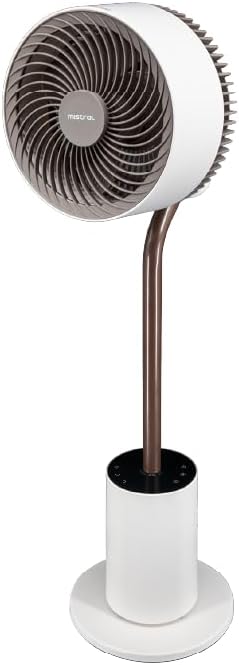
Aworan 4.1: Iwaju alaye view of the fan, highlighting the fan head, stand, and control base. This image provides a clear perspective of the fan's overall structure.
- Ori Fan: Ó ní àwọn abẹ́ afẹ́fẹ́ àti mọ́tò náà.
- Front Guard: Ideri aabo fun awọn abe afẹfẹ.
- Rear Guard: Back cover of the fan head, housing the atmosphere light.
- Duro: Connects the fan head to the base.
- Control Base: Houses the control panel and power input.
- Okun Agbara: Fun asopọ si itanna iṣan.
4.2 Iṣakoso latọna jijin
The remote control allows convenient operation of all fan functions from a distance. (Refer to Image 1.1 for a visual of the remote control.)
- Bọtini agbara: Ó ń tan/pa afẹ́fẹ́.
- Bọtini Iyara: Adjusts fan speed (1-12 speeds + Booster).
- Bọtini Ipo: Cycles through Normal, Natural, Sleeping, and ECO modes.
- Bọtini Oscillation: Activates/deactivates 3D oscillation (horizontal and vertical).
- Bọtini Aago: Sets the operating timer (up to 12 hours).
- Bọtini Imọlẹ: Controls the atmosphere light (On/Off, brightness adjustment).
- Indicating Lights Off Button: Turns off the control panel's indicator lights.
5. Eto
The MISTRAL Horizon Twilight fan typically comes pre-assembled. Follow these steps for initial setup:
- Ṣii silẹ: Fara yọ afẹfẹ kuro ati gbogbo awọn ẹya ẹrọ lati apoti.
- Ibi: Place the fan on a stable, flat surface. Ensure there is adequate space around the fan for proper air circulation and oscillation.
- Asopọ agbara: Fi pulọọgi agbara sinu ihò ina ti o yẹ.
- Awọn batiri Iṣakoso Latọna jijin: Open the battery compartment on the remote control and insert the required batteries (not included, typically AAA). Ensure correct polarity.
6. Awọn ilana Iṣiṣẹ
Operate your fan using either the control panel on the base or the remote control.
6.1 Agbara Tan / Pa
- Tẹ awọn Agbara button on the control panel or remote control to turn the fan On or Off.
6.2 iyara Iṣakoso
- Tẹ awọn Iyara button to cycle through 12 fan speed settings.
- A Booster Speed setting is also available for maximum airflow.
6.3 Awọn ọna
Tẹ awọn Ipo bọtini lati yan lati awọn ipo iṣẹ atẹle:
- Ipo deede: Pese ṣiṣan afẹfẹ igbagbogbo ni iyara ti o yan.
- Ipo Adayeba: Ṣe afarawe afẹfẹ adayeba nipasẹ yiyatọ iyara àìpẹ ni igba diẹ.
- Ipo sisun: Ó ń ṣiṣẹ́ ní iyàrá tó kéré sí i, tó sì dákẹ́ jẹ́ẹ́, ó sì ń dínkù díẹ̀díẹ̀asing over time for comfortable sleep.
- Ipo ECO: Adjusts fan speed automatically based on ambient temperature to optimize energy consumption.
6.4 3D Oscillation
The fan features 3D oscillation for wider air distribution.
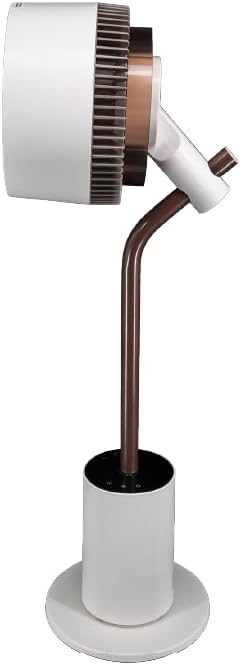
Aworan 6.4: Apa view of the fan, illustrating its ability to tilt vertically, which is part of its 3D oscillation feature. The fan head is angled upwards.
- Tẹ awọn oscillation button to activate or deactivate the oscillation function.
- Oscillation Petele: Left and Right movement at 30°, 60°, 90°, or 120° angles.
- Oscillation inaro: Up and Down movement at 50° or 90° angles.
- The fan can oscillate both horizontally and vertically simultaneously for 3D airflow.
6.5 Aago Išė
- Tẹ awọn Aago button to set the fan to automatically turn off after a specified period.
- The timer can be set for up to 12 hours. Each press typically increases the timer by 1 hour.
6.6 aroma Diffuser
The fan includes an aroma diffuser feature for a pleasant environment.
- Locate the aroma diffuser compartment (usually at the back of the fan head or base).
- Open the compartment and add a few drops of your preferred essential oil onto the provided pad (if applicable).
- Close the compartment. The fan's airflow will gently diffuse the aroma.
6.7 Inner Mood Lighting
The fan features an atmosphere light on the back of the rear guard.

Aworan 6.7: The MISTRAL fan with its inner mood lighting activated, casting a warm glow from behind the fan head. This demonstrates the adjustable atmosphere light feature.
- Tẹ awọn Imọlẹ button on the remote control to turn the mood light On/Off.
- Tẹ awọn Imọlẹ button repeatedly to cycle through 3 adjustable brightness levels.
6.8 Indicating Lights Off Function
- Tẹ awọn Indicating Lights Off button on the remote control to turn off the control panel's indicator lights, which can be useful in dark environments like a bedroom.
7. Itọju
Regular cleaning and maintenance will ensure optimal performance and extend the lifespan of your fan.
- Ninu Ode: Mu ese ita ti afẹfẹ afẹfẹ pẹlu asọ, damp asọ. Ma ṣe lo abrasive ose tabi epo.
- Awọn abẹfẹfẹ mimọ: Unplug the fan before attempting to clean the blades. If accessible, gently wipe the blades with a soft cloth to remove dust. Do not immerse the fan in water.
- Aroma Diffuser Pad: If using an aroma diffuser, regularly clean or replace the aroma pad to prevent residue buildup.
- Ibi ipamọ: When not in use for extended periods, unplug the fan, clean it, and store it in a cool, dry place, preferably in its original packaging.
8. Laasigbotitusita
Ti o ba pade awọn ọran pẹlu olufẹ rẹ, tọka si awọn iṣoro ati awọn ojutu ti o wọpọ wọnyi:
| Isoro | Owun to le Fa | Ojutu |
|---|---|---|
| Fan ko ni tan-an. | No power supply; Power button not pressed; Remote control batteries depleted. | Check power cord connection and wall outlet; Press the Power button; Replace remote control batteries. |
| Afẹfẹ alailagbara. | Low speed setting; Fan blades are dirty. | Increase fan speed; Clean fan blades (refer to Maintenance section). |
| Fan ki asopọ dani ariwo. | Obstruction near blades; Fan not on a stable surface. | Unplug and check for obstructions; Place fan on a flat, stable surface. |
| Isakoṣo latọna jijin ko ṣiṣẹ. | Batteries depleted or incorrectly inserted; Obstruction between remote and fan. | Replace batteries, ensuring correct polarity; Ensure clear line of sight to the fan's receiver. |
9. Awọn pato
| Ẹya ara ẹrọ | Ẹ̀kúnrẹ́rẹ́ |
|---|---|
| Awoṣe | MHV7123DR-TL |
| Fan Iru | 7-inch DC High Velocity Fan |
| Motor Iru | Brushless DC Motor |
| Awọn iyara | 12 Speeds + Booster Speed |
| Awọn ọna | Normal, Natural, Sleeping, ECO |
| oscillation | 3D Oscillation (Left/Right: 30°, 60°, 90°, 120°; Up/Down: 50°, 90°) |
| Aago | Awọn wakati 12 |
| Pataki Awọn ẹya ara ẹrọ | Aroma Diffuser, Inner Mood Lighting (3 adjustable brightness), Indicating Lights Off Function, Remote Control |
| Orisun agbara | Okun Itanna |
| Ọja Mefa | 25D x 25W x 90H sẹntimita |
| Fọọmù ifosiwewe | Stand / Floor Fan |
10. Atilẹyin ọja ati Support
MISTRAL products are manufactured to high-quality standards. For warranty information, please refer to the warranty card included with your purchase or visit the official MISTRAL website. For technical support or service inquiries, please contact MISTRAL customer service.
Jọwọ ṣe idaduro ẹri rira rẹ fun awọn iṣeduro atilẹyin ọja.


