1. Ifihan
This manual provides detailed instructions for the installation, operation, and maintenance of your ieGeek S3 2K Wireless Outdoor Security Camera. Please read this manual thoroughly before using the product to ensure proper function and safety. Keep this manual for future reference.
2. Ọja Ipariview
The ieGeek S3 is a 2K battery-powered wireless security camera designed for both indoor and outdoor use. It features 180° pan rotation, smart motion detection, color night vision, and two-way audio communication.
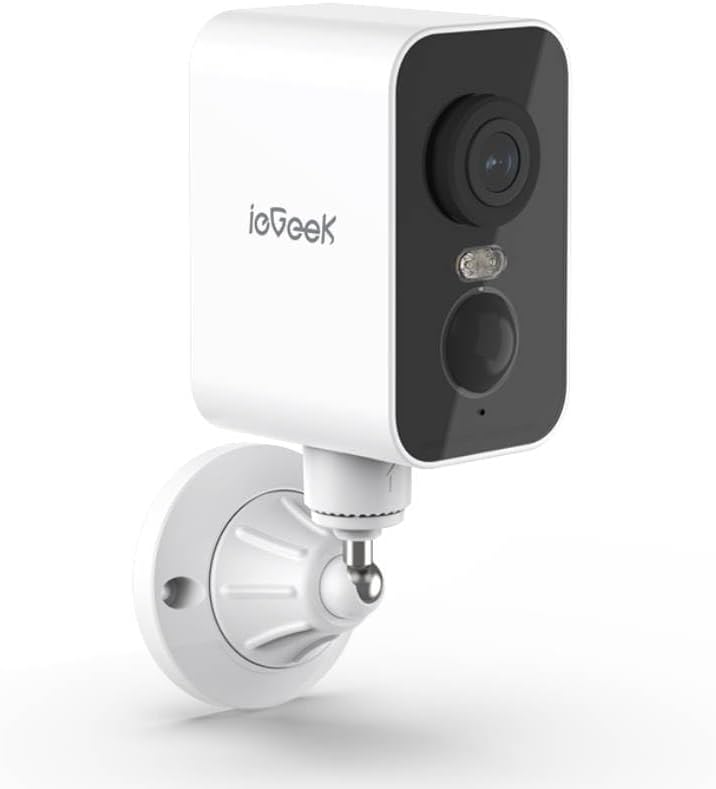
Nọmba 2.1: ieGeek S3 2K Wireless Outdoor Security Camera. This image displays the white rectangular camera body with a black front panel housing the lens, an LED light, and a motion sensor. The camera is attached to a white wall-mount bracket.
2.1 Kini ni Apoti
- ieGeek S3 Battery Security Camera
- Bracket Screw Pack (for wall mounting)
- Sitika fifi sori ẹrọ
- Ngba agbara USB
- Ilana Afowoyi (iwe yii)
3. Eto
3.1 Ngba agbara si Kamẹra
Before initial use, fully charge the camera's built-in 5200 mAh lithium-ion battery using the provided charging cable. Connect the cable to the camera's charging port and a standard USB power adapter (not included). The charging indicator light will provide status.
3.2 App Download ati Account Creation
- Download the 'CloudEdge' or 'ieGeek Cam' app from your smartphone's app store (iOS or Android).
- Ṣí àpù náà kí o sì tẹ̀lé àwọn ìtọ́ni tó wà lójú ìbòjú láti ṣẹ̀dá àkọọ́lẹ̀ tuntun tàbí wọlé tí o bá ti ní ọ̀kan tẹ́lẹ̀.
3.3 Fifi sori ẹrọ ti ara (Ifi sori ogiri)
The ieGeek S3 camera is designed for wall mounting and has an IP65 waterproof rating, making it suitable for outdoor environments.
- Choose a suitable location for installation. Ensure the camera has a clear field of view and good Wi-Fi signal strength.
- Use the provided installation sticker to mark the drill holes on the wall.
- Lu awọn ihò ki o si fi awọn ìdákọ̀ró ogiri sinu wọn.
- Attach the mounting bracket to the wall using the screws from the bracket screw pack.
- Secure the camera to the mounting bracket. Adjust the camera angle as needed.
3.4 Device Pairing with App
- Ensure your smartphone is connected to a 2.4GHz Wi-Fi network. The camera supports 2.4GHz Wi-Fi only.
- Open the 'CloudEdge' or 'ieGeek Cam' app and tap the '+' icon to add a new device.
- Yan awoṣe kamẹra rẹ lati inu atokọ naa.
- Follow the in-app instructions to power on the camera and reset it if necessary (usually by pressing a reset button until an indicator light flashes).
- Scan the QR code displayed on your phone screen with the camera lens. Hold the phone approximately 4-8 inches (10-20 cm) from the camera.
- Once the camera confirms successful scanning (e.g., with an audible prompt), proceed in the app to complete the connection.
- Name your camera and set its location.
4. Ṣiṣẹ kamẹra
4.1 Live View and Pan Rotation
Láti ojú ìbòjú pàtàkì ti app náà, tẹ kámẹ́rà rẹ láti wọlé sí ojú ìtajà náà view. You can use the on-screen controls to pan the camera 180° horizontally to adjust the viewigun igun.
4.2 Išipopada erin ati titaniji
The camera features AI motion detection. When motion is detected, the camera will record a video clip and send an alert to your smartphone. You can customize motion detection sensitivity and alert settings within the app.
4.3 Meji-Ona Audio
Utilize the built-in microphone and speaker for two-way communication. Tap the microphone icon in the live view to speak through the camera, and listen to audio from the camera's location.
4.4 Night Vision
The camera automatically switches to color night vision in low-light conditions, providing clear surveillance up to 33 feet (10 meters) using its infrared LEDs.
4.5 Ifipamọ Fidio
Foo fidio ti o gbasilẹtage can be stored in two ways:
- Káàdì TF (MicroSD): Insert a TF card (up to 128GB, not included) into the camera's designated slot for local storage.
- Ibi ipamọ awọsanma: Optional cloud storage services may be available through the app for remote access and backup of recordings.
4.6 Ìṣọ̀kan Alexa
The ieGeek S3 camera is compatible with Amazon Alexa. Follow the instructions in the 'CloudEdge' or 'ieGeek Cam' app to link your camera with your Alexa account for voice control and viewing live feeds on compatible Alexa devices.
5. Itọju
5.1 Gbigba agbara batiri
The camera is battery-powered. When the battery level is low, you will receive an alert via the app. Recharge the camera using the provided charging cable. Battery life varies based on usage and environmental factors.
5.2 Ninu
To maintain optimal performance, periodically clean the camera lens and housing with a soft, dry cloth. Avoid using harsh chemicals or abrasive materials that could damage the camera's surface or lens.
6. Laasigbotitusita
- Kamẹra ko sopọ mọ Wi-Fi: Ensure your Wi-Fi network is 2.4GHz. Check Wi-Fi signal strength at the camera's location. Try resetting the camera and repeating the pairing process.
- Didara aworan ti ko dara: Nu lẹnsi kamẹra naa. Rii daju pe ko si awọn idena ninu aaye kamẹra naa view. Ṣàyẹ̀wò iyàrá ìsopọ̀mọ́ra ìkànnì ayélujára rẹ.
- Wiwa išipopada ko ṣiṣẹ: Verify motion detection is enabled in the app settings. Adjust sensitivity levels. Ensure the camera is positioned correctly to capture motion in the desired area.
- Batiri mimu yarayara: Awọn iṣẹlẹ wiwa išipopada loorekoore, laaye view access, and two-way audio use can consume battery faster. Reduce motion detection sensitivity or frequency if possible. Ensure the camera is fully charged.
- Awọn iṣoro ohun elo: Ensure the app is updated to the latest version. Try restarting the app or your smartphone.
7. Awọn pato
| Orukọ awoṣe | ieGeek Battery Cam S3 |
| Ipinnu Yaworan fidio | 2K (Opinu 3 MP ti o munadoko) |
| inu ile / ita gbangba Lilo | Ninu ile, ita gbangba |
| Orisun agbara | Battery Powered (5200 mAh Lithium Ion) |
| Asopọmọra Technology | 2.4GHz Wi-Fi (Wi-Fi 6 Technology) |
| Adarí Iru | CloudEdge, Amazon Alexa, ieGeek Cam App |
| Iṣagbesori Iru | Ògiri Ògiri |
| Pataki Awọn ẹya ara ẹrọ | Pan Rotating 180°, AI Motion Detection, Color Night Vision, 2-Way Audio |
| Viewigun igun | 180 degrees (Pan) |
| Ibiti Iran Night | Ẹsẹ 33 (mita 10) |
| Iwọn fireemu | 15 awọn fireemu fun keji |
| Omi Resistance Ipele | Mabomire (IP65) |
| Awọn aṣayan ipamọ | TF Card (MicroSD) up to 128 GB, Cloud Storage (optional) |
| Awọn iwọn (L x W x H) | 3.9 x 1 x 3.9 inches |
| Iwọn Nkan | 11.2 iwon |
| Awọn ẹrọ ibaramu | Alexa, Smartphone, Smartwatch, Tablet |
8. Atilẹyin ọja ati Support
For warranty information, please refer to the specific terms provided at the time of purchase or contact ieGeek customer support directly. If you encounter any issues or have questions regarding your ieGeek S3 camera, please visit the official ieGeek webojú-òpó wẹ́ẹ̀bù tàbí kí o kàn sí ẹgbẹ́ iṣẹ́ oníbàárà wọn fún ìrànlọ́wọ́.
Atilẹyin Ayelujara: Visit the ieGeek Store on Amazon


