1. Ifihan
The Seitron Elios MIDI control unit (Model TDST24M) is an innovative device specifically designed for the advanced monitoring and management of solar thermal panel systems. It offers intelligent control, ensuring optimal performance and reliability for your solar energy installation.
This manual provides essential information for the proper installation, operation, and maintenance of your Elios MIDI control unit, helping you maximize the efficiency and management of your solar thermal system.
2. Key Awọn ẹya ara ẹrọ
- Intelligent Solar Energy Control: Designed for advanced monitoring of solar thermal panel systems.
- Imọ-ẹrọ Onitẹsiwaju: Equipped with 3 relay outputs (2 for loads + 1 for alarm), one PWM output, one 0-10V output, and 3 sensor inputs, providing a versatile solution for various solar system types.
- Intuitive Management: Features 6 different plant schemes, allowing the control unit to automatically manage inputs and outputs for optimized solar thermal system performance.
- Detailed Visualization: A backlit LCD display provides a comprehensive overview of the hydraulic scheme, output status, sensor readings, and other essential monitoring and management information.
- Iṣe Ti o dara julọ: Operates on 230V~ 50Hz with power consumption less than 2 VA, ensuring efficient and reliable operation across a wide range of temperatures and environmental conditions.
- Ibamu sensọ: Supports 3 x NTC 10K @ 25°C ±1% sensors.
- Wide Operating Limits: Sensor operating limits are -50°C to +200°C for the collector and -50°C to +110°C for the boiler.
3. Eto ati fifi sori
Proper installation is crucial for the optimal functioning of the Elios MIDI control unit. It should be installed by a qualified technician in accordance with local electrical codes and regulations.
3.1 Iṣagbesori
Mount the control unit in a dry, protected location, away from direct sunlight, excessive heat, or moisture. Ensure adequate ventilation around the unit.
3.2 Electrical Awọn isopọ
The Elios MIDI control unit requires a 230V~ 50Hz power supply. Connect the power according to the wiring diagram provided in the full installation guide (not included in this manual). Ensure all connections are secure and properly insulated.
Connect the NTC 10K sensors to the designated input terminals. Pay close attention to the correct assignment of sensors to collector, boiler, and other measurement points as per your system's hydraulic scheme.
Connect the relay outputs, PWM output, and 0-10V output to the respective loads (pumps, valves, etc.) as required by your solar thermal system design.

Nọmba 3.1: Ẹyìn view of the Elios MIDI control unit, illustrating the various connection terminals for power, sensors, and outputs. This view jẹ pataki fun awọn okun waya to dara lakoko fifi sori ẹrọ.
4. Awọn ilana Iṣiṣẹ
The Elios MIDI control unit features an intuitive interface for easy operation and monitoring.
4.1 Ifihan Loriview

Nọmba 4.1: Iwaju view of the Elios MIDI control unit, highlighting the backlit LCD display. The display shows the selected hydraulic scheme (e.g., SCH 09) and current system status, along with navigation buttons.
The backlit LCD display provides real-time information about your solar thermal system. It typically shows the active hydraulic scheme, current temperatures from connected sensors, and the status of outputs (e.g., pump running).
4.2 Awọn bọtini lilọ kiri
The control unit features several buttons for navigation and parameter adjustment:
- Awọn itọka oke/isalẹ: Used to navigate through menus, adjust values, or scroll through information.
- Ṣeto Bọtini: Used to confirm selections or enter a menu.
- Bọtini ESC: Used to exit a menu or cancel an operation.
4.3 Scheme Selection
The Elios MIDI supports 6 different hydraulic schemes. To select or change a scheme, navigate through the main menu using the arrow buttons and confirm with the SET button. Refer to the detailed programming manual for specific instructions on configuring each scheme.
4.4 Monitoring Parameters
From the main display, you can view various parameters such as:
- Alakojo otutu
- igbomikana otutu
- Auxiliary temperatures (if applicable)
- Ipo fifa
- Ipo itaniji
Use the arrow buttons to cycle through the available information screens.
5. Itọju
The Seitron Elios MIDI control unit is designed for reliable operation with minimal maintenance. However, periodic checks can help ensure its longevity and continued performance.
- Ninu: Gently wipe the unit's exterior with a soft, dry cloth. Do not use abrasive cleaners or solvents.
- Ṣayẹwo sensọ: Periodically verify that sensor cables are securely connected and free from damage. Ensure sensors are properly positioned in their respective locations (collector, boiler).
- Awọn ipo Ayika: Ensure the operating environment remains within the specified temperature and humidity ranges to prevent damage to the electronics.
- Awọn imudojuiwọn famuwia: Check the Seitron official website periodically for any available firmware updates that might improve performance or add new features. Consult a qualified technician for any firmware update procedures.
6. Laasigbotitusita
If you encounter issues with your Elios MIDI control unit, refer to the following common problems and solutions before contacting technical support.
6.1 No Display / Unit Not Powering On
- Ṣayẹwo Ipese Agbara: Ensure the unit is properly connected to a 230V~ 50Hz power source and that the circuit breaker or fuse is not tripped.
- Asopọmọra: Verify all power connections are secure and correctly wired.
6.2 Awọn kika iwọn otutu ti ko tọ
- Asopọ sensọ: Check that the NTC 10K sensors are securely connected to the correct terminals on the control unit.
- Ibi sensọ: Ensure sensors are correctly installed in their respective locations (e.g., collector sensor in the collector, boiler sensor in the boiler).
- Bibajẹ Sensọ: Inspect sensor cables for any visible damage or kinks. A damaged sensor may need replacement.
6.3 Outputs Not Activating (e.g., Pump Not Running)
- Scheme Configuration: Verify that the selected hydraulic scheme and its parameters are correctly configured for your system's operation.
- Iyatọ iwọn otutu: Ensure the temperature differential between the collector and boiler is sufficient to trigger the pump according to the programmed settings.
- Asopọmọra fifuye: Check the wiring to the pump or other loads connected to the relay outputs.
For persistent issues or problems not covered here, please contact Seitron technical support or a qualified service technician.
7. Imọ ni pato
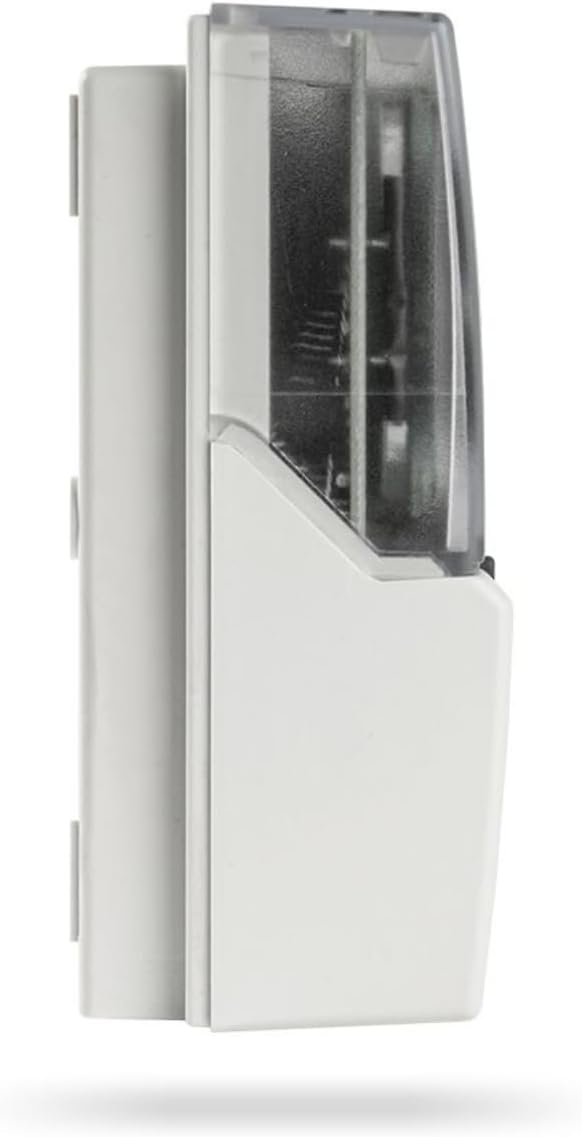
Nọmba 7.1: Pro ẹgbẹfile of the Elios MIDI control unit, illustrating its compact design and dimensions.
| Paramita | Iye |
|---|---|
| Brand | SEITRON |
| Awoṣe | Elios MIDI (TDST24M) |
| Àwọ̀ | Funfun |
| Voltage | 230V~ 50Hz (AC) |
| Power Absorption | <2 VA |
| Ifihan Iru | LCD (Backlit) |
| Sensọ Iru | 3 x NTC 10K @ 25°C ±1% |
| Sensor Operating Limits (Collector) | -50°C .. +200°C |
| Sensor Operating Limits (Boiler) | -50°C .. +110°C |
| Itọkasi | ±2°C |
| Awọn iwọn (L x H x P) | 156 x 108 x 47 mm |
8. Atilẹyin ọja ati Support
For information regarding the product warranty, please refer to the warranty card included with your purchase or visit the official Seitron webAaye naa. Atilẹyin ọja naa maa n bo awọn abawọn iṣelọpọ labẹ awọn ipo lilo deede.
For technical support, service, or spare parts, please contact your authorized Seitron dealer or visit the Seitron official website for contact information. When contacting support, please have your product model (TDST24M) and serial number (if applicable) ready.
Webojula: www.seitron.com


