1. Ifihan
Thank you for choosing the WOLFANG WB03 Baby Monitor. This device is designed to provide reliable and secure monitoring of your baby, offering peace of mind through advanced features and a clear display. This manual provides essential information for setting up, operating, and maintaining your baby monitor.
The WOLFANG WB03 features a 5-inch HD display, a 1080P camera with 360-degree rotation and zoom, infrared night vision, two-way audio, temperature detection, and cry detection. It operates on a secure, non-Wi-Fi connection, ensuring privacy and stability.
2. Package Awọn akoonu
Jọwọ ṣayẹwo package fun awọn nkan wọnyi:
- Ẹka Obi (Abojuto)
- Ẹya Ọmọ (Kamẹra)
- Itọsọna olumulo
- 2 x Power Adapters
- 2 x Awọn kebulu USB
- Wall Mount akọmọ
- Skru fun Wall iṣagbesori
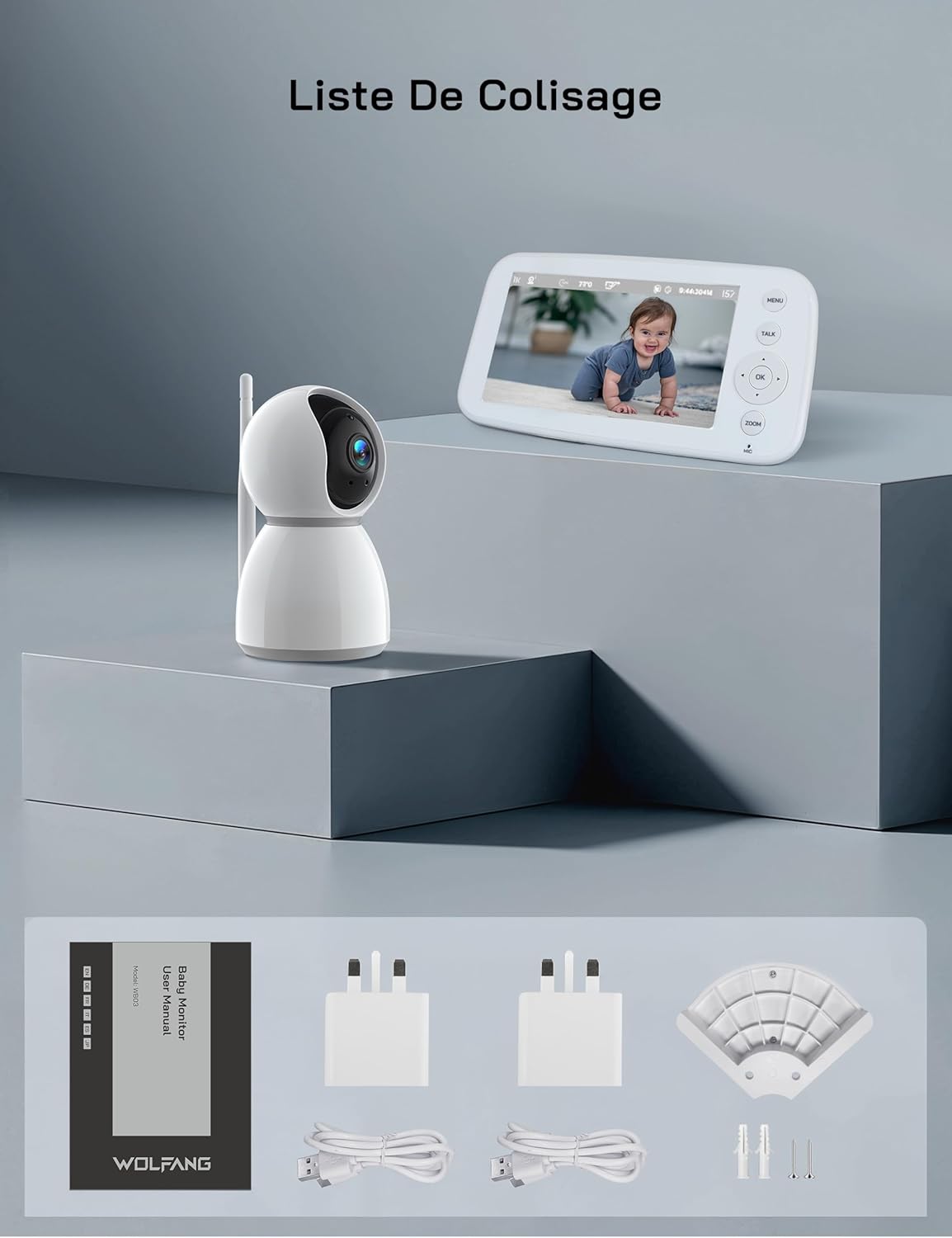
Nọmba 2.1: Visual representation of the WOLFANG WB03 baby monitor package contents, including the monitor, camera, user manual, two power adapters, two USB cables, and wall mounting hardware.
3. Ọja Ipariview
The WOLFANG WB03 system consists of a Parent Unit (monitor) and a Baby Unit (camera). Familiarize yourself with the components and their functions.

Nọmba 3.1: The WOLFANG WB03 baby monitor system, featuring a white parent unit with a screen displaying a baby, and a white pan-tilt camera unit.
Ẹka Obi (Abojuto)
- 5-inch HD Ifihan: For clear video feed.
- Awọn bọtini Iṣakoso: Menu, Talk, OK, Navigation (Up/Down/Left/Right), Zoom.
- Gbohungbohun: For two-way talk.
- Agbọrọsọ: For audio from the baby unit and lullabies.
- Eriali: For wireless connection.
- Ibudo Agbara: Type-C for charging.
Ẹya Ọmọ (Kamẹra)
- 1080P Camera Lens: High-resolution video capture.
- Awọn LED infurarẹẹdi: For night vision.
- Gbohungbohun: To pick up baby's sounds.
- Agbọrọsọ: For two-way talk and lullabies.
- Sensọ iwọn otutu: To monitor room temperature.
- Eriali: For wireless connection.
- Ibudo Agbara: Type-C for continuous power.

Nọmba 3.2: An illustration highlighting key features of the WOLFANG WB03 baby monitor, including VOX Mode, Night Vision, 8 Lullabies, Remote Pan/Tilt, Type-C charging, Two-Way Intercom, 2350 mAh Battery, and Temperature Detection.
4. Awọn ilana iṣeto
4.1 Ngba agbara si Ẹka Obi
- Connect one USB cable to a power adapter and plug it into the Parent Unit's Type-C port.
- Pulọọgi ohun ti nmu badọgba agbara sinu iṣan ogiri kan.
- Charge the Parent Unit for at least 3 hours before first use. The battery indicator on the screen will show charging status.
4.2 Fífi agbára fún ẹ̀rọ ọmọ
- Connect the second USB cable to a power adapter and plug it into the Baby Unit's Type-C port.
- Plug the power adapter into a wall outlet. The Baby Unit requires continuous power to operate.
- The Baby Unit will automatically power on once connected to power.
4.3 Placement of the Baby Unit
Gbe Ẹka Ọmọ si ipo ti o pese kedere view of your baby. Ensure it is at least 1.5 to 2 meters (5 to 6 feet) away from the Parent Unit to avoid audio feedback (bip sound).
- Place the camera on a flat, stable surface, such as a dresser or shelf.
- Alternatively, use the included wall mount bracket to secure the camera to a wall.
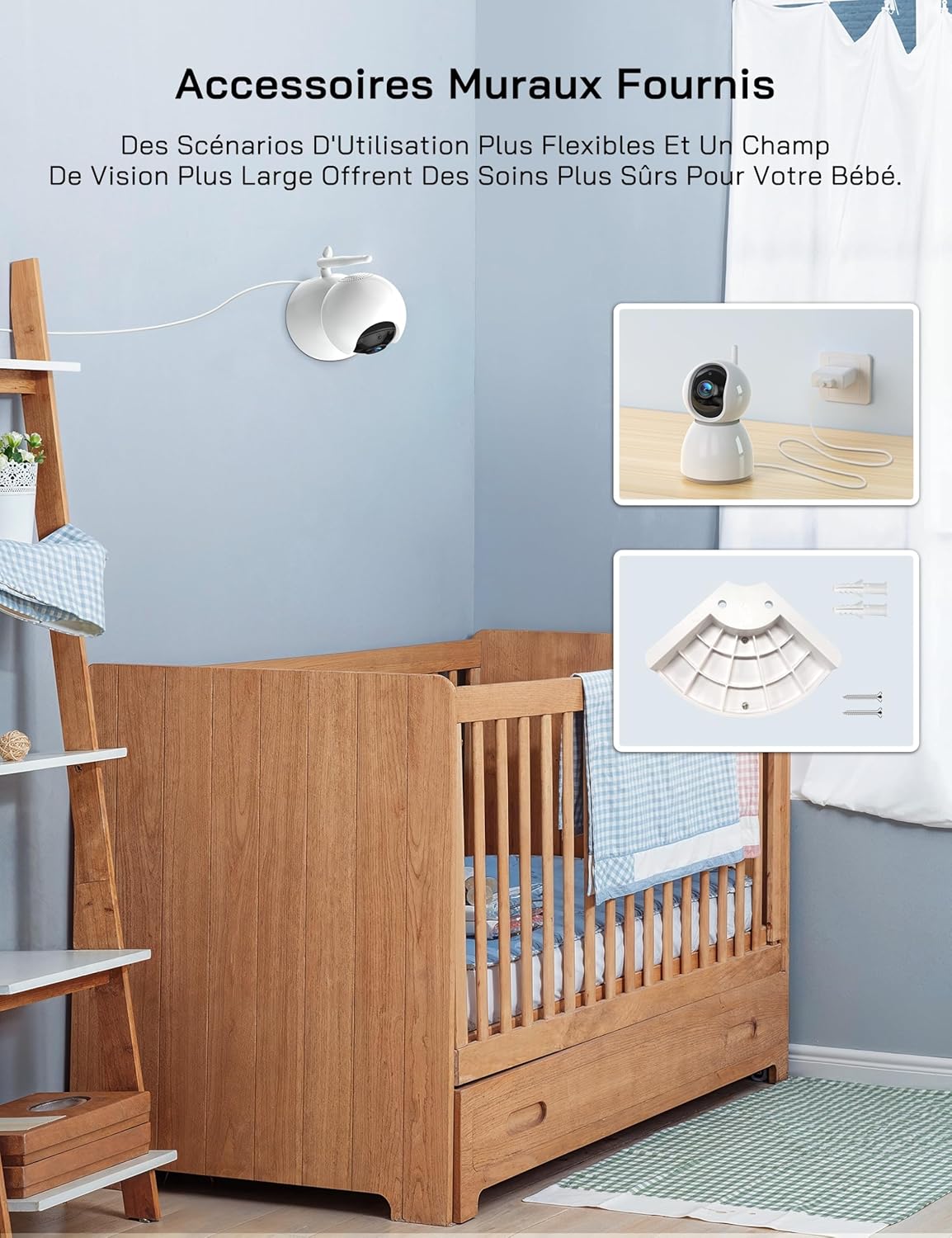
Nọmba 4.1: An image showing the included wall mount bracket and screws, demonstrating how the camera can be securely mounted to a wall above a crib.
4.4 Pairing (If Necessary)
The Parent Unit and Baby Unit are pre-paired at the factory. If the connection is lost or you are adding additional cameras (up to 4 cameras supported), follow these steps:
- On the Parent Unit, press the Akojọ bọtini.
- Navigate to the Camera icon (📷) and select it.
- Choose an empty camera channel (e.g., CAM 2, CAM 3, CAM 4).
- Select the 'Pair' option. The monitor will display 'Pairing...'.
- Within 10 seconds, press the pairing button on the back of the Baby Unit.
- Once paired, the video feed from the Baby Unit will appear on the Parent Unit screen.
5. Awọn ilana Iṣiṣẹ
5.1 Agbara Tan / Pa
- Ẹka obi: Press and hold the Power button on the side of the monitor to turn it on or off.
- Ẹka Ọmọ: The camera powers on automatically when connected to a power source. Disconnect from power to turn off.
5.2 Basic Monitoring
Once both units are powered on and paired, the Parent Unit will automatically display the live video feed from the Baby Unit.
5.3 Pan, Pulọọgi, ati Sun-un
The camera offers 360-degree horizontal rotation and 90-degree vertical tilt, along with 2x digital zoom.
- Pàn/Titẹ: Use the navigation buttons (Up/Down/Left/Right) on the Parent Unit to adjust the camera's viewigun igun.
- Sun-un: Tẹ awọn Sún button on the Parent Unit to activate 2x digital zoom. Use navigation buttons to move the zoomed area.

Nọmba 5.1: An image showing the camera's 360-degree rotation and 2x zoom capability, with the monitor displaying the zoomed view of a baby.
5.4 Meji-Ona Ọrọ
Communicate with your baby remotely using the two-way talk feature.
- Tẹ mọlẹ SỌRỌ button on the Parent Unit.
- Speak clearly into the microphone on the Parent Unit. Your voice will be transmitted to the Baby Unit.
- Tu silẹ SỌRỌ button to hear your baby's sounds again.

Nọmba 5.2: An image depicting the two-way talk feature, with a mother in the kitchen communicating with her baby in the nursery via the monitor.
5.5 infurarẹẹdi Night Vision
The Baby Unit automatically activates infrared night vision in low-light conditions, providing a clear black-and-white video feed.

Nọmba 5.3: Two images demonstrating the clear infrared night vision feature, showing a sleeping baby in a dimly lit room.
5.6 Abojuto iwọn otutu
The Baby Unit continuously monitors the room temperature and displays it on the Parent Unit screen. An alarm will sound if the temperature exceeds 30°C (86°F) or falls below 14°C (57.2°F).
5.7 Cry Detection (VOX Mode)
The VOX (Voice Operated eXchange) mode conserves battery life by turning off the screen when no sound is detected. The screen will automatically activate when your baby cries or makes significant noise.
- To enable/disable VOX mode or adjust sensitivity (Low/Medium/High), navigate to the VOX settings in the Parent Unit's menu.
- If you wish to keep the screen on continuously, you must disable cry detection and the automatic screen off feature in the settings.
5.8 Lullabies
The monitor includes 8 soothing lullabies to help calm your baby.
- Tẹ awọn Akojọ button on the Parent Unit.
- Navigate to the Music icon (🎵) and select it.
- Choose a lullaby to play or select 'Loop' for continuous playback.
5.9 Olurannileti ono
Set a timer to remind you of feeding times.
- Tẹ awọn Akojọ button on the Parent Unit.
- Navigate to the Timer icon (🕑) and select it.
- Set your desired feeding interval (e.g., 2h, 3h, 4h).
5.10 Multi-Camera Support and Split Screen
The WOLFANG WB03 supports connecting up to 4 cameras simultaneously. The 5-inch screen supports split-screen display for simultaneous viewing or scheduled rotation of camera feeds.
- To switch between cameras or activate split-screen mode, access the camera settings in the Parent Unit's menu.
- O le view multiple cameras at once in split-screen or set a timed rotation to cycle through each camera's view.
6. Itọju
6.1 Ninu
- Wipe the surfaces of the Parent Unit and Baby Unit with a dry, soft cloth.
- Maṣe lo awọn sprays mimọ tabi awọn olutọpa olomi.
6.2 Itọju Batiri (Ẹka Obi)
- Lati mu igbesi aye batiri pọ si, yago fun gbigba agbara si batiri ni kikun nigbagbogbo.
- If storing the unit for an extended period, charge the battery to about 50% and store it in a cool, dry place.
7. Laasigbotitusita
| Isoro | Ojutu |
|---|---|
| Monitor beeps or produces feedback noise. | Ensure the Baby Unit and Parent Unit are at least 1.5 to 2 meters (5 to 6 feet) apart. Proximity can cause audio interference. |
| No video/audio on the Parent Unit. |
|
| Kamẹra ko ni tan. | The camera must be continuously plugged into a power source. Ensure the power adapter and cable are securely connected and the outlet is functional. |
| Screen turns off automatically. | This is likely due to VOX mode. If you want the screen to stay on, disable cry detection and the automatic screen off feature in the Parent Unit's settings. |
| Temperature alarm sounds frequently. | Check the room temperature displayed on the monitor. Adjust the room's climate control if necessary to keep the temperature within the safe range (14°C to 30°C). |
8. Awọn pato
| Ẹya ara ẹrọ | Ẹ̀kúnrẹ́rẹ́ |
|---|---|
| Orukọ awoṣe | WB03 |
| Iwọn Ifihan Ẹka Obi | 5 inches |
| Ipinnu kamẹra | 1080P |
| Ipinnu Atẹle | 720P |
| Asopọmọra Technology | Alailowaya (FHSS) |
| Wi-Fi Ibeere | Ko si |
| Parent Unit Battery Capacity | 2350 mAh |
| Igbesi aye batiri (Ipo deede) | Isunmọ. wakati meji 8 |
| Battery Life (VOX Mode) | Isunmọ. 10+ wakati |
| Kamẹra Pan Angle | 360 iwọn |
| Kamẹra Titẹ Igun | 90 iwọn |
| Digital Sisun | 2x |
| Pataki Awọn ẹya ara ẹrọ | Two-Way Audio, Infrared Night Vision, Temperature Detection, Cry Detection, Feeding Alarm, 8 Lullabies, Split Screen, Wall Mountable |
| Awọn iwọn Ọja (L x W x H) | 16 x 8.3 x 1.9 cm |
| Iwọn Nkan | 411 giramu |
| Iṣeduro Lilo | Baby Monitoring (Indoor) |
9. Atilẹyin ọja ati Support
9.1 atilẹyin ọja Alaye
WOLFANG n pese 2-odun atilẹyin ọja and accessory upgrade services. We are committed to delivering high-quality imaging products and support.
9.2 Onibara Support
Our customer service team is available 24 hours a day on weekdays to assist you. If you have any questions, require assistance, or need support, please contact us via our official email:
support.vc@wolfang.co
We aim to resolve any issues to your satisfaction as quickly as possible.


