Ọrọ Iṣaaju
This manual provides comprehensive instructions for the setup, operation, and maintenance of your Petsuper Automatic Pet Feeder with Camera. Designed for convenience and pet well-being, this smart feeder allows for remote feeding, real-time monitoring, and scheduled meal plans for your cats, dogs, and small animals.

Image: The Petsuper Automatic Pet Feeder, a white device with a clear food reservoir, a stainless steel bowl, and an integrated camera, shown with a cat nearby.
Alaye Aabo
- Ensure the feeder is placed on a stable, level surface to prevent tipping.
- Do not immerse the main unit (base) in water or any other liquid. Only detachable components are washable.
- Use only the provided 5V DC power adapter.
- If using battery backup, ensure 5x AAA batteries (not included) are inserted correctly. Remove batteries if the feeder will not be used for an extended period.
- Jeki kuro ni arọwọto awọn ọmọde ati awọn ohun ọsin nigbati o ko ba wa ni lilo tabi nigba itọju.
- This feeder is designed for dry food only. Do not use wet food or kibble with a diameter over 12mm (0.47in).
- Regularly check for any damage to the power cord or feeder unit. Discontinue use if damaged.
Package Awọn akoonu
Jẹrisi pe gbogbo awọn ohun kan wa ninu package:
- Laifọwọyi Pet atokan Unit
- Ounjẹ ekan pẹlu dimu
- Adapter agbara
- Apo Itọsọna olumulo
- Desiccant Bag
Ṣeto
- Assemble the Feeder: Place the stainless steel food bowl into its holder, then attach the holder to the main feeder unit. Ensure it clicks securely into place.

Image: Close-up of the detachable stainless steel bowl and its holder, indicating ease of assembly and cleaning.
- Ibi ti ina elekitiriki ti nwa: Connect the 5V DC power adapter to the feeder and plug it into a wall outlet. For uninterrupted operation during power outages, insert 5x AAA batteries (not included) into the battery compartment located at the bottom of the unit.

Image: The pet feeder connected to a wall outlet via its 5V power adapter, with an icon indicating the option for 5x AAA battery backup.
- Ṣe igbasilẹ ohun elo naa: Scan the QR code provided in the User Guide Kit or search for "Petsuper" in your device's app store (iOS/Android) to download the official Petsuper APP.

Image: A smartphone displaying the Petsuper app download QR code and subsequent steps for device connection, including selecting the pet feeder and connecting to 2.4 GHz or 5 GHz Wi-Fi.
Ìjápọ̀ tó báramu: https://a.smart321.com/petsuperpetsuper
- Sopọ si Wi-Fi: Open the Petsuper APP, register your account, and follow the on-screen instructions to add your pet feeder. The feeder supports both 2.4GHz and 5GHz Wi-Fi networks. Ensure your device is connected to the same network during setup.
- Kojọpọ Ounjẹ: Open the top lid of the feeder and pour dry pet food into the reservoir. Close the lid securely. The lid includes a desiccant bag compartment to keep food fresh.

Image: A diagram illustrating the Petsuper feeder's triple freshness lock system, including a desiccant bag, oxygenated silicone sealing, and a closed grain outlet.
Awọn ilana Iṣiṣẹ
App Isakoṣo latọna jijin
The Petsuper APP provides full control over your feeder from anywhere with an internet connection.
- A ti ṣeto ifunni laifọwọyi: Program up to 50 meals daily, with each meal offering up to 6 portions (approximately 8 grams per portion). This allows for precise portion control to manage your pet's weight and prevent indigestion.

Image: A smartphone screen showing the Petsuper app's interface for setting timed feeding schedules, with options for days of the week and meal portions.
- Real-time Video Monitoring (1080P HD): Access the integrated 1080P HD camera to view your pet's mealtime in real-time. The camera features night vision for clear visibility even in low light conditions. You can also record videos and take snapshots.

Image: A cat eating from the feeder, with an overlay showing a smartphone screen displaying the 1080P HD night vision camera feed from the feeder.
- Audio Ọna Meji: Use the app's intercom feature to speak to your pet remotely, providing comfort or calling them for mealtime.
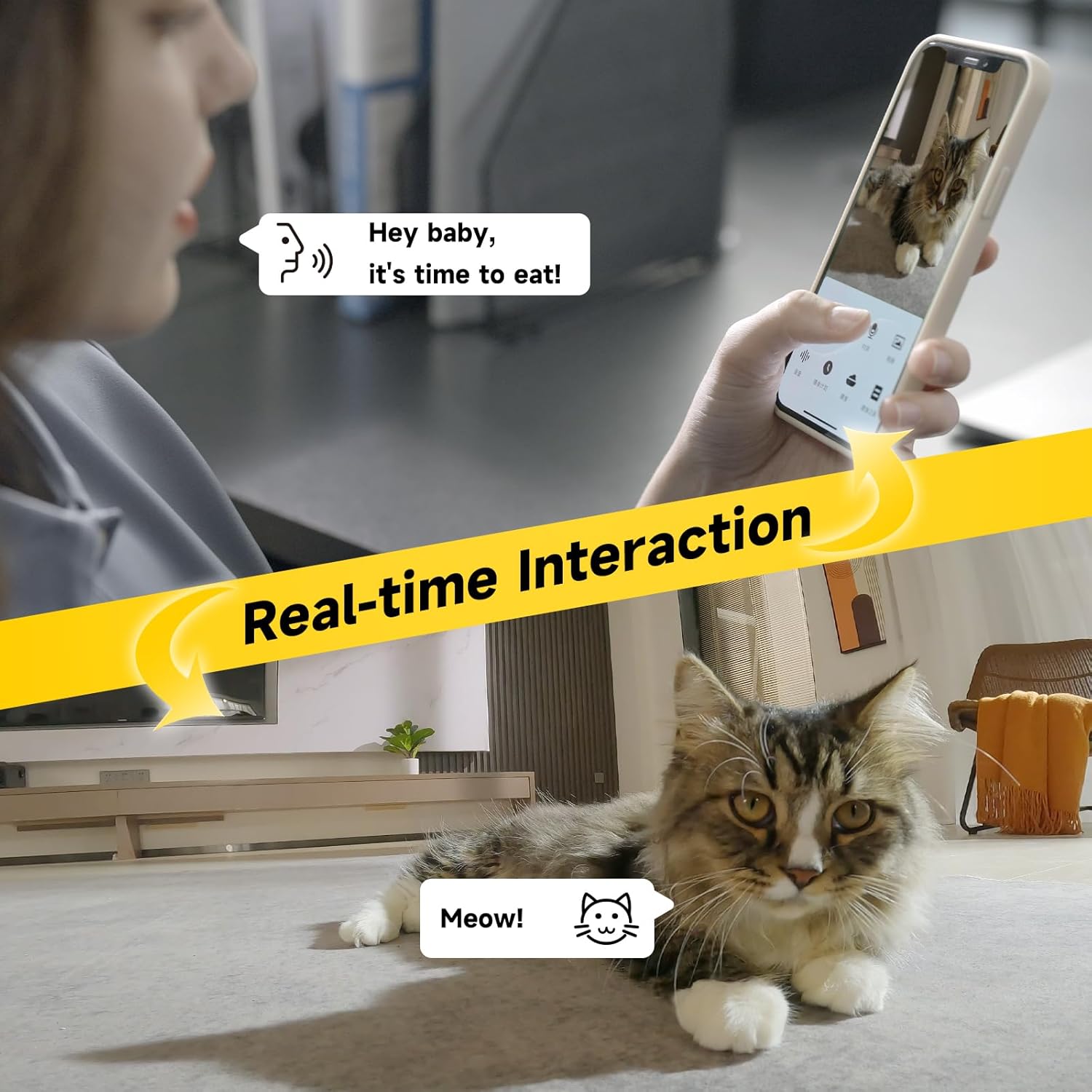
Image: A person interacting with a cat through the Petsuper app, demonstrating the real-time voice interaction feature.
- Ifunni pẹlu ọwọ: Dispense food instantly by tapping the "Instant Snack" or similar button within the app.
- Feeding Records: Access a history of dispensed meals to monitor your pet's eating habits.
- Pipin idile: Share control of the feeder with other family members' phones for collaborative pet care.
Bọtini ifunni Afowoyi
For quick manual dispensing, double-click the white button on the front of the feeder. This will dispense one portion of food.
Ibamu Ounjẹ
The Petsuper Automatic Pet Feeder is designed for dry food. It features an anti-clogging design with three mixing compartments and wider grain outlets to ensure smooth delivery of various dry food types, including freeze-dried and air-dried food.
- Iwon Kibble ti a ṣe iṣeduro: 2-12mm (0.08-0.47 inches).
- Pataki: Do not use wet pet food or kibble with a diameter over 12mm (0.47in) to prevent jamming.

Image: A cutaway diagram of the feeder's internal mechanism, highlighting the multi-food types compatibility, soft plastic food churn, and wider grain outlets for anti-clogging.

Image: Visual guide showing recommended food types (dry, freeze-dried, air-dried, mixed) and kibble sizes (5mm, 10mm, 12mm) for the feeder.
Official ọja Video
Video: A demonstration of the Petsuper Automatic Cat Feeder, showcasing its features including app operation, camera monitoring, and food dispensing.
Itoju
Ninu
Regular cleaning ensures hygiene and optimal performance of your feeder.
- The food tank, grain bucket lid, bottom cover, and stainless steel bowl are detachable and dishwasher safe for easy cleaning.
- Pataki: Do not wash the main base unit of the feeder. Wipe it clean with a damp aṣọ nikan.
- Rí i dájú pé gbogbo àwọn ẹ̀yà ara náà gbẹ pátápátá kí o tó tún kó wọn jọ kí o sì tún fi oúnjẹ kún un.

Image: Disassembled parts of the feeder (food tank, grain bucket lid, bottom cover, stainless steel bowl) being cleaned under running water, emphasizing their detachability.
Rirọpo Bag Desiccant
The desiccant bag helps keep the food dry and fresh. It is recommended to change the desiccant bag once a month.
Laasigbotitusita
| Isoro | Owun to le Fa | Ojutu |
|---|---|---|
| Atokan ko pin ounje. | Food hopper empty; food jammed; power issue. | Refill food; check kibble size (2-12mm) and clear any blockages; ensure power adapter is connected or batteries are installed. |
| Ohun elo naa ko le sopọ mọ ifunni naa. | Incorrect Wi-Fi password; feeder too far from router; Wi-Fi band incompatibility. | Verify Wi-Fi password; move feeder closer to router; ensure your Wi-Fi is 2.4GHz or 5GHz and your phone is connected to the same band during setup. |
| Camera feed is unclear or black. | Poor lighting; camera lens obstructed; network issue. | Ensure adequate lighting or rely on night vision; clean camera lens; check Wi-Fi connection stability. |
| Two-way audio has echo or static. | Interference; proximity of phone to feeder. | Move further away from the feeder when using the intercom; check for other electronic interference. |
| Scheduled feeding not occurring. | Incorrect schedule settings in app; feeder offline. | Review and correct feeding schedule in the Petsuper APP; ensure feeder is connected to Wi-Fi. |
Awọn pato
| Ẹya ara ẹrọ | Ẹ̀kúnrẹ́rẹ́ |
|---|---|
| Brand | Petsuper |
| Orukọ awoṣe | PF02-3 |
| Agbara | 3L |
| Ohun elo | Stainless Steel, ABS plastic |
| Àwọ̀ | Funfun |
| Awọn iwọn Nkan (LxWxH) | 7.6 x 7.6 x 12.9 inches |
| Iwọn Nkan | 3.89 iwon |
| Ipinnu kamẹra | 1080P HD |
| Asopọmọra | 5G and 2.4GHz WiFi |
| Ibi ti ina elekitiriki ti nwa | 5V DC Adapter, 5x AAA Batteries (not included) |
| Eto ifunni | 1-50 meals daily, up to 6 portions per meal |
| Iwọn Ipin | Approx. 8 grams per portion |
| Niyanju Kibble Iwon | 2-12mm |
| Awọn olugbo afojusun | Ologbo, Aja, Kekere Eranko |
| Olupese | Shenzhen Petsuper Smart Technology Co.,Ltd. |
Atilẹyin ọja ati Support
The Petsuper Automatic Pet Feeder comes with a 1-odun atilẹyin ọja lati ọjọ ti o ra.
For technical support, warranty claims, or any inquiries, please contact Petsuper-Direct customer service through the Amazon platform or visit the official Petsuper store:
Petsuper Official Store on Amazon
Please have your model number (PF02-3) and purchase date available when contacting support.


