1. Ifihan
This manual provides essential information for the installation, operation, and maintenance of the Cisco IE-3400-8T2S-E Catalyst IE3400 Rugged Series Network Essential Switch. This device is designed for industrial environments, offering robust network connectivity. Please read this manual thoroughly before operating the device.
2. Alaye Aabo
Ṣe akiyesi awọn iṣọra ailewu atẹle lati yago fun ipalara ati ibajẹ si ohun elo:
- Rii daju didasilẹ ẹrọ to dara.
- Ge asopọ agbara kuro ṣaaju ṣiṣe eyikeyi itọju tabi awọn ilana fifi sori ẹrọ.
- Operate the switch within the specified environmental conditions (temperature, humidity).
- Àwọn òṣìṣẹ́ tó ní ìmọ̀ nìkan ló yẹ kí wọ́n fi ẹ̀rọ yìí sí àti ṣe àtúnṣe rẹ̀.
- Yago fun ṣiṣafihan ẹrọ naa si ọrinrin tabi awọn iwọn otutu to gaju.
3. Package Awọn akoonu
Jẹrisi pe package rẹ ni awọn nkan wọnyi ninu:
- Cisco IE-3400-8T2S-E Catalyst IE3400 Rugged Series Network Essential Switch
- Iwe (Itọsọna Ibẹrẹ Ibẹrẹ, Alaye Aabo)
- Mounting hardware (if included with specific model variant)
- Power connector terminal blocks
Tí àwọn nǹkan kan bá sọnù tàbí tí wọ́n bá bàjẹ́, kàn sí olùpèsè rẹ lẹ́sẹ̀kẹsẹ̀.
4. Ti ara Loriview
The following diagram illustrates the front panel components of the Cisco IE-3400-8T2S-E switch.
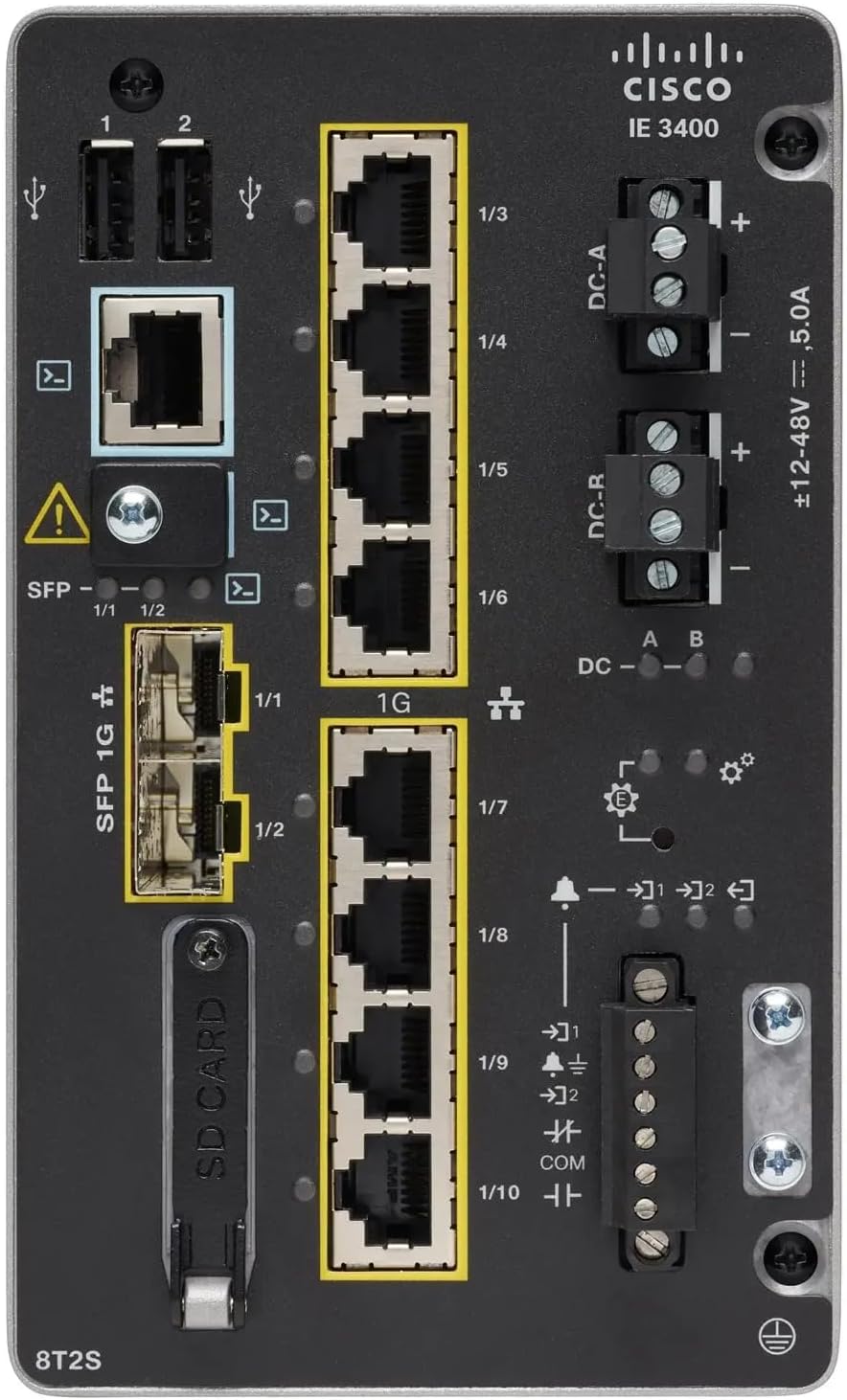
Nọmba 1: Front Panel Layout of the Cisco IE-3400-8T2S-E Switch
4.1. Front Panel Components Description
- Àwọn Ibudo USB (1, 2): Two USB ports for connecting external devices or for configuration.
- Ibudo Kọnsole: An RJ45 console port for local management and initial configuration.
- SFP 1G Ports (1/1, 1/2): Two Small Form-Factor Pluggable (SFP) ports supporting 1 Gigabit Ethernet for fiber optic connections.
- 1G Ethernet Ports (1/3 - 1/10): Eight 1 Gigabit Ethernet RJ45 ports for standard network connections.
- DC Power Inputs (DC-A, DC-R): Redundant DC power input terminals, supporting a voltage range of ±12-48V at 5.0A.
- Skru Ilẹ: Terminal for connecting the chassis to earth ground.
- Iho kaadi SD: Slot for an SD card, typically used for configuration backup or software storage.
- Alarm/Relay Ports (1/9, 1/10): Terminals for connecting external alarm systems or relay controls.
- Awọn itọkasi LED: Various LEDs indicating power status (DC A/B), system status, link/activity for ports, and alarm status.
5. Eto
5.1. Iṣagbesori Yipada
The IE3400 series switches are designed for industrial environments and typically support DIN rail or wall mounting. Refer to the specific mounting instructions provided with your mounting kit for detailed steps.
5.2. Nsopọ Agbara
- Rí i dájú pé orísun agbára náà ti pa kí o tó so pọ̀.
- Connect the DC power cables to the DC-A and/or DC-R terminal blocks, observing polarity (+ and -). The switch supports redundant power inputs.
- Connect the grounding wire to the grounding screw on the front panel.
- Once all connections are secure, apply power to the switch. The DC-A and/or DC-B LEDs should illuminate.
5.3. Awọn isopọ nẹtiwọki
- Awọn ibudo Ethernet: Connect standard RJ45 Ethernet cables from your network devices to the 1G Ethernet ports (1/3 - 1/10).
- Awọn ibudo SFP: Insert compatible SFP transceivers into the SFP 1G ports (1/1, 1/2) and connect fiber optic cables as required.
- Ibudo Kọnsole: For initial configuration, connect a console cable from your management workstation to the RJ45 console port.
6. Awọn ilana Iṣiṣẹ
6.1. Ibẹrẹ Agbara-soke
Upon applying power, the switch will perform a power-on self-test (POST). The system LED will indicate the boot status. Once the boot process is complete, the switch will be ready for configuration.
6.2. Configuration Access
The switch can be configured via the console port using a terminal emulator or remotely via Telnet/SSH once an IP address is assigned. Refer to the Cisco IOS documentation for detailed configuration commands and procedures.
6.3. Awọn afihan LED
Monitor the LED indicators on the front panel to understand the switch's operational status:
- DC-A/DC-B LEDs: Indicate the status of the primary and redundant DC power inputs.
- LED eto: Indicates the overall operational status of the switch (e.g., green for normal operation, amber for warning, red for fault).
- Awọn LED ọna asopọ/Awọn iṣẹ ṣiṣe (fun ibudo): Indicate network link status and data activity on each Ethernet and SFP port.
- LED itaniji: Illuminates when a critical system alarm is triggered.
7. Itọju
7.1. Ninu
Lokọọkan nu ode ti yipada pẹlu asọ ti o gbẹ. Ma ṣe lo olomi tabi aerosol olutọpa. Rii daju pe awọn ṣiṣi atẹgun ko ni eruku ati idoti.
7.2. Awọn imudojuiwọn famuwia
Nigbagbogbo ṣayẹwo Cisco support website for the latest firmware updates. Applying updates can improve performance, add features, and address security vulnerabilities. Follow Cisco's official procedures for firmware upgrades.
7.3. Awọn ero Ayika
Ensure the switch operates within its specified temperature and humidity ranges. Proper airflow around the device is crucial for heat dissipation.
8. Laasigbotitusita
Abala yii n pese awọn igbesẹ laasigbotitusita ipilẹ fun awọn ọran ti o wọpọ.
8.1. Ko si Agbara
- Verify that the power source is active and the power cables are securely connected to the DC-A/DC-R terminals.
- Check the DC-A/DC-B LEDs. If they are off, there is no power or a power supply issue.
8.2. No Network Link
- Ensure Ethernet or fiber optic cables are properly connected to both the switch port and the connected device.
- Check the Link/Activity LED for the specific port. If it is off, there is no link.
- Rí i dájú pé ẹ̀rọ tí a so pọ̀ náà ti ṣiṣẹ́ dáadáa, ó sì ń ṣiṣẹ́ dáadáa.
8.3. System Alarm
- If the Alarm LED is illuminated, consult the Cisco IOS documentation for specific alarm codes and their meanings.
- Check system logs via the console or network management interface for detailed error messages.
9. Awọn pato
| Ẹya ara ẹrọ | Sipesifikesonu |
|---|---|
| Awoṣe | IE-3400-8T2S-E |
| Olupese | Sisiko |
| Àjọlò Ports | 8 x 1 Gigabit RJ45 |
| Awọn ibudo SFP | 2 x 1 Gigabit SFP |
| Ni wiwo Iru | RJ45, SFP, PoE, PoE+ (model dependent) |
| Agbara Input | ±12-48V DC, 5.0A (Redundant) |
| Ọja Mefa | 36 x 9 x 55 cm |
| Iwọn Nkan | 2.28 kilo |
| Awọn ẹrọ ibaramu | Tabili Kọmputa, Kọǹpútà alágbèéká, Ẹ̀rọ Ìtẹ̀wé |
| UPC | 703670760433 |
10. Atilẹyin ọja ati Support
This product is offered as an Amazon Renewed item. Warranty and return policies are typically managed by the reseller (Amazon Renewed) for a specified period. Please refer to your purchase documentation or contact Amazon Renewed support for details regarding your specific warranty coverage.
For technical documentation, software downloads, and advanced support for the Cisco IE-3400-8T2S-E switch, please visit the official Cisco support website and search for your specific model.


