Ọrọ Iṣaaju
This manual provides detailed instructions for the installation, operation, and maintenance of your HUPEJOS V50-4CH 4-Channel Dash Cam. Please read this manual thoroughly before using the device to ensure proper functionality and safety.
Ọja Pariview
The HUPEJOS V50-4CH is a compact 4-channel dash camera system designed to provide comprehensive vehicle surveillance. It features front, left, right, and rear cameras, offering 360-degree coverage. Key features include:
- Gbigbasilẹ ikanni 4: Simultaneous recording from front, left, right, and rear cameras.
- Ipinnu giga: Front camera records at 2K, rear at 1080p, and left/right at 720p.
- GPS ti a ṣe: Records vehicle speed and location data.
- 5GHz Wi-Fi: For fast playback and sharing via smartphone app.
- Iṣakoso ohun: Hands-free operation for various functions.
- G-Sensọ: Automatic locking of important video files during collisions.
- Gbigbasilẹ Loop: Àwọn àkọsílẹ̀ máa ń tẹ̀síwájú, wọ́n máa ń tún àwọn àgbà kọ files nigbati kaadi SD ti kun.
- Ipo Ibuduro Wakati 24: Requires a hardwire kit (not included) for continuous surveillance when parked.
- Iran Alẹ: Enhanced low-light recording with F1.8 aperture and IR lights.
- Àlẹ̀mọ́ CPL: Reduces glare and reflections for improved image quality.
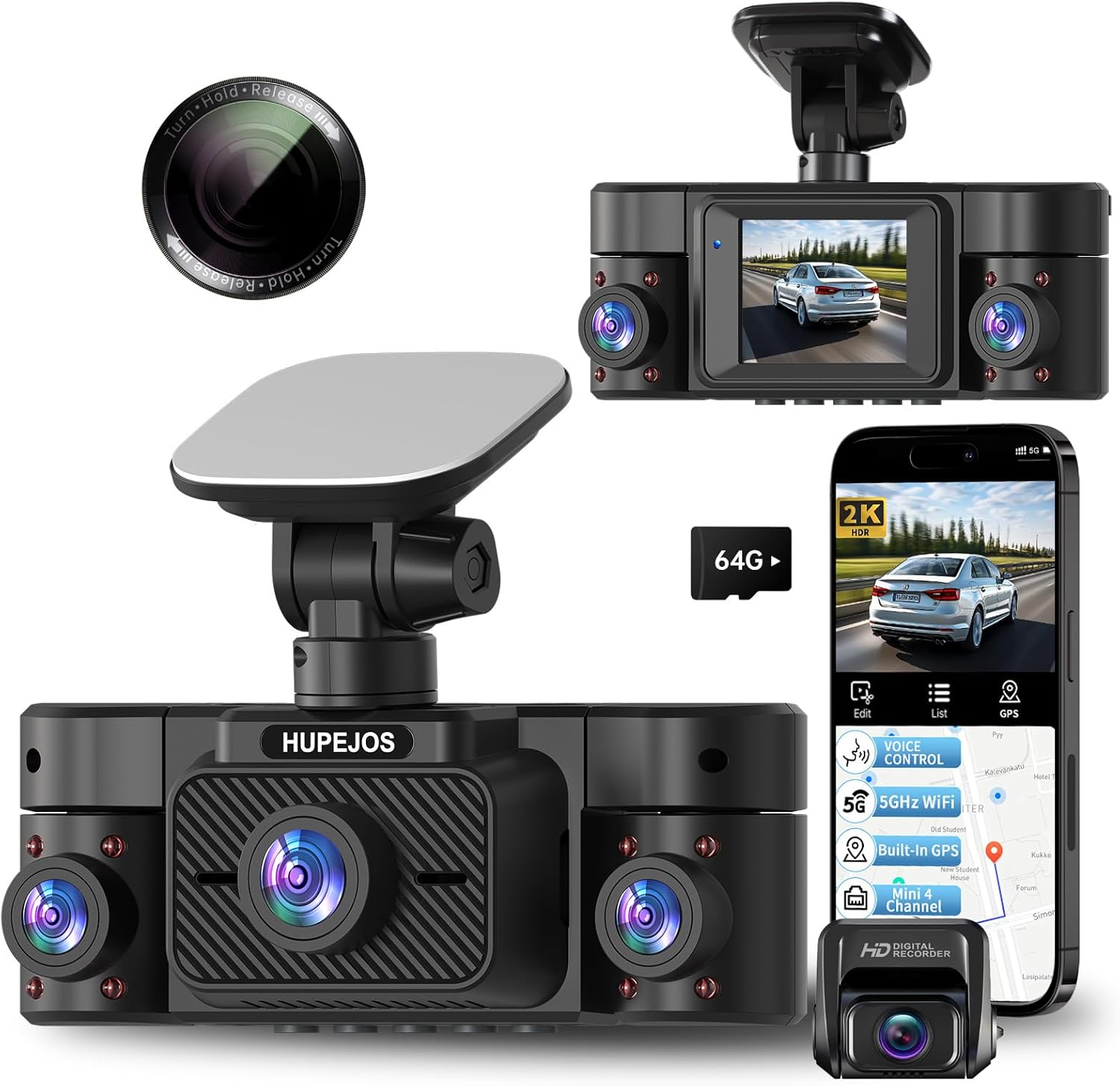
Image: The HUPEJOS V50-4CH dash cam, showing its compact design, multiple camera lenses, and the included CPL filter. A smartphone screen displays the companion app interface with recording and GPS features.

Image: An illustration highlighting the key features of the HUPEJOS V50-4CH dash cam, including 360-degree all-round protection, voice control, 5GHz Wi-Fi, built-in GPS, G-sensor lock, loop recording, 2-inch IPS screen, 4K UHD video recording (note: product description states 2K front, 1080p rear, 720p side), night vision, WDR/HDR, 24-hour parking mode, and included 64GB micro SD card.
Ohun ti o wa ninu Apoti
Nígbà tí o bá ti yọ àpótí kúrò, jọ̀wọ́ rí i dájú pé gbogbo àwọn èròjà wà níbẹ̀:
- HUPEJOS V50-4CH Dash Cam Unit
- CPL Ajọ
- Mounting Hardware (e.g., suction cup mount, adhesive mount)
- Ṣaja ọkọ ayọkẹlẹ
- Okun USB
- Afowoyi Olumulo (iwe-ipamọ yii)
- 64GB Micro SD Card (as indicated in feature image)
Eto ati fifi sori
- Mura kaadi SD naa: Insert the provided 64GB Micro SD card into the dash cam's SD card slot. It is recommended to format the SD card within the dash cam settings before first use.
- Gbigbe Kamẹra Dash:
- Nu agbegbe ferese oju ibi ti kamẹra dash yoo wa ni agesin.
- Attach the mounting hardware (suction cup or adhesive mount) to the dash cam.
- Securely attach the dash cam to the windshield, ensuring it does not obstruct your view. Position it centrally for optimal front camera coverage.
- Adjust the camera angles for the front, left, right, and rear lenses to cover desired areas.
- Asopọ agbara:
- So ṣaja ọkọ ayọkẹlẹ pọ si ibudo titẹ agbara kamẹra dash.
- So ìkángun kejì ti ẹ̀rọ amúlétutù ọkọ̀ náà mọ́ ibi tí agbára 12V ti ọkọ̀ rẹ wà (ìhò tí ó ń tàn sígá).
- Route the power cable neatly along the windshield and dashboard edges to avoid interference with driving.
- CPL Filter Installation:
- Gently attach the CPL filter to the front camera lens.
- Rotate the CPL filter while observing the screen to reduce glare from the dashboard or reflections from the windshield.

Image: The HUPEJOS V50-4CH dash cam mounted on a car's windshield, demonstrating its compact size and how it integrates into the vehicle's interior without obstructing the driver's view.

Image: A close-up of the CPL filter, showing its design for attachment to the dash cam lens. The text on the filter indicates "Turn Hold Release" for adjustment.
Awọn ilana Iṣiṣẹ
Isẹ ipilẹ
- Titan/Apapa: The dash cam will automatically power on and begin recording when the vehicle's ignition is turned on. It will power off automatically when the ignition is turned off.
- Awọn ọna Gbigbasilẹ: The dash cam supports continuous loop recording. When the memory card is full, the oldest unprotected files yoo wa ni kọ.
- Ifihan iboju: The 2-inch IPS screen displays live views from the cameras. You can switch between different camera views or display all four simultaneously via the menu settings.
Iṣakoso ohun
The V50-4CH supports voice commands for hands-free operation. Common commands include:
- "Ibẹrẹ fidio"
- "Dá Fídíò dúró"
- "Fi kámẹ́rà iwájú hàn"
- "Tan WiFi"
- "Tan iboju"
- "Ya fọto"

Image: A driver interacting with the HUPEJOS V50-4CH dash cam using voice commands, illustrating the hands-free operation feature for safe driving.
Wi-Fi Asopọmọra ati App Lilo
The dash cam features built-in 5GHz Wi-Fi for quick connection to your smartphone. Download the dedicated app (refer to the dash cam's screen or packaging for app name/QR code) to:
- View gbe footage.
- Sisisẹsẹhin ti o ti gbasilẹ fidio.
- Ṣe igbasilẹ awọn fidio si foonu rẹ.
- Ṣatunṣe awọn eto.
- Share footage.

Image: Demonstrates the built-in 5GHz Wi-Fi for fast data transfer to a smartphone and the built-in GPS feature, which allows viewing real-time vehicle speed and tracking data in recordings on a laptop or smartphone.
Iṣẹ -ṣiṣe GPS
The integrated GPS module records your vehicle's speed and location data. This information is embedded in the video files ati ki o le jẹ viewed using the dedicated playback software on a computer or through the smartphone app, providing crucial evidence in case of an incident.
G-Sensor (Emergency Recording)
The built-in G-sensor detects sudden impacts or rapid acceleration/deceleration. When triggered, it automatically locks the current video segment, preventing it from being overwritten by loop recording. These emergency files ti wa ni fipamọ sinu folda lọtọ lori kaadi SD.

Image: Illustrates the loop recording function (every 3 minutes, oldest files overwritten), the G-sensor for automatic locking of important files during impacts, and the 24-hour parking mode with radar precision monitoring (requires separate hardwire kit).
24-Hour Parking Mode
For continuous surveillance when your vehicle is parked, the dash cam supports a 24-hour parking mode. This feature requires a separate hardwire kit (not included, suggested ASIN: B0DMR2SLFH) to provide constant power to the dash cam. In parking mode, the dash cam can detect motion or impacts and record automatically.
CPL Filter Adjustment
The CPL (Circular Polarizing Lens) filter helps reduce reflections and glare from the windshield, dashboard, and other shiny surfaces, improving video clarity and color saturation. To adjust, gently rotate the outer ring of the CPL filter until reflections are minimized on the dash cam's screen. This adjustment is best done during daylight hours.
Itoju
- Fifọ lẹnsi naa: Use a soft, lint-free cloth to gently clean the camera lenses. Avoid abrasive materials or harsh chemicals.
- Itọju kaadi SD: Regularly format the SD card (at least once a month) within the dash cam's settings to ensure optimal performance and prevent data corruption. Replace the SD card if you notice frequent errors or reduced performance.
- Awọn imudojuiwọn famuwia: Ṣayẹwo awọn olupese ká website periodically for firmware updates. Updating the firmware can improve performance and add new features.
- Iwọn Iṣiṣẹ: Yẹra fún fífi dash cam sí àwọn iwọn otutu tó le koko fún ìgbà pípẹ́.
Laasigbotitusita
| Isoro | Owun to le Solusan |
|---|---|
| Kamẹra Dash ko ni agbara lori. |
|
| Gbigbasilẹ duro lairotẹlẹ. |
|
| Didara fidio ko dara tabi blur. |
|
| Awọn oran asopọ Wi-Fi. |
|
| Iṣakoso ohun ko fesi. |
|
Awọn pato
| Ẹya ara ẹrọ | Ẹ̀kúnrẹ́rẹ́ |
|---|---|
| Orukọ awoṣe | V50-4CH |
| Brand | HUPEJOS |
| Ipinnu Yaworan fidio | Front: 2K, Rear: 1080p, Left/Right: 720p |
| Pataki Awọn ẹya ara ẹrọ | 360 Degree Coverage, 4 Channel Recording, CPL Filter, Built-in GPS, 5GHz Wi-Fi, Voice Control, G-Sensor, Loop Recording, 24-Hour Parking Mode, Night Vision (WDR/HDR, F1.8 aperture, 8 IR lights) |
| Asopọmọra Technology | USB, Ailokun (Wi-Fi) |
| Iṣagbesori Iru | Ìgbékalẹ̀ Afẹ́fẹ́, Ìgbékalẹ̀ Dáṣíbọ̀dù |
| Ọna Iṣakoso | Fọwọkan, Ohùn |
| Awọn irinše to wa | CPL Filter, Mounting Hardware, Car Charger, USB Cable, 64GB Micro SD Card |
| Àwọ̀ | Dudu |
| Awọn iwọn (Itosi.) | Length: 4.8 Inch, Height: 1.8 Inch |

Image: Illustrates the 4-channel recording capabilities of the HUPEJOS V50-4CH dash cam, showing simultaneous views from the front (2K), rear (1080p), and left/right (720p) cameras, providing comprehensive coverage.

Aworan: A alaye view of the HUPEJOS V50-4CH dash cam, emphasizing its 360-degree full protection with four cameras. It shows the approximate viewing angles for the front (150°), left (150°), right (150°), and rear cameras.
Atilẹyin ọja ati Support
For warranty information, technical support, or service inquiries, please refer to the contact details provided on the product packaging or visit the official HUPEJOS webojula. Tọju iwe-ẹri rira rẹ bi ẹri rira fun awọn iṣeduro atilẹyin ọja.


