1. Ifihan
O ṣeun fun riraasing the Podofo Android 13.0 2Din Car Stereo. This manual provides detailed instructions for the installation, operation, and maintenance of your new car multimedia system. Please read this manual thoroughly before use to ensure proper functionality and to maximize your user experience. Keep this manual for future reference.
2. Ọja Ipariview
2.1 Package Awọn akoonu
Awọn nkan wọnyi ti o wa ninu package rẹ:
- 1 x Ẹrọ orin ọkọ ayọkẹlẹ
- Okun agbara
- Okun RCA
- Àwọn okùn USB (2x)
- Okun Input Kamẹra
- Iron pieces (Brackets)
- Eriali GPS
- Itọsọna olumulo
2.2 Key Awọn ẹya ara ẹrọ
- 7-inch HD Touch Screen Display
- Android 13.0 Awọn ọna System
- Bluetooth fun ipe laisi ọwọ ati sisanwọle orin
- GPS Lilọ kiri
- Phone Mirror Link (Android/iOS)
- Àtìlẹ́yìn Ìṣàkóso Kẹ̀kẹ́ Ìdarí (SWC)
- Built-in WiFi connectivity
- FM Radio with 18 preset stations
- DSP Sound Effects for audio customization
- Supports USB/AUX/SD card/U disk multimedia playback
- 1080P HD video playback
- Reverse Assistance (requires optional camera)
2.3 ọja Mefa
The main unit measures approximately 17.8 cm (7.0 inches) in width and 10.2 cm (4.0 inches) in height, with a depth of 5.2 cm (2.0 inches).
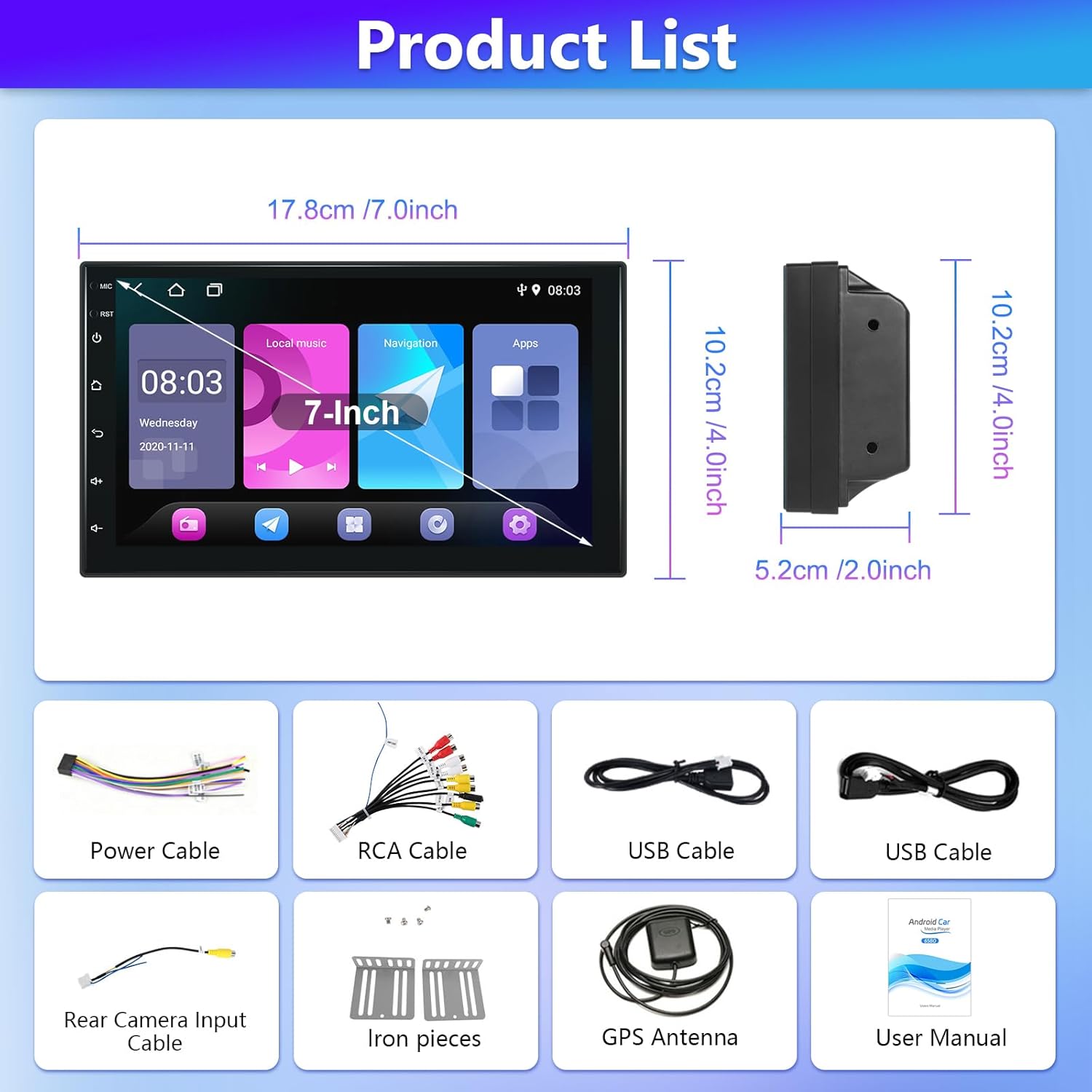
Image: Product dimensions and included accessories. The display measures 7 inches diagonally. The unit's width is 17.8cm, height is 10.2cm, and depth is 5.2cm. Accessories include power cables, RCA cables, USB cables, rear camera input cable, iron pieces (brackets), GPS antenna, and the user manual.
3. fifi sori
Fífi sori ẹrọ to peye ṣe pataki fun iṣẹ ṣiṣe to dara julọ ti sitẹrio ọkọ ayọkẹlẹ rẹ. Ti o ko ba ni idaniloju nipa awọn igbesẹ eyikeyi, o ni imọran lati wa iranlọwọ ọjọgbọn.
3.1 Awọn isopọ onirin
Refer to the wiring diagram below for connecting the power, speakers, and other accessories. Ensure all connections are secure to prevent malfunctions.
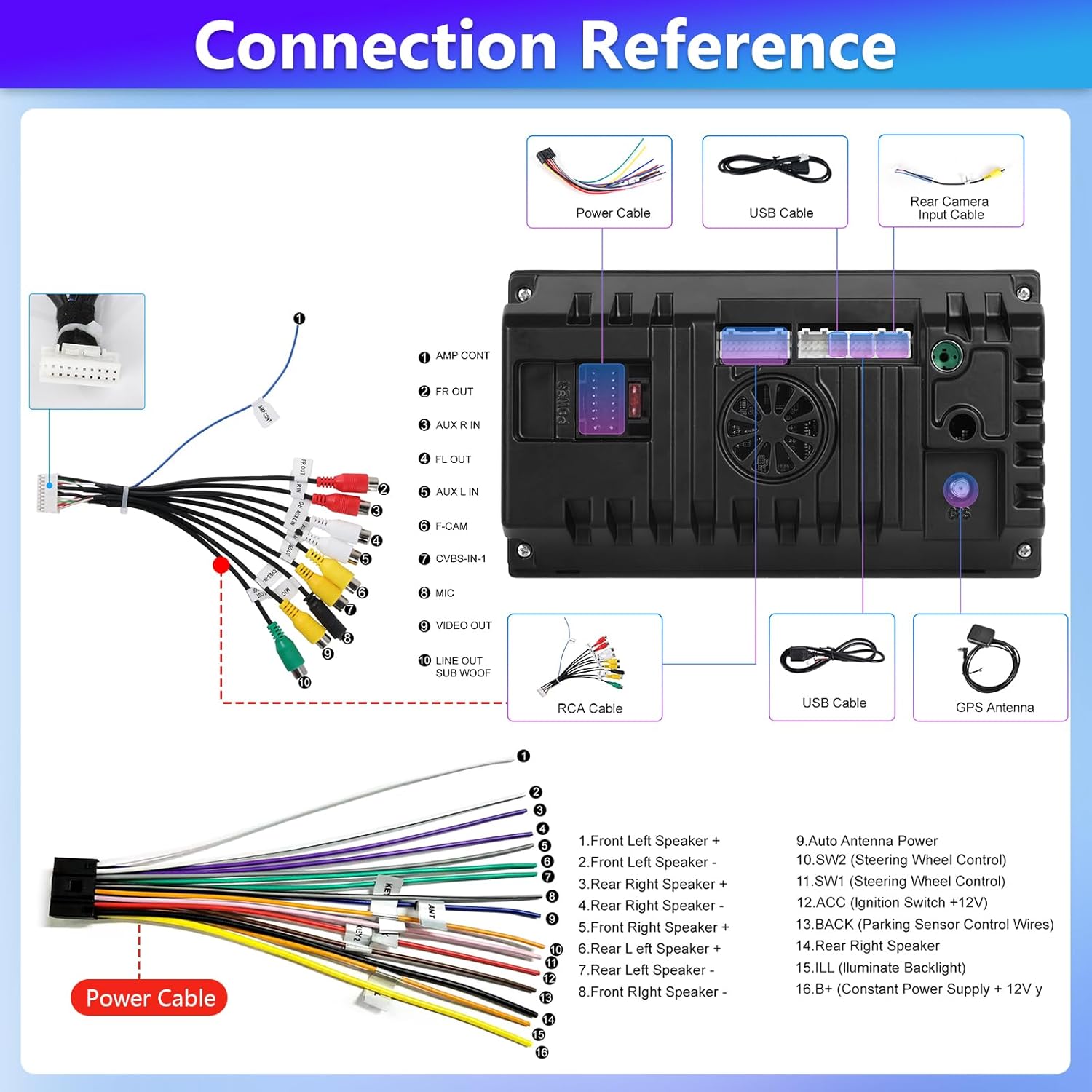
Image: Detailed wiring diagram for the car stereo. It shows connections for the power cable, USB cables, rear camera input cable, RCA cable, and GPS antenna. The main harness includes labeled wires for front/rear speakers, ACC, B+, SWC, and other functions.
3.2 Rear Camera Wiring (Optional)
If you are installing an optional rear-view kamẹra, tẹle awọn igbesẹ wọnyi:
- Connect the red cable from the camera power to the positive terminal of the car's reverse light cable.
- Connect the black cable from the camera power to the negative terminal of the car's reverse light cable.
- Connect the video signal cable from the camera to the 'F-CAM' or 'CVBS-IN-1' input on the car stereo.
Tip: The reverse input cable must be plugged in even if the reverse camera is not being used. Otherwise, it may affect Bluetooth and WiFi signal reception.

Image: Diagram illustrating how to connect an optional backup camera. It shows the red cable connecting to the reverse light positive, the black cable to the reverse light negative, and the video cable connecting to the head unit's camera input.
4. Isẹ
4.1 Bluetooth Asopọmọra
Pair your smartphone with the car stereo via Bluetooth for hands-free calling and audio streaming. Access the Bluetooth menu on the stereo, enable Bluetooth on your phone, and select the stereo from the list of available devices. Confirm the pairing code if prompted.
4.2 Redio FM
Tune into your favorite radio stations using the FM radio function. The stereo supports 18 preset stations for quick access. Use the scan function to find available stations or manually tune to a specific frequency.
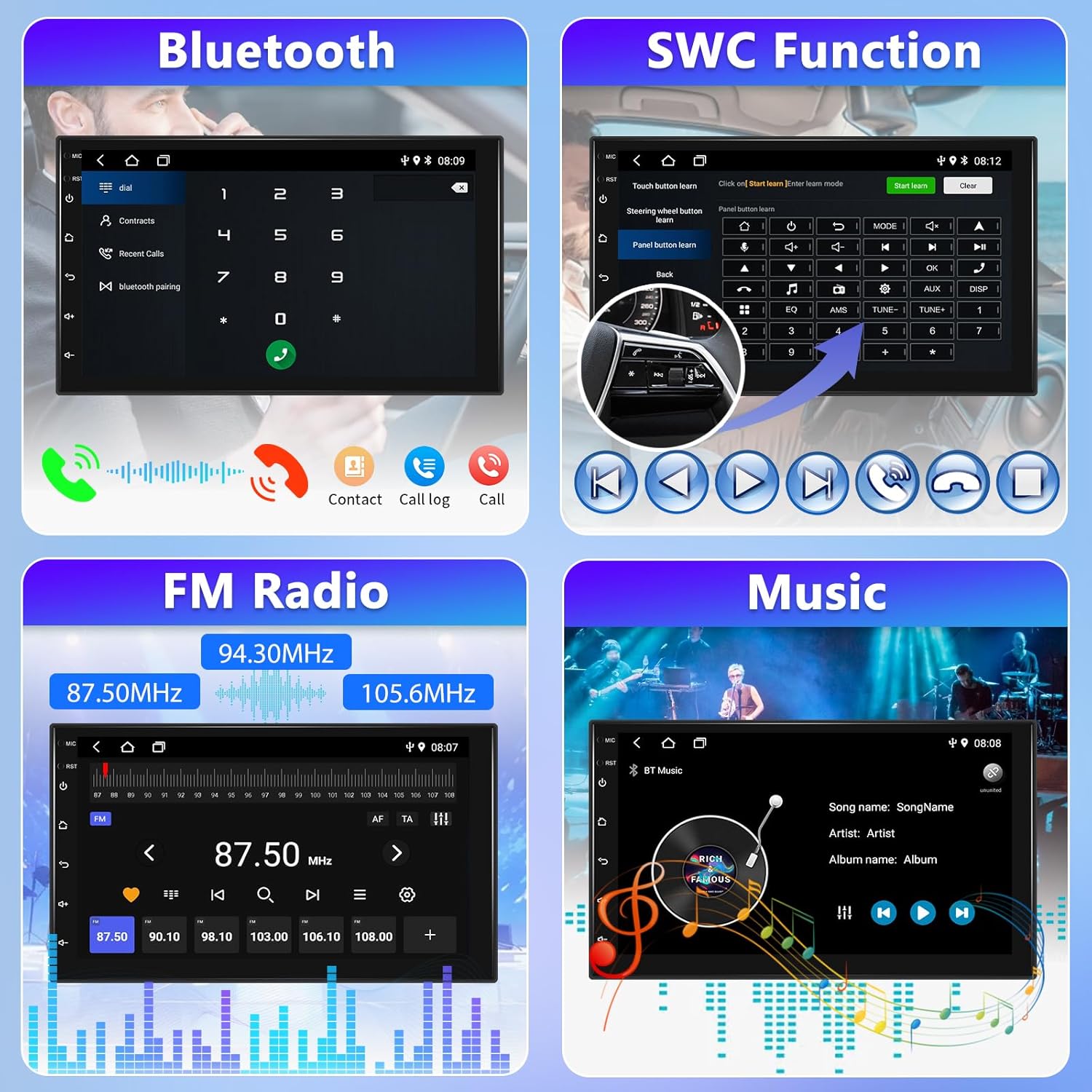
Image: Screenshots of the Bluetooth interface for calls, Steering Wheel Control (SWC) learning, FM Radio tuning (87.50MHz to 105.6MHz), and the music playback screen.
4.3 Phone Mirror Link
The Mirror Link feature allows you to display your smartphone's screen directly onto the car stereo's display. Connect your phone using the original USB cable. This enables synchronization of videos, movies, games, and other content from your phone to the stereo screen.
4.4 GPS Lilọ kiri
Utilize the built-in GPS navigation system for turn-by-turn directions and route planning. The system provides real-time location tracking and guidance to your destination.

Image: Demonstrates the split-screen functionality, allowing two applications to run side-by-side, and the Mirror Link feature showing a phone screen mirrored onto the car stereo display.

Image: Shows the GPS navigation interface with a map displaying a route, and the WiFi connection screen with various app icons, indicating internet access.
4.5 Iṣakoso kẹkẹ idari (SWC)
The car stereo supports learning steering wheel control buttons. This allows you to control various functions of the stereo directly from your steering wheel, enhancing driving safety and convenience.
- Without CANBUS Decode: Connect the plugs or steering wheel control wires (Key1 / Key2) in the power cable to the corresponding port or wire of your original car. Then, go to the Steering Wheel Key manual match settings to activate the button functions.
- With CANBUS Decoder: Connect the CANBUS before powering on the machine. Go to Apps -> Factory Settings (password: 1234) -> Can Settings to make SWC work properly. Select the brand of the CANBUS decoder, then select the matching model and year according to the actual situation.

Image: Instructions for setting up Steering Wheel Control (SWC), detailing steps for systems with and without a CANBUS decoder, and showing the interface for button learning.
4.6 DSP Sound Effects
The powerful DSP (Digital Signal Processor) chip supports multiple EQ DSP adjustments, allowing you to customize sound frequencies to your preference. Adjust bass, treble, and other audio parameters for an optimized listening experience.

Image: Display of the DSP sound effects interface, showing a graphic equalizer with multiple frequency bands for audio adjustment and sound field settings.
4.7 Pipin iboju
Iṣẹ́ ìbòjú pínpín yìí fún ọ láyè láti lo àwọn ohun èlò méjì ní àkókò kan náà lórí ìbòjú 7-inch.ample, you can have navigation running on one side and music playback on the other.
4.8 Reverse Assistance
When an optional rear-view camera is connected, the stereo automatically displays the camera feed when the vehicle is put into reverse. This feature includes guidelines and offers a 170° wide view angle, waterproof level, and night vision capabilities (camera dependent).
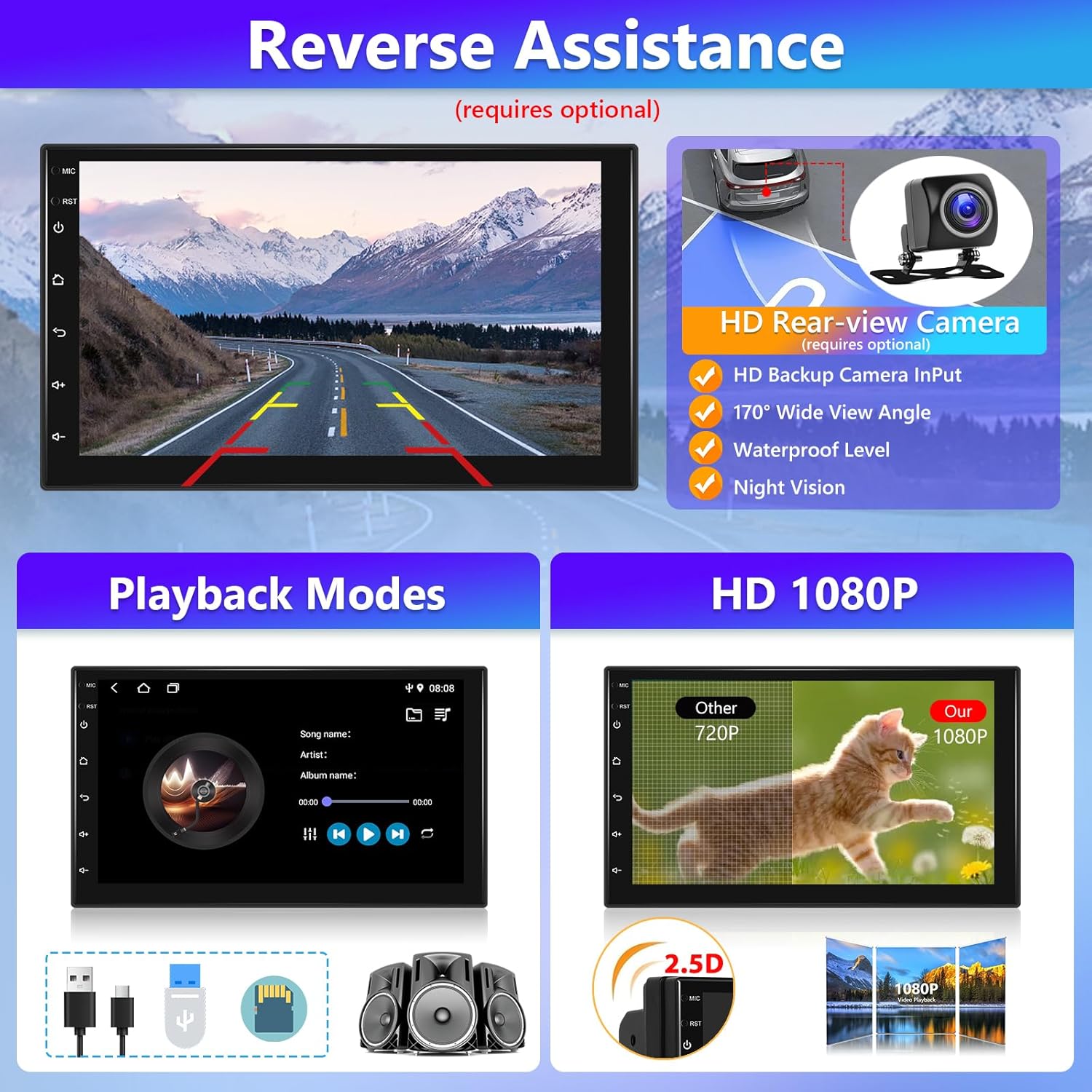
Image: Shows the reverse assistance view with parking lines, details about the optional HD rear-view camera (170° wide angle, waterproof, night vision), and icons representing various playback modes (USB, SD card, speakers) and 1080P HD video support.
4.9 WiFi Asopọ
Connect the car stereo to a WiFi hotspot (e.g., from your smartphone) to access online features, download apps, browse the internet, and stream content.
5. Itọju
To ensure the longevity and optimal performance of your Podofo car stereo, follow these maintenance guidelines:
- Ninu: Lo aṣọ rírọrùn tí ó gbẹ láti nu ibojú àti òde. Yẹra fún àwọn ohun ìfọṣọ tàbí àwọn ohun olómi tí ó lè ba ojú ilẹ̀ jẹ́.
- Iwọn otutu: Avoid exposing the unit to extreme temperatures, both hot and cold, as this can affect electronic components.
- Awọn imudojuiwọn sọfitiwia: Periodically check for software updates from the manufacturer to ensure you have the latest features and bug fixes.
- Ibi ti ina elekitiriki ti nwa: Ensure a stable power supply to prevent electrical damage.
6. Laasigbotitusita
Tí o bá ní ìṣòro pẹ̀lú sitẹrio ọkọ̀ ayọ́kẹ́lẹ́ rẹ, wo àwọn ìṣòro àti ìdáhùn tó wọ́pọ̀ wọ̀nyí:
- Ko si Agbara:
- Check all power connections, including the ACC (ignition switch) and B+ (constant power) wires.
- Verify the car's fuse box for any blown fuses related to the stereo.
- Ko si Ohun:
- Rí i dájú pé àwọn wáyà agbọ́hùnsọ̀pọ̀ so pọ̀ dáadáa, wọn kò sì ní ìsopọ̀ pẹ̀lú ẹ̀rọ agbọ́hùnsọ̀pọ̀.
- Check volume levels and mute settings on the stereo.
- Verify audio output settings.
- Awọn oran Asopọ Bluetooth:
- Rí i dájú pé Bluetooth ti ṣiṣẹ́ lórí sitẹrio àti fóònù rẹ.
- Pa awọn isọdọmọ iṣaaju rẹ ki o tun gbiyanju lati so pọ.
- Move closer to the stereo if there are interference issues.
- Ipadanu ifihan agbara GPS:
- Rii daju pe eriali GPS ti fi sii daradara ati pe o ni kedere view ti ọrun.
- Check antenna connection to the stereo.
- Iboju Fọwọkan Ko dahun:
- Try restarting the unit.
- Rii daju pe iboju jẹ mimọ ati laisi idoti.
Ti iṣoro naa ba wa lẹhin igbiyanju awọn iṣeduro wọnyi, jọwọ kan si atilẹyin alabara.
7. Awọn pato
| Iwọn Nkan | 1.98 iwon |
| Package Mefa | 11.02 x 8.27 x 4.13 inches |
| Nọmba Awoṣe Nkan | 2Din |
| Iwọn Ifihan | 7 inches |
| Asopọmọra Technology | Bluetooth, Wi-Fi |
| Pataki Ẹya | Built-In Bluetooth, GPS Navigation, Mirror Link, SWC, FM Radio |
| Awọn ẹrọ ibaramu | Foonuiyara |
| Lapapọ HDMI Ports | 1 |
| Asopọmọra Iru | HDMI, RCA, USB |
| Ipo Ijade Ohun | Sitẹrio, Agbegbe |
| Kakiri Ohun ikanni iṣeto ni | 5.1 |
| Fidio fifi koodu | H.264, H.265/HEVC |
| Nọmba ti awọn ikanni | 2 |
8. Atilẹyin ọja ati Support
8.1 Atilẹyin ọja
This Podofo car stereo comes with a 1-year warranty from the date of purchase. This warranty covers manufacturing defects and malfunctions under normal use. Please retain your proof of purchase for warranty claims.
8.2 Afikun Idaabobo Eto
Awọn eto aabo ti o gbooro sii wa fun rira lati pese aabo afikun ju atilẹyin ọja boṣewa lọ:
- Eto Idaabobo Ọdun 2: Ó máa fa ìbòjúmọ́ fún oṣù mẹ́rìndínlógójì.
- Eto Idaabobo Ọdun 3: Ó máa fa ìbòjúmọ́ fún oṣù mẹ́rìndínlógójì.
Fun awọn alaye lori riraasing these plans, please refer to your retailer.
8.3 Onibara Support
For technical assistance, troubleshooting, or warranty inquiries, please contact Podofo customer support through the retailer's platform or the official Podofo webojula.
9. Fidio ọja
Video: An official product video demonstrating the features and functionality of the Podofo Android 13.0 2Din Car Stereo. This video provides a visual guide to the user interface, key operations, and overall user experience.


