1. Ifihan
O ṣeun fun riraasing the XO F41 Mirror Bluetooth Speaker. This device combines a digital clock display with a portable Bluetooth speaker, offering multiple playback options including Bluetooth, TF card, and FM radio. Please read this manual carefully before use to ensure proper operation and to maximize your experience with the product.

Image 1.1: The XO F41 Mirror Bluetooth Speaker in use, showing its digital clock display.
2. Awọn ẹya Ọja
- Bluetooth 5.3 Asopọmọra: For stable and efficient wireless audio streaming.
- Ifihan digi: Clear digital time display with adjustable brightness.
- Awọn ọna Sisisẹsẹhin lọpọlọpọ: Supports Bluetooth, TF card, and FM radio.
- Gbohungbohun ti a ṣepọ: Fun ipe ti ko ni ọwọ.
- Akoko Sisisẹsẹhin Gigun: Up to 8 hours at 50% volume, 5 hours at 100% volume.
- Iwapọ ati Apẹrẹ to gbe: Easy to carry and place anywhere.
- Ngba agbara USB-C: Modern and convenient charging port.
3. Package Awọn akoonu
Jọwọ ṣayẹwo package fun awọn nkan wọnyi:
- XO F41 Mirror Bluetooth Speaker
- USB-C Ngba agbara Cable
- Itọsọna olumulo

Image 3.1: The XO F41 Mirror Bluetooth Speaker packaging.
4. Ifilelẹ ẹrọ ati Awọn iṣakoso
Mọ ara rẹ pẹ̀lú àwọn bọ́tìnì àti àwọn ibùdókọ̀ agbọ́rọ̀sọ náà:
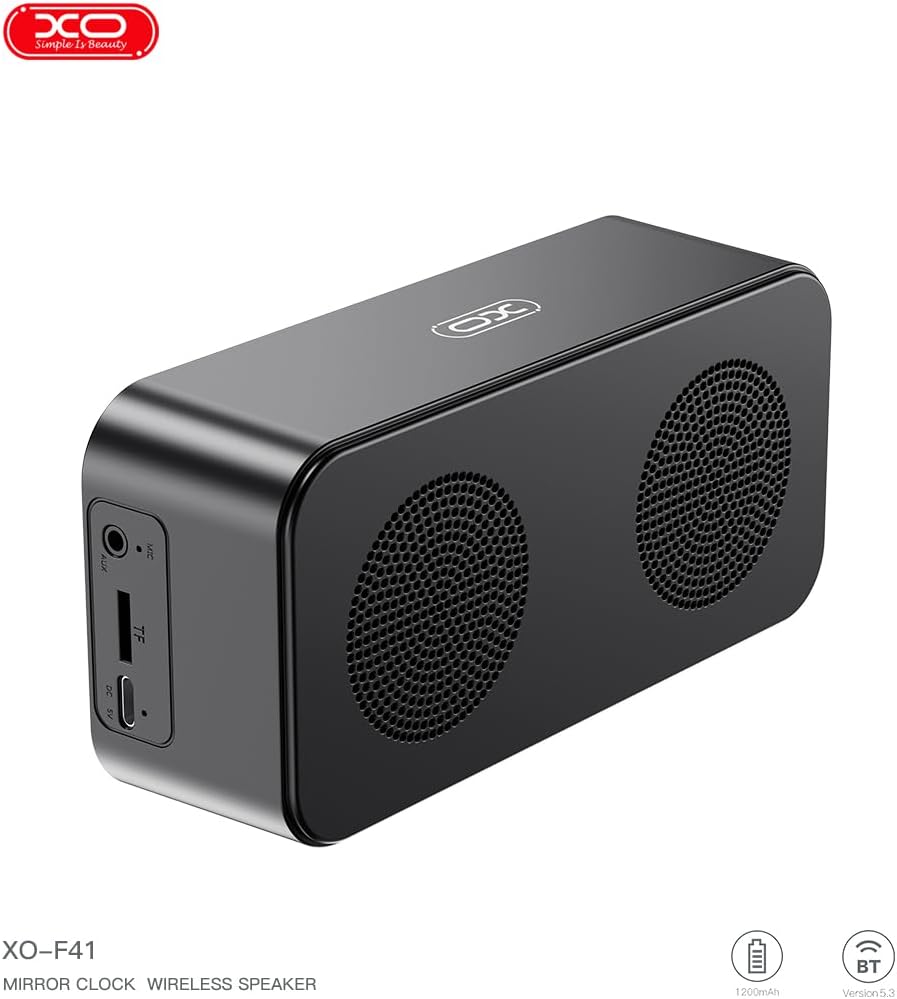
Aworan 4.1: Apa view of the XO F41 with ports labeled.
- Bọtini agbara: Tẹ ki o si dimu mọ lati tan/pa. Tẹ kukuru lati yi awọn ipo pada.
- Bọ́tìnnì Ṣíṣe/Sánu duro: Mu ohun orin ṣiṣẹ tabi da duro. Dahun/pari awọn ipe.
- Iwọn didun Up/Orin atẹle: Tẹ kukuru fun iwọn didun soke, tẹ gun fun orin atẹle.
- Iwọn didun isalẹ/Orin ti tẹlẹ: Tẹ kukuru fun iwọn didun isalẹ, gun tẹ fun orin iṣaaju.
- Ibudo USB-C: Fun gbigba agbara ẹrọ.
- Iho Kaadi TF: Insert a TF (MicroSD) card for local music playback.
- Ibudo AUX: Fun titẹ sii ohun afetigbọ.
5. Eto
5.1 Gbigba agbara si Agbọrọsọ
- So okùn USB-C tí a pèsè mọ́ ibudo gbigba agbara lórí agbọ́hùnsọ̀.
- So opin okun miiran pọ si ohun ti nmu badọgba agbara USB (kii ṣe pẹlu) tabi ibudo USB ti kọnputa kan.
- The charging indicator will illuminate. It takes approximately 3 hours for a full charge.
- The indicator will turn off or change color once fully charged.
5.2 Agbara Tan / Pa
- Lati Fi agbara: Press and hold the Power button for approximately 3 seconds. You will hear an audible prompt.
- Lati Paarẹ: Press and hold the Power button for approximately 3 seconds. You will hear an audible prompt.
6. Awọn ilana Iṣiṣẹ
6.1 Sisopọ Bluetooth
- Ensure the speaker is powered on and in Bluetooth mode. If not, short press the Power button to cycle through modes until "BT" or a Bluetooth icon appears on the display.
- Lori ẹrọ alagbeka rẹ, mu Bluetooth ṣiṣẹ ki o wa awọn ẹrọ to wa.
- Select "XO-F41" from the list of devices.
- Once paired, the speaker will indicate a successful connection, and you can begin playing audio from your device.
Ipo Kaadi TF 6.2
- Fi káàdì TF (MicroSD) pẹ̀lú ohùn MP3 sí i files sinu TF kaadi Iho.
- The speaker will automatically switch to TF card mode and begin playing music. If not, short press the Power button to cycle to TF card mode.
- Lo awọn bọtini Iwọn didun Up/Down fun lilọ kiri orin ati bọtini Play/Duro fun iṣakoso ṣiṣiṣẹsẹhin.
6.3 FM Redio Ipo
- Short press the Power button to switch to FM radio mode. The display will show the FM frequency.
- Tẹ bọtini Play/Duro fun igba pipẹ lati ṣe ayẹwo ati fipamọ awọn ibudo FM ti o wa laifọwọyi.
- Short press the Volume Up/Down buttons to switch between saved stations.
6.4 Clock and Alarm Settings
The XO F41 features a digital clock display. Specific instructions for setting the time and alarm are typically found in the detailed manual included with the product. Generally, a dedicated 'M' (Mode) or 'Set' button is used to enter time/alarm setting mode, and volume buttons are used to adjust values.

Image 6.1: The XO F41 speaker functioning as a bedside clock.
6.5 Siṣàtúnṣe Ifihan Imọlẹ
The display brightness is adjustable. Look for a dedicated button (often labeled with a sun icon or similar) or a combination of button presses (e.g., double-pressing the Power button) to cycle through brightness levels. Refer to the included quick start guide for exact steps.
7. Itọju
- Ninu: Lo asọ asọ ti o gbẹ lati nu dada agbọrọsọ naa. Ma ṣe lo abrasive ose tabi epo.
- Ibi ipamọ: Tọju agbohunsoke ni itura, aye gbigbẹ kuro lati orun taara ati awọn iwọn otutu ti o pọju nigbati o ko ba wa ni lilo fun awọn akoko ti o gbooro sii.
- Omi Resistance: This device is not waterproof. Avoid exposure to water or excessive moisture.
- Itọju Batiri: Lati pẹ aye batiri, yago fun gbigba agbara si batiri ni kikun nigbagbogbo. Gba agbara si ẹrọ nigbagbogbo, paapaa ti kii ṣe ni lilo igbagbogbo.
8. Laasigbotitusita
| Isoro | Owun to le Fa | Ojutu |
|---|---|---|
| Agbọrọsọ ko ni agbara lori. | Batiri kekere. | Gba agbara fun agbọrọsọ naa fun o kere ju iṣẹju 30. |
| Ko le so pọ nipasẹ Bluetooth. | Speaker not in pairing mode; Bluetooth disabled on device; too far from device. | Ensure speaker is in Bluetooth mode. Enable Bluetooth on your device. Move speaker closer to your device (within 10 meters). |
| No sound from TF card. | TF card not inserted correctly; unsupported file format; no audio files on card. | Reinsert TF card. Ensure files are in MP3 format. Verify audio files are present on the card. |
| Gbigba redio FM ti ko dara. | Ifihan agbara; kikọlu ayika. | Move the speaker to a different location. Re-scan for stations. |
9. Awọn pato
| Ẹya ara ẹrọ | Ẹ̀kúnrẹ́rẹ́ |
|---|---|
| Nọmba awoṣe | XO-F41 |
| Ẹya Bluetooth | Bluetooth V5.3 |
| Bluetooth Igbohunsafẹfẹ | 2.402GHz-2.480GHz |
| Agbara Batiri | 1200mAh |
| Gbigba agbara Input | USB-C, DC5V/0.5A |
| Akoko gbigba agbara | O fẹrẹ to awọn wakati 3 |
| Play Time | 8H (50% volume); 5H (100% volume) |
| Ijinna to munadoko | Kere ju awọn mita 10 |
| Agbara to pọju | 5W |
| Agbohunsoke Unit | 52mm |
| Ifihan Ibuwọlu-si-Noise | > 80dB |
| Ọja Mefa | 15 x 3.81 x 11 cm (isunmọ 150 x 45 x 72 mm) |
| Iwọn Ọja | 320 g (approx. 0.28 kg) |
| Ohun elo | Ṣiṣu |
| Pataki Ẹya | Imọlẹ adijositabulu |

Image 9.1: Detailed product parameters.
10. atilẹyin ọja Information
The XO F41 Mirror Bluetooth Speaker comes with a standard manufacturer's warranty. Please refer to the warranty card included in your package for specific terms, conditions, and duration. Keep your purchase receipt as proof of purchase for any warranty claims.
11. Onibara Support
For further assistance, technical support, or inquiries regarding your XO F41 Mirror Bluetooth Speaker, please contact the retailer or manufacturer's customer service department. Contact details are typically provided on the product packaging or the official brand webojula.