Ọrọ Iṣaaju
This manual provides instructions for the proper use and installation of the Richmat 4 Pin to 8 Pin Conversion Cable. This cable is designed to facilitate the connection of 8-pin actuators to adjustable bed bases equipped with 4-pin control box ports. Please read this manual thoroughly before installation to ensure correct setup and operation.
Ọja Pariview
The Richmat 4 Pin to 8 Pin Conversion Cable is a specialized adapter that allows compatibility between different types of actuator and control box connections in adjustable bed systems. It features a 4-pin male connector on one end and an 8-pin female connector on the other.

Nọmba 1: The Richmat 4 Pin to 8 Pin Conversion Cable. This image displays the full length of the black conversion cable, showing both the 4-pin and 8-pin connectors at its ends.
The cable is constructed from durable materials to ensure reliable performance and a secure connection. Its primary function is to bridge the gap between control boxes with 4-pin output ports and actuators that require an 8-pin input.

Nọmba 2: Alaye view of the 4-pin and 8-pin connectors. This image highlights the two distinct connector types on the conversion cable, with red arrows pointing to a close-up of the internal pin configurations for both the 4-pin (right) and 8-pin (left) ports.
Eto ati fifi sori
Follow these steps to correctly install the 4 Pin to 8 Pin Conversion Cable:
- Ṣe idanimọ Awọn ibudo: Locate the 4-pin output port on your adjustable bed base control box and the 8-pin input port on your actuator. Ensure they match the connectors on the conversion cable.
- Sopọ si Apoti Iṣakoso: Take the 4-pin end of the conversion cable and firmly plug it into the corresponding 4-pin port on your adjustable bed base control box. Ensure a snug fit.
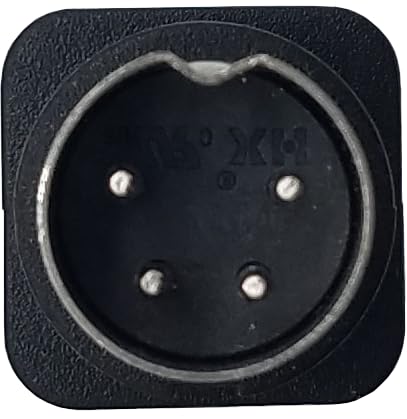
Nọmba 3: Close-up of the 4-pin male connector. This image shows the circular 4-pin connector with its four metal pins clearly visible, designed to plug into a control box.
- Connect to Actuator: Take the 8-pin end of the conversion cable and firmly plug it into the 8-pin input port on your actuator. Ensure the connection is secure.

Nọmba 4: Close-up of the 8-pin female connector. This image displays the rectangular 8-pin female port, which receives the male 8-pin connector from an actuator.
- Jẹrisi Asopọmọra: Once both ends are connected, gently tug on the cable at each connection point to ensure they are fully seated and will not easily disconnect during operation.
- Iṣe idanwo: After installation, test the adjustable bed base functions (e.g., head up/down, foot up/down) to confirm that the actuator responds correctly through the new connection.

Nọmba 5: Igun view of the conversion cable, showing both connectors. This image provides a perspective view of the cable, clearly showing the distinct shapes and pin configurations of both the 4-pin and 8-pin connectors.
Awọn ilana Iṣiṣẹ
The 4 Pin to 8 Pin Conversion Cable is a passive adapter. Once correctly installed, it enables communication between your 4-pin control box and 8-pin actuator. Operation of your adjustable bed base will proceed as normal, using your existing remote control or integrated controls. The cable itself does not require any specific operational steps beyond proper installation.
Itoju
- Ninu: Keep the cable and its connectors clean and free from dust and debris. Use a dry, soft cloth for cleaning. Do not use liquid cleaners directly on the connectors.
- Ayewo: Periodically inspect the cable for any signs of wear, damage, or fraying. Ensure the connectors are not bent or corroded.
- Ibi ipamọ: If the cable is removed for storage, coil it loosely and store it in a dry, cool place away from direct sunlight and extreme temperatures.
- Yago fun Wahala: Do not pull on the cable itself to disconnect it; always grasp the connector housing. Avoid sharp bends or kinks in the cable.
Laasigbotitusita
If you encounter issues after installing the conversion cable, consider the following troubleshooting steps:
- No Actuator Response:
- Ensure both the 4-pin and 8-pin connectors are fully and securely seated.
- Check if the original 4-pin control box and the 8-pin actuator were functioning correctly before installing the conversion cable.
- Inspect the cable for any visible damage, such as cuts or bent pins.
- Iṣiṣẹ Laarin:
- Loose connections are a common cause. Re-seat both ends of the cable.
- Ensure the cable is not under tension or being pinched by moving parts of the bed base.
- Incorrect Pin Configuration:
- Verify that your control box indeed has a 4-pin output and your actuator requires an 8-pin input. This cable is specifically designed for this conversion.
If problems persist after performing these checks, contact Richmat customer support or your product retailer for further assistance.
Awọn pato
| Ẹya ara ẹrọ | Ẹ̀kúnrẹ́rẹ́ |
|---|---|
| Orukọ ọja | 4 Pin to 8 Pin Conversion Cable |
| Brand | Richmat |
| Nọmba awoṣe | RMCB (Model Name: ZYT-36S-42) |
| Connector 1 Type | 4-Pin Male (for control box) |
| Connector 2 Type | 8-Pin Female (for actuator) |
| Àwọ̀ | Dudu |
| Idi | Converts 4-pin control box ports to 8-pin for actuator compatibility |
Atilẹyin ọja ati Support
For warranty information or technical support regarding your Richmat 4 Pin to 8 Pin Conversion Cable, please refer to the documentation provided with your adjustable bed base or contact Richmat directly through their official webojula tabi onibara iṣẹ awọn ikanni. Tọju iwe-ẹri rira rẹ bi ẹri rira.


