Ọrọ Iṣaaju
This manual provides detailed instructions for the setup, operation, and maintenance of your Weofly Nova Active Noise Cancelling Headphones. Please read this manual thoroughly before using the product to ensure optimal performance and longevity.
Ohun ti o wa ninu Apoti
Upon unboxing your Weofly Nova headphones, please verify that all the following components are included:
- Weofly Nova Over-Ear Headphones
- USB-A si okun gbigba agbara USB-C
- 3.5mm AUX Cable (USB-C to 3.5mm TRS)
- Itọsọna olumulo

Image: The Weofly Nova Active Noise Cancelling Headphones in Sliver, showcasing wọn oniru.
Ọja Pariview
The Weofly Nova headphones are designed for comfort and high-quality audio, featuring Active Noise Cancellation and Bluetooth 5.4 connectivity.

Image: A woman wearing the Weofly Nova headphones, illustrating their lightweight and stylish design. The headphones weigh only 130g.

Image: Two pairs of Weofly Nova headphones, one in brown and one in white, highlighting their distinct aesthetic and color options.
Awọn ẹya pataki:
- Ifagile Ariwo Nṣiṣẹ (ANC): Advanced technology to reduce ambient noise.
- Bluetooth V5.4: For faster and more stable wireless connections.
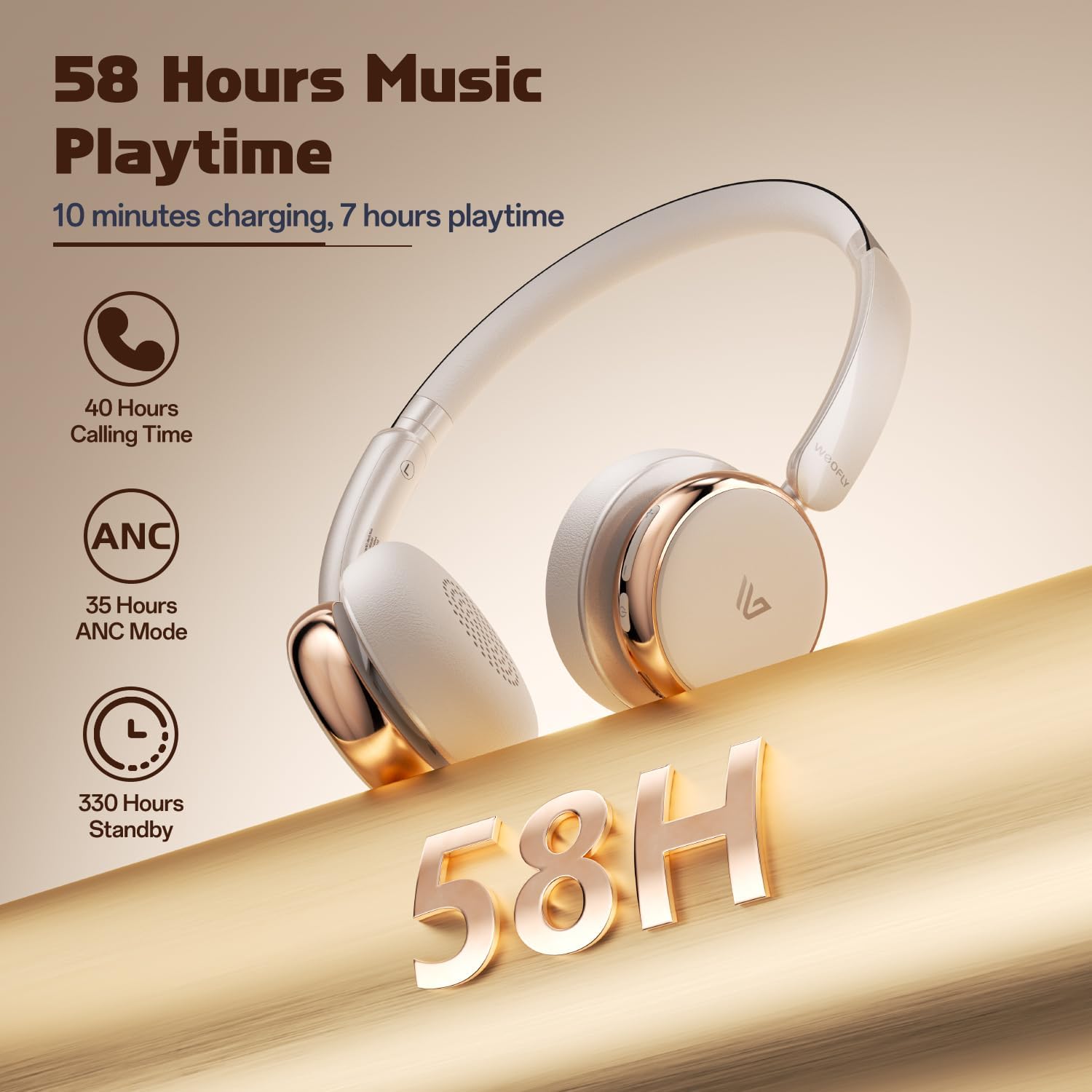
- Igbesi aye batiri gigun: Up to 58 hours of music playtime on a single charge.
- Apẹrẹ itunu: Ultra-soft memory protein earcups and adjustable headband.
- Ohun Iduroṣinṣin Giga: 40mm dynamic drivers for clear audio with rich bass.
- Asopọmọra ẹrọ pupọ: Connect to two smart devices simultaneously.
Fidio: Ipariview of the Weofly Nova Active Noise Cancelling Headphones, demonstrating their features and design.
Awọn ilana iṣeto
1. Ngba agbara si awọn Agbekọri
Before first use, fully charge your Weofly Nova headphones. A full charge takes approximately 2 hours.
- Connect the USB-C end of the charging cable to the headphone's charging port.
- So opin USB-A pọ si ohun ti nmu badọgba agbara USB ibaramu (kii ṣe pẹlu) tabi ibudo USB ti kọnputa kan.
- Ina Atọka yoo fi ipo gbigba agbara han ati paa tabi yi awọ pada nigbati o ba gba agbara ni kikun.

Image: The Weofly Nova headphones being charged via a USB-C cable, illustrating the fast charging capability.
2. Agbara lori / Paa
- Lati Fi agbara: Tẹ mọlẹ Bọtini Agbara titi ti ina Atọka yoo fi tan.
- Lati Paarẹ: Tẹ mọlẹ Bọtini Agbara titi ti ina Atọka yoo wa ni pipa.
3. Sisopọ Bluetooth
The headphones support quick pairing. The first time you power them on, they will automatically enter pairing mode.
- Rii daju pe awọn agbekọri ti wa ni pipa.
- Press and hold the Power button for approximately 5 seconds until the indicator light flashes blue and red alternately, indicating pairing mode.
- Lori ẹrọ rẹ (foonuiyara, tabulẹti, kọǹpútà alágbèéká), mu Bluetooth ṣiṣẹ ki o wa awọn ẹrọ to wa.
- Select "Weofly Nova" from the list of devices.
- Once connected, the indicator light will turn solid blue or flash blue slowly.
The headphones can connect to two devices simultaneously. To connect a second device, repeat the pairing process. The headphones will automatically switch between devices for calls or media playback.

Image: An illustration showing the Weofly Nova headphones connecting to a laptop and a smartphone via advanced Bluetooth 5.4, highlighting faster transmission and stable connection.
Awọn ilana Iṣiṣẹ
1. Ifagile Ariwo Nṣiṣẹ (ANC)
The Weofly Nova headphones feature Active Noise Cancellation to minimize ambient sounds.
- To Activate/Deactivate ANC: Press the dedicated ANC button on the earcup. An audible prompt will confirm the status.

Image: A woman wearing Weofly Nova headphones while focused on her laptop, demonstrating the effectiveness of ANC in reducing distractions.
2. Sisisẹsẹhin Orin
Ṣakoso orin rẹ taara lati awọn agbekọri:
- Ṣiṣẹ/Daduro: Tẹ bọtini Olona-iṣẹ lẹẹkan.
- Orin t’okan: Tẹ mọlẹ bọtini Iwọn didun Up.
- Tẹlẹ Orin: Tẹ mọlẹ bọtini Iwọn didun isalẹ.
- Iwọn didun Up: Tẹ bọtini didun Up ni ṣoki.
- Iwọn didun isalẹ: Tẹ bọtini Iwọn didun isalẹ ni ṣoki.
3. Iṣakoso ipe
Manage phone calls with ease:
- Idahun/Ipe Ipari: Tẹ bọtini Olona-iṣẹ lẹẹkan.
- Kọ Ipe: Tẹ mọlẹ bọtini iṣẹ-ọpọlọpọ fun iṣẹju-aaya 2.
- Nọmba Ikẹhin Tun Tun: Tẹ bọtini Olona-iṣẹ lẹẹmeji.
4. Oluranlọwọ ohun
Activate your device's voice assistant:
- Mu Oluranlọwọ Ohun ṣiṣẹ: Mẹta-tẹ bọtini Olona-iṣẹ.

Image: A multi-panel image illustrating the comfort of the headphones during travel, and the functionality of voice assistance and built-in microphone for hands-free calls.
5. Ipo ere
For reduced latency during gaming, activate Game Mode:
- Activate/Deactivate Game Mode: Press and hold the Multi-function button for 2 seconds (while not on a call or playing music).
6. Ti firanṣẹ Asopọ
Use the provided 3.5mm AUX cable for a wired connection:
- Connect the USB-C end of the AUX cable to the headphone's USB-C port.
- Connect the 3.5mm end to your audio source's headphone jack.
- Awọn agbekọri yoo yipada laifọwọyi si ipo ti firanṣẹ.
Itoju
To ensure the longevity and optimal performance of your Weofly Nova headphones, follow these maintenance guidelines:
- Ninu: Lo asọ asọ ti o gbẹ lati nu agbekọri naa. Ma ṣe lo abrasive ose tabi epo.
- Ibi ipamọ: Tọju awọn agbekọri naa ni itura, aye gbigbẹ kuro lati orun taara ati awọn iwọn otutu to gaju.
- Yago fun Ọrinrin: Ma ṣe fi awọn agbekọri han si omi tabi ọrinrin pupọ.
- Mu pẹlu Itọju: Yago fun sisọ tabi tẹriba awọn agbekọri si awọn ipa to lagbara.
Laasigbotitusita
If you encounter issues with your Weofly Nova headphones, refer to the following common solutions:
| Isoro | Ojutu |
|---|---|
| Awọn agbekọri ko ṣiṣẹ | Ensure the headphones are fully charged. Connect to a power source and allow to charge for at least 30 minutes before attempting to power on again. |
| Ko le so pọ pẹlu ẹrọ | Ensure headphones are in pairing mode (flashing blue/red). Turn off and on your device's Bluetooth. Move headphones closer to the device. Clear previous Bluetooth connections on your device. |
| Ko si ohun tabi iwọn didun kekere | Check headphone and device volume levels. Ensure headphones are properly connected via Bluetooth or AUX cable. Test with a different audio source. |
| ANC ko ṣiṣẹ daradara | Ensure ANC is activated. Adjust headphone fit to ensure a good seal around your ears. ANC is most effective against low-frequency, constant noise. |
| Asopọmọra igba diẹ | Ensure no obstacles are between the headphones and your device. Move away from other wireless devices that may cause interference. Ensure headphones are fully charged. |
Awọn pato
Technical details for the Weofly Nova Active Noise Cancelling Headphones:
- Orukọ awoṣe: Nova
- Imọ-ẹrọ Asopọmọra: Ailokun (Bluetooth)
- Imọ-ẹrọ Ibaraẹnisọrọ Alailowaya: Bluetooth 5.4
- Irú Awakọ Olohun: 40mm Yiyi Driver
- Iṣakoso Ariwo: Ti nṣiṣe lọwọ Noise Ifagile
- Igbesi aye batiri: Up to 58 hours (music playtime), 40 hours (talk time), 35 hours (ANC mode)
- Akoko gbigba agbara: O fẹrẹ to awọn wakati 2
- Agbara Batiri: 500mAh
- Ìwọ̀n Nkan: 0.26 kilogram (9.1 iwon)
- Gbigbe Eti: Lori Eti
- Awọn ẹrọ ibaramu: Foonu alagbeka, Tabulẹti, Kọǹpútà alágbèéká, Àwọn Agbọrọsọ Ọlọ́gbọ́n
Aworan: A alaye view of the Weofly Nova earcup, emphasizing the 40mm dynamic driver responsible for high-fidelity sound quality.

Image: The Weofly Nova headphones prominently displaying '58H', signifying their extended battery life of 58 hours for music playback.
Atilẹyin ọja ati Support
Weofly products come with a standard manufacturer's warranty. For specific warranty details, please refer to the warranty card included in your product packaging or visit the official Weofly website. For technical support, troubleshooting assistance, or any inquiries regarding your Weofly Nova headphones, please contact Weofly customer service through the contact information provided on our webaaye tabi ninu iwe ọja rẹ.


