1. Ifihan
This manual provides essential instructions for the proper installation, operation, and maintenance of your CUIPPWRJ Reaper F4 128K 65A BLHeli32 4-in-1 Electronic Speed Controller (ESC). This device is designed for multirotor drone applications, integrating four ESCs into a single compact unit for simplified wiring and reduced weight. Please read this manual thoroughly before use to ensure optimal performance and safety.
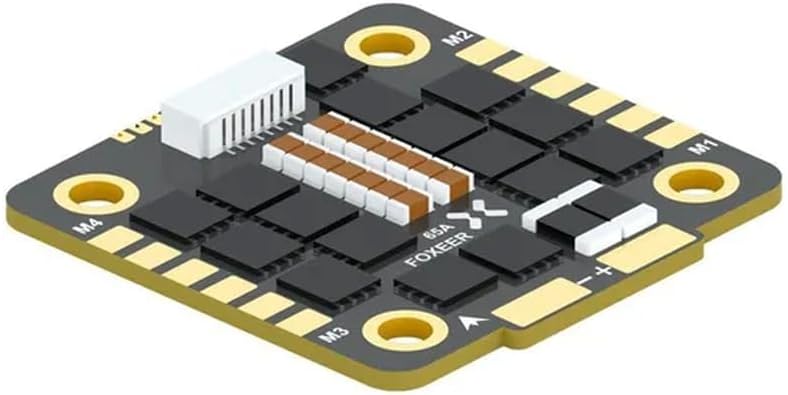
Figure 1: CUIPPWRJ Reaper F4 128K 65A BLHeli32 4-in-1 ESC. This image displays the CUIPPWRJ Reaper F4 128K 65A BLHeli32 4-in-1 Electronic Speed Controller. It features a compact, square design with gold-plated pads for motor connections (M1, M2, M3, M4) and main power input (+/-). Key components like capacitors and the main processor are visible, along with the '65A FOXEER' branding, indicating its current rating and a potential component supplier or design influence. A white connector for signal input is also present.
2. Eto ati fifi sori
Proper installation is crucial for the performance and longevity of your ESC. Follow these steps carefully:
- Iṣagbesori: Securely mount the ESC to your drone frame using appropriate standoffs and hardware. Ensure there is adequate airflow for cooling.
- Awọn Isopọ mọto: Solder the three motor wires from each of your four motors to the corresponding M1, M2, M3, and M4 pads on the ESC. The order of wires may affect motor direction; this can be adjusted in software.
- Iṣagbewọle agbara: Solder the main battery positive (+) and negative (-) leads to the large designated pads on the ESC. Ensure correct polarity to prevent damage. This ESC supports 3-8S LiPo batteries.
- Isopọ ifihan agbara: Connect the signal cable from the ESC to your flight controller's motor output pins. Refer to your flight controller's manual for specific pin assignments. The 4-in-1 design simplifies this connection, typically using a single ribbon cable or harness.
- Iṣeto Famuwia:
- This ESC comes with BLHeli32 firmware. Connect the ESC to your computer via your flight controller (or a dedicated BLHeli32 passthrough adapter).
- Use the BLHeliSuite32 software to configure settings such as motor direction, PWM frequency, and other parameters.
- Perform ESC calibration if required by your flight controller or specific setup.
Akiyesi: Always double-check all connections for shorts and correct polarity before applying power. Incorrect wiring can cause severe damage to the ESC and other components.
3. Awọn ilana Iṣiṣẹ
Once installed and configured, the ESC operates in conjunction with your flight controller to control the speed of your drone's motors.
- Agbara Tan: Connect your LiPo battery to the main power leads of the ESC. The flight controller and ESC will initialize.
- Ihamọra: Arm your drone through your flight controller's arming sequence (typically a specific stick command on your radio transmitter).
- Iṣakoso mọto: The flight controller sends signals to the ESC, which then translates these signals into motor speed adjustments. Increase throttle to spin the motors.
- Pipasilẹ: Disarm your drone after flight to stop the motors and prevent accidental spin-up.
Awọn iṣọra Aabo:
- Always operate your drone in a safe environment, away from people and obstacles.
- Never touch spinning propellers.
- Disconnect the battery immediately after use and before performing any maintenance or adjustments.
- Bojuto batiri voltage and ESC temperature during flight.
4. Itọju
Regular maintenance helps ensure the longevity and reliability of your ESC.
- Ninu: Periodically inspect the ESC for dust, dirt, or debris. Use a soft brush or compressed air to gently clean the components. Avoid using liquids.
- Ayewo: Check solder joints for cracks or cold joints. Inspect wires for fraying or damage. Ensure all mounting hardware is secure.
- Ibi ipamọ: Store the ESC in a dry, cool environment, away from direct sunlight and extreme temperatures.
5. Laasigbotitusita
If you encounter issues with your ESC, consider the following common troubleshooting steps:
- Mọto Ko Yiyi:
- Check motor wire connections for continuity and proper soldering.
- Verify signal wire connection to the flight controller.
- Ensure the motor is not physically obstructed.
- Check BLHeliSuite32 for motor direction and settings.
- Motor Desync/Stuttering:
- Ensure motor wires are securely soldered and not loose.
- Check for bent motor shafts or damaged bearings.
- Adjust ESC timing settings in BLHeliSuite32 (e.g., motor timing, PWM frequency).
- Ensure adequate power supply from the battery.
- Igbóná púpọ̀:
- Ensure sufficient airflow around the ESC.
- Check for excessively high motor KV or propeller size for the given voltage.
- Verify that the current draw is within the ESC's 65A rating.
- Ko si Agbara:
- Check main battery connection and polarity.
- Inspect for any visible damage to the ESC or power leads.
- Idanwo batiri voltage.
If problems persist, consult online resources, community forums, or contact the manufacturer's support.
6. Awọn pato
| Awoṣe | Reaper F4 128K |
| Nọmba Awoṣe Nkan | CUIPPWRJ123 |
| Iṣagbewọle Voltage | 3-8S LiPo |
| Ilọsiwaju lọwọlọwọ | 65A |
| Firmware | BLHeli32 |
| Iṣẹ ṣiṣe | 4-in-1 ESC |
| Awọn iwọn | 1.18 x 0.79 x 0.39 inches |
| Iwọn Nkan | 14.1 iwon |
| Olupese | CUIPPWRJ |
7. atilẹyin ọja Information
Specific warranty terms and conditions for the CUIPPWRJ Reaper F4 128K 65A BLHeli32 4-in-1 ESC are provided by the manufacturer or seller at the time of purchase. Please retain your proof of purchase. For detailed warranty information, refer to the documentation included with your product or contact the seller directly.
8. Atilẹyin
For technical assistance, troubleshooting beyond this manual, or inquiries regarding your product, please contact the retailer or manufacturer directly. Many resources, including community forums and online guides, are also available for BLHeli32 ESCs and multirotor drone components.