1. Ifihan
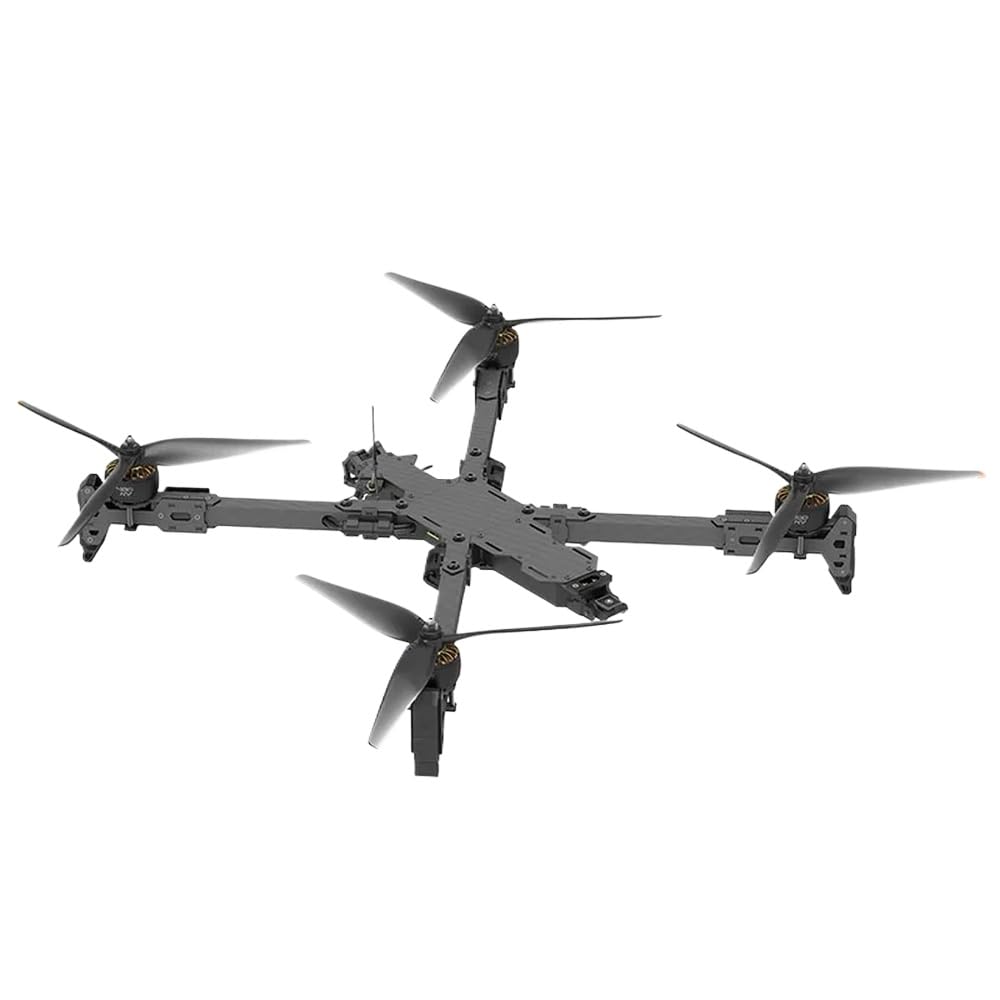
This manual provides essential instructions for the safe and efficient operation, setup, and maintenance of your CUIPPWRJ X413 Analog 8S 13-inch Drone. Please read this manual thoroughly before operating the drone to ensure proper usage and to prevent damage or injury. This drone is designed for experienced users due to its advanced features and performance capabilities.
2. Awọn Itọsọna Aabo
Operating a drone requires adherence to strict safety protocols. Failure to follow these guidelines may result in property damage, personal injury, or legal penalties.
- Ṣiṣayẹwo Ọkọ ofurufu-ṣaaju: Always inspect the drone for any damage, loose propellers, or battery issues before each flight.
- Ayika ofurufu: Operate in open areas, away from people, animals, buildings, and power lines. Avoid flying near airports or restricted airspace.
- Awọn ipo oju ojo: Do not fly in strong winds (above Level 8), rain, snow, or fog.
- Aabo Batiri: Use only approved batteries and chargers. Do not overcharge or puncture batteries. Store batteries in a cool, dry place.
- Ààbò propeller: Keep hands and face clear of rotating propellers. Always remove propellers before performing maintenance or handling the drone indoors.
- Laini Oju: Ṣetọju laini wiwo pẹlu drone ni gbogbo igba lakoko ọkọ ofurufu.
- Awọn Ilana Agbegbe: Be aware of and comply with all local drone regulations and laws.
3. Package Awọn akoonu
Verify that all items are present in your package. If any components are missing or damaged, contact CUIPPWRJ support.
- 1 x X413 8S Analog BNF Drone
- 1 x Landing Pad (assumed)
- 1 x Unspecified Accessory (as per product description)
- 2 x Awọn Propeller (Pọpa)
- 3 x Battery Straps
- 1 x Screw Bag
4. Eto
4.1 Unboxing ati ayewo
Carefully remove all components from the packaging. Inspect the drone frame, motors, propellers, and wiring for any signs of damage during transit. Ensure all connections are secure.
4.2 Propeller fifi sori
Attach the propellers to the motors according to the rotation direction indicated on the motor bells and propellers. Ensure the correct propeller (CW or CCW) is installed on the corresponding motor. Secure them firmly using the provided screws or quick-release mechanisms.
4.3 batiri Asopọ
Connect your fully charged 8S battery to the drone's power connector. Secure the battery using the provided straps to prevent movement during flight. Ensure the battery is properly balanced and not damaged.
4.4 Controller Binding (BNF)
As a Bind-N-Fly (BNF) model, the X413 requires binding to a compatible radio transmitter. Refer to your specific radio transmitter's manual for detailed binding procedures. Typically, this involves putting the drone into bind mode (often via a button on the flight controller or a command in Betaflight/INAV) and then initiating the bind process on your transmitter.
4.5 Pre-Flight Configuration
It is recommended to connect the drone to a flight controller configurator software (e.g., Betaflight or INAV, depending on the FC firmware) via USB to verify settings, calibrate accelerometers, and ensure all channels from your transmitter are correctly mapped and responding.
5. Ṣiṣẹ
5.1 Arming ati disarming
To arm the motors, typically move the throttle stick to its lowest position and the yaw stick to the bottom-right (or a configured switch). The motors will spin at a low idle speed. To disarm, perform the reverse stick command or toggle the arming switch. Always arm and disarm in a safe, clear area.
5.2 Ipilẹ ofurufu idari
- Ijoko: Ó ń ṣàkóso gíga (sókè/ìsàlẹ̀).
- Eerun: Controls lateral movement (left/right).
- Ipo: Controls forward/backward movement.
- Yaw: Controls rotation around the vertical axis (left/right turn).
5.3 GPS Iṣẹ
The integrated GPS module provides enhanced positioning and stability. Before takeoff, wait for the GPS module to acquire a sufficient number of satellites (indicated by an LED or OSD message). This enables features like position hold and return-to-home (if configured).
5.4 Video Transmission (VTX)
The drone is equipped with a BLITZ 1.2G 1.6W VTX. Ensure your video receiver is tuned to the correct frequency and channel. The VTX output power can be adjusted (0-25-400-800-1600mw) via OSD or flight controller software. Always verify local regulations regarding VTX power levels.
6. Itọju
6.1 Ninu
After each flight, especially in dusty or dirty environments, clean the drone using a soft brush or compressed air. Pay attention to motors, propellers, and electronic components. Avoid using liquids directly on electronics.
6.2 Propeller Rirọpo
Regularly inspect propellers for cracks, bends, or nicks. Damaged propellers can cause instability and reduce flight efficiency. Replace damaged propellers immediately with genuine CUIPPWRJ X413 13X9X3 propellers.
6.3 batiri Itọju
Store batteries at a storage voltage (typically 3.8V per cell) when not in use for extended periods. Do not fully discharge batteries. Avoid exposing batteries to extreme temperatures.
6.4 famuwia imudojuiwọn
Periodically check the CUIPPWRJ website or relevant flight controller firmware repositories for updates. Firmware updates can improve performance, add features, or fix bugs. Follow official instructions carefully when performing updates.
7. Laasigbotitusita
- Drone Does Not Arm: Check if the throttle is at its lowest position. Verify transmitter connection and arming switch position. Ensure no pre-arm checks (e.g., low battery, no GPS lock) are preventing arming.
- Ọkọ ofurufu aiduroṣinṣin: Inspect propellers for damage or incorrect installation. Check for loose motor mounts or frame components. Recalibrate accelerometers in the flight controller software.
- Ko si Ifunni Fidio: Ensure VTX and VRX (video receiver) are on the same frequency and channel. Check VTX power settings. Inspect antenna connections on both drone and receiver.
- GPS Not Locking: Rii daju pe drone naa ni imọlẹ view of the sky. Wait longer for satellite acquisition. Check GPS module connection to the flight controller.
- Mọto Ko Yiyi: Check motor wiring and connections. Inspect for physical obstructions. Test the motor individually via the flight controller configurator.
8. Awọn pato
| Ẹya-ara / Ẹya | Sipesifikesonu |
|---|---|
| Adarí Ofurufu (FC) | BLITZ F7 Pro Flight Controller |
| Oluṣakoso Iyara Itanna (ESC) | BLITZ E80 4-IN-1 Pro ESC |
| Video Transmission (VTX) | BLITZ Whoop 1.2G 1.6W VTX (0-25-400-800-1600mw) |
| Ìpìlẹ̀ kẹ̀kẹ́ fireemu | 599mm |
| Mọto | XING 4214 motors |
| Awọn ẹrọ atẹgun | 13X9X3 propellers |
| Iwọn (laisi batiri) | 2070g |
| Awọn iwọn (L×W×H) | 425x425x26mm |
| Iyara ti o pọju | 140km/h |
| Maximum Takeoff Altitude | 6000m |
| Max Hover Time (without load) | Approx. 18 mins (with 8S 5600mAh battery) |
| Max Hover Time (with 4KG load) | 7 iṣẹju |
| Max Hover Time (with 6KG load) | 5 iṣẹju |
| Max Wind Speed Resistance | Ipele 8 |
| Awọn iwọn otutu ti nṣiṣẹ | -10°C si 40°C |
| Nọmba Awoṣe Nkan | CUIPPWRJ123 |
| Iwọn Nkan | 14.1 iwon (400g) |
| Olupese | CUIPPWRJ |
9. Atilẹyin ọja ati Support
CUIPPWRJ products are typically covered by a limited warranty against manufacturing defects. For specific warranty terms and conditions, please refer to the warranty card included with your product or visit the official CUIPPWRJ website. For technical support, troubleshooting assistance, or spare parts, please contact CUIPPWRJ customer service through their official channels. Always provide your product model number (CUIPPWRJ123) and purchase details when seeking support.