1. Ifihan
This manual provides essential information for the safe and effective operation, setup, and maintenance of your CUIPPWRJ Manta5 SE Drone. This drone features a Squashed-X frame design, AE227-1960KV motors, GPS functionality, and is compatible with 6S batteries, making it suitable for both cinematic and freestyle flying. Please read this manual thoroughly before operating the drone.
2. Alaye Aabo
Operating a drone requires responsibility and adherence to safety guidelines. Failure to follow these instructions may result in injury, damage to the drone, or property damage.
- Awọn Ilana Agbegbe: Always fly in accordance with local laws and regulations. Check for no-fly zones and altitude restrictions.
- Ṣiṣayẹwo Ọkọ ofurufu-ṣaaju: Before each flight, inspect the drone for any damage, loose propellers, or connection issues.
- Ayika: Fly in open areas, away from people, animals, buildings, and power lines. Avoid flying in strong winds or adverse weather conditions.
- Aabo Batiri: Use only compatible 6S batteries. Handle batteries with care, avoid overcharging or over-discharging, and store them in a safe, fireproof location.
- Ààbò propeller: Má ṣe jẹ́ kí ọwọ́ àti ojú rẹ wà ní ìhòhò tí ó ń yípo. Máa yọ àwọn propeller kúrò kí o tó ṣe àtúnṣe tàbí ìṣètò.
- Laini Oju: Maintain visual line of sight with the drone at all times, even when using FPV.
- Iṣeduro ọjọ ori: This product is recommended for users aged 36 months to 18 years, with adult supervision for younger users.
3. Package Awọn akoonu
Rí i dájú pé gbogbo àwọn èròjà wà níbẹ̀ àti pé wọ́n wà ní ipò tó dára nígbà tí o bá yọ àpótí kúrò:
- CUIPPWRJ Manta5 SE Drone (Squashed-X Frame with AE227-1960KV Motors)
- Modulu GPS
- ELRS Receiver (for 'Analog W Elrs W Gps' variant)
- Propellers (quantity may vary)
- Antenna (for FPV and control link)
- Afowoyi Olumulo (iwe-ipamọ yii)
Note: Batteries and charger are typically sold separately. Ensure you have a compatible 6S battery and charger.
4. Eto
4.1 Ibẹrẹ Ayẹwo
Carefully remove the drone from its packaging. Inspect the frame, motors, wiring, and camera for any visible damage that may have occurred during shipping.
4.2 Propeller fifi sori
Attach the propellers to the motors. Ensure that each propeller is installed on the correct motor (clockwise or counter-clockwise rotation) and tightened securely. Refer to the markings on the propellers and motor shafts.
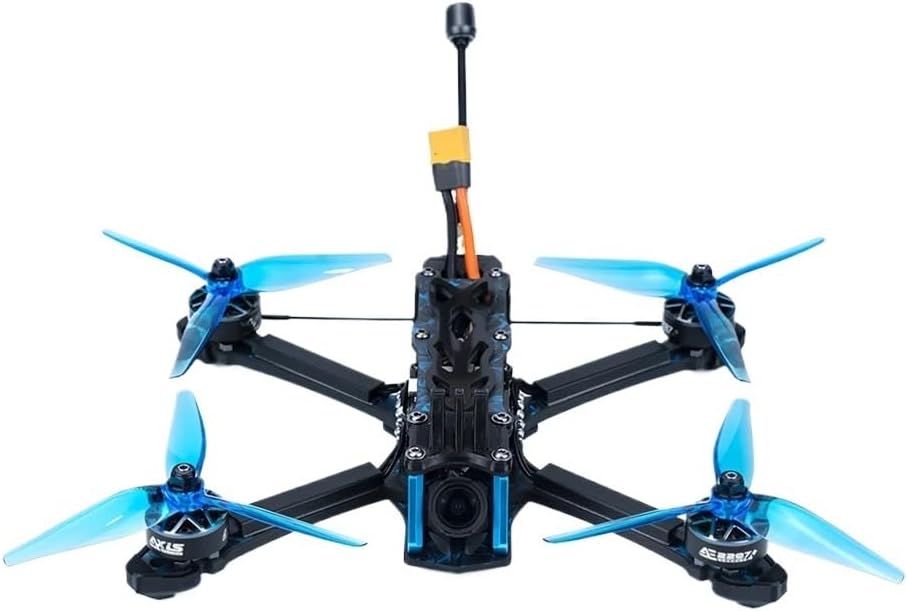
Nọmba 1: The CUIPPWRJ Manta5 SE Drone, featuring its Squashed-X frame, AE227-1960KV motors, and translucent blue propellers. The FPV camera is visible at the front, and the antenna and battery connector are at the top. This image illustrates the fully assembled drone ready for flight.
4.3 batiri Asopọ
Connect a fully charged 6S LiPo battery to the drone's XT60 connector. Ensure the connection is firm and secure. The drone will power on, and you may hear a series of beeps indicating initialization.
4.4 ELRS Receiver Binding (if applicable)
If your drone variant includes an ELRS receiver, follow the specific binding procedure for your ELRS module and radio transmitter. Typically, this involves putting the receiver into binding mode (often by powering it on/off three times) and initiating the binding process on your transmitter.
Ìṣàtúnṣe GPS 4.5
For optimal GPS performance, perform a compass calibration before the first flight and whenever flying in a new location. Refer to your flight controller's firmware documentation (e.g., Betaflight, ArduPilot) for detailed calibration steps. This usually involves rotating the drone on multiple axes.
5. Ṣiṣẹ
5.1 Pre-Flight sọwedowo
- Rí i dájú pé batiri náà ti gba agbára dáadáa, ó sì ti so mọ́ ara rẹ̀ dáadáa.
- Verify propellers are correctly installed and tightened.
- Check for clear flight path and safe environment.
- Confirm radio transmitter is powered on and bound to the drone.
- Check FPV feed (if applicable) for clarity and signal strength.
- Wait for GPS lock (indicated by LED status or OSD) before arming, especially for GPS-assisted flight modes.
5.2 Gbígbé àti Ìbalẹ̀
Arm the motors using your radio transmitter's designated switch. Slowly increase throttle to lift off. For landing, gently decrease throttle while maintaining control, aiming for a soft touchdown. Disarm motors immediately after landing.
5.3 Ofurufu Ipo
The Manta5 SE supports various flight modes suitable for cinematic and freestyle flying. These modes are typically configured in your flight controller software (e.g., Betaflight). Common modes include:
- Acro Mode (Rate Mode): Provides full manual control, ideal for freestyle maneuvers.
- Angle Mode (Self-Leveling): Assists with leveling the drone, suitable for beginners or stable cinematic shots.
- GPS Hold/Return to Home: Utilizes the GPS module for position holding or automatically returning to the take-off point.
5.4 FPV System (First-Person View)
If your drone is equipped with an FPV system, ensure your FPV goggles or monitor are powered on and tuned to the correct video frequency. The FPV system provides real-time video feedback for an immersive flying experience.
6. Itọju
Regular maintenance ensures the longevity and performance of your drone.
- Ninu: After each flight, especially in dusty or dirty environments, gently clean the drone's frame, motors, and camera lens with a soft brush or compressed air.
- Ayewo Propeller: Check propellers for cracks, bends, or nicks. Damaged propellers can cause instability and reduce flight efficiency. Replace them immediately if damaged.
- Ayẹwo mọto: Ensure motors spin freely and quietly. Check for any debris lodged in the motor bells.
- Asopọmọra ati awọn ọna asopọ: Periodically inspect all wiring for fraying or loose connections. Ensure battery connectors are clean and free of corrosion.
- Ìdúróṣinṣin Fírẹ́mù: Check the Squashed-X frame for any cracks or stress points, especially after hard landings or crashes.
- Awọn imudojuiwọn famuwia: Keep your flight controller firmware updated to benefit from performance improvements and bug fixes.
7. Laasigbotitusita
Abala yii n ṣalaye awọn ọran ti o wọpọ ti o le ba pade.
| Isoro | Owun to le Fa | Ojutu |
|---|---|---|
| Drone ko ni agbara lori | Dead battery, loose connection, damaged power cable | Charge battery, check all power connections, inspect cables for damage. |
| Ìfò tí kò dúró ṣinṣin / Ìrìnàjò | Damaged propellers, incorrect calibration, motor issue, unbalanced drone | Replace damaged propellers, recalibrate accelerometer/gyro, check motor function, ensure even weight distribution. |
| Ko si ifunni fidio FPV | Incorrect VTX channel, loose camera/VTX connection, damaged VTX/camera | Verify VTX channel matches goggles/monitor, check all video connections, inspect components for damage. |
| No GPS lock | Poor satellite visibility, GPS module not connected, incorrect configuration | Move to an open area, ensure GPS module is securely connected, verify GPS settings in flight controller software. |
| Drone not arming | Throttle too high, safety switch not engaged, low battery voltage, arming disabled in flight controller | Lower throttle, engage arming switch, check battery voltage, tunview flight controller arming settings. |
If you encounter issues not listed here, consult online resources for your flight controller firmware or contact customer support.
8. Awọn pato
- Awoṣe: CUIPPWRJ123
- Iru fireemu: Squashed-X
- Awọn ọkọ ayọkẹlẹ: AE227-1960KV
- Ibamu Batiri: 6S LiPo
- Lilọ kiri: GPS ti a ṣepọ
- Olugba: ELRS (for 'Analog W Elrs W Gps' variant)
- Awọn iwọn (Apapọ): 1.18 x 0.79 x 0.39 inches
- Ìwọ̀n Nkan: 14.1 iwon
- Olupese: CUIPPWRJ
- Ọjọ ori ti a ṣeduro: 36 osu - 18 ọdun
9. Atilẹyin ọja ati Support
For warranty information and technical support, please refer to the documentation provided with your purchase or contact CUIPPWRJ customer service directly. Keep your proof of purchase for any warranty claims.