1. Ọja Ipariview
The CUIPPWRJ F405 V3 BLS 60A 30x30 Flight Controller and 4in1 ESC Stack is designed for freestyle drones, offering an integrated solution for flight management and motor control. This stack delivers efficient power output for improved flight times and performance, featuring an intuitive setup process suitable for both beginners and experienced drone builders.
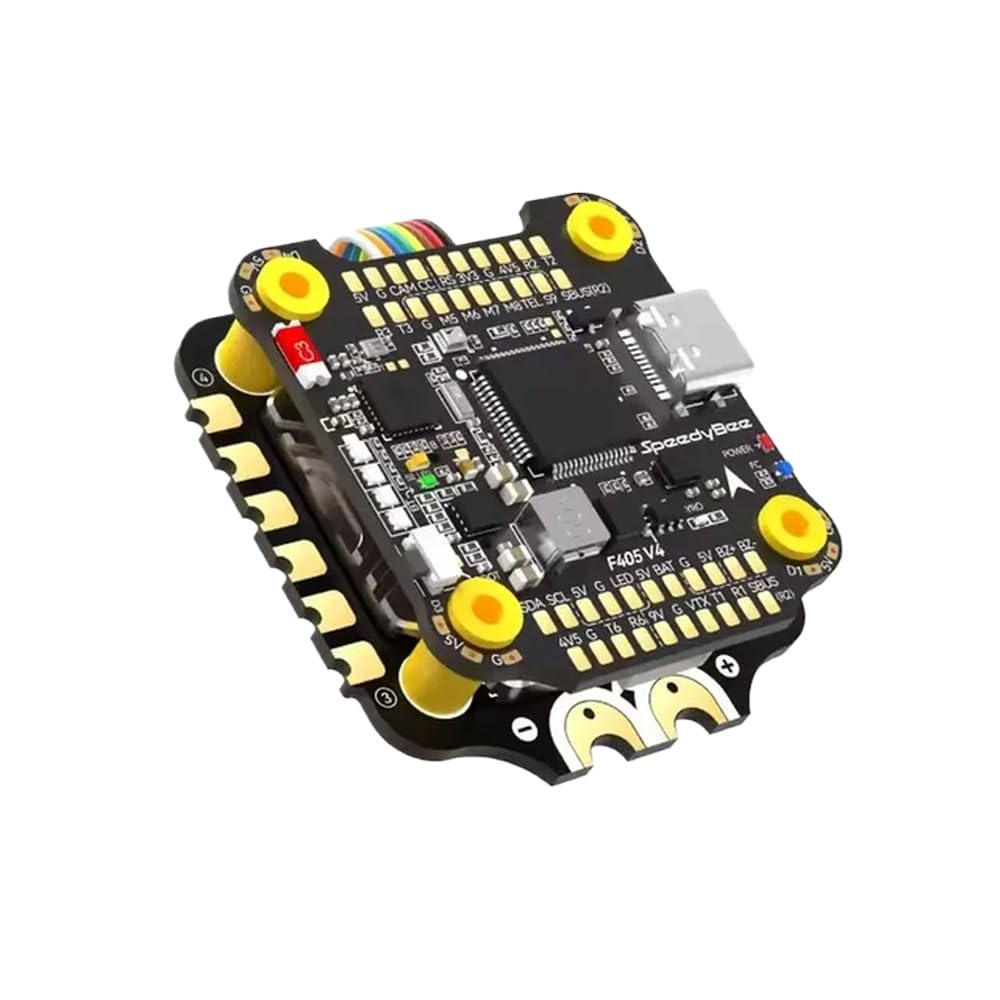
Nọmba 1: CUIPPWRJ F405 V3 BLS 60A 30x30 Flight Controller and 4in1 ESC Stack. This image displays the compact design of the integrated flight controller and electronic speed controller unit.
2. Key Awọn ẹya ara ẹrọ
- Apẹrẹ Onipọ: Specifically engineered for freestyle drones, enhancing the DIY build experience.
- Iṣe to gaju: Incorporates an F405 flight controller for responsive and efficient flight management.
- Integrated Solution: Combines a 60A 4in1 ESC for simplified installation and cleaner wiring.
- Ibamu gbooro: Supports a wide range of motors and configurations, allowing for customized setups.
- Imudara Itọju: Constructed to withstand the demands of intensive freestyle flying.
3. Eto Itọsọna
Follow these steps for proper installation and initial configuration of your flight controller and ESC stack.
3.1 Fifi sori ti ara
- Iṣagbesori: Securely mount the F405 V3 BLS 60A stack onto your drone frame using appropriate standoffs and screws. Ensure proper orientation as indicated by the arrow on the flight controller.
- Awọn Isopọ mọto: Solder the motor wires from your drone to the corresponding pads on the 4in1 ESC. Pay close attention to the motor numbering and rotation direction.
- Asopọ agbara: Solder the main battery lead (XT60/XT30 connector) to the designated battery pads on the ESC. Double-check polarity (+ and -) to prevent damage.
3.2 Peripheral Wiring
Connect essential peripherals to the flight controller:
- Olugba (RX): Connect your radio receiver to the appropriate UART port on the flight controller (e.g., SBUS, CRSF, iBUS). Refer to the flight controller's pinout diagram.
- Video Transmitter (VTX): Connect the VTX to the designated VTX pads for video signal, ground, and power.
- Kamẹra: Connect your FPV camera to the camera input pads on the flight controller or VTX.
- GPS (Optional): If using GPS, connect it to a free UART port.
3.3 Iṣeto ni Sọfitiwia
- Sopọ si PC: Connect the flight controller to your computer using a USB cable.
- Fi Awọn awakọ sii: Ensure necessary drivers (e.g., STM32 Virtual COM Port Driver, Zadig) are installed.
- Famuwia Filaṣi: Open your preferred configurator software (e.g., Betaflight Configurator, INAV Configurator). Select the correct target for your F405 V3 flight controller and flash the latest stable firmware.
- Iṣeto akọkọ: Follow the configurator's setup wizard to calibrate accelerometers, set up motor protocols (e.g., DShot600), configure your receiver, and assign flight modes.
- Idanwo Mọto: Carefully test motor direction and functionality within the configurator. Correct any reversed motors by re-soldering or using the ESC configurator.
4. Awọn ilana Iṣiṣẹ
This section outlines the basic steps for operating your drone with the CUIPPWRJ F405 V3 BLS 60A stack.
4.1 Pre-Flight sọwedowo
- Ṣe àyẹ̀wò gbogbo àwọn wáyà fún àwọn ìsopọ̀ tí ó bàjẹ́ tàbí tí ó bàjẹ́.
- Ensure propellers are securely attached and oriented correctly.
- Rí i dájú pé batiri náà ti gba agbára dáadáa àti pé ó wà ní ìdúróṣinṣin.
- Check radio transmitter battery level and ensure it is powered on.
4.2 Powering On and Arming
- Agbara Tan: Connect the fully charged battery to the drone's main power lead. The flight controller will initialize, indicated by LED lights.
- Ihamọra: With the drone on a stable, level surface and clear of obstacles, perform the arming sequence configured in your flight controller software (e.g., stick command, switch). The motors will spin slowly, indicating the drone is armed.
4.3 Ofurufu
- Gently increase throttle to lift off.
- Use the pitch, roll, and yaw sticks on your transmitter to control the drone's movement.
- Bojuto batiri voltage and flight time.
4.4 Disaring
To safely disarm the drone, perform the disarming sequence configured in your flight controller software. The motors will stop spinning. Always disarm before approaching the drone or after landing.
5. Itọju
Regular maintenance ensures the longevity and reliable performance of your CUIPPWRJ F405 V3 BLS 60A stack.
- Ayewo Lẹhin-Ọkọ ofurufu: After each flight, visually inspect the flight controller and ESC for any signs of physical damage, loose wires, or debris.
- Ninu: Gently clean the components with a soft brush or compressed air to remove dust, dirt, or grass. Avoid using liquids directly on the electronics.
- Awọn imudojuiwọn famuwia: Periodically check for and install the latest stable firmware for your flight controller and ESC. Firmware updates often include performance improvements and bug fixes.
- Solder Joint Integrity: Occasionally inspect solder joints for cracks or cold joints, especially after hard crashes. Re-solder if necessary.
- Rirọpo Ẹka: If any component on the stack is damaged beyond repair, replace it with an identical or compatible part.
6. Laasigbotitusita
Abala yii n ṣalaye awọn ọran ti o wọpọ ti o le ba pade.
6.1 No Power to Flight Controller/ESC
- Ṣayẹwo Batiri: Rii daju pe batiri ti gba agbara ati ti sopọ daradara.
- Inspect Power Leads: Verify that the main battery leads are securely soldered to the ESC and that there are no shorts.
- Ṣayẹwo Fuse: Some setups may include a fuse; check if it's blown.
6.2 Motors Not Spinning or Spinning Incorrectly
- Arming State: Ensure the drone is armed.
- Iṣatunṣe ESC: Verify ESCs are properly calibrated (if applicable to your ESC protocol).
- Itọsọna moto: Check motor direction in the configurator. Adjust if necessary.
- Asopọmọra: Inspect motor wiring for loose connections or incorrect soldering.
- Motor Protocol: Ensure the correct motor protocol (e.g., DShot600) is selected in the configurator.
6.3 No Signal from Receiver
- Asopọmọra: Confirm your receiver is correctly bound to your radio transmitter.
- Asopọmọra: Check the receiver's wiring to the flight controller for correct connections (signal, ground, power).
- Iṣeto UART: Verify the correct UART port is enabled for serial RX in the flight controller configurator.
- Ilana olugba: Ensure the correct receiver protocol (e.g., SBUS, CRSF) is selected in the configurator.
6.4 Ìfòfò Àìdúróṣinṣin / Ìrìn Àjò
- Ìṣàtúnṣe ìwọ̀n ìfàsẹ́yìn: Recalibrate the accelerometer on a level surface.
- Awọn gbigbọn: Check for excessive vibrations from motors or propellers. Balance propellers if needed.
- PID Tuning: Adjust PID (Proportional-Integral-Derivative) values in the configurator. Start with default settings and fine-tune gradually.
- Iṣagbesori: Ensure the flight controller is securely mounted and isolated from vibrations.
7. Awọn alaye ọja
| Ẹya ara ẹrọ | Ẹ̀kúnrẹ́rẹ́ |
|---|---|
| Nọmba awoṣe | CUIPPWRJ123 |
| Ofurufu Adarí | F405 V3 |
| Ìsinsìnyí ESC | 60A (4in1) |
| Stack Size | 30x30mm |
| Package Mefa | 1.18 x 0.79 x 0.39 inches |
| Iwọn Nkan | 14.1 iwon |
| Olupese | CUIPPWRJ |
8. Atilẹyin ọja ati Support
8.1 atilẹyin ọja Alaye
This product is covered by a limited warranty against manufacturing defects. Please retain your proof of purchase for warranty claims. The warranty period and terms may vary by region. For specific warranty details, please refer to the official CUIPPWRJ webojula tabi kan si atilẹyin alabara.
8.2 Onibara Support
For technical assistance, troubleshooting, or any questions regarding your CUIPPWRJ F405 V3 BLS 60A 30x30 Flight Controller and 4in1 ESC Stack, please contact CUIPPWRJ customer support through their official website or the retailer from whom you purchased the product. Provide your model number (CUIPPWRJ123) and a detailed description of your issue for faster service.