Ọrọ Iṣaaju
This manual provides comprehensive instructions for the CUIPPWRJ F405 BLS 35A Stack V2 20x20 Flight Controller and 4-in-1 ESC. Designed for drone enthusiasts, this compact and powerful unit integrates a flight controller and electronic speed controller to deliver efficient power management and precise control. Please read this manual thoroughly before installation and operation to ensure proper functionality and safety.
Ọja Awọn ẹya ara ẹrọ
- Iṣe: Features a powerful F405 flight controller for superior responsiveness.
- Ibamu: Designed for 20x20mm mounting, ideal for drones and racing setups.
- Agbara: Integrated 35A ESC supports a wide range of motors for performance.
- Iwọn: Compact design allows for easy installation in space-constrained builds.
- Iṣẹ ṣiṣe: 4-in-1 ESC and flight controller combo simplifies wiring and reduces weight.
Awọn pato
| Nọmba Awoṣe Nkan | CUIPPWRJ123 |
| Package Mefa | 1.18 x 0.79 x 0.39 inches |
| Iwọn Nkan | 14.1 iwon |
| Olupese | CUIPPWRJ |
| Ìsinsìnyí ESC | 35A (4-in-1) |
| Iṣagbesori Àpẹẹrẹ | 20x20mm |
Package Awọn akoonu
Jọwọ rii daju pe gbogbo awọn ohun kan wa ninu apo rẹ:
- CUIPPWRJ F405 BLS 35A Stack V2 (Flight Controller + 4-in-1 ESC)
- Connection Cables (e.g., power, signal)
- Mounting Hardware (e.g., screws, standoffs)
Awọn iṣọra Aabo
- Always disconnect power before handling or making connections to the stack.
- Ensure correct polarity when connecting power to avoid damage.
- Jeki ẹrọ naa kuro ni omi, ọrinrin, ati awọn iwọn otutu to gaju.
- Handle with care to prevent electrostatic discharge (ESD) damage.
- This product is intended for experienced users in drone building and operation.
Eto Itọsọna
1. Fifi sori ti ara
Mount the F405 BLS 35A Stack onto your drone frame using the provided mounting hardware. Ensure the flight controller is oriented correctly according to your flight control software's default settings or adjust in the software later. The 20x20mm mounting pattern ensures compatibility with many mini drone frames.
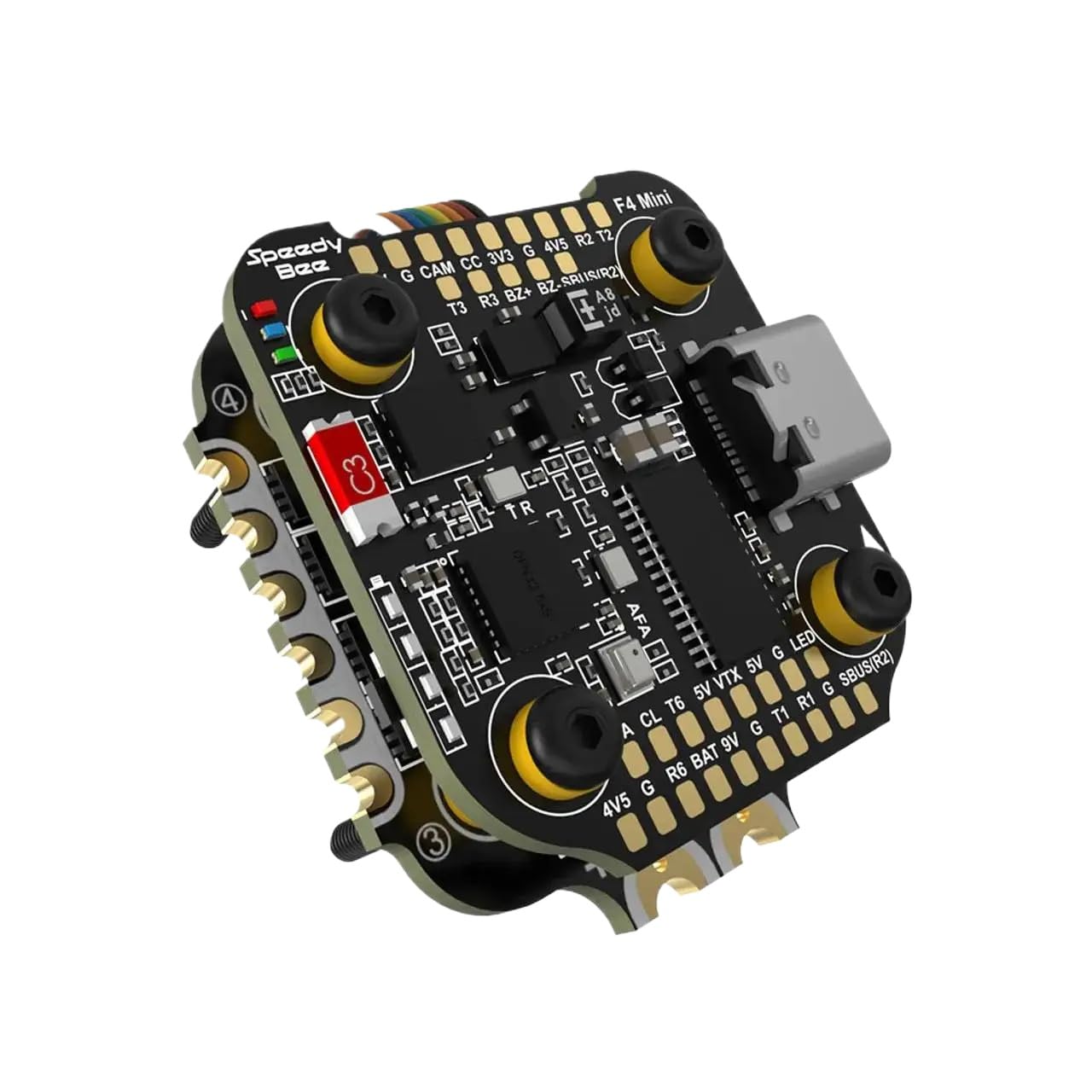
Image: CUIPPWRJ F405 BLS 35A Stack V2. This image shows the compact design of the flight controller and ESC stack, ready for installation in a drone frame. Note the various connection pads and mounting holes.
2. Wiring Awọn isopọ
Carefully connect the motors, receiver, VTX (video transmitter), camera, and other peripherals to the appropriate pads on the flight controller and ESC. Refer to the wiring diagram below for detailed connection points. Ensure all solder joints are clean and secure.
- Awọn Isopọ mọto: Connect motor wires to the ESC pads (M1-M4) in the correct order.
- Iṣagbewọle agbara: Connect the main battery lead to the VBAT and GND pads on the ESC.
- Olugba: Connect your receiver (e.g., SBUS, CRSF, Spektrum) to the designated UART RX pad.
- VTX/Kámẹ́rà: Connect video signal and power to the VTX and camera pads as required.
3. Software iṣeto ni
Connect the flight controller to your computer via a USB cable. Open your preferred flight control software (e.g., Betaflight, Emuflight, ArduPilot). Follow these general steps:
- Fifi sori Awakọ: Install necessary USB drivers if prompted.
- Firmware Flash: Flash the latest stable firmware for the F405 flight controller.
- Iṣeto: Configure UARTs, receiver type, ESC protocol (e.g., DShot600), motor direction, and PID settings.
- Iṣatunṣe: Calibrate accelerometers and ESCs according to the software's instructions.
- Awọn ayẹwo aabo: Perform motor direction tests and failsafe configuration before flight.
Awọn ilana Iṣiṣẹ
Once the setup and configuration are complete, you are ready to operate your drone. Always ensure you are in a safe environment, away from people and obstacles, before arming your motors.
- Ṣiṣayẹwo Ọkọ ofurufu-ṣaaju: Verify all connections are secure, propellers are correctly installed, and battery is fully charged.
- Ihamọra: Arm the motors using the designated switch on your radio transmitter. The flight controller LED will indicate arming status.
- Ofurufu: Control the drone using your radio transmitter. Start with gentle movements to familiarize yourself with its response.
- Pipasilẹ: Disarm the motors immediately after landing or in an emergency using the designated switch.
- Lẹ́yìn ìrìnàjò: Disconnect the battery after each flight session.
Itoju
- Ayẹwo igbagbogbo: Periodically inspect all solder joints and connections for signs of wear or damage.
- Ninu: Keep the flight controller and ESC clean from dust, dirt, and debris. Use a soft brush or compressed air.
- Awọn imudojuiwọn famuwia: Check for and install firmware updates for the flight controller and ESC to ensure optimal performance and access to new features.
- Ibi ipamọ: Store the stack in a dry, cool environment when not in use.
Laasigbotitusita
- Problem: Motors not spinning or erratic behavior.
- Ojutu: Check motor connections, ESC calibration, and motor direction in the flight control software. Ensure the correct ESC protocol is selected.
- Problem: Flight controller not connecting to computer.
- Ojutu: Verify USB cable integrity, install necessary drivers (e.g., DFU driver), and try a different USB port or computer.
- Problem: Drone drifts or is unstable during flight.
- Ojutu: Recalibrate the accelerometer. Check PID settings and ensure the flight controller is securely mounted and free from vibrations.
- Problem: No video signal from VTX/Camera.
- Ojutu: Check wiring connections for VTX and camera. Ensure VTX is powered and configured correctly in the OSD (On-Screen Display) settings.
Atilẹyin ọja ati Support
CUIPPWRJ products are manufactured to high-quality standards. For warranty information or technical support, please refer to the official CUIPPWRJ webojula tabi kan si alagbata rẹ. Tọju iwe-ẹri rira rẹ bi ẹri rira.
For further assistance, you may visit the manufacturer's support page or community forums for common questions and advanced configurations.