1. Ifihan
Thank you for choosing the ZEBRONICS PIXAPLAY 65 Android Projector. This manual provides essential information for setting up, operating, and maintaining your projector to ensure a premium home theater experience. Please read this manual thoroughly before use and keep it for future reference.
2. Ohun ti o wa ninu Apoti
Jẹrisi pe gbogbo awọn ohun kan wa ninu package:
- Projector - 1 unit
- Iṣakoso Latọna jijin - ẹyọ kan
- Power Cord - 1 unit
- HDMI Cable - 1 unit
- Cotton Swab Pack - 1 unit

Image: The ZEBRONICS PIXAPLAY 65 projector shown with its included remote control, illustrating the main components of the package.
3. Ọja Ipariview & Awọn ẹya
The ZEBRONICS PIXAPLAY 65 is an advanced Android projector designed for versatile home entertainment. Key features include:
- Isọtẹlẹ iboju nla: Enjoy a screen size of up to 508 cm (200 inches) for an immersive viewiriri iriri.
- Imọlẹ giga & ipinnu: Features an 8500 lumens LED lamp with 1080p FHD native resolution and 4K support for clear and detailed images.
- Agbọrọsọ ti a ṣe sinu: Integrated powerful speaker for audio playback without external speakers.
- Long LED Lamp Igbesi aye: LED lamp offers a lifespan of 50,000 hours.
- Idojukọ Itanna: Adjust image focus precisely using the remote control.
- Atilẹyin Miracast: Seamlessly mirror content from Android devices.
- WiFi-band-meji: Supports both 2.4GHz and 5GHz WiFi for stable streaming.
- Quad-core Processor: Ensures smooth operation and quick processing of media.

Image: A graphic summarizing key features of the Pixaplay 65, including 8500 Lumens, 50,000H Lifelong LED Lamp, up to 508cm screen size, Quad-Core Processor, 1080p FHD (Native) resolution, and Miracast capability.

Image: A visual representation demonstrating the projector's 4K Ultra HD support, showing a comparison of 4K, 2K, and FHD resolutions with a motocross scene.

Image: The projector placed on a small stool, with a person sitting nearby, highlighting the built-in speakers and their audio output.
4. Eto Itọsọna
4.1 Ibi
Gbé ẹ̀rọ àgbékalẹ̀ náà sí orí ilẹ̀ tí ó dúró ṣinṣin, tí ó tẹ́jú. Rí i dájú pé afẹ́fẹ́ wà ní àyíká ẹ̀rọ náà. Fún àǹfààní tó dára jùlọ. viewTí o bá ń ṣe bẹ́ẹ̀, gbé àwòrán náà sí ìpele ìṣàfihàn (ògiri tàbí ìbòjú).
4.2 Asopọ agbara
- So okùn agbára pọ̀ mọ́ ibudo ìtẹ̀wọlé agbára ti ẹ̀rọ atọ́nà náà.
- Pulọọgi opin miiran ti okun agbara sinu iṣan agbara ti o dara.
- Ina Atọka agbara lori pirojekito yoo tan imọlẹ.
4.3 Ibẹrẹ Agbara Lori
Tẹ bọtini agbara lori projector tabi iṣakoso latọna jijin lati tan ẹrọ naa. Projector naa yoo bẹrẹ sii bẹrẹ ati han iboju ile.
5. Awọn ilana Iṣiṣẹ
5.1 Lilọ kiri
Use the directional buttons (Up, Down, Left, Right) and the OK button on the remote control to navigate through the Android interface and select options.
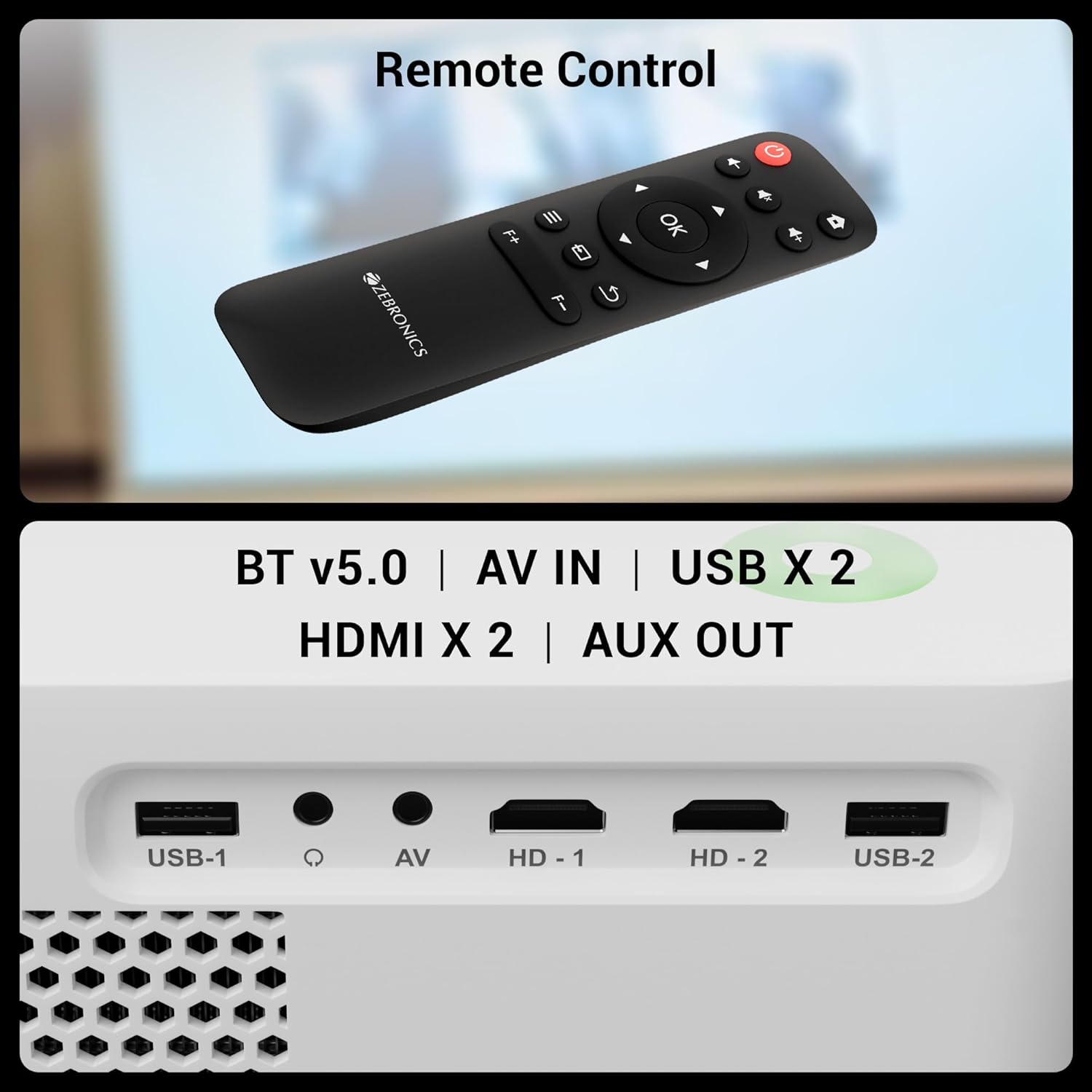
Image: The remote control for the Pixaplay 65 is shown alongside a detailed view of the projector's connectivity ports, including USB, AV IN, and HDMI.
5.2 Electronic Focus Adjustment
To achieve a clear image, use the dedicated focus buttons (F+ / F-) on the remote control to adjust the electronic focus until the projected image is sharp.
5.3 App Management
The projector runs on Android, allowing you to install and manage various applications. Access the app drawer from the home screen to view and launch installed apps. Connect to WiFi to download new applications from the pre-installed app store.

Image: The projector displaying its smart interface with various application icons, emphasizing its app support and dual-band WiFi capabilities.
6. Asopọmọra
The PIXAPLAY 65 offers multiple connectivity options:
- HDMI (x2): Connect Blu-ray players, gaming consoles, laptops, and other HDMI-enabled devices.
- USB (x2): Mu awọn media ṣiṣẹ taara lati awọn awakọ USB.
- AV NI: Connect older devices using an AV cable.
- AUX JADE: Connect external audio systems or headphones.
- Bluetooth v5.0: Pair with Bluetooth speakers or headphones for wireless audio.
- WiFi (2.4GHz & 5GHz): Connect to your home network for online streaming and app downloads.
- Miracast: Wirelessly mirror your Android smartphone or tablet screen to the projector.

Image: A smartphone mirroring a racing game to the projector screen, demonstrating the Miracast functionality for wireless content sharing.
7. Itọju
7.1 Ninu awọn lẹnsi
Use the provided cotton swab pack or a soft, lint-free cloth specifically designed for optical lenses to gently clean the projector lens. Do not use abrasive cleaners or excessive force.
7.2 Gbogbogbo Cleaning
Wipe the exterior of the projector with a soft, dry cloth. Avoid using liquid cleaners directly on the device.
7.3 Ibi ipamọ
When not in use for extended periods, store the projector in a cool, dry place, away from direct sunlight and excessive dust.
8. Laasigbotitusita
8.1 Ko si Agbara
- Rí i dájú pé okùn agbára náà so mọ́ ẹ̀rọ ìfihàn àti ibi tí a ti ń gbé agbára jáde dáadáa.
- Ṣayẹwo boya iṣan agbara n ṣiṣẹ daradara.
8.2 Ko si Aworan tabi Aworan Daru
- Verify the input source is correctly selected (e.g., HDMI 1, USB).
- Adjust the electronic focus using the remote control.
- Rí i dájú pé lẹ́ńsì àwòrán náà mọ́ tónítóní.
- Check the HDMI or other connection cables for secure fit.
8.3 Ko si Ohun
- Increase the volume on the projector and the connected source device.
- If using an external audio system, ensure it is properly connected to the AUX OUT port.
- Check if Bluetooth audio is connected and functioning correctly.
8.4 Isakoṣo latọna jijin Ko Ṣiṣẹ
- Rii daju pe ko si awọn idena laarin isakoṣo latọna jijin ati pirojekito.
- Rọpo awọn batiri ni isakoṣo latọna jijin.
9. Awọn pato
Detailed technical specifications for the ZEBRONICS PIXAPLAY 65 Projector:
| Ẹya ara ẹrọ | Sipesifikesonu |
|---|---|
| Brand | SEBRRONNÌSÌ |
| Orukọ awoṣe | Zeb-Pixaplay 65 |
| Ọja Mefa | 17.3 x 22.6 x 8.6 cm |
| Iwọn Nkan | 1.35 kg |
| Ifihan Iru | LCD LED |
| Ipinnu abinibi | 1920 x 1080 (FHD) |
| O pọju. Ipinnu atilẹyin | 3840 x 2160 (4K) |
| Imọlẹ | 8500 Lumens |
| Apakan Ipin | 16:9 |
| Oṣuwọn sọtun | 60 Hz |
| Lamp Igbesi aye | wakati meji 50,000 |
| Asopọmọra Technology | HDMI (x2), AV IN, USB (x2), AUX OUT, Bluetooth v5.0, WiFi (2.4GHz & 5GHz) |
| Awọn ẹrọ ibaramu | Laptops, Smartphones, Gaming Consoles, Media Players, Blu-ray Players |
| Fọọmù ifosiwewe | Gbigbe |

Image: A diagram illustrating the physical dimensions of the ZEBRONICS PIXAPLAY 65 projector: 17.3cm (height), 22.6cm (width), and 8.6cm (depth).
10. Atilẹyin ọja ati Support
The ZEBRONICS PIXAPLAY 65 Projector comes with a 1 Odun atilẹyin ọja lati ọjọ ti o ra. Jọwọ ṣe idaduro iwe rira rẹ bi ẹri atilẹyin ọja.
For technical support, service, or warranty claims, please contact ZEBRONICS customer service through their official website or authorized service centers. Refer to the product packaging or official ZEBRONICS webojula fun awọn julọ lọwọlọwọ alaye olubasọrọ.


