Ọrọ Iṣaaju
This manual provides essential instructions for the safe operation, maintenance, and troubleshooting of your roborock QV 35S Robot Vacuum and Mop. Please read this manual thoroughly before using the product and retain it for future reference.

Nọmba 1: The roborock QV 35S Robot Vacuum and Mop with its multifunction docking station and companion app interface.
Alaye Aabo pataki
Nigbagbogbo tẹle awọn iṣọra aabo ipilẹ nigba lilo awọn ohun elo itanna lati dinku eewu ina, mọnamọna, ati ipalara.
- Ka gbogbo awọn ilana ṣaaju lilo ohun elo naa.
- Má ṣe jẹ́ kí àwọn ọmọdé máa lo robot náà. Máa ṣe àbójútó àwọn ọmọdé àti ẹranko nígbà tí robot náà bá ń ṣiṣẹ́.
- Ṣe idaniloju agbara voltage ibaamu awọn voltagàmì sí ibi tí wọ́n ti ń gba agbára.
- Ma ṣe lo roboti ni awọn agbegbe pẹlu ina ti o ṣii tabi awọn nkan ẹlẹgẹ.
- Jeki irun, aṣọ alaimuṣinṣin, awọn ika ọwọ, ati gbogbo awọn ẹya ara kuro lati awọn ṣiṣi ati awọn ẹya gbigbe.
- Only use the charging dock provided by the manufacturer.
Package Awọn akoonu
Jẹrisi pe gbogbo awọn paati wa ninu package:
- roborock QV 35S Robot Vacuum and Mop
- Multifunction docking Station
- Mop Pads (two rotating)
- Okun agbara
- Itọsọna olumulo
Ṣeto
1. Ibùdó Ìdókòwò
Place the multifunction docking station on a hard, level surface against a wall. Ensure there is at least 0.5 meters (1.6 feet) of clear space on both sides and 1.5 meters (4.9 feet) in front of the dock for optimal robot navigation. Connect the power cable to the dock and plug it into a power outlet.
2. Gbigba agbara akọkọ
Place the robot onto the charging contacts of the docking station. The robot will automatically power on and begin charging. Allow the robot to fully charge before its first use.
3. App Asopọ
Download the roborock app from your mobile device's app store. Open the app and follow the on-screen instructions to add your roborock QV 35S. A 2.4 GHz Wi-Fi network is required for app connection.

Nọmba 2: The roborock app provides comprehensive control and customization options for your robot.
Awọn ilana Iṣiṣẹ
1. Ibẹrẹ aworan agbaye
For the first cleaning cycle, allow the robot to map your home. The PreciSense LiDAR navigation system will scan 360° to create detailed maps for efficient route planning. The robot supports up to 4 floor maps, automatically switching between them for multi-story homes.

Nọmba 3: The robot utilizes LiDAR technology for precise navigation and mapping, enabling efficient cleaning routes.
2. Ninu awọn ipo
The roborock QV 35S offers various cleaning modes accessible via the app:
- Igbale Nikan: Fún yíyọ àwọn ìdọ̀tí gbígbẹ kúrò.
- Mop Nikan: Fun mimọ tutu ti awọn ilẹ lile.
- Igbale & Mop: Fífi ìfọ́mọ́ àti mímú omi kúrò ní àkókò kan náà.
- Isọdọmọ ti aṣa: Ṣetumo awọn yara kan pato tabi awọn agbegbe fun mimọ.
3. Suction and Mopping Features
The robot features 10,000 Pa HyperForce suction for deep cleaning and dual spinning mops that rotate at up to 200 RPM. The mops can lift 10 mm to avoid wetting carpets during cleaning. Water flow can be adjusted in 30 levels via the app.

Nọmba 4: The robot's powerful 10,000 Pa HyperForce suction effectively removes debris from various surfaces.

Nọmba 5: Dual spinning mops provide effective wet cleaning, with an automatic lift feature for carpets.
4. Idiwo
The reactive technical obstacle avoidance system uses structured light to detect and navigate around obstacles, even in cluttered environments. The robot can suggest "No-Go Zones" for areas where it might get stuck, such as under chairs or tables.
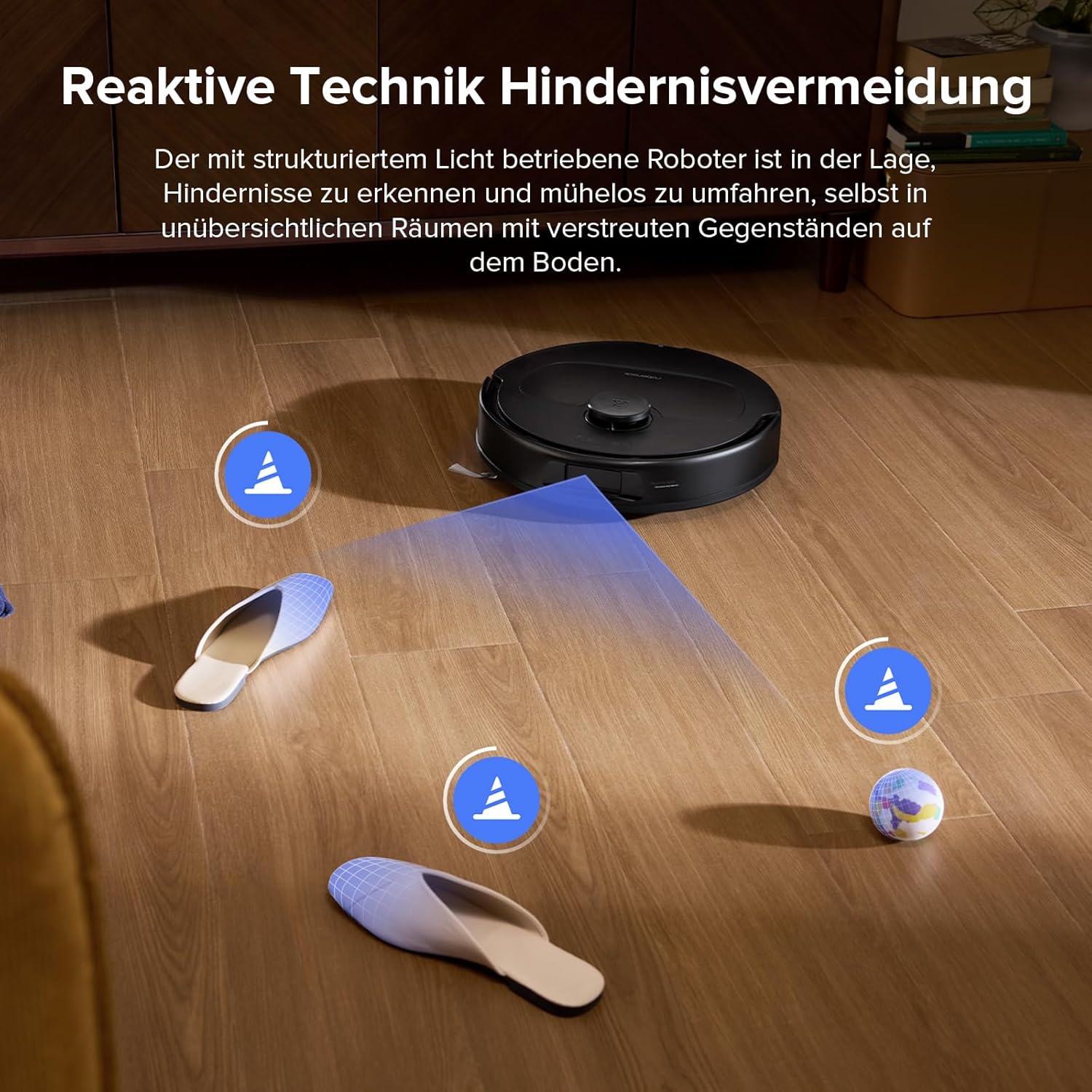
Nọmba 6: The robot's advanced sensors enable it to identify and bypass common household obstacles.
Itoju
1. Multifunction Dock Maintenance
The multifunction dock automatically washes and dries the mop pads, refills the water tank, and empties the dustbin. The dustbag in the dock can hold debris for over 7 weeks. Regularly check and empty the dustbag as needed. The entire docking station is detachable for easy and thorough cleaning to prevent sludge and dirt buildup.

Nọmba 7: The multifunction dock simplifies maintenance with automated cleaning and emptying features.
2. Main Brush and Side Brush Cleaning
The robot features a dual anti-tangle system with a rubberized floating main brush and a unique arc-shaped side brush. While designed to prevent tangles, it is recommended to periodically check and clean the brushes, especially if you have pets with long hair. Remove any hair or debris wrapped around the brushes. The improved side brush is SGS-certified for a 0% entanglement rate.
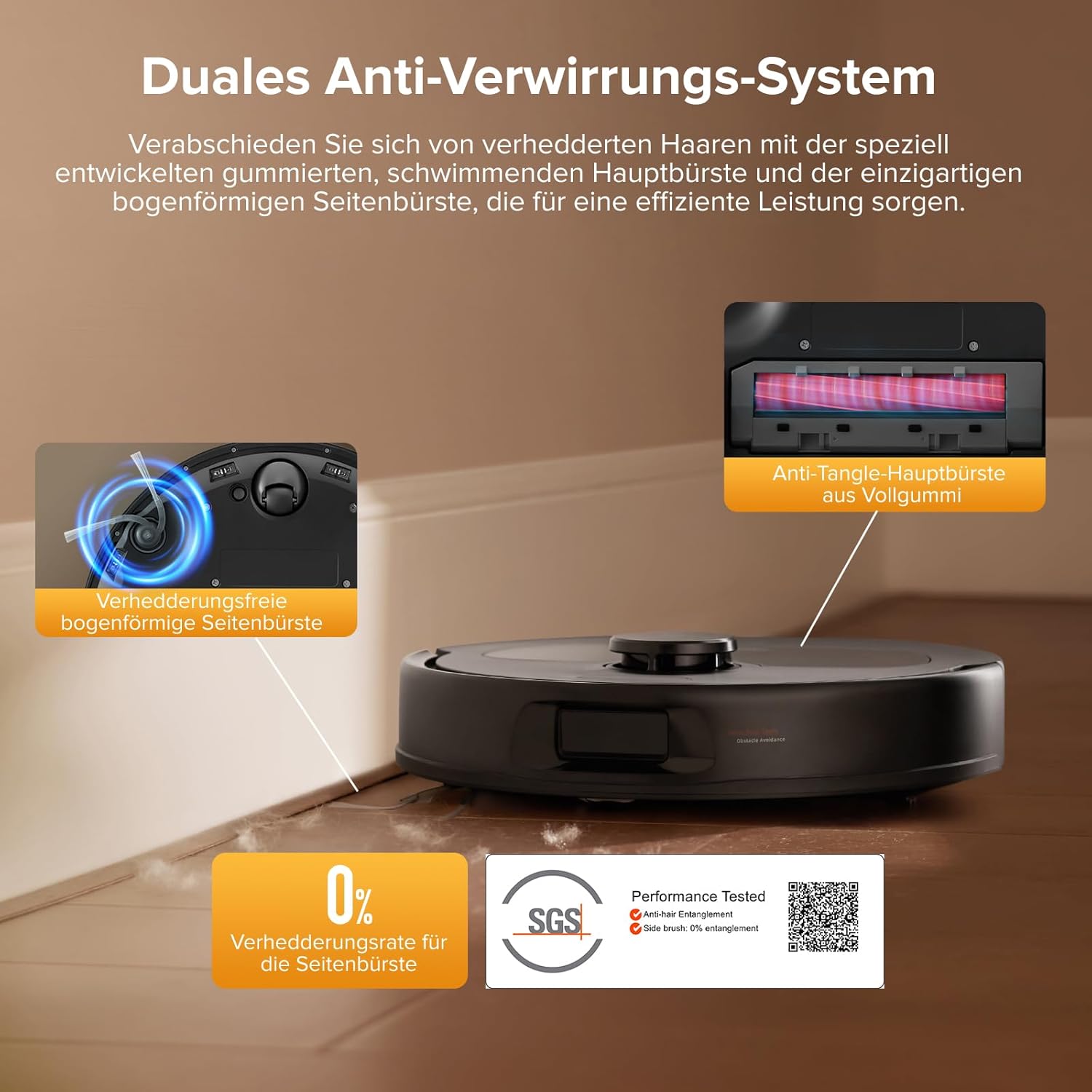
Nọmba 8: The anti-tangle brush system minimizes hair entanglement, but periodic inspection is advised. SGS Certification Details
3. Mop Pad Cleaning
The mop pads are automatically washed and dried by the docking station. For optimal performance, it is recommended to occasionally remove and hand-wash the mop pads with water to remove any accumulated dirt or residue.
4. Filter Cleaning
The robot's internal filter should be cleaned regularly. Tap out dust and rinse with water. Ensure the filter is completely dry before reinserting it into the robot.
Laasigbotitusita
| Isoro | Owun to le Fa | Ojutu |
|---|---|---|
| Rọ́bọ́ọ̀tì kò sopọ̀ mọ́ Wi-Fi. | Ọ̀rọ̀ ìpamọ́ Wi-Fi tí kò tọ́, nẹ́tíwọ́ọ̀kì 5GHz, tàbí àmì àìlera. | Ensure you are using a 2.4 GHz Wi-Fi network. Verify the password. Move the robot closer to the router. |
| Robot di nigbagbogbo. | Small obstacles, loose cables, or tight spaces. | Clear the area of small objects and cables. Use the app to define "No-Go Zones" for problematic areas. |
| Ko dara afamora išẹ. | Full dustbin, clogged filter, or tangled main brush. | Empty the dustbin. Clean or replace the filter. Remove any hair or debris from the main brush. |
| Àwọn pádì ìfọṣọ tí kò mọ́ dáadáa. | Dirty mop pads, insufficient water flow, or empty water tank. | Ensure mop pads are clean. Adjust water flow settings in the app. Refill the water tank. |
| Robot displays "move to new location and restart" error. | Robot is in an unfamiliar or problematic location, or a sensor issue. | Manually move the robot to a clear, open area and restart it. If the issue persists, clean all sensors and ensure no obstructions. |
Awọn pato
- Brand: roborock
- Awoṣe: QV 35S
- Àwọ̀: Roborock Qv 35s Black
- Robot Dimensions (L x W x H): Isunmọ 35 x 35 x 9.65 cm (13.8 x 13.8 x 3.8 inches)
- Dock Dimensions (L x W x H): 35 x 48.7 x 52.1 cm (13.8 x 19.2 x 20.5 inches)
- Ìwọ̀n Nkan: 16 Kilograms (including dock)
- Agbara mimu: 10,000 Pa HyperForce
- Mopping System: Dual Spinning Mops (up to 200 RPM), 10mm Auto Mop Lift
- Lilọ kiri: PreciSense LiDAR Navigation & Mapping
- Yẹra fun Idiwo: Reactive Technical Obstacle Avoidance (structured light)
- Ohun elo Iṣakoso: Yes (roborock app, requires 2.4 GHz Wi-Fi)
- Iṣakoso ohun: Compatible with Amazon Echo, Google Home
- Awọn ẹya pataki: 360-degree rotation, removable container, pet hair suction, advanced custom cleaning, precise laser mapping, automatic shutdown.
- Awọn eroja to wa: Docking station, water tank, mop pads, two rotating brushes.
Atilẹyin ọja ati Support
Fun alaye atilẹyin ọja, atilẹyin imọ-ẹrọ, tabi awọn ibeere iṣẹ, jọwọ tọka si roborock osise. webojula tabi kan si wọn onibara iṣẹ taara.
You can find more information and support on the official roborock store page: roborock Official Store


