1. Ifihan
This manual provides essential information for the proper setup, operation, and maintenance of your ZEISS DTI 6/20 Thermal Imaging Camera. Please read these instructions carefully before using the device to ensure optimal performance and longevity.
2. Ohun ti o wa ninu Apoti
Jẹrisi pe gbogbo awọn paati wọnyi wa ninu package rẹ:
- Kamẹra aworan gbona
- Lens (20 mm)
- Neoprene okun
- Carrying case including shoulder strap
- okun USB
- Optics ninu asọ
- Batiri litiumu-ion
- Awọn ọna Itọsọna
- Awọn akọsilẹ ailewu
- Kaadi atilẹyin ọja
- EULA iwe
3. Ọja Ipariview
The ZEISS DTI 6/20 is a high-resolution thermal imaging monocular designed for detailed observation in low-light conditions. It features advanced image processing and ergonomic design for ease of use.

Nọmba 1: Igun view of the ZEISS DTI 6/20 Thermal Imaging Camera. This image displays the overall design, including the objective lens, eyepiece, and the ZEISS branding on the side.
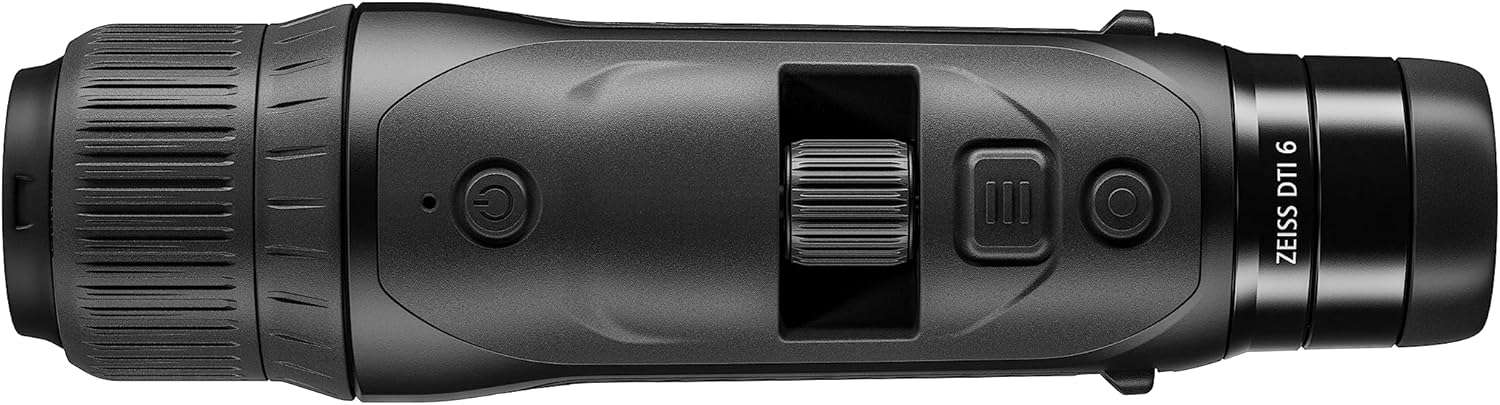
Nọmba 2: Oke view of the ZEISS DTI 6/20, highlighting the power button, scroll wheel for magnification control, and other operational buttons. The ergonomic placement of controls is visible.
Awọn ẹya pataki:
- ZSIP Pro Image Technology: Delivers sharp, high-contrast thermal images.
- Ifihan Ipinnu giga: AMOLED display with 1024x768 resolution, paired with a 640x480 sensor and 12µm pixel pitch.
- Ìfikún: 1.5x optical magnification with up to 10x digital zoom, controlled by a scroll wheel.
- Isọdi: 4 preset scene modes and up to 5 user-created layouts. Adjustable zoom settings, display brightness, and color palettes.
- Ibi ipamọ inu: 16GB for capturing images and videos.
- Igbesi aye batiri: Up to 6.5 hours of continuous operation with a removable lithium-ion battery.
- Apẹrẹ Ergonomic: Suitable for both left and right-handed users, with controls positioned for natural access even with gloves.
- App Asopọmọra: Seamless data transfer and live streaming to smartphones via the ZEISS Hunting App using Bluetooth, USB, or WLAN.
4. Eto
4.1 Fifi sori batiri
- Wa yara batiri lori ẹrọ naa.
- Ṣii ideri iyẹwu naa.
- Insert the provided lithium-ion battery, ensuring correct polarity.
- Pa ideri batiri naa ni aabo.
4.2 Ibẹrẹ Agbara Lori
- Press and hold the power button (refer to Figure 2) until the ZEISS logo appears on the display.
- Allow the device to initialize. This may take a few seconds.
- Adjust the diopter on the eyepiece for clear focus according to your vision.
5. Awọn ilana Iṣiṣẹ
5.1 Agbara Tan / Pa
- Lati Fi agbara: Tẹ mọlẹ bọtini agbara.
- Lati Paarẹ: Press and hold the power button until the shutdown sequence initiates.
5.2 Magnification Control
Use the scroll wheel located on the top of the device (refer to Figure 2) to adjust the digital zoom level. Rotate the wheel forward to increase magnification and backward to decrease it.
5.3 Awọn ipo iwoye
The DTI 6/20 offers 4 preset scene modes optimized for different observation conditions. Access these modes through the device's menu to enhance image clarity based on your environment.
5.4 isọdi
The device allows for extensive personalization:
- User Layouts: Create and save up to 5 custom display layouts.
- Awọn Eto Ifihan: Adjust display brightness to suit ambient light conditions.
- Awọn paleti awọ: Select from various color palettes to optimize thermal contrast and target identification.
5.5 App Connectivity (ZEISS Hunting App)
Enhance your experience by connecting the DTI 6/20 to the ZEISS Hunting App on your smartphone.

Nọmba 3: A user operating the ZEISS DTI 6/20 thermal imaging camera in an outdoor environment, demonstrating its ergonomic handling and practical application.
- Gbigbe Data: Transfer images and videos from the device's 16GB internal storage to your smartphone via Bluetooth, USB, or WLAN.
- Sisanwọle Live: Stream live thermal footage directly to your smartphone for shared viewing tabi gbigbasilẹ.
- Further Customization: The app provides additional options for device settings and management.
6. Itọju
6.1 Ninu
- Use the provided optics cleaning cloth to gently wipe the lenses. Avoid abrasive materials.
- For the device body, use a soft, damp asọ. Maṣe lo awọn kẹmika ti o lewu tabi awọn olomi.
- Rí i dájú pé ẹ̀rọ náà ti pa kí o tó sọ ọ́ di mímọ́.
6.2 batiri Itọju
- Gba agbara si batiri ni kikun ṣaaju lilo akọkọ.
- Tọ́jú ẹ̀rọ àti bátìrì náà sí ibi tí ó tutù tí ó sì gbẹ nígbà tí a kò bá lò ó fún ìgbà pípẹ́.
- Yago fun ṣiṣafihan batiri si awọn iwọn otutu to gaju.
7. Laasigbotitusita
7.1 Ẹrọ Ko Nṣiṣẹ Tan-an
- Rii daju pe batiri ti fi sori ẹrọ daradara ati pe o ti gba agbara ni kikun.
- Try charging the battery for at least 30 minutes before attempting to power on again.
7.2 Image Appears Blurry
- Adjust the diopter on the eyepiece for your vision.
- Ensure the objective lens is clean and free from smudges or debris.
- Check the focus of the thermal image using the manual focus ring if available.
7.3 Connectivity Issues with ZEISS Hunting App
- Ensure Bluetooth or WLAN is enabled on both the device and your smartphone.
- Verify that the ZEISS Hunting App is updated to the latest version.
- Restart both the thermal camera and your smartphone.
8. Awọn pato
| Ẹya ara ẹrọ | Sipesifikesonu |
|---|---|
| Ọja Mefa | 9.06 x 2.44 x 2.68 inches |
| Iwọn Nkan | 1.52 iwon (24.33 iwon) |
| Nọmba Awoṣe Nkan | 527020-9911-000 |
| Brand | ZEISS |
| Orukọ awoṣe | DTI 6/20 |
| Oju Nkan lẹnsi Apejuwe | Plössl |
| Idojukọ Iru | Idojukọ Afowoyi |
| Orisun agbara | Agbara Batiri (Lithium-ion) |
| Awọn ẹrọ ibaramu | Foonuiyara |
| Ifojusi Gigun Apejuwe | 300mm |
| Aaye Ti View | Awọn iwọn 10 |
| Iwọn Sun-un | 3x Optical, up to 10x Digital |
| Iwọn sensọ | 640 x 480 with 12 micron pixel pitch |
| Ipinnu Ifihan | 1024 x 768 HD AMOLED |
| Ibi ipamọ inu | 16GB |
| Batiri Run Time | Awọn wakati 6.5 (tẹsiwaju) |
9. Atilẹyin ọja ati Support
The ZEISS DTI 6/20 Thermal Imaging Camera is manufactured by ZEISS. For detailed warranty information, please refer to the included warranty card or visit the official ZEISS website. For technical support, service, or inquiries, please contact ZEISS customer service through their official channels.
Olupese: ZEISS


