1. Ifihan
This manual provides essential information for the safe and effective use of your boAt Aavante Bar Quake 2.1 Channel Soundbar with Wired Subwoofer. Please read this manual thoroughly before operating the device and retain it for future reference. The boAt Aavante Bar Quake is designed to enhance your audio experience with its 200W RMS output and versatile connectivity options.
Awọn ẹya pataki pẹlu:
- 200W RMS boAt Signature Sound: Ó fúnni ní ohùn tó lágbára àti tó ṣe kedere.
- 2.1 Channel Soundbar with Wired Subwoofer: Provides immersive sound with enhanced bass.
- Multichannel Connectivity: Supports Bluetooth v5.3, AUX, USB, Optical, and HDMI-ARC.
- Awọn ọna EQ: Offers tailored audio profiles for Movies, Music, News, and 3D content.
- Bass & Treble Controls: Allows for personalized audio adjustments.
2. Alaye Aabo pataki
Lati rii daju iṣẹ ailewu ati yago fun ibajẹ, jọwọ ṣe akiyesi awọn iṣọra wọnyi:
- Ma ṣe fi ẹrọ naa han si ojo, ọrinrin, tabi awọn iwọn otutu to gaju.
- Maṣe ṣii casing. Tọkasi gbogbo iṣẹ si oṣiṣẹ oṣiṣẹ.
- Ensure proper ventilation around the soundbar and subwoofer.
- Lo oluyipada agbara nikan ti a pese pẹlu ẹyọkan.
- Jeki ẹrọ naa kuro ni awọn orisun ooru ati oorun taara.
- Avoid placing heavy objects on the soundbar or subwoofer.
- Ge asopọ agbara pulọọgi lakoko iji manamana tabi nigba lilo fun igba pipẹ.
3. Package Awọn akoonu
Jẹrisi pe gbogbo awọn ohun kan wa ninu package:
- boAt Aavante Bar Quake Soundbar
- Ti firanṣẹ Subwoofer
- Remote Control (with 2 x 12V Alkaline batteries included)
- Afowoyi Olumulo (iwe-ipamọ yii)
- Kaadi atilẹyin ọja
- Adapter agbara
4. Ọja Ipariview
Familiarize yourself with the components of your boAt Aavante Bar Quake sound system.
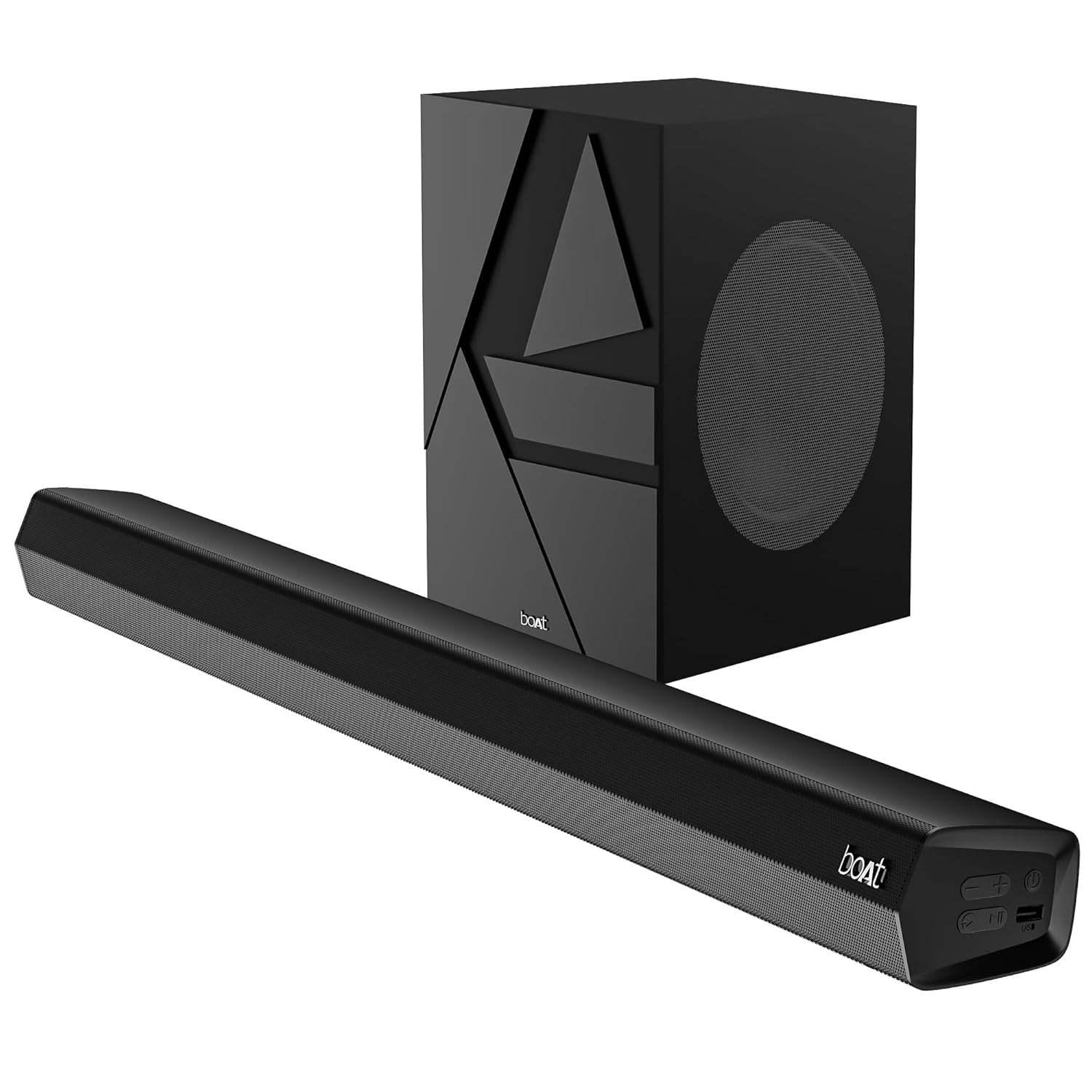
Image 1: The boAt Aavante Bar Quake soundbar and its accompanying wired subwoofer, showcasing their design and relative sizes.
4.1 Soundbar Awọn ẹya ara ẹrọ

Aworan 2: A sunmọ-soke view of the boAt Aavante Bar Quake soundbar, highlighting its sleek design and the '200W RMS boAt Signature Sound' feature.
The soundbar houses the main speakers and control interface. It delivers 200W RMS boAt Signature Sound for a powerful audio experience.
4.2 Subwoofer ti firanṣẹ

Image 3: An illustration showing the boAt Aavante Bar Quake soundbar and its wired subwoofer integrated into a home entertainment setup, emphasizing the 2.1 channel configuration.
The wired subwoofer provides deep, rich bass, complementing the soundbar for a full-range audio output.
4.3 Asopọmọra Ports

Aworan 4: alaye view of the rear panel of the boAt Aavante Bar Quake soundbar, clearly showing the various input ports including USB, HDMI (ARC), AUX, and Optical, along with Bluetooth connectivity.
The soundbar features multiple input options for connecting various devices:
- Ibudo USB: Fun gbigba ohun lati awọn awakọ USB.
- HDMI (ARC) Ibudo: For high-quality audio connection to compatible TVs.
- Bluetooth: Fun sisanwọle ohun afetigbọ lati awọn ẹrọ alagbeka.
- Iṣawọle AUX: Fún sísopọ̀ àwọn ẹ̀rọ nípasẹ̀ okùn ohùn 3.5mm.
- Iṣawọle Opitika: For digital audio connection from TVs or other sources.
4.4 Iṣakoso latọna jijin

Image 5: The master remote control for the boAt Aavante Bar Quake, illustrating buttons for power, mute, input selection, volume, playback, EQ modes (Music, Movies, News, 3D), and dedicated bass and treble controls.
The included remote control allows full command over the soundbar's functions, including power, volume, input selection, EQ modes, and bass/treble adjustments.
5. Eto
5.1 Ibi
- Pẹpẹ ohun: Place the soundbar on a stable, flat surface directly in front of your television, or mount it on the wall below your TV. Ensure there are no obstructions in front of the soundbar.
- Subwoofers: Position the subwoofer on the floor, preferably in a corner or near a wall, to enhance bass response. Ensure it is within reach of the soundbar for the wired connection.
5.2 Nsopọ Subwoofer
Connect the wired subwoofer to the dedicated subwoofer output port on the soundbar using the integrated cable.
5.3 Asopọ agbara
- So adapter agbara pọ mọ ibudo DC IN lori ọpa ohun.
- Pulọọgi opin miiran ti oluyipada agbara sinu iṣan ogiri kan.
- Ensure the subwoofer is also connected to a power source if it has a separate power cable (for this model, it's wired to the soundbar).
5.4 Awọn isopọ Ohun
Yan ọkan ninu awọn ọna wọnyi lati so orisun ohun rẹ pọ:
- HDMI ARC (Niyanju): Connect an HDMI cable from the HDMI ARC port on your TV to the HDMI ARC port on the soundbar. This allows audio to be sent from the TV to the soundbar and often enables TV remote control of the soundbar volume.
- Ojú: Connect an optical cable from your TV's optical output to the OPTICAL IN port on the soundbar.
- AUX: Connect a 3.5mm audio cable from your device's audio output to the AUX IN port on the soundbar.
- USB: Insert a USB drive into the USB port on the soundbar to play audio files taara.
- Bluetooth: Wo Apá 6.2 fún àwọn ìtọ́ni ìbáṣepọ̀ Bluetooth.
6. Awọn ilana Iṣiṣẹ
6.1 Agbara Tan / Pa
Tẹ awọn Agbara bọ́tìnì lórí ọ̀pá ohùn tàbí ìṣàkóso láti tan tàbí pa ẹ̀rọ náà.
6.2 Sisopọ Bluetooth
- Tan ọpa ohun naa ki o yan ipo Bluetooth nipa lilo Iṣawọle button on the remote or soundbar. The LED indicator will flash.
- Mu Bluetooth ṣiṣẹ lori ẹrọ alagbeka rẹ ki o wa awọn ẹrọ to wa.
- Select "boAt Aavante Bar Quake" from the list.
- Ni kete ti a ba so pọ, Atọka LED yoo da didan duro ati ki o wa ni iduroṣinṣin.
6.3 Yiyan Orisun Input
Tẹ awọn Iṣawọle button on the remote control or soundbar repeatedly to cycle through the available input sources: Bluetooth, AUX, Optical, HDMI ARC, and USB.
6.4 Iṣakoso iwọn didun
Lo awọn Iwọn didun + ati Iwọn didun - buttons on the remote control or soundbar to adjust the volume level.
6.5 Awọn ipo EQ
The soundbar offers four preset equalizer modes to optimize audio for different content types. Press the corresponding button on the remote control to select:
- Awọn fiimu: Ó mú kí ìjíròrò àti àwọn ipa fíìmù sunwọ̀n síi.
- Orin: Pese pro iwe ohun iwọntunwọnsifile fun orin šišẹsẹhin.
- Iroyin: Optimizes vocal clarity for news and spoken content.
- Ọdun 3: Ṣẹda gbooro, awọn ohun immersive diẹ siitage.
6.6 Bass & Treble Controls
Lo awọn BASS+ / BASS- ati TREB+ / TREB- buttons on the remote control to fine-tune the bass and treble levels according to your preference.
7. Itọju
7.1 Ninu
- Mu awọn oju ilẹ ti ọpa ohun ati subwoofer kuro pẹlu asọ ti o gbẹ.
- Do not use liquid cleaners, aerosols, or abrasive chemicals, as these may damage the finish.
- Rii daju pe ẹrọ naa ti yọọ kuro ṣaaju ṣiṣe mimọ.
7.2 Ibi ipamọ
Tí o bá ń tọ́jú ẹ̀rọ náà fún ìgbà pípẹ́, yọ ọ́ kúrò nínú agbára iná mànàmáná kí o sì tọ́jú rẹ̀ sí ibi tí ó tutù tí ó sì gbẹ, tí kò sí ìmọ́lẹ̀ oòrùn tààrà àti ooru tó le koko.
8. Laasigbotitusita
| Isoro | Owun to le Fa | Ojutu |
|---|---|---|
| Ko si agbara | Okun agbara ko sopọ; Agbara iṣan ko ṣiṣẹ | Rí i dájú pé okùn agbára náà so pọ̀ dáadáa; Gbìyànjú ọ̀nà agbára mìíràn. |
| Ko si ohun | Incorrect input source; Volume too low; Mute activated; Incorrect cable connection | Select correct input source; Increase volume; Deactivate mute; Check audio cable connections |
| Sisopọ Bluetooth kuna | Ìdáhùn ohùn kò sí ní ipò ìsopọ̀; Ẹ̀rọ náà ti jìnnà jù; Ìdádúró | Ensure soundbar is in Bluetooth pairing mode; Move device closer; Avoid interference from other devices |
| Isakoṣo latọna jijin ko ṣiṣẹ | Àwọn bátìrì ti dínkù; Ìdènà láàrín ọ̀nà jíjìn àti ibi ìró ohùn | Replace remote control batteries; Remove any obstructions |
9. Awọn pato
| Orukọ awoṣe | Aavante Bar Quake |
| Agbọrọsọ Iru | Pẹpẹ ohun |
| Kakiri Ohun ikanni iṣeto ni | 2.1 |
| Agbọrọsọ Agbara Ijade ti o pọju | 200 Wattis RMS |
| Asopọmọra Technology | Bluetooth v5.3, AUX, USB, Optical, HDMI-ARC |
| Idahun Igbohunsafẹfẹ | 40 Hz |
| Ipo Ijade Ohun | Stereo, Movies, Music, News, 3D |
| Ọna Iṣakoso | Latọna jijin |
| Iṣagbesori Iru | Table & Wall |
| Ọja Mefa | 90.3D x 6.5W x 8.6H |
| Iwọn Nkan | 6.5 kg |
| Awọn irinše to wa | User Manual, Warranty Card, Soundbar, Wired Subwoofer, Remote Control |
| Orisun agbara | Ti firanṣẹ Electric |
| Awọn batiri ti a beere | Yes (2 x 12V Alkaline for remote, included) |
| Olupese | Fojuinu Marketing Limited |
10. Atilẹyin ọja ati Support
10.1 atilẹyin ọja Alaye
The boAt Aavante Bar Quake comes with a 1-odun lopin atilẹyin ọja from the date of purchase. This warranty covers manufacturing defects. Please retain your purchase receipt and warranty card for any warranty claims.
10.2 Onibara Support
For technical assistance, troubleshooting, or warranty claims, please contact boAt customer support. Refer to the contact information provided on your warranty card or visit the official boAt website for the latest support details.


