1. Ọja Ipariview
Awọn Ourlife Sports Action Camera is designed to capture clear and detailed images with 1080P HD video recording and 5MP photography. It is suitable for various activities, from outdoor sports to everyday moments, delivering vibrant and dynamic visuals. Its robust design, including a waterproof casing and wide-angle lens, makes it an ideal companion for adventurers.
Awọn ẹya pataki:
- HD 1080P Video & 5MP Photography: Capture high-resolution videos and crisp still images.
- Apẹrẹ ti ko ni omi: Designed for extreme sports, allowing use while surfing, swimming, or diving.
- 140° Ultra-Wide-Angle Lens: Ó gba pápá gbígbòòrò kan view for immersive footage.
- Batiri 400mAh pipẹ pipẹ: Supports extended shooting time.
- 2-Inch HD LCD Screen: Pese kan ko o view for framing shots and playback.
- Ni wiwo olumulo-ore: Easy to operate for all users.

Figure 1.1: The Ourlife Sports Action Camera enclosed in its waterproof housing, ready for underwater use. The camera features an HD 1080P display and is designed for capturing dynamic visuals in various environments.
2. Ohun ti o wa ninu Apoti
Jọwọ ṣayẹwo awọn akoonu inu package rẹ lati rii daju pe gbogbo awọn nkan wa:
- Ourlife Sports Action Camera
- Ile ti ko ni omi
- Mu Bar / polu Mount
- Agekuru 1
- Oke 1
- Oke 2
- Oke 3
- Oke 4
- Bandages
- Batiri gbigba agbara (400mAh)
- Ṣaja batiri
- Afowoyi Olumulo (iwe-ipamọ yii)
- Pẹpẹ Pry

Figure 2.1: All included accessories and components for the Ourlife Sports Action Camera. This includes various mounts, the waterproof housing, battery, charger, and other essential items.
3. Eto Itọsọna
3.1 Ngba agbara si Batiri naa
- Insert the provided 400mAh rechargeable battery into the battery charger.
- Connect the battery charger to a power source using a compatible USB cable (not included) and adapter.
- The indicator light on the charger will show the charging status. Once fully charged, disconnect the charger.
3.2 Fi Batiri ati Kaadi Iranti sii
- Open the battery compartment cover on the camera.
- Insert the charged battery, ensuring the correct polarity.
- Locate the TF (microSD) card slot. Insert a compatible memory card (Class 10 or higher, up to 32GB recommended) until it clicks into place.
- Pa ideri batiri naa ni aabo.
3.3 Attaching the Waterproof Housing and Mounts
- To use the camera underwater or in harsh environments, place it inside the waterproof housing. Ensure the housing is clean and free of debris, and the seal is properly seated.
- Close the housing latch firmly to create a watertight seal.
- Attach the desired mount (e.g., Handle Bar/Pole Mount, Clip, or other mounts) to the waterproof housing or directly to the camera if not using the housing, depending on your activity.
- Secure the mount using the provided screws or clips.

Figure 3.1: The camera in its waterproof housing, demonstrating its capability to be submerged up to 98 feet (approximately 30 meters). This housing protects the camera during water-based activities.
4. Awọn ilana Iṣiṣẹ
4.1 Titan / Pa a
- Lati Fi agbara: Press and hold the Power/Mode button (usually located on the front or top of the camera) for a few seconds until the screen lights up.
- Lati Paarẹ: Tẹ bọtini Power/Mode ki o si di i mu lẹẹkansi titi iboju yoo fi pa.
4.2 Navigating the 2-Inch LCD Screen
The 2-inch HD LCD screen allows you to preview your shots, review footage, and navigate settings. Use the Power/Mode button to cycle through modes (Video, Photo, Playback, Settings) and the Up/Down buttons (if available) or Shutter button to select options within menus.
4.3 Recording Videos and Taking Photos
- Ipo Fidio: Once powered on, the camera typically defaults to video recording mode. Press the Shutter/OK button (usually on top) to start recording. Press it again to stop.
- Ipo Fọto: Press the Power/Mode button repeatedly until the camera enters photo mode. Press the Shutter/OK button to take a picture.
- Ipo Sisisẹsẹhin: Switch to playback mode to review awọn fidio ti o gbasilẹ ati awọn fọto lori iboju LCD.
4.4 Using the 140° Wide-Angle Lens
The 140° wide-angle lens is automatically engaged, providing a broad field of view. This is ideal for capturing expansive landscapes, group shots, or immersive action footage where you want to include more of the surroundings.

Figure 4.1: Visual representation of the Ourlife Sports Action Camera highlighting its key features: 12MP image resolution, 140° wide-angle lens, waterproof capability, 2-inch LCD display, and 1080P Ultra HD video capture.
5. Itọju
5.1 Cleaning the Camera and Housing
- Use a soft, lint-free cloth to clean the camera body and LCD screen. For stubborn smudges, slightly dampen awọn asọ pẹlu omi.
- Fun lẹnsi naa, lo asọ mimọ lẹnsi amọja ati ojutu lati yago fun awọn itọ.
- After using the waterproof housing in saltwater, rinse it thoroughly with fresh water and let it air dry. Ensure no salt residue remains on the seals.
5.2 batiri Itọju
- Gba agbara si batiri ni kikun ṣaaju lilo akọkọ.
- Má ṣe jẹ́ kí batiri náà máa gbẹ pátápátá nígbà gbogbo kí ó lè pẹ́ sí i.
- If storing the camera for an extended period, charge the battery to about 50% and remove it from the camera.
5.3 Ibi ipamọ
Store the camera and its accessories in a cool, dry place, away from direct sunlight and extreme temperatures. Keep it in its original packaging or a protective case to prevent damage.
6. Laasigbotitusita
| Isoro | Owun to le Fa | Ojutu |
|---|---|---|
| Kamẹra ko ṣiṣẹ. | Batiri ti ku tabi ko fi sii daradara. | Gba agbara batiri naa patapata. Rii daju pe batiri naa wa pẹlu polarity ti o tọ. |
| Kò le gba fidio tabi ya fọto. | Memory card is full, corrupted, or not inserted. | Insert a compatible memory card. Format the memory card (this will erase all data). Delete unnecessary files. |
| Dídára fídíò/fọ́tò tí kò dára. | Lens is dirty. Insufficient lighting. Incorrect settings. | Clean the lens. Ensure adequate lighting. Check camera settings for resolution and exposure. |
| Water leakage into housing. | Housing not properly sealed. Debris on seal. Damaged seal. | Ensure housing latch is firmly closed. Check for and remove any debris on the rubber seal. Inspect the seal for cracks or damage; replace if necessary. |
7. Awọn pato
| Brand | Ourlife |
| Nọmba awoṣe | RXE123 |
| Ipinnu Yaworan fidio | 1080p HD |
| Ipinnu Fọto | Awọn piksẹli 5 (MP) |
| Iwon iboju | 2-inch LCD |
| Wide-Angle Field of View | 140° |
| Agbara Batiri | 400mAh |
| Flash Memory Iru | TF (microSD) |
| Fidio Yaworan kika | AVI |
| Fọto sensọ Technology | CCD |
| Ipari Ifojusi ti o pọju | 30 |
| Ipari Ifojusi Kere | 28 |
| O pọju Iho | 2.8 f |
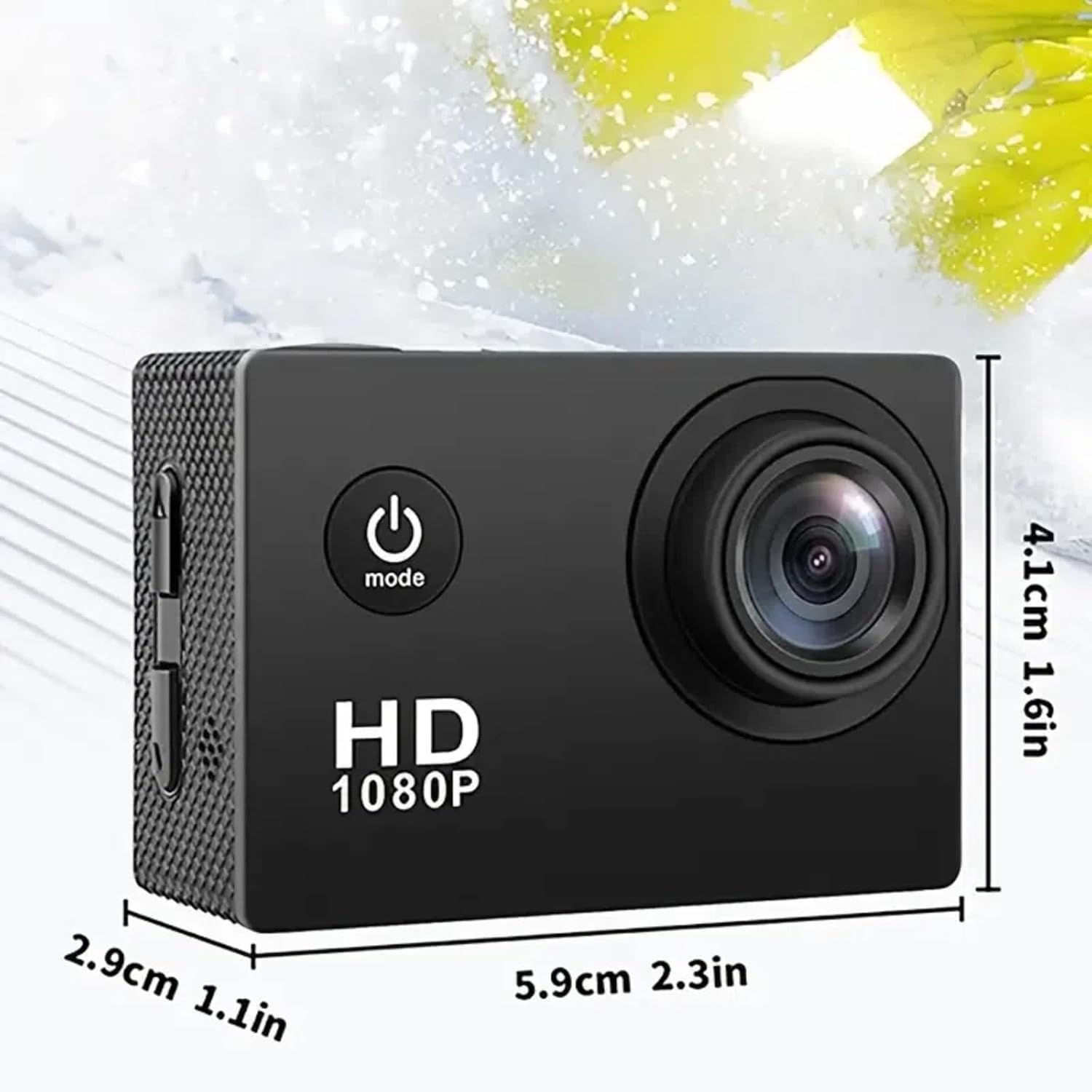
Figure 7.1: Physical dimensions of the Ourlife Sports Action Camera, showing its compact size for portability and ease of use.
8. Atilẹyin ọja ati Support
For warranty information, technical support, or service inquiries, please contact Ourlife customer support. Details can typically be found on the product packaging or the official Ourlife webojula.
Jọwọ ṣe idaduro ẹri rira rẹ fun eyikeyi awọn ibeere atilẹyin ọja.


