1. Ifihan
Thank you for choosing the Felicita Ergonomic Office Chair SLCH-10WHGY. This chair is designed to provide optimal comfort and support for long hours of work, featuring a breathable mesh back, adjustable lumbar support, a 3D headrest, and convenient flip-up armrests. Please read this manual carefully before assembly and use to ensure proper function and longevity of your chair.

Figure 1: Felicita Ergonomic Office Chair SLCH-10WHGY (White/Gray)
2. Package Awọn akoonu ati Apejọ
Before beginning assembly, please ensure all parts are present and undamaged. Refer to the parts diagram below. Tools for assembly are included in the package.

Figure 2: Chair Components Overview
Awọn Igbesẹ Apejọ:
- Fi Casters sori ẹrọ: Insert the five rollers into the legs of the chair base.
- Insert Gas Rod: Place the gas rod vertically into the center hole of the chair base.
- Attach Armrest and Backrest: Connect the armrest and backrest using 4 screws (M6*25mm).
- Connect Armrest and Seat Cushion: Attach the armrest to the seat cushion using 4 screws (M6*30mm).
- Install Tray: Secure the tray to the underside of the seat cushion using 4 screws (M6*20mm).
- Attach Seat to Gas Rod: Insert the gas rod into the tray hole.
- Install Armrests (Side): Install the armrests to the side of the seat/backrest assembly using 2 screws (M8*25mm).
- Fi sori ẹrọ Headrest: Attach the headrest to the top of the backrest using two screws (M6*25mm).
Video 1: Chair Assembly Guide. This video demonstrates the step-by-step process of assembling the Felicita office chair.
3. Awọn ilana Iṣiṣẹ
Your Felicita office chair offers several adjustable features to customize your seating experience.
3.1 Lumbar Support Adjustment
The lumbar support can be adjusted vertically and horizontally to fit the curve of your lower back, providing optimal support and reducing strain during prolonged sitting.
- Atunse inaro: The lumbar support can be moved up and down by 3cm.
- Atunse petele: The lumbar support can be moved forward and backward by 3cm.

Àwòrán 3: Àtúnṣe Àtìlẹ́yìn Lumbar
Video 2: Lumbar Support Adjustment. This video illustrates how to adjust the chair's lumbar support for personalized comfort.
3.2 Headrest Atunṣe
The 3D headrest can be adjusted to support your head and neck comfortably.
- Atunse Giga: The headrest can be moved up and down by 5cm.
- Atunse igun: The headrest offers a 45-degree adjustable range to fit various head positions.

Àwòrán 4: Àtúnṣe ìdúró orí
Video 3: Headrest Adjustment. This video demonstrates how to adjust the headrest's height and angle.
3.3 Armrest Adjustment (Flip-up)
The armrests are designed to flip up by 90 degrees, allowing you to push the chair closer to your desk or store it compactly when not in use.

Figure 5: Flip-up Armrests for Space Saving
Video 4: Armrest Adjustment. This video shows how to flip up the armrests.
3.4 Giga tolesese
Adjust the chair's height to find your ideal ergonomic position. The chair offers an 8cm height adjustment range.
- To raise the chair: Pull the lever upwards while taking your weight off the seat.
- To lower the chair: Pull the lever upwards while seated.
3.5 Rocking Function
The chair features a rocking function for relaxation. You can also adjust the tension of the rocking mechanism.
- Activate/Deactivate Rocking: Pull the lever outwards to enable rocking, push it inwards to lock the backrest in an upright position.
- Adjust Rocking Tension: Turn the round knob located under the seat to increase (clockwise) or decrease (counter-clockwise) the rocking tension.

Figure 6: Height and Rocking Adjustment Controls
Video 5: Height and Rocking Function. This video demonstrates how to adjust the chair's height and use the rocking feature.
4. Itọju
Regular maintenance will help prolong the life of your Felicita office chair.
- Ninu: For the mesh backrest and fabric seat, use a soft cloth dampened pẹlu ìwọnba ọṣẹ ati omi. Yẹra fun awọn kẹmika lile tabi awọn olutọpa abrasive.
- Awọn Casters: Periodically check the casters for hair or debris and clean them to ensure smooth movement.
- Awọn skru: Occasionally check all screws and tighten them if necessary to maintain stability.
5. Laasigbotitusita
Ti o ba ba awọn ọran eyikeyi pade pẹlu alaga rẹ, jọwọ tọka si awọn iṣoro ati awọn solusan ti o wọpọ wọnyi:
- Alaga ko ṣatunṣe giga: Ensure the gas rod is correctly inserted and the height adjustment lever is fully engaged. Check for any obstructions.
- Awọn alaga n gbe: Rí i dájú pé gbogbo àwọn skru ìsopọ̀ ni a ti mú dáadáa.
- Casters are not rolling smoothly: Clean any debris (hair, dust) from the caster wheels.
- Rocking function is too stiff/loose: Adjust the rocking tension knob located under the seat.
Ti iṣoro naa ba wa, jọwọ kan si atilẹyin alabara.
6. Awọn pato
| Ẹya ara ẹrọ | Sipesifikesonu |
|---|---|
| Nọmba awoṣe | SLCH-10WHGY |
| Awọn iwọn Ọja (W x D x H) | 66 cm x 66 cm x 111-124 cm |
| Ijoko Height Range | 41 cm - 49 cm |
| Iwọn Ọja | Isunmọ. 10 kg |
| Aimi Fifuye Agbara | Isunmọ. 120 kg |
| Pada Style | Apapo Pada |
| Ohun elo ijoko | Fomu Polyurethane |
| Ohun elo ohun elo | Reinforced Mesh Fabric (100% Polyester) |
| Frame/Legs Material | Resin (Nylon) |
| Ohun elo Caster | Nylon PU wrapped (Scratch-resistant, Quiet) |
| Lilo Batiri | Rara |
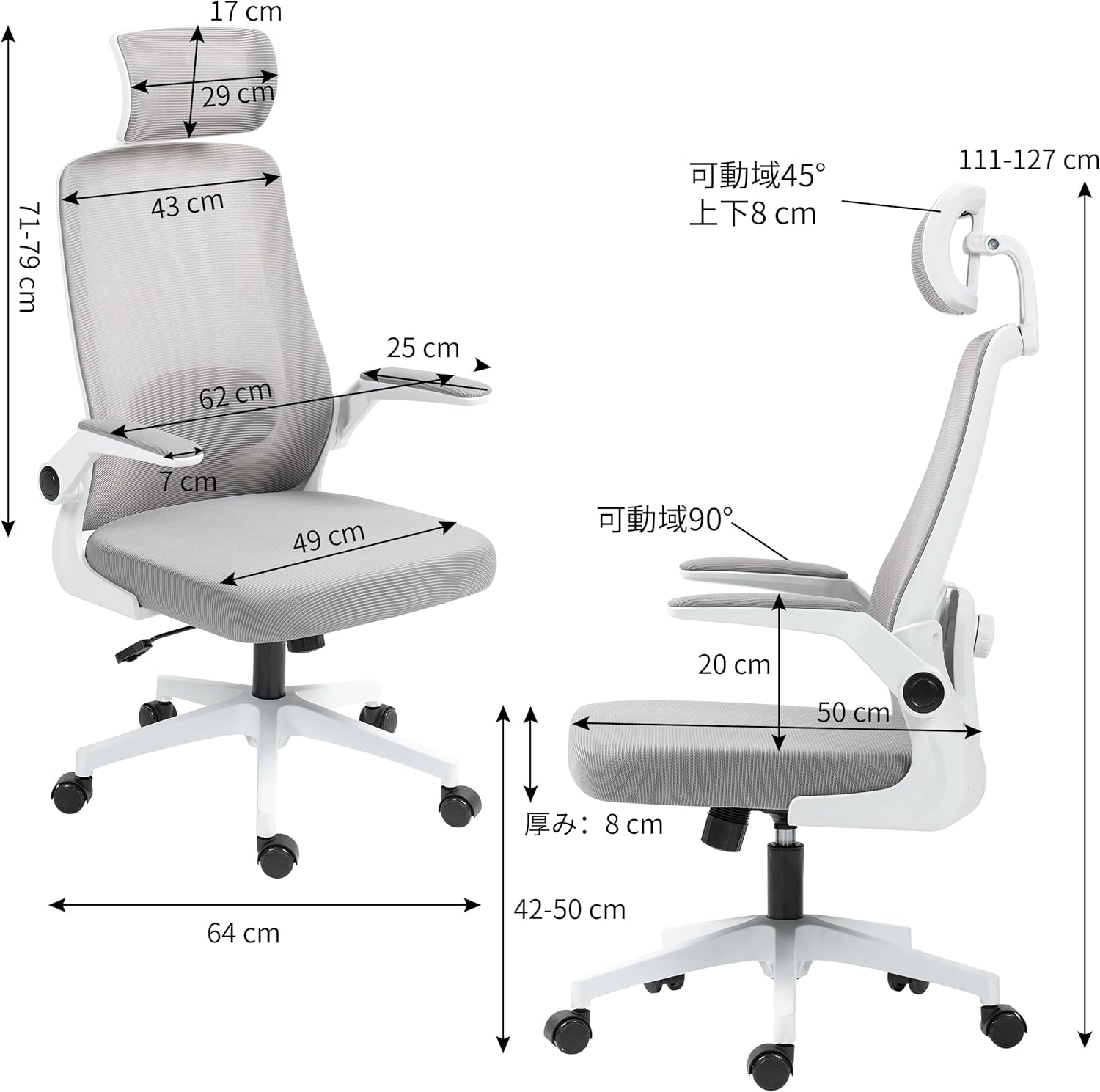
Figure 7: Detailed Chair Dimensions
7. Atilẹyin ọja ati Support
Your Felicita office chair comes with a 1-odun atilẹyin ọja to ensure your peace of mind. The product has passed BIFMA strength tests by SGS, a world-renowned certification body, confirming its durability and safety.
For any inquiries, support, or warranty claims, please do not hesitate to contact us. Our customer support is available 365 days a year.
- Official LINE: @086sbarx
- Foonu: 050-7114-5374
- Imeeli: syalen.jp@gmail.com