Ọrọ Iṣaaju
This manual provides essential information for the installation, operation, and maintenance of your QNAP QSW-2104-2T-R2-US 6-Port Unmanaged Switch. Please read this manual thoroughly before using the device to ensure proper setup and optimal performance.

Aworan: Iwaju view of the QNAP QSW-2104-2T-R2-US 6-Port Unmanaged Switch, showing the DC IN port, LED indicators, and six RJ45 ports.
Package Awọn akoonu
Jẹrisi pe gbogbo awọn ohun kan wa ninu package:
- QNAP QSW-2104-2T-R2-US Unmanaged Switch
- Ibi ti ina elekitiriki ti nwa
- Akọmọ skru
- ìdákọ̀ró
- Ẹsẹ Ẹsẹ
- Itọsọna fifi sori iyara (QIG)
Ṣeto
1. Ti ara Placement
- Place the switch on a stable, flat surface.
- Ensure adequate ventilation around the device. Avoid placing it in enclosed spaces or near heat sources.
- The fanless design ensures quiet operation, but proper airflow is still important for heat dissipation.

Image: Diagram illustrating the fanless design and heat dissipation of the QNAP QSW-2104-2T-R2-US switch, showing arrows indicating airflow.
2. Asopọ agbara
- Connect the power adapter to the DC IN port on the switch.
- Pulọọgi ohun ti nmu badọgba agbara sinu iṣan agbara ti o yẹ.
- The PWR/SYS LED indicator will illuminate when power is supplied.
3. Awọn isopọ nẹtiwọki
The QSW-2104-2T-R2-US features six RJ45 ports:
- Awọn ibudo 1-4: 2.5GBASE-T RJ45 ports, supporting 2.5Gbps, 1Gbps, and 100Mbps speeds.
- Awọn ibudo 5-6: 10GBASE-T RJ45 ports, supporting 10Gbps, 5Gbps, 2.5Gbps, 1Gbps, and 100Mbps speeds.
- Connect your network devices (e.g., computers, NAS, routers, access points) to the available RJ45 ports using Ethernet cables (CAT5e, CAT6, or CAT7 recommended for optimal performance).
- The switch is unmanaged, meaning it operates on a plug-and-play basis without requiring complex configuration.

Aworan: Isunmọ view of the QNAP QSW-2104-2T-R2-US switch ports, clearly labeling the two 10GbE RJ45 ports and four 2.5GbE RJ45 ports.
Ṣiṣẹ Yipada
LED Ifi
The switch features LED indicators to provide status information:
- PWR/SYS LED: Indicates power status and system activity.
- LINK/ACT LEDs (for each port):
- Solid Green: Link established at 2.5G/5G/10G speed.
- Solid Amber: Link established at 100M/1G speed.
- Flashing: Data activity.
- Off: No link or device connected.
- LED LED: Indicates detection of a network loop.
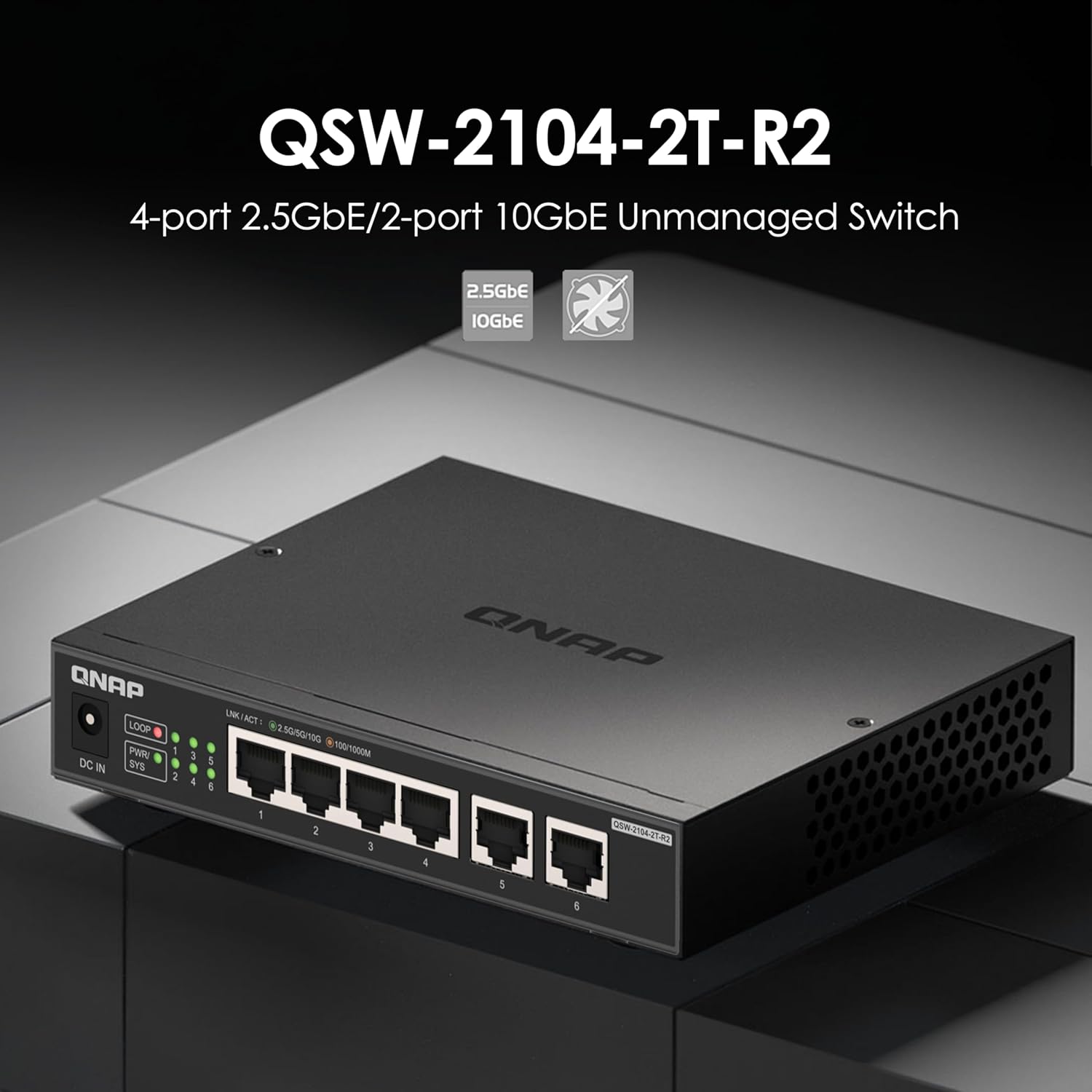
Aworan: Iwaju view of the QNAP QSW-2104-2T-R2-US switch, highlighting the LED indicators for power, system, link/activity, and loop detection.
Pulọọgi ati Ṣiṣẹ Ṣiṣẹ
The QSW-2104-2T-R2-US is an unmanaged switch, requiring no software configuration. Simply connect your devices, and the switch will automatically detect and negotiate the optimal speed for each connected device.

Image: Network diagram illustrating various devices like a router, NAS, PC, TV, gaming console, and Wi-Fi access point connected to the QNAP QSW-2104-2T-R2-US switch.
Itoju
- Ninu: Lo asọ ti o tutu, ti o gbẹ lati nu ode ti yipada. Ma ṣe lo olomi tabi awọn olutọpa aerosol.
- Afẹfẹ: Ensure that the ventilation holes are not obstructed to maintain proper heat dissipation.
- Firmware: As an unmanaged switch, firmware updates are typically not required or available.
Laasigbotitusita
| Isoro | Owun to le Fa | Ojutu |
|---|---|---|
| No power (PWR/SYS LED off) | Ohun ti nmu badọgba agbara ko ni asopọ tabi aṣiṣe; iṣan agbara ko ṣiṣẹ. | Check power connections. Try a different power outlet. Ensure the power adapter is functioning correctly. |
| No link (LINK/ACT LED off) | Ethernet cable disconnected or faulty; connected device is off or faulty. | Ensure the Ethernet cable is securely connected at both ends. Try a different cable. Verify the connected device is powered on and working. |
| Iyara nẹtiwọọki ti o lọra | Cable quality; device compatibility; network congestion. | Use CAT6 or CAT7 cables for 2.5Gbps/10Gbps connections. Ensure connected devices support the desired speeds. Check for other network activity. |
| LOOP LED is on | A ti ri lupu nẹtiwọọki. | A network loop occurs when there are redundant paths between devices, which can cause network instability. Disconnect one of the redundant connections to break the loop. The switch has built-in loop detection to help prevent issues. |

Image: Diagram illustrating the loop detection feature of the QNAP QSW-2104-2T-R2-US switch, showing a warning symbol when a network loop is identified.
Awọn pato
| Ẹya ara ẹrọ | Ẹ̀kúnrẹ́rẹ́ |
|---|---|
| Awoṣe | QSW-2104-2T-R2-US |
| Nọmba ti Ports | 6 |
| 2.5GBASE-T RJ45 Ports | 4 (supports 2.5G/1G/100Mb) |
| 10GBASE-T RJ45 Ports | 2 (supports 10G/5G/2.5G/1G/100Mb) |
| Yipada Agbara | 60 Gbps |
| Jumbo Fireemu Support | 12K |
| Apẹrẹ | Fanless, Unmanaged |
| Awọn iwọn (H x W x D) | 4 x 6 x 1 inches (isunmọ) |
| Iwọn | 1.61 poun (isunmọ) |
| Ni wiwo Iru | RJ45 |
| UPC | 885022028153 |
Alaye atilẹyin ọja
QNAP products typically come with a standard manufacturer's warranty. For specific warranty terms and conditions, please refer to the warranty card included in your product packaging or visit the official QNAP webojula. Jeki ẹri rira rẹ fun awọn iṣeduro atilẹyin ọja.
This product is noted to come with a 2-year warranty.
Onibara Support
For technical assistance, product information, or support, please visit the official QNAP support website or contact their customer service. Refer to the Quick Installation Guide (QIG) for contact details.
O tun le ṣàbẹwò awọn QNAP Store on Amazon fun diẹ ọja alaye ati oro.


