1. Ifihan
O ṣeun fun riraasing the Chefman Countertop Microwave Oven. This manual provides important information regarding the safe operation, installation, maintenance, and troubleshooting of your appliance. Please read it thoroughly before use and retain it for future reference.

Aworan 1.1: Iwaju view of the Chefman Countertop Microwave Oven.
2. Awọn aabo pataki
When using electrical appliances, basic safety precautions should always be followed to reduce the risk of fire, electric shock, burns, or injury. Read all instructions before using this appliance.
- Ma ṣe ṣisẹ adiro ti o ba ni okun tabi plug ti o bajẹ, ti ko ba ṣiṣẹ daradara, tabi ti o ba ti bajẹ tabi ti o lọ silẹ.
- Ma ṣe gbona awọn olomi tabi awọn ounjẹ miiran ninu awọn apoti ti a fi edidi bi wọn ṣe yẹ lati bu gbamu.
- Maṣe lo awọn kemikali ibajẹ tabi awọn eefin ninu ohun elo yii.
- Ma ṣe gba okun laaye lati rọ si eti tabili tabi counter, tabi fi ọwọ kan awọn aaye ti o gbona.
- Nigbagbogbo rii daju pe turntable gilasi ati oruka rola wa ni ipo ti o tọ ṣaaju ṣiṣe.
- Maṣe gbiyanju lati ṣiṣẹ adiro yii pẹlu ṣiṣi ilẹkun nitori eyi le ja si ifihan ipalara si agbara makirowefu.
- Ohun elo yii jẹ ipinnu fun lilo ile nikan.
3. Ọja Ipariview
The Chefman Countertop Microwave Oven features a compact design with 0.9 cubic feet capacity and 900 watts of cooking power. It includes various presets and user-friendly controls for efficient food preparation.
3.1 Key Awọn ẹya ara ẹrọ
- Agbara: 0.9 Onigun Ẹsẹ
- Agbara: 900 Watts with 10 Power Levels
- Awọn tito tẹlẹ sise: 6 popular presets (Popcorn, Pizza, Beverages, Veggies, Potatoes, Leftovers)
- Ibi iwaju alabujuto: Digital controls with One-Touch Express Cook
- Awọn iṣẹ pataki: Eco Mode, Child Safety Lock, Mute Button, Memory Function
- Inu inu: Easy-clean interior with dishwasher-safe glass turntable

Aworan 3.1: Pariview of key features including capacity, power, and safety.
4. Eto
4.1 Ṣiṣii silẹ
Carefully remove the microwave oven and all packaging materials from the carton. Check the oven for any damage, such as dents or a broken door. Do not operate the oven if it is damaged. Retain the carton and packaging materials for future use or dispose of them responsibly.
4.2 Ibi
- Place the oven on a flat, stable surface that can support its weight and the heaviest food item likely to be cooked in the oven.
- Ensure adequate ventilation. Allow at least 4 inches (10 cm) of space on the top, back, and sides of the oven for proper airflow. Do not block any ventilation openings.
- Pa ààrò mọ́ kúrò lọ́wọ́ àwọn orísun ooru, èéfín tàbí omi tí ń tú jáde.
- Do not place the oven near a radio or TV, as microwave operation may cause interference.
4.3 Itanna Asopọ
Plug the oven into a standard 120V, 60Hz AC outlet. Ensure the outlet is properly grounded. Do not use an extension cord unless absolutely necessary, and if so, ensure it is a grounded 3-prong cord with a rating equal to or greater than the microwave's rating.
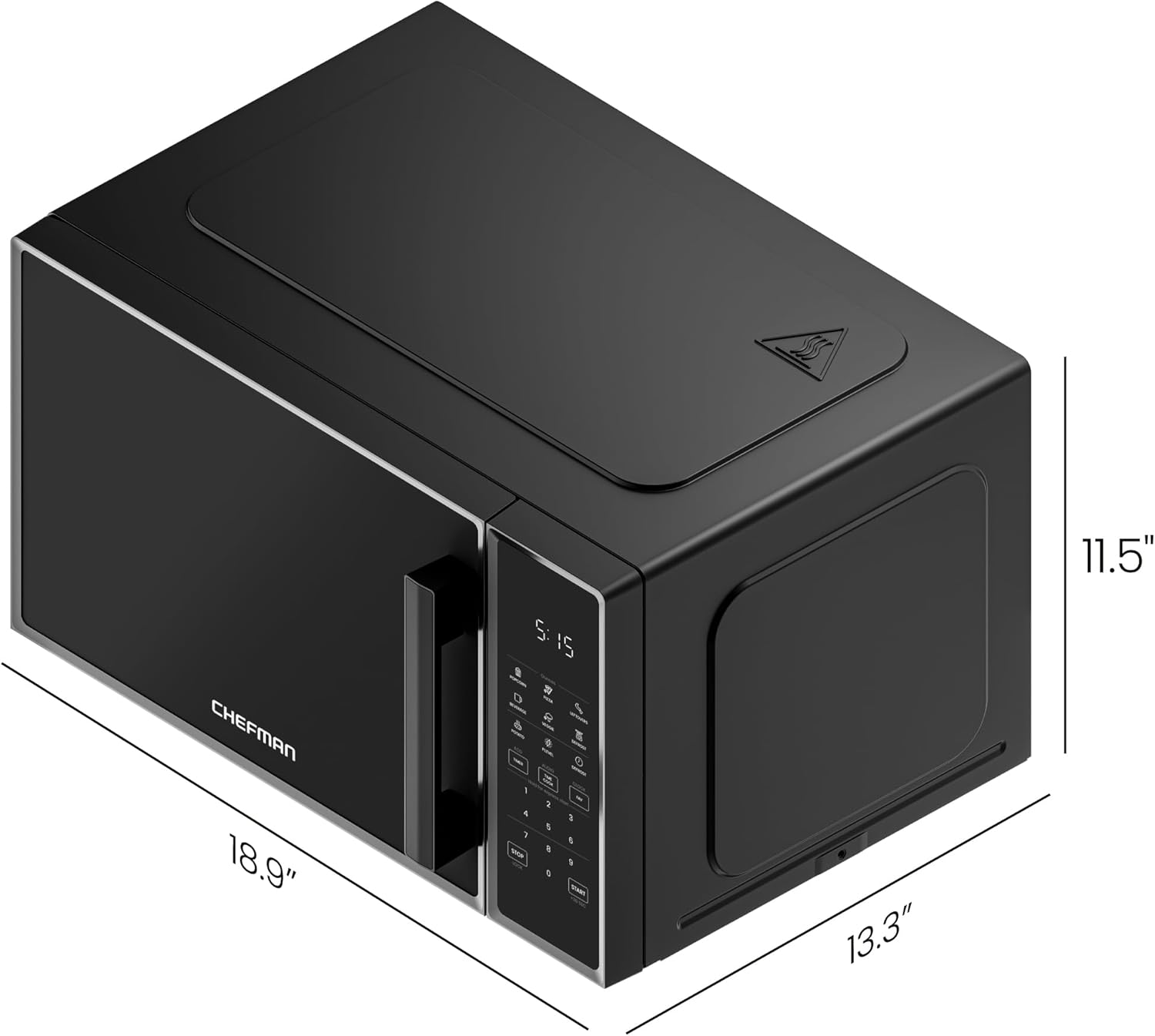
Image 4.1: Product dimensions for proper placement.
5. Awọn ilana Iṣiṣẹ
5.1 Eto aago
- Tẹ awọn Aago bọtini lẹẹkan.
- Use the number pads to enter the current time (e.g., 1-2-3-0 for 12:30).
- Tẹ awọn Aago bọtini lẹẹkansi lati jẹrisi.
5.2 Ipilẹ Makirowefu Sise
- Fi ounjẹ sinu apo eiyan-ailewu kan makirowefu lori turntable gilasi.
- Pa ilẹkun ni aabo.
- Tẹ awọn Aago ASIKO bọtini.
- Enter the desired cooking time using the number pads (e.g., 1-0-0 for 1 minute).
- To adjust power level (default is 100%): Press P.LEVEL, then use number pads (1-0 for 100%, 5 for 50%, etc.).
- Tẹ BERE lati bẹrẹ sise.
5.3 Express Cook Function
For quick cooking, simply press any number key (1-6) to start cooking immediately for that number of minutes at 100% power. For example, pressing '1' will cook for 1 minute.
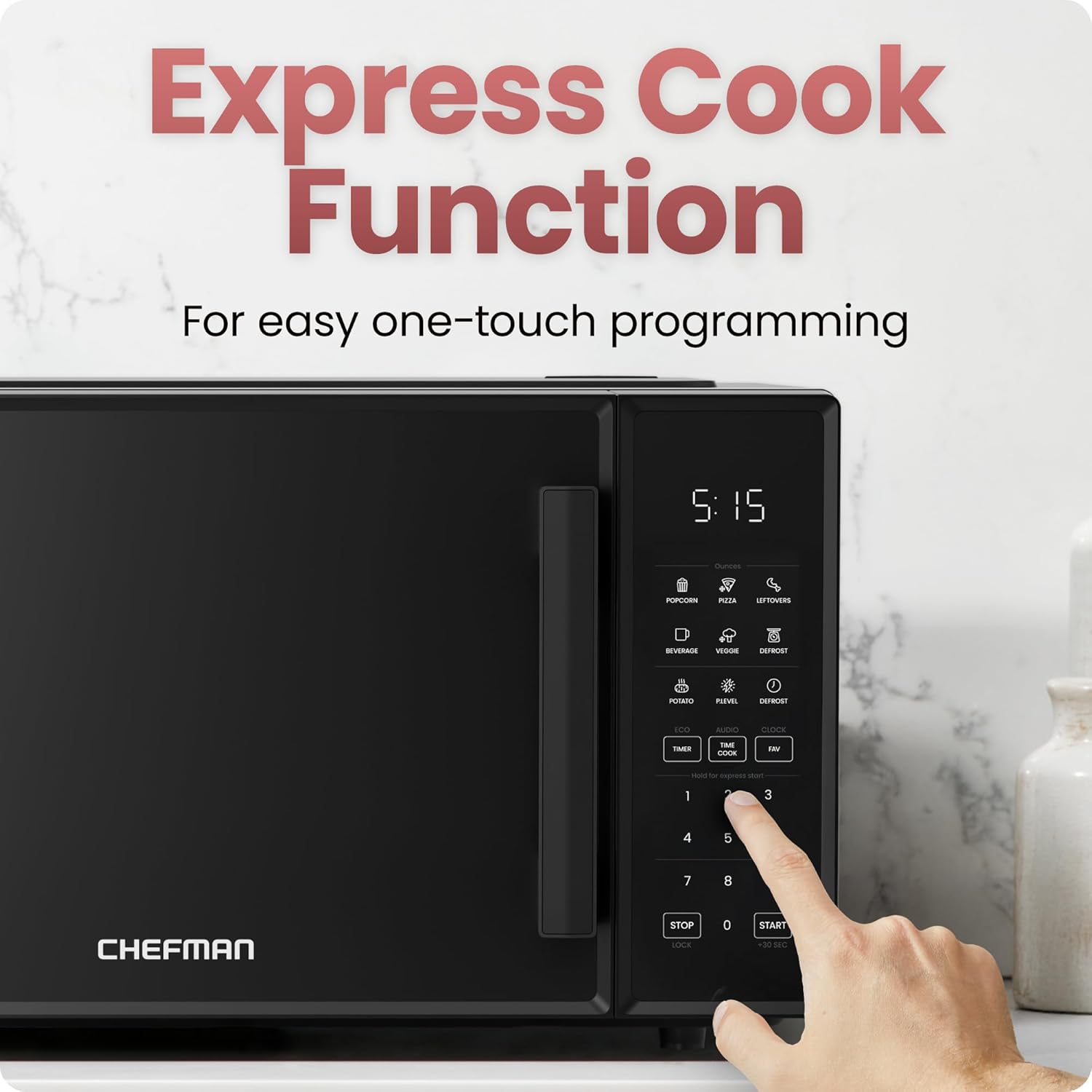
Image 5.1: Using the Express Cook function.
5.4 Tito Sise Awọn iṣẹ
The microwave includes 6 one-touch preset options for common foods:
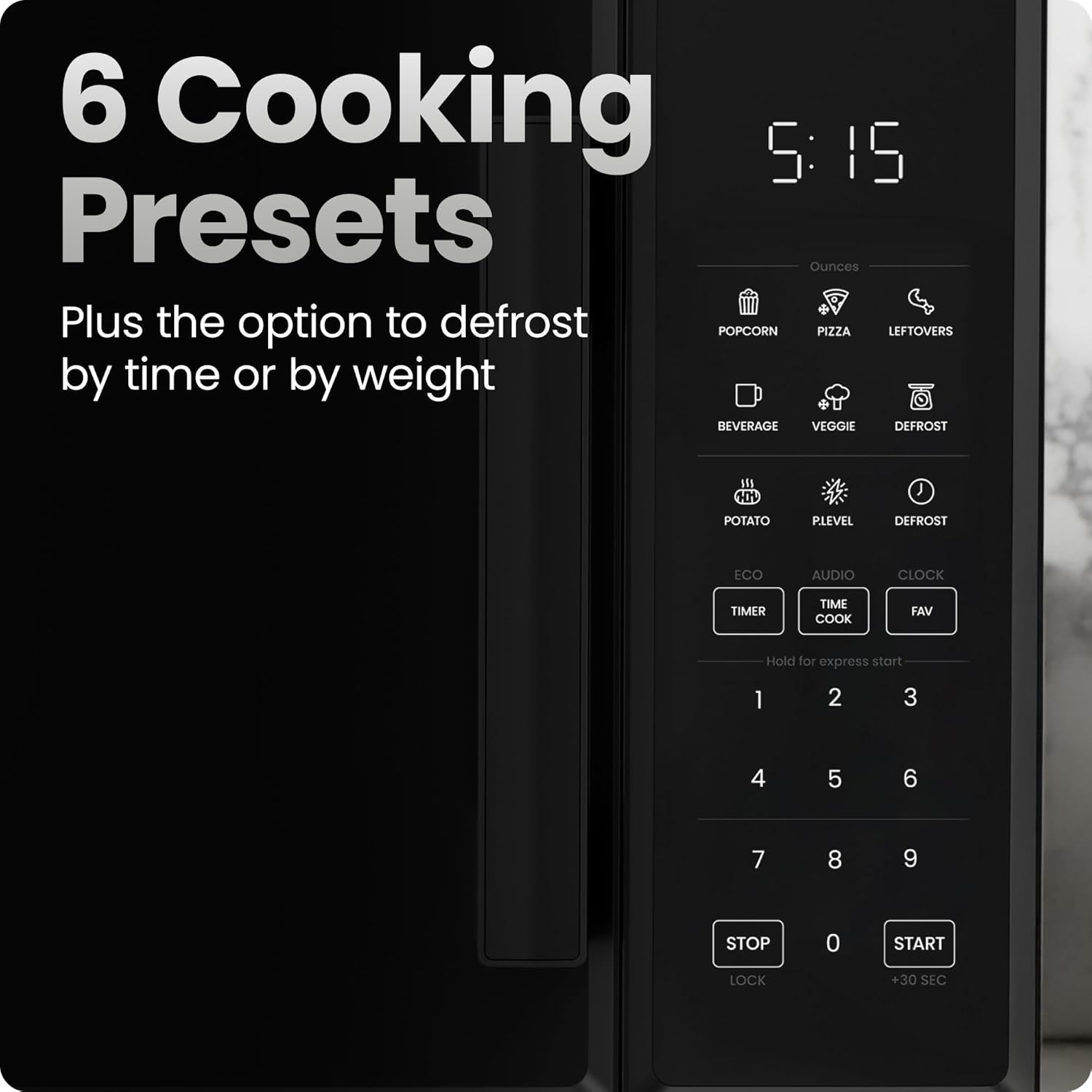
Image 5.2: Control panel with 6 cooking presets.
- Fi ounjẹ naa sinu adiro.
- Press the corresponding preset button (e.g., ṢE AGBADO, PIZZA, OMIRAN, EWE, ỌDUNKUN, OSISI).
- Ààrò náà yóò ṣètò àkókò sísè àti ìwọ̀n agbára tó yẹ láìfọwọ́sí.
- Tẹ BERE lati bẹrẹ.
5.5 Defrost Išė
The microwave offers defrosting by time or weight.
- Defrost nipasẹ iwuwo: Tẹ DÁJỌ́ once. Use number pads to enter the weight of the food in ounces. Press BERE.
- Defrost nipasẹ Aago: Tẹ DÁJỌ́ twice. Use number pads to enter the desired defrosting time. Press BERE.
5.6 Memory Function (FAV)
Program up to three frequently used cooking settings for one-touch access.
- Lati ṣeto: Tẹ FAV, then press a number (1, 2, or 3) to select a memory slot. Enter your desired cooking time and power level (as in Basic Microwave Cooking). Press FAV lẹẹkansi lati fipamọ.
- To use: Press FAV, then the corresponding number (1, 2, or 3). Press BERE.
5.7 Ipo Eco
To save power, the display can be turned off when not in use.
- To activate: Press ECO. The display will turn off after a few seconds of inactivity, showing only the clock.
- To deactivate: Press any button to wake the display, then press ECO lẹẹkansi.
5.8 Mute Button (AUDIO)
Silence the microwave's beeping sounds.
- To mute: Press AUDIO. The sound will be turned off.
- To unmute: Press AUDIO lẹẹkansi.
5.9 Child Safety Lock (LOCK)
Prevent unintended operation, especially by children.

Image 5.3: Child safety lock feature on the door handle.
- Lati muu ṣiṣẹ: Tẹ mọlẹ STOP/LOCK button for 3 seconds. An indicator will appear on the display.
- Lati mu maṣiṣẹ: Tẹ mọlẹ STOP/LOCK button for 3 seconds again. The indicator will disappear.
6. Itọju ati Cleaning
Ninu deede ati itọju yoo rii daju igbesi aye gigun ati iṣẹ aipe ti adiro makirowefu rẹ.
6.1 Ode Ninu
Pa awọn ita ita pẹlu ipolowoamp aṣọ àti ọṣẹ onírun díẹ̀. Yẹra fún àwọn ohun ìfọṣọ tàbí àwọn kẹ́míkà líle tí ó lè ba ìparí rẹ̀ jẹ́.
6.2 inu ilohunsoke Cleaning
Mọ iho inu inu nigbagbogbo. Fun awọn idasonu, mu ese lẹsẹkẹsẹ pẹlu ipolongoamp cloth. For stubborn food residue, place a bowl of water with lemon slices inside and microwave for 2-3 minutes. The steam will loosen the residue, making it easier to wipe clean.

Image 6.1: Easy-clean interior with glass turntable.
6.3 Glass Turntable and Roller Ring
The glass turntable and roller ring can be removed for cleaning. Wash them in warm, soapy water or place them on the top rack of your dishwasher. Ensure they are completely dry and correctly positioned before returning them to the oven.
7. Laasigbotitusita
Tí o bá ní ìṣòro pẹ̀lú ààrò máìkrówéfù rẹ, wo àtẹ yìí fún àwọn ìṣòro àti ìdáhùn tó wọ́pọ̀.
| Isoro | Owun to le Fa | Ojutu |
|---|---|---|
| Lọla ko ni bẹrẹ | Door not closed properly; Power cord unplugged; Fuse blown or circuit breaker tripped; Child safety lock activated. | Ensure door is firmly closed; Check power cord connection; Reset circuit breaker or replace fuse; Deactivate child safety lock. |
| Ounjẹ kii ṣe alapapo | Incorrect cooking time/power level; Microwave-safe dish not used. | Adjust cooking time and power level; Use only microwave-safe cookware. |
| Turntable ko yiyi | Turntable or roller ring not positioned correctly; Food too large or obstructing movement. | Reposition turntable and roller ring; Ensure food does not obstruct rotation. |
| Ariwo ti o pọju nigba iṣẹ | Loose parts; Food container rattling. | Check for loose components; Ensure cookware is stable on the turntable. |
If the problem persists after attempting these solutions, please contact Chefman Customer Support.
8. Awọn pato
| Sipesifikesonu | Ẹ̀kúnrẹ́rẹ́ |
|---|---|
| Nọmba awoṣe | RJ55-9-V2 |
| Agbara | 0.9 Onigun Ẹsẹ |
| Wattage | 900 watt |
| Voltage | 120 Volts |
| Awọn iwọn Ọja (D x W x H) | 13.27" x 18.9" x 11.52" |
| Iwọn Nkan | 28.4 iwon |
| Ohun elo | Irin, Ṣiṣu |
| Àwọ̀ | Dudu |
| Iru fifi sori ẹrọ | Countertop |
9. Atilẹyin ọja ati Support
This Chefman Countertop Microwave Oven comes with a Idaniloju ọdun mẹta provided by Chefman, covering defects in materials and workmanship under normal household use.
For warranty claims, technical support, or further assistance, please visit the official Chefman webojula tabi kan si wọn onibara iṣẹ Eka. O le wa alaye siwaju sii ati awọn ọja ni Chefman Store.


