1. Ifihan
This manual provides detailed instructions for the installation, operation, and maintenance of your NKPU 48-inch White Low Profile Ceiling Fan with Light. Please read this manual thoroughly before installation and use to ensure proper function and safety. Keep this manual for future reference.

Aworan 1.1: Pariview of the NKPU 48-inch White Low Profile Ceiling Fan, including the remote control and mobile app interface.
2. Alaye Aabo pataki
Nigbagbogbo tẹle awọn iṣọra aabo ipilẹ nigba fifi sori ẹrọ ati sisẹ ohun elo yii lati dinku eewu ina, mọnamọna, ati ipalara ti ara ẹni.
- Ka gbogbo awọn itọnisọna ni pẹkipẹki ṣaaju ki o to bẹrẹ fifi sori ẹrọ.
- Rii daju pe agbara wa ni pipa ni ẹrọ fifọ Circuit ṣaaju fifi sori ẹrọ tabi iṣẹ.
- Gbogbo onirin gbọdọ wa ni ibamu pẹlu awọn koodu itanna ti orilẹ-ede ati agbegbe. Ti o ko ba mọ pẹlu onirin, kan si alagbawo ina mọnamọna ti o peye.
- A gbọ́dọ̀ gbé afẹ́fẹ́ náà kalẹ̀ pẹ̀lú ìjìnnà tó kéré jù ẹsẹ̀ méje (2.1 mítà) láti ilẹ̀ títí dé etí abẹfọ́ tí ó tẹ̀lé e.
- Do not connect the fan to a dimmer switch or a fan's gear switch. Use only conventional wall switches for ON/OFF control.
- Má ṣe fi àwọn nǹkan sí ojú ọ̀nà àwọn abẹ́ afẹ́fẹ́.
- Rii daju pe fifi sori ẹrọ le ṣe atilẹyin iwuwo ti afẹfẹ.
3. Package Awọn akoonu
Daju pe gbogbo awọn paati wa ati ti ko bajẹ ṣaaju tẹsiwaju pẹlu fifi sori ẹrọ.
- 1 x Ceiling Fan with Lights Kit
- 1 x Itọsọna olumulo
- 1 x Isakoṣo latọna jijin

Image 3.1: The NKPU ceiling fan with its remote control and a smartphone displaying the control app, illustrating the various features like dimmable light, app control, remote control, 6 fan speeds, reversible motor, low profile, low noise, and 3 color temperatures.
4. Eto & Fifi sori
Detailed installation instructions and videos are available on the product page. This section provides an overview of key installation considerations.
4.1 iṣagbesori Aw
This ceiling fan is designed for Ẹke Fula installation, suitable for average to large rooms (110 sq.ft - 170 sq.ft). Angle mount is not supported.
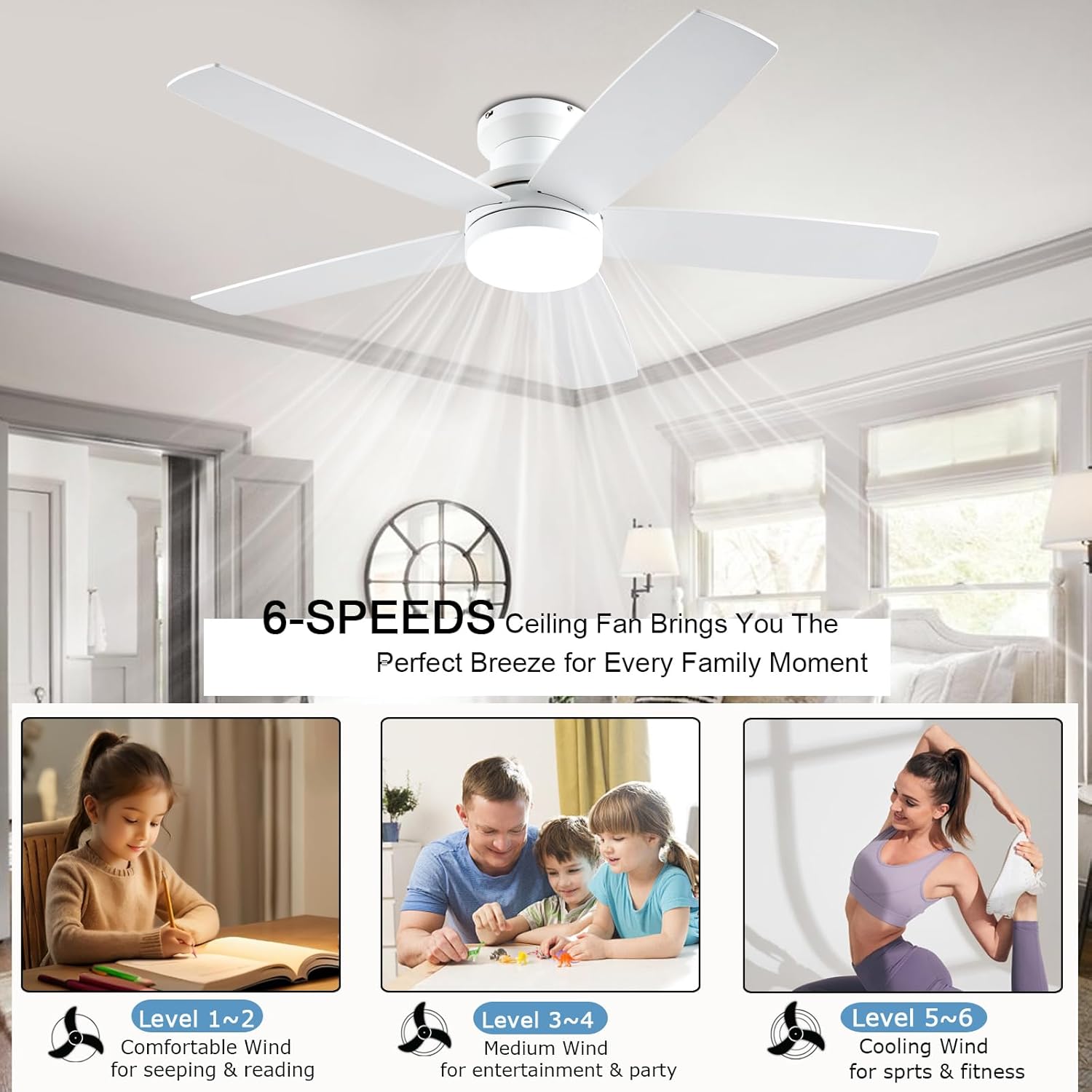
Image 4.1: Diagram showing the 48-inch ceiling fan dimensions (48"D x 48"W x 12.9"H) and illustrating the flush mount option as suitable, while an angle mount is not. Recommended room size is 110-170 sq.ft.
4.2 Blade fifi sori
The fan comes with dual-sided blades, offering two aesthetic options: one side in white and the other in wood grain. Choose the side that best matches your interior decor during installation.

Aworan 4.2: Isunmọ view of the dual-sided fan blades, showing one side in white (A-side) and the other in white wood grain (B-side), allowing for customizable aesthetics.
4.3 Wall Switch Compatibility
The fan is suitable for conventional wall switches to control the fan and light ON/OFF functions. Do not connect the fan to a dimmer switch or a fan's gear switch, as this can damage the unit.

Image 4.3: Illustration demonstrating that the fan is compatible with conventional wall switches for ON/OFF control, but explicitly warns against connecting it to dimmer switches or fan gear switches.
5. Awọn ilana Iṣiṣẹ
Your NKPU ceiling fan can be controlled via the included remote control or a dedicated mobile application.
5.1 Latọna Iṣakoso Awọn iṣẹ
The remote control allows for comprehensive management of the fan and light settings.
- Paa Lapapọ: Powers the entire unit on or off.
- Imọlẹ TAN/PA: O ṣakoso ina naa ni ominira.
- Bọtini Yipada Ipo Imọlẹ: Cycles through 3 color temperatures (3000K Warm White, 4000K Natural White, 6000K Cool White).
- Light Brightness Increase/Decrease: Adjusts light intensity from 10% to 100%.
- Fan Gear (Speed): Selects one of 6 fan speeds.
- Fan Timing: Sets a timer for 1, 2, or 4 hours.
- Fan Forward and Reverse: Changes the direction of blade rotation for summer or winter modes.
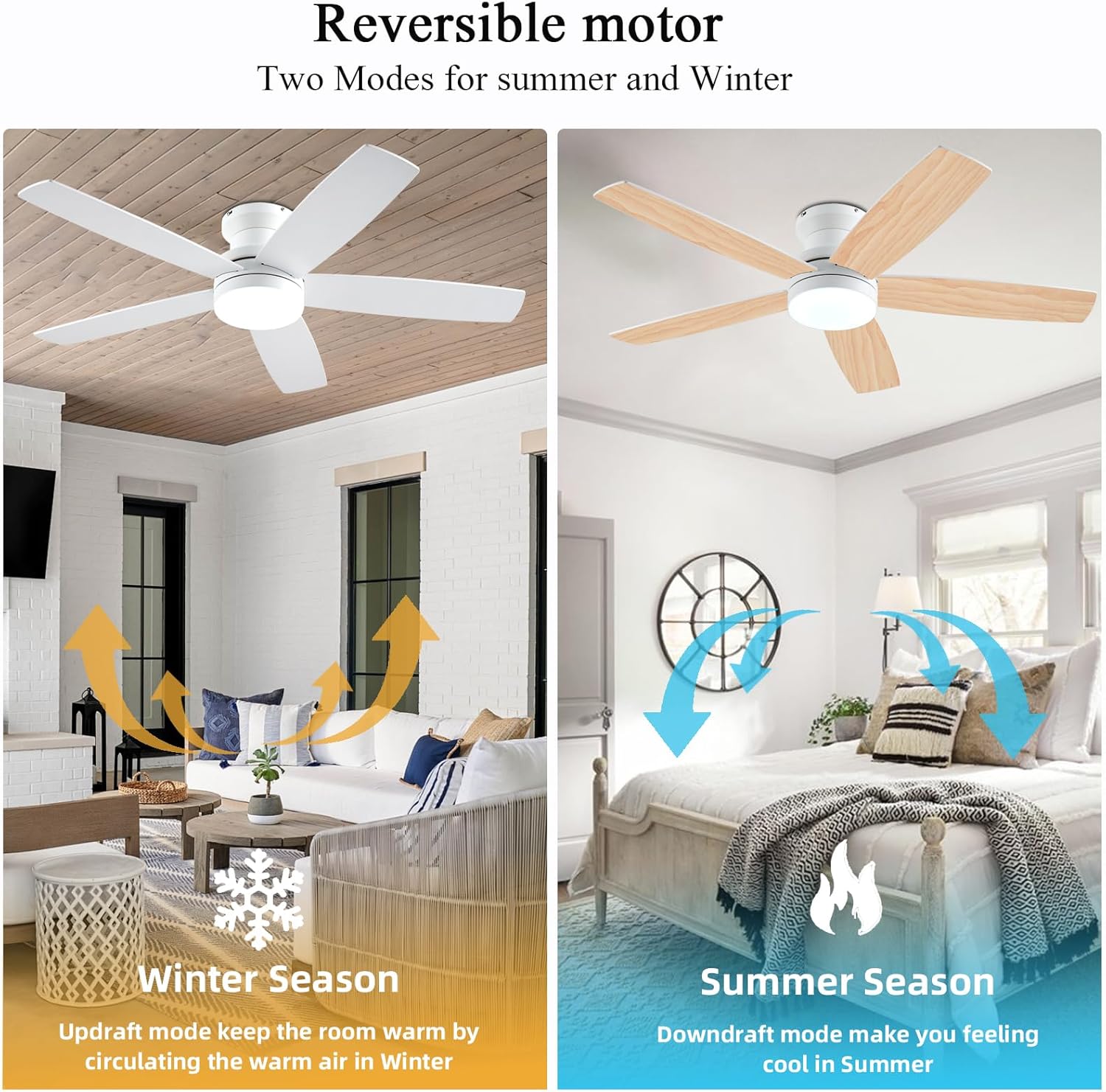
Image 5.1: The remote control and a smartphone displaying the 'Fan Lamp Pro' app, illustrating the various control options for the fan and light, including speed, brightness, color temperature, and timer settings.

Image 5.2: Detailed diagram of the remote control buttons and their functions, alongside visual representations of the three adjustable color temperatures (6000K Cool Light, 4500K Natural Light, 3000K Warm Light) and the 10-100% dimmable range.
5.2 Mobile App Iṣakoso
For enhanced control, download the "Fan Lamp Pro" app. Scan the QR code provided in the image below or visit http://www.jasonghost.com/fanlamppro/ lati gba lati ayelujara awọn app.
- Scan the QR code to download the "Fan Lamp Pro" app.
- Fi ẹrọ kun.
- Choose Light Fan.
- Click to Pair: Click the "+" button to set the name of your fan light. Then, click the pair button 1-2 times within 3 seconds after the fan is powered on.

Image 5.3: Instructions for setting up app control, including a QR code to download the "Fan Lamp Pro" app, steps for adding a device, and pairing the fan with the app.
5.3 Mẹ́ńtì DC tó lè yí padà
The fan features a reversible DC motor, allowing for two modes of operation to suit different seasons:
- Summer Season (Downdraft Mode): Blades rotate counter-clockwise, creating a direct breeze to make you feel cool.
- Winter Season (Updraft Mode): Blades rotate clockwise, circulating warm air trapped near the ceiling downwards, helping to keep the room warm.

Image 5.4: Visual representation of the reversible motor's two modes: updraft for winter to circulate warm air, and downdraft for summer to create a cooling breeze.
5.4 3CCT Dimmable LED Light
The integrated LED light offers three color temperatures and dimming capabilities from 10% to 100%.
- 3000K Gbona Funfun: Ideal for a cozy and relaxing ambiance.
- 4000K Adayeba Funfun: Suitable for general illumination and daily activities.
- 6000K Cool White: Provides bright, crisp lighting for tasks or a modern feel.

Image 5.5: Display of the three color temperature options for the LED light: 3000K Warm White, 4500K Natural Light, and 6000K Cool Light, along with a dimming scale from 10% to 100%.
5.5 6-Speed Settings
The fan offers 6 distinct speed settings to provide the desired airflow for any occasion.
- Ipele 1-2 (Kekere): Comfortable wind for sleeping or reading.
- Level 3-4 (Medium): Natural wind for entertainment or parties.
- Ipele 5-6 (O ga): Cooling wind for sports or fitness activities.

Image 5.6: Illustration of the 6-speed settings, categorized into Low (1-2 for comfort), Medium (3-4 for natural wind), and High (5-6 for cooling), with suggested activities for each level.
5.6 Iṣẹ́ ìdákẹ́jẹ́ẹ́
The fan is equipped with a silent DC motor, ensuring a peaceful environment with a noise level below 30 dB, comparable to a library whisper.

Image 5.7: A graph comparing the fan's noise level (30 dB) to common sounds like normal conversation (50 dB), library whisper (35 dB), and feather drops (20 dB), highlighting its quiet operation.
6. Itọju
Itọju deede ṣe idaniloju igbesi aye gigun ati iṣẹ ti o dara julọ ti olufẹ aja rẹ.
- Ninu: Lati nu afẹfẹ naa, nu pẹlu asọ, damp cloth. Do not use abrasive cleaners or solvents. Ensure the power is off before cleaning.
- Ayẹwo abẹfẹlẹ: Periodically check the fan blades for any dust buildup and clean them to maintain efficient airflow.
- Tira: Check all screws and connections periodically to ensure they are secure.

Image 6.1: Close-up of the fan blades, emphasizing their durable and stylish solid wood construction, which is UV resistant, damp resistant, and features premium textures.
7. Laasigbotitusita
Tí o bá ní ìṣòro pẹ̀lú afẹ́fẹ́ àjà ilé rẹ, wo àwọn ìṣòro àti ìdáhùn tó wọ́pọ̀ wọ̀nyí.
| Isoro | Owun to le Fa | Ojutu |
|---|---|---|
| Fan ko bẹrẹ | Ko si agbara si awọn àìpẹ; Awọn asopọ okun alaimuṣinṣin; Isakoṣo latọna jijin batiri kekere. | Check circuit breaker; Ensure all connections are secure; Replace remote control batteries. |
| Imọlẹ ko ṣiṣẹ | Loose wire connection; LED driver issue. | Check light wiring; Contact customer support if LED driver is suspected. |
| Isakoṣo latọna jijin ko dahun | Batteries are dead; Remote not paired; Obstruction between remote and receiver. | Replace batteries; Re-pair the remote control (refer to app pairing instructions); Remove obstructions. |
| Ariwo ti o pọju | Àwọn skru tí ó lè so mọ́ ara wọn; Àwọn abẹ́ tí kò ní ìwọ̀ntúnwọ̀nsì. | Tighten all mounting screws; Ensure blades are properly installed and balanced. |
Ti iṣoro naa ba wa lẹhin igbiyanju awọn iṣeduro wọnyi, jọwọ kan si atilẹyin alabara.
8. Awọn alaye ọja
| Ẹya ara ẹrọ | Ẹ̀kúnrẹ́rẹ́ |
|---|---|
| Brand | NKPU |
| Orukọ awoṣe | BR-SY69 / SY69-WHITE |
| Àwọ̀ | Funfun |
| Ọja Mefa | 48"D x 48"W x 12.9"H |
| Iwọn Nkan | 10.27 iwon |
| Electric Fan Design | Aja Fan |
| Orisun agbara | DC |
| Ara | Igbalode |
| Yara Iru | Yara, Yara Awọn ọmọde, Yara gbigbe, Ile-itọju, Yara-iṣere |
| Pataki Ẹya | Adjustable Height, Adjustable Tilt, App Operable, LED Light, Remote Controlled |
| Niyanju Lilo | Air Circulation, Cooling, Lighting |
| Ariwo Ipele | 30 dB |
| Wattage | 60 watt |
| Pari Iru | Funfun |
| Nọmba ti Blades | 5 |
| Iyara | 6 RPM (6 Power Levels) |
| Voltage | 110 Volts |
| Yipada Iru | Titari Bọtini |
| Awọn irinše to wa | 1 x Ceiling Fan with Lights Kits, 1 x User Manual, Remote |
| inu ile / ita gbangba Lilo | Ninu ile, ita gbangba |
| Ọna Iṣakoso | App, Latọna jijin |
| Iṣẹ ṣiṣe | High Efficiency (up to 80% reduction in power loss compared to traditional fans) |
| Ti beere awọn batiri? | Bẹẹni (fun iṣakoso latọna jijin) |
9. Atilẹyin ọja & Atilẹyin
Your NKPU ceiling fan comes with a Atilẹyin ọja laisi aibalẹ oṣu 24. We are committed to providing excellent customer service.
If you encounter any issues during the installation or use of the fan, please do not hesitate to contact us. Our 24-hour after-sales support ẹgbẹ́ náà wà láti ràn ọ́ lọ́wọ́.
For warranty claims or technical assistance, please refer to the contact information provided with your purchase or on the official NKPU webojula.


