1. Ifihan
This manual provides detailed instructions for the safe and effective use of your TOTAL TMT57026 Laser Distance Meter. Please read this manual thoroughly before operating the device and keep it for future reference. This device is designed for accurate distance measurements up to 70 meters, suitable for various professional and DIY applications.
2. Awọn ilana aabo
- Lesa Ìtọjú: Ẹ̀rọ yìí máa ń tú ìtànṣán lésà Class 2 jáde. Má ṣe tẹjú mọ́ ìtànṣán lésà tàbí kí o darí rẹ̀ sí àwọn ènìyàn tàbí ẹranko mìíràn.
- Idaabobo Oju: Yago fun ifihan oju taara si tan ina lesa.
- Ayika Ṣiṣẹ: Ma ṣe ṣiṣẹ ẹrọ ni awọn bugbamu bugbamu tabi nitosi awọn ohun elo ina.
- Omi Resistance: Ẹrọ yii jẹ ko omi sooro. Yago fun ifihan si omi tabi ọriniinitutu giga.
- Itọju: Only qualified personnel should repair the device.
- Awọn batiri: Use only specified AAA batteries. Do not mix old and new batteries or different types of batteries.
3. Ọja Ipariview
Familiarize yourself with the components of your TOTAL TMT57026 Laser Distance Meter.
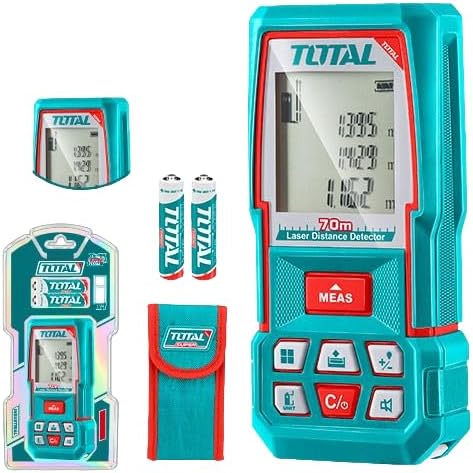
Figure 1: The TOTAL TMT57026 Laser Distance Meter, showing the device itself, two AAA batteries, a carrying pouch, and retail packaging. The device features a digital display and multiple function buttons.
Awọn eroja pataki:
- Lesa Emitter/Olugba: Be ni oke ti awọn ẹrọ.
- Iboju ifihan: Shows measurements, units, and mode indicators.
- Bọtini MEAS: Initiates single or continuous measurement.
- Bọtini UNIT: Changes measurement units (e.g., meters, feet, inches).
- C/O Button: Clears the last measurement or turns the device off.
- Awọn bọtini iṣẹ: For area, volume, addition, subtraction, and other calculations.
- Abala Batiri: Ti wa ni ẹhin ẹrọ naa.
4. Eto
4.1 Fifi sori batiri
- Wa ideri iyẹwu batiri ni ẹhin ẹrọ naa.
- Fi ideri náà sí i tàbí kí o tú u láti ṣí i.
- Insert two (2) AAA 1.5V disposable batteries, ensuring correct polarity (+/-). The device includes two AAA batteries.
- Pa ideri batiri naa ni aabo.
4.2 Titan / Pa a
- Lati Fi agbara: Tẹ awọn MEAS bọ́tìnì náà fún ìgbà díẹ̀. Ìfihàn náà yóò tàn.
- Lati Paarẹ: Tẹ mọlẹ C/O button for approximately 3 seconds. The device will also automatically power off after a period of inactivity to conserve battery life.
5. Awọn ilana Iṣiṣẹ
5.1 Ipilẹ Distance Wiwọn
- Rii daju pe ẹrọ ti wa ni titan.
- Tọka ina lesa ni aaye ibi-afẹde.
- Tẹ awọn MEAS button once. The laser will activate, and the measurement will appear on the display.
- The measurement will be held on the screen until a new measurement is taken or the device is turned off.
5.2 Wiwọn Tesiwaju (Titọpa)
- Tẹ mọlẹ MEAS bọtini fun isunmọ 2 aaya.
- The device will enter continuous measurement mode, displaying real-time distance as you move the device.
- Tẹ awọn MEAS button again to stop continuous measurement and hold the last value.
5.3 Yiyipada Iwọn Iwọn
- Tẹ awọn UNIT button repeatedly to cycle through available units: meters (m), feet (ft), and inches (in).
- A ó fi ẹ̀rọ tí a yàn hàn lórí ìfihàn náà.
5.4 Wíwọ̀n Agbègbè àti Ìwọ̀n
The device supports calculation of area and volume. Refer to the icons on the function buttons for specific modes.
- Press the appropriate function button (e.g., the button with the square icon for area, or cube icon for volume).
- Follow the on-screen prompts to take the required measurements (e.g., length, width for area; length, width, height for volume).
- The calculated result will be displayed.
5.5 Afikun ati iyokuro
Lo awọn +/- button to add or subtract measurements.
- Take the first measurement.
- Tẹ awọn +/- button to select addition or subtraction mode.
- Take the second measurement. The device will automatically perform the calculation and display the result.
6. Itọju
6.1 Ninu
- Nu ẹrọ naa pẹlu asọ, damp asọ. Ma ṣe lo abrasive ose tabi epo.
- Clean the laser lens carefully with a soft, lint-free cloth, similar to cleaning camera lenses.
6.2 Ibi ipamọ
- Tọju ẹrọ naa ni ibi gbigbẹ, itura, kuro lati orun taara ati awọn iwọn otutu to gaju.
- Tí o bá ń tọ́jú rẹ̀ fún ìgbà pípẹ́, yọ àwọn bátìrì náà kúrò kí ó má baà jò.
6.3 Batiri Rirọpo
- When the battery indicator on the display shows low power, replace both AAA batteries following the instructions in Section 4.1.
7. Laasigbotitusita
| Isoro | Owun to le Fa | Ojutu |
|---|---|---|
| Ẹrọ naa ko ṣiṣẹ. | Awọn batiri ti ku tabi ti fi sori ẹrọ ti ko tọ. | Ṣayẹwo polarity batiri tabi ropo pẹlu awọn batiri AAA tuntun. |
| Awọn wiwọn ti ko pe. | Laser lens is dirty; target surface is too reflective/non-reflective; device is unstable. | Clean the laser lens. Measure against a suitable, stable surface. Ensure device is held steady. |
| Laser beam is not visible. | Bright ambient light; laser is off. | Operate in lower light conditions. Ensure device is powered on and MEAS button is pressed. |
| Ifihan fihan koodu aṣiṣe. | Wíwọ̀n tí kò sí ní ìwọ̀n; àṣìṣe inú. | Ensure target is within 0.05m to 70m range. Try restarting the device. If error persists, contact support. |
8. Awọn pato
- Awoṣe: TMT57026
- Brand: Lapapọ
- Iwọn Iwọn: 0.05 to 70 mita
- Awọn Ẹka Iwọn: Àwọn Mítà (m), Ẹ̀sẹ̀ (ft), Ìwọ̀n (in)
- Kilasi lesa: Kilasi 2
- Awọn batiri: 2 x AAA, 1.5V (included)
- Iru Batiri: Isọnu
- Automatic Laser Shut-off: Bẹ́ẹ̀ni (lẹ́yìn àìṣiṣẹ́)
- Automatic Device Shut-off: Bẹ́ẹ̀ni (lẹ́yìn àìṣiṣẹ́)
- Awọn iwọn ọja: Isunmọ 17 x 5 x 0.1 cm
- Ìwọ̀n Nkan: Approximately 160 g (0.16 Kilograms)
- Ohun elo: Ṣiṣu
- Àwọ̀: Turquoise
- Ipele Resistance Omi: Ko Omi Resistant
- Olupese: Lapapọ
- Ilu isenbale: China
9. Atilẹyin ọja ati Support
For warranty information and technical support, please contact TOTAL customer service. Keep your purchase receipt as proof of purchase.
For further assistance, please refer to the official TOTAL webaaye tabi kan si olupin agbegbe rẹ.


