1. Eto
1.1 Fifi sori batiri
The eKids Ms. Rachel Sing-Along Microphone requires 2 AAA (R03) batteries for operation. Batteries are included with the product. Adult supervision is required for battery installation.
- Locate the battery compartment on the back of the microphone.
- Using a Phillips screwdriver, open the battery compartment door.
- Insert 2 AAA (R03) batteries, ensuring correct polarity (+/-) as indicated inside the compartment.
- Close the battery compartment door and tighten the screw securely.
Akiyesi: Do not attempt to recharge non-rechargeable batteries. Rechargeable batteries should only be charged under adult supervision. Do not mix old and new batteries, or different types of batteries. Remove exhausted batteries promptly. Remove batteries if the unit will not be used for an extended period.
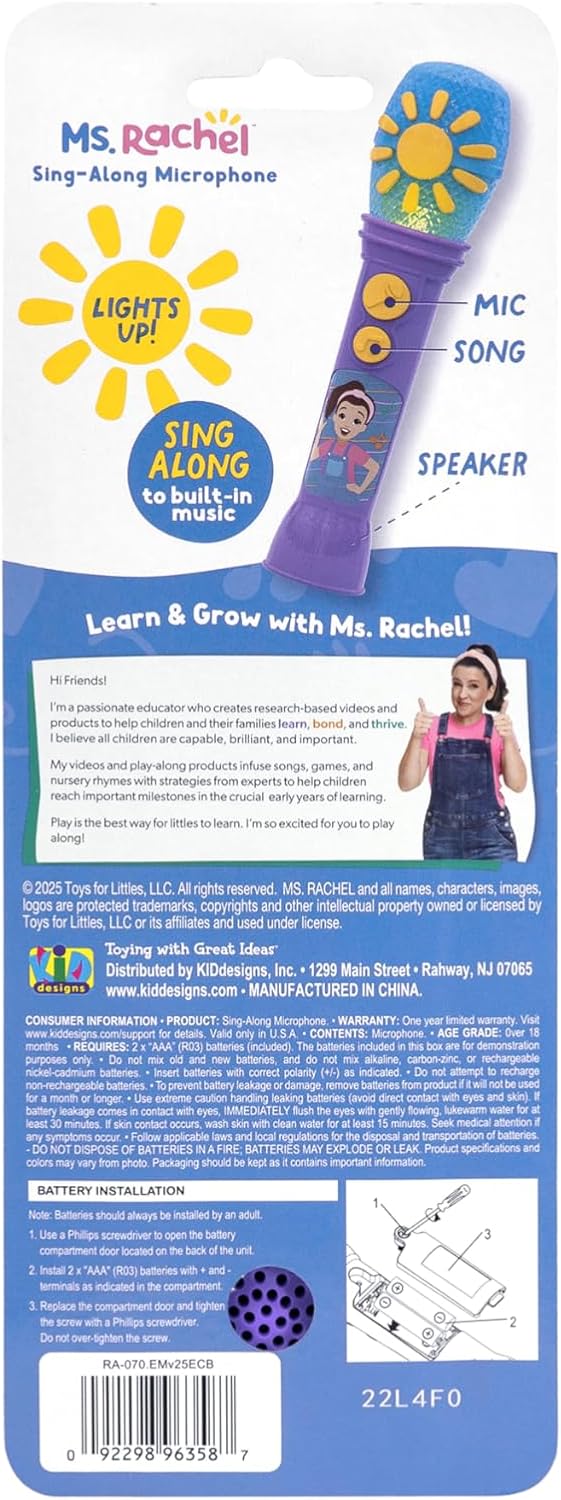
Image: Back packaging of the microphone, illustrating battery installation steps and safety warnings.
2. Isẹ
The eKids Ms. Rachel Sing-Along Microphone is designed for interactive play, allowing children to sing along and amplify their voice.
2.1 Awọn iṣakoso
- Bọtini gbohungbohun: Press this button to activate the voice amplification feature. Speak or sing into the microphone to hear your voice amplified.
- Bọtini Orin: Press this button to play built-in songs. The microphone includes three pre-recorded songs: "Old MacDonald," "Wheels on the Bus," and "I'm So Happy." Flashing lights will accompany the music.

Image: A diagram illustrating the microphone's components, including the microphone button, song button, dynamic speaker, and flashing lights.
2.2 Ohùn Amplification
To use the voice amplification feature, hold the microphone close to your mouth and press the Microphone Button. Your voice will be amplified through the built-in speaker.
2.3 Built-in Music and Lights
Press the Song Button to play one of the three built-in songs. The microphone's head will illuminate with flashing lights, enhancing the musical experience.

Àwòrán: Ìfihàn àwòránasing the key features of the microphone: sing-along capability, flashing lights, and a real working microphone function.
3. Itọju
3.1 Ninu
To clean the microphone, wipe it with a soft, dry cloth. Do not use abrasive cleaners or immerse the unit in water. Keep the microphone dry and away from moisture.
3.2 batiri Itọju
Refer to the battery installation instructions in Section 1.1 for proper battery handling. Always ensure batteries are inserted with correct polarity. Remove batteries if the product will not be used for an extended period to prevent leakage.
4. Laasigbotitusita
| Isoro | Owun to le Fa | Ojutu |
|---|---|---|
| Microphone does not turn on or play music. | Awọn batiri ti lọ silẹ, ti fi sori ẹrọ ti ko tọ, tabi sonu. | Ṣayẹwo polarity batiri. Ropo pẹlu alabapade AAA batiri. |
| Ohùn amplification is not working. | Microphone button not pressed, or batteries are low. | Ensure the Microphone Button is pressed. Replace batteries if needed. |
| Sound is distorted or has feedback. | Microphone is too close to the speaker, or hand is covering the microphone head. | Maintain a slight distance from the speaker. Avoid covering the microphone head with your hand. |
| Lights are not flashing with music. | Awọn batiri ti wa ni kekere. | Ropo pẹlu alabapade AAA batiri. |
5. Awọn pato
- Awoṣe: B0DZPJ6D9W
- Awọn iwọn ọja: 8.19 x 1.99 x 2.04 inches
- Ìwọ̀n Nkan: 4.2 iwon
- Ọjọ ori Ti a ṣeduro Olupese: 18 osu - 6 ọdun
- Awọn batiri: 2 x AAA (R03) batteries (included)
- Olupese: Awọn apẹrẹ KID
- UPC: 0092298963587
6. Atilẹyin ọja & Atilẹyin
6.1 Atilẹyin ọja to lopin
Ọja yi ti wa ni bo nipasẹ a Atilẹyin ọja Odun kan from the date of purchase. This warranty covers defects in materials and workmanship under normal use. For full warranty details and conditions, please refer to the product packaging or contact customer support.
6.2 Onibara Support
For technical assistance, warranty claims, or product inquiries, please contact KIDdesigns customer support. You can find contact information on the product packaging or visit the eKids brand store:
Olupese: KIDdesigns Inc., 1290 Main Street, Rahway, NJ 07065, USA.
7. Awọn fidio ọja
Kò sí fídíò ọjà tí olùtajà náà fi sílẹ̀ nínú ìwé ìtọ́ni yìí.


