Ọrọ Iṣaaju
Thank you for choosing the Pro Breeze 25L Smart Dehumidifier. This appliance is designed to efficiently remove excess moisture from your indoor environment, helping to prevent mold, mildew, and dampness. Featuring smart Wi-Fi connectivity, a digital display, and multiple operating modes, this dehumidifier offers advanced control and convenience. Please read this manual thoroughly before operation to ensure safe and optimal performance.
Awọn Itọsọna Aabo pataki
Nigbagbogbo tẹle awọn iṣọra aabo ipilẹ nigba lilo awọn ohun elo itanna lati dinku eewu ina, mọnamọna, ati ipalara.
- Rii daju pe ipese agbara ibaamu voltage pato lori awọn Rating aami.
- Ma ṣe ṣiṣẹ ẹrọ mimu kuro pẹlu okun ti o bajẹ tabi plug.
- Keep the appliance at least 20 cm (8 inches) away from walls and other objects to ensure proper airflow.
- Maṣe fi omi mọlẹ, okun agbara, tabi pulọọgi sinu omi tabi awọn olomi miiran.
- Unplug the dehumidifier before cleaning, maintenance, or when not in use.
- Ohun elo yii wa fun lilo inu ile nikan.
- Ma ṣe dina ẹnu-ọna afẹfẹ tabi iṣan.
- Ṣe abojuto awọn ọmọde ati rii daju pe wọn ko ṣere pẹlu ohun elo naa.
- Ma ṣe gbiyanju lati tun tabi ṣe atunṣe ẹyọ naa funrararẹ. Kan si oṣiṣẹ iṣẹ ti o peye.
Ọja Awọn ẹya ara ẹrọ

Image: The Pro Breeze 25L Smart Dehumidifier, showcasing its compact design and highlighting features such as Wi-Fi compatibility, 25L extraction rate, energy efficiency, and laundry mode. Dimensions are also indicated.
- Powerful Dehumidification: Extracts up to 25 liters of moisture per day, effectively combating persistent humidity, mold, and condensation in large rooms.
- Omi omi nla: Features a 5.5-liter water tank with automatic shut-off when full. A drainage hose is included for continuous operation.
- Agbara Lilo: Utilizes a high-performance compressor, 24-hour timer, and automatic stop system to reduce energy consumption.
- Isẹ idakẹjẹ: Designed with silent technology, making it suitable for use in bedrooms, living rooms, offices, and other quiet environments.
- Iṣakoso Smart nipasẹ App: Manage all functions remotely using the free Pro Breeze app or voice commands with Alexa and Google Home (compatible with iPhone and Android).
- Digital Display & Humidity Sensor: An intuitive LED screen allows selection of fan speed and humidity levels between 30% and 80%. The smart sensor displays real-time humidity and automatically stops the dehumidifier once the target is reached.
- Awọn ọna Iṣiṣẹ lọpọlọpọ: Includes a 24-hour timer and 4 operating modes, including a dedicated Ipo gbigbe ifọṣọ. Also features a Titiipa ọmọ, Automatic Defrost Mode, ati Alẹ Ifihan.

Image: The Pro Breeze dehumidifier positioned next to a large 25-liter water bottle, visually representing its daily moisture extraction capacity and the benefit of fewer tank emptying cycles.
Package Awọn akoonu
Jọwọ ṣayẹwo apoti fun awọn nkan wọnyi:
- Pro Breeze 25L Smart Dehumidifier Unit
- Tesiwaju idominugere okun
- Itọsọna olumulo
Ṣeto
- Ṣii silẹ: Fi ìṣọ́ra yọ ẹ̀rọ ìtútù kúrò nínú àpótí rẹ̀. Pa àpótí náà mọ́ fún ìtọ́jú tàbí gbígbé lọ síbi tí ó yẹ lọ́jọ́ iwájú.
- Ibi: Place the dehumidifier on a firm, level surface. Ensure there is at least 20 cm (8 inches) of clear space around the air inlet and outlet to allow for efficient airflow. Avoid placing it near heat sources or in direct sunlight.
- Asopọ agbara: Pulọọgi okun agbara sinu iṣan itanna ti ilẹ. Rii daju voltage ibaamu awọn kuro ká ibeere.
- Fifi sori Omi Omi: Ensure the water tank is correctly inserted into the unit. The dehumidifier will not operate if the tank is not properly seated or is full.
- Ìṣàn omi tó ń tẹ̀síwájú (Àṣàyàn): For continuous operation without emptying the tank, connect the provided drainage hose to the continuous drainage port on the back of the unit. Route the hose to a suitable drain, ensuring it is sloped downwards to allow water to flow freely.
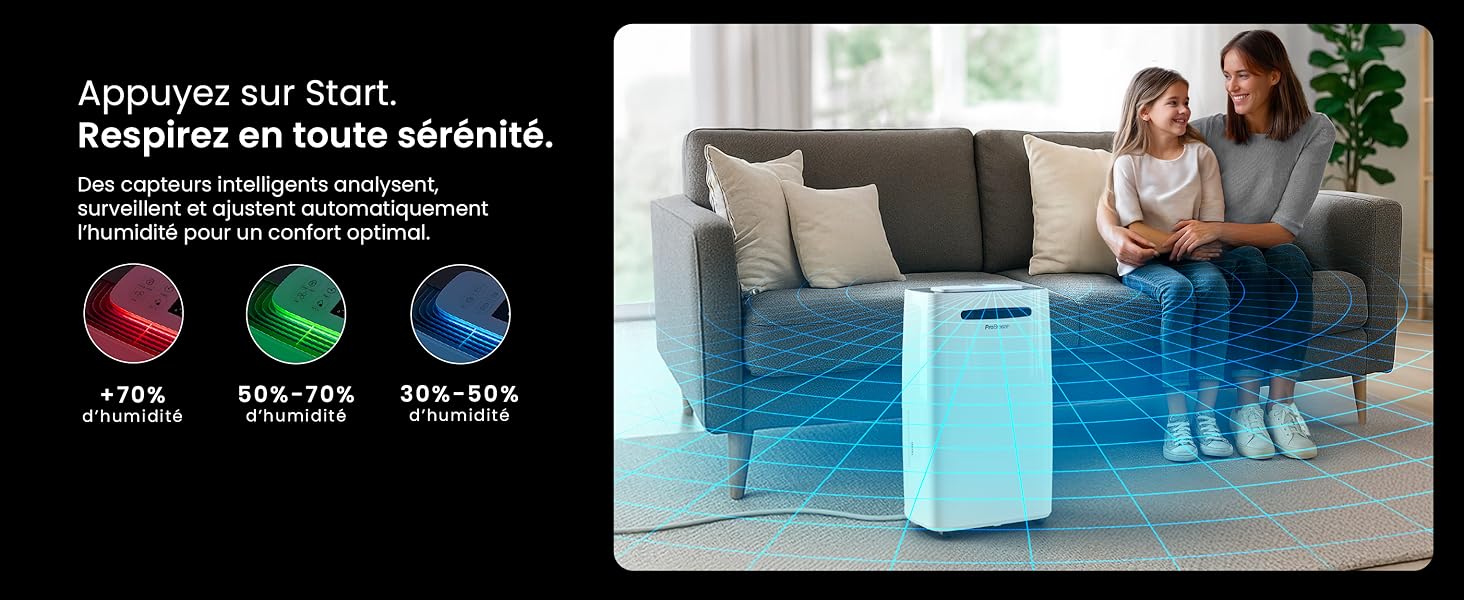
Image: The dehumidifier shown in different environments such as a garage, home office, and laundry room, illustrating its versatility and suitability for various spaces. Icons for continuous drainage and automatic defrost are also present.
Awọn ilana Iṣiṣẹ
Ibi iwaju alabujutoview

Aworan: A alaye view of the dehumidifier's illuminated digital control panel, showing buttons for power, mode, fan speed, timer, child lock, and humidity settings, along with the LED display.
The intuitive LED display and touch controls allow for easy operation.
- Bọtini agbara: Tẹ lati tan-an tabi PA kuro.
- Bọtini Ipo: Cycle through available operating modes: Deede, Laundry Drying, ati Ipo Alẹ.
- Bọtini Iyara Fan: Adjust the fan speed between Kekere ati Ga.
- Humidity Setting (SET %): Use the up/down arrows to set your desired humidity level (30% - 80%). The unit will operate until this level is reached.
- Bọtini Aago: Set a 24-hour timer for automatic power ON or OFF.
- Bọtini Titiipa Ọmọ: Tẹ mọlẹ lati muu ṣiṣẹ/mu maṣiṣẹ titiipa ọmọ, idilọwọ awọn ayipada lairotẹlẹ si eto.
- Bọtini Ifihan: Turn the LED display lights ON or OFF, useful for night mode.
Wi-Fi ati App Iṣakoso

Image: A user interacting with the Pro Breeze mobile application on a smartphone, demonstrating remote control capabilities for the dehumidifier. The app shows current humidity and temperature settings.
The Pro Breeze 25L Smart Dehumidifier can be controlled remotely via the Pro Breeze app. Download the app from your smartphone's app store and follow the in-app instructions to connect your device to your home Wi-Fi network. Once connected, you can control all functions, set schedules, and monitor humidity levels from anywhere.
The unit is also compatible with Amazon Alexa and Google Home for voice control. Refer to the app's help section for detailed instructions on integrating with these smart home platforms.
Itoju
Ṣofo Omi Omi
When the water tank is full, the dehumidifier will automatically shut off and an indicator light will illuminate. Carefully remove the water tank from the unit, empty the collected water, and reinsert the tank securely. The unit will resume operation.
Ninu Ajọ Afẹfẹ
A clogged filter can reduce efficiency. It is recommended to clean the air filter every two weeks or more frequently depending on usage and air quality.
- Pa dehumidifier kuro ki o yọọ kuro ni iṣan agbara.
- Locate and remove the air filter (usually on the back or side of the unit).
- Fi ẹ̀rọ ìfọṣọ nu àlẹ̀mọ́ náà tàbí kí o fi omi gbígbóná àti ọṣẹ fọ̀ ọ́ pẹ̀lẹ́pẹ̀lẹ́.
- Fi omi wẹ̀ ẹ́ dáadáa kí o sì jẹ́ kí àlẹ̀mọ́ náà gbẹ pátápátá kí o tó tún fi sínú ẹ̀rọ náà.
Ninu Ode
Mu ese ita ti dehumidifier pẹlu asọ, damp asọ. Ma ṣe lo awọn kẹmika ti o lewu, awọn olutọpa abrasive, tabi awọn nkanmimu, nitori iwọnyi le ba ilẹ jẹ.
Ibi ipamọ
If storing the unit for an extended period, ensure the water tank is empty and clean, and the filter is clean and dry. Store the dehumidifier in a cool, dry place, preferably in its original packaging.
Laasigbotitusita
| Isoro | Owun to le Fa | Ojutu |
|---|---|---|
| Dehumidifier ko ni tan. | No power; water tank full or incorrectly inserted; ambient temperature too low. | Check power connection; empty and reinsert water tank; ensure room temperature is above 5°C (41°F). |
| Ẹka n ṣiṣẹ ṣugbọn kii ṣe gbigba omi. | Humidity level too low; air filter clogged; room temperature too low; unit size too small for space. | Adjust desired humidity setting lower; clean air filter; ensure room temperature is adequate; consider if unit is appropriate for room size. |
| Ẹka jẹ alariwo. | Ẹ̀yà náà kò sí ní ojú ilẹ̀ tí ó tẹ́jú; àlẹ̀mọ́ afẹ́fẹ́ dí; àwọn èròjà inú rẹ̀ ń mì tìtì. | Gbé e sí orí ilẹ̀ tí ó tẹ́jú, tí ó dúró ṣinṣin; àlẹ̀mọ́ afẹ́fẹ́ mímọ́; tí ariwo bá ń bá a lọ, kàn sí olùrànlọ́wọ́. |
| Awọn oran asopọ Wi-Fi. | Incorrect Wi-Fi password; unit too far from router; router issues; app issues. | Verify Wi-Fi password; move unit closer to router; restart router; reinstall Pro Breeze app. |
| Frost han lori awọn okun waya. | Iwọn otutu ibaramu kekere. | The unit has an automatic defrost function. If frost persists, increase room temperature. |
Awọn pato
| Sipesifikesonu | Ẹ̀kúnrẹ́rẹ́ |
|---|---|
| Nọmba awoṣe | PB-D-37W-W-EU |
| Brand | Pro Breeze |
| Moisture Extraction Capacity | 25 liters / ọjọ |
| Omi ojò Agbara | 5.5 liters |
| Awọn iwọn (L x W x H) | 38.6 cm x 26 cm x 50 cm |
| Iwọn | 15.1 kilo |
| Awọn iyara Fan | 2 |
| Pataki Awọn ẹya ara ẹrọ | Adjustable Humidity Control, Night Mode, Continuous Drainage, Wi-Fi Connectivity, Digital Display, 24h Timer, Laundry Drying Mode, Child Lock, Automatic Defrost |
| Niyanju Pakà Area | Up to 322 sq ft (30 m²) |

Image: The Pro Breeze dehumidifier highlighting its elegant and discreet design, along with its dimensions (50cm H, 38.6cm L, 26cm P) and four easy-to-move caster wheels.
Atilẹyin ọja ati Support
Pro Breeze products are manufactured to the highest standards. This product comes with a standard manufacturer's warranty. For specific warranty details, please refer to the warranty card included in your package or visit the official Pro Breeze webojula.
If you encounter any issues or have questions regarding your dehumidifier, please contact Pro Breeze customer support. Contact information can typically be found on the Pro Breeze webaaye tabi lori apoti ọja.


