Ọrọ Iṣaaju
Thank you for choosing the OKP Life L6 Aqua Robot Vacuum and Mop Combo. This advanced 3-in-1 cleaning system is designed to provide efficient and thorough cleaning for your home, combining sweeping, vacuuming, and mopping functionalities. With its ultra-mini body, dToF laser navigation, and smart app control, the L6 Aqua offers a convenient and intelligent cleaning experience. Please read this manual carefully before using the product to ensure proper operation and maintenance.
Alaye Aabo
Always follow basic safety precautions when using electrical appliances. This appliance is not intended for use by persons (including children) with reduced physical, sensory or mental capabilities, or lack of experience and knowledge, unless they have been given supervision or instruction concerning use of the appliance by a person responsible for their safety. Children should be supervised to ensure that they do not play with the appliance. Do not use the robot in wet environments or near water. Do not allow the robot to pick up large objects, liquids, or burning materials. Ensure the charging dock is placed on a level surface against a wall, with no obstacles around it.
Package Awọn akoonu
Jọwọ ṣayẹwo awọn akoonu package lati rii daju pe gbogbo awọn ohun kan wa:
- 1x OKP Life L6 Aqua Robot Vacuum and Mop Combo
- 1x Washable Mop Cloth
- 1x 450ml Dust Box (integrated)
- 1x 200ml Water Tank (integrated)
- 1x Ibi gbigba agbara
- 1x Itọsọna olumulo
- 4x Ẹgbẹ gbọnnu
- 1x Disposable Dry Mop Cloth
Ọja Pariview
Familiarize yourself with the main components of your OKP Life L6 Aqua robot vacuum.

Image: The OKP Life L6 Aqua robot vacuum, its charging dock, and a washable mop cloth. The robot features a compact design with a clear dustbin cover and a dToF laser navigation sensor on top.

Image: The OKP Life L6 Aqua robot vacuum operating in a living room, demonstrating its compact size and ability to navigate around furniture.
Ṣeto
- Gbigbe Ibi iduro: Place the charging dock against a wall in an open area, ensuring there are no obstacles within 1 meter (3 feet) to the front and 0.5 meters (1.5 feet) to the sides. Connect the power adapter to the dock and a power outlet.
- Gbigba agbara akọkọ: Place the robot vacuum onto the charging dock. Ensure the charging contacts on the robot align with those on the dock. The robot will begin charging automatically. For first-time use, fully charge the robot (approximately 4-5 hours) before operation.
- Ṣe igbasilẹ ohun elo ati Asopọ: Download the 'OKP' app from your smartphone's app store (available for iOS and Android). Follow the in-app instructions to connect your L6 Aqua robot vacuum to your home Wi-Fi network. The robot supports 2.4GHz and 5GHz dual-channel networks.
- Iṣọkan Iranlọwọ Oluranlọwọ: Once connected to the app, you can link your robot to Amazon Alexa or Google Home for voice control. Refer to the app's settings for detailed instructions on integrating with these smart home platforms.

Image: A user interacting with the OKP app on a smartphone, demonstrating various cleaning modes and map editing features. Icons for Wifi, Amazon Alexa, and Google Home are visible, indicating compatibility.
Awọn ilana Iṣiṣẹ
The OKP Life L6 Aqua offers various cleaning modes and smart features for optimal performance.
- dToF Laser Navigation: The robot uses advanced dToF laser mapping to scan your home in real-time, creating precise maps for efficient cleaning paths. This technology provides 190° ultra-wide-angle recognition and millimeter-level precision for obstacle avoidance.
- 3-in-1 Cleaning System: The L6 Aqua combines sweeping, vacuuming, and mopping functions. It features a 200ml water tank and a 450ml exposed dust box. You can select from Quiet, Standard, or Strong suction levels via the app.
- Ṣíṣàwárí Kápẹ́ẹ̀tì Ọlọ́gbọ́n: The robot automatically detects carpets and adjusts suction power for optimal cleaning. It will also avoid mopping on carpeted areas to protect them.
- Customizable Maps & No-Go Zones: Use the OKP app to create and save multiple maps (up to 3). You can define virtual walls or 'No-Go Zones' (up to 8) to restrict the robot from entering specific areas.
- Efficient Cleaning with Breakpoint Technology: If the battery runs low (15%), the L6 Aqua will auto-dock for charging. Once recharged to 80%, it will resume cleaning from the exact breakpoint, ensuring no missed spots.
- Precision Sensing: Equipped with 9 sensors for precise obstacle detection and 190° wide-angle sensing for greater coverage and access to narrow spaces.

Image: Diagram illustrating the 360° dToF LiDAR Navigation with a 15m range, highlighting fast and accurate mapping, 15m scanning radius, and 360° coverage up to 700 square meters (7535 sqft).

Image: Visual representation of the 3-in-1 cleaning system, showing icons for sweeping, vacuuming, and mopping, along with suction levels: Silence, Standard, and Super (6000Pa).

Image: An illustration showing how to set customizable maps and no-go zones using the app, with a robot vacuum avoiding a designated red 'No-Go Zone' area where children are playing.

Image: The robot vacuum demonstrating its precision sensing capabilities, navigating around various household objects like slippers, toys, and furniture with 190° wide-angle detection.
Itoju
Itọju deede ṣe idaniloju iṣẹ ṣiṣe ti o dara julọ ati fa gigun igbesi aye ti igbale robot rẹ.
- Dust Box Cleaning: The 450ml dust box should be emptied after each cleaning cycle or when full. Open the top cover, remove the dust box, and dispose of collected debris. Clean the filter regularly.
- Omi Omi ninu: After mopping, empty any remaining water from the 200ml water tank. Rinse the tank with clean water and allow it to air dry.
- Mop Cloth Care: The washable mop cloth should be removed and cleaned after each use. Hand wash or machine wash with mild detergent and air dry completely before reattaching. Disposable mop options are also available.
- Fẹlẹfọ: The L6 Aqua features a brushless suction port and dual high-speed side brushes designed to prevent hair entanglement. Periodically check and clean the side brushes for any trapped hair or debris.
- Sensọ Cleaning: Wipe the dToF laser navigation sensor, cliff sensors, and charging contacts with a clean, dry cloth regularly to ensure accurate navigation and charging.
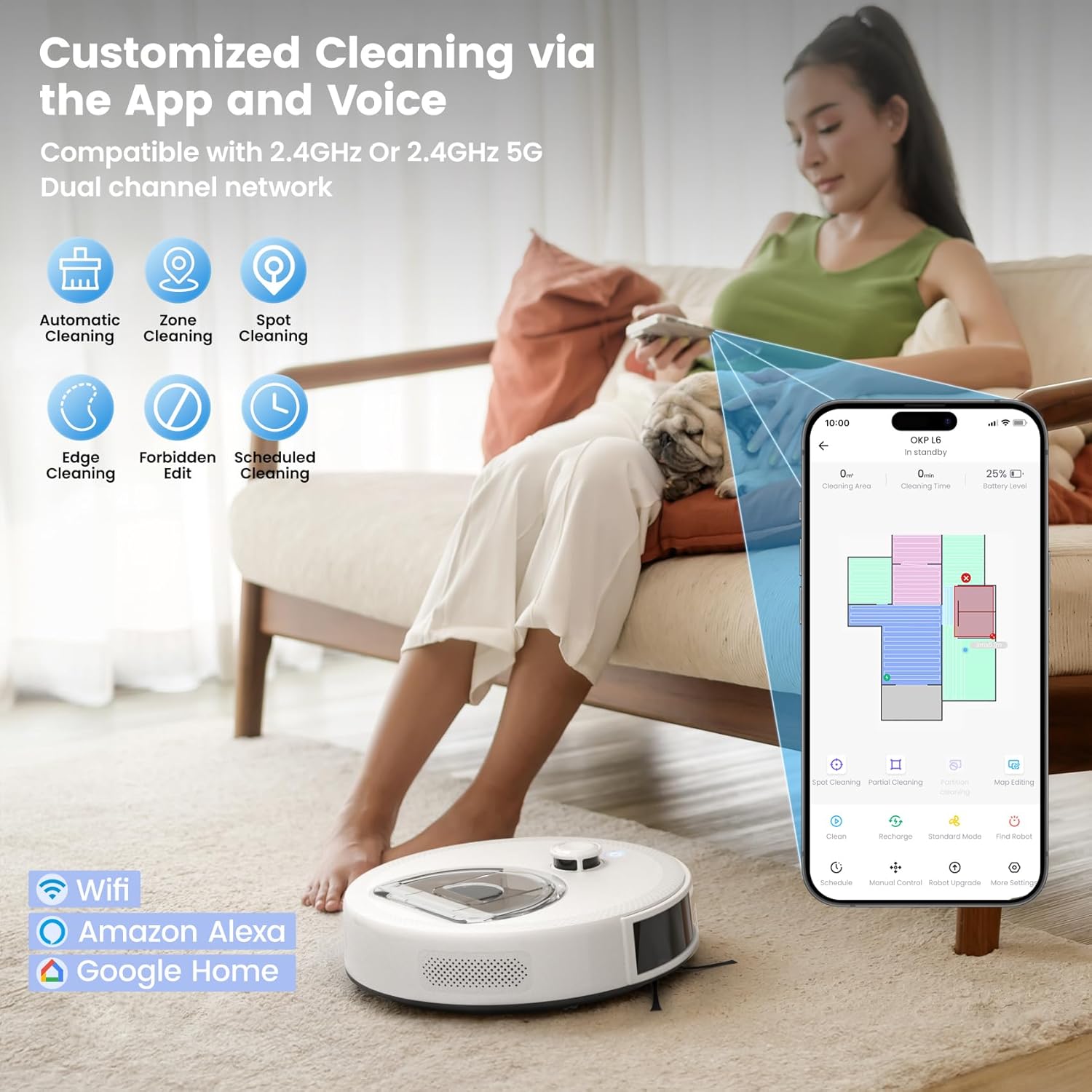
Image: Comparison showing the OKP L6 Aqua's sealed LiDAR turret, brushless suction port, dual high-speed side brushes, straight-through airflow, and seamless body designed to prevent hair wrap and dirt traps, contrasted with a generic robot vacuum that shows hair entanglement.
Laasigbotitusita
If you encounter issues with your robot vacuum, please refer to the following common solutions:
| Isoro | Owun to le Fa | Ojutu |
|---|---|---|
| Robot ko ni tan | Low battery; Power button not pressed | Charge the robot; Press and hold the power button |
| Robot ko le ri ibi iduro gbigba agbara | Dock obstructed; Dock not powered | Clear area around dock; Ensure dock is plugged in |
| Iṣẹ ṣiṣe mimọ ti ko dara | Dust box full; Brushes tangled; Filter clogged | Empty dust box; Clean brushes; Clean/replace filter |
| Robot di nigbagbogbo | Obstacles in path; Sensors dirty | Clear floor of clutter; Clean all sensors |
| App asopọ oran | Incorrect Wi-Fi password; Router too far; Network issues | Re-enter password; Move robot closer to router; Restart router/robot |
Awọn pato
| Ẹya ara ẹrọ | Sipesifikesonu |
|---|---|
| Brand | Igbesi aye OKP |
| Orukọ awoṣe | L6 Aqua Robot Vacuum and Mop Combo |
| Pataki Awọn ẹya ara ẹrọ | 360-Degree Swivel, Low Noise, No-Go Zone, Ultra-mini Body, dToF LiDAR Navigation |
| Àwọ̀ | Funfun |
| Ọja Mefa | 11.02"L x 11.02"W x 3.14"H |
| Agbara Apoti eruku | 450 milimita |
| Omi ojò Agbara | 200 milimita |
| Àlẹmọ Iru | Foomu |
| Igbesi aye batiri (Aago ṣiṣe) | Titi di iṣẹju 150 |
| Ọna Iṣakoso | App, Latọna jijin, Fọwọkan, Ohùn |
| Awọn ẹrọ ibaramu | Amazon Echo, Google Home, Smartphones, Tablets |
| Iwọn Nkan | 8 iwon |
Atilẹyin ọja ati Support
OKP Life products come with a standard manufacturer's warranty. For detailed warranty information, please refer to the warranty card included in your package or visit the official OKP Life website. If you have any questions, require technical assistance, or need to claim warranty service, please contact OKP Life customer support through the contact information provided in the app or on their official webojula.


