1. Ifihan
Thank you for choosing the ASD 12 Inch Smart RGBW Flush Mount Ceiling Light. This fixture combines a stylish minimalist design with efficient, versatile lighting solutions. Featuring multicolor RGBW capabilities, smart app control, and remote operation, it offers a wide range of lighting effects for your space. This manual provides essential information for safe installation, effective operation, and proper maintenance of your new lighting fixture.

Figure 1.1: ASD 12 Inch Smart RGBW Flush Mount Ceiling Light with accessories.
3. Package Awọn akoonu
Daju pe gbogbo awọn paati wa ṣaaju ki o to bẹrẹ fifi sori:
- ASD 12 Inch Smart RGBW Flush Mount Ceiling Light Fixture (4 units)
- Isakoṣo latọna jijin
- Ohun elo iṣagbesori (awọn skru, awọn eso waya)
- Ilana itọnisọna
4. Awọn pato
| Ẹya ara ẹrọ | Ẹ̀kúnrẹ́rẹ́ |
|---|
| Brand | ASD |
| Orukọ awoṣe | LOFT |
| Nọmba apakan | A-LFM12D20SRGBW-N-4p |
| Àwọ̀ | 12" | Nickel | RGBW |
| Ohun elo | Alloy Steel, Acrylic |
| Ara | Igbalode |
| Ọja Mefa | 11.3"L x 11.3"W x 3.4"H |
| Awọn Lilo pato | Lilo inu ile nikan |
| Orisun agbara | Hardwired |
| Imọlẹ Orisun Orisun | LED |
| Pari Iru | Ya |
| Ohun elo iboji | Ṣiṣu |
| Voltage | 120 Volts |
| Wattage | 20 watt |
| Iṣagbesori Iru | Fifọlẹ |
| Apapọ Life | Awọn wakati 50,000 |
| Pataki Awọn ẹya ara ẹrọ | 1064/1220LM, Remote Control, RGBW, Smart App, CCT Adjustable 2700-6500K |

Nọmba 4.1: Awọn iwọn ọja ati awọn ẹya bọtini.
5. fifi sori
Follow these steps to install your ASD Smart RGBW Flush Mount Ceiling Light:
- Mura fun fifi sori: Turn off power at the circuit breaker before starting. Ensure the mounting surface is clean and stable.
- Remove the Lens: Gently remove the lens from the fixture by rotating it clockwise. This will expose the mounting holes and wiring connections.
- Gbe Imuduro: Attach the fixture's base to the electrical outlet box using the provided screws. Ensure it is securely fastened.
- Awọn isopọ Waya: Connect the wires: Black to Black (Live), White to White (Neutral), and Ground to Ground. Secure all connections with wire nuts. Carefully tuck all wires back into the outlet box.
- So Lẹnsi naa: Once wiring is complete and secure, attach the lens by aligning it with the fixture and rotating it counter-clockwise until it locks into place.
- Pada Agbara pada: Tan agbara pada si ẹrọ fifọ.
- Download ASD SMART App: For smart control features, download the "ASD SMART" application from your smartphone's app store. Scan the QR codes below or click the links to download.
Google Play itaja (Android)
Ile itaja App Apple (iOS) - Add Fixture to App: Follow the in-app instructions to add your new ceiling light to the ASD SMART app. This typically involves putting the light into pairing mode and connecting it to your Wi-Fi network.

Figure 5.1: Initial installation steps: removing the lens and wiring.
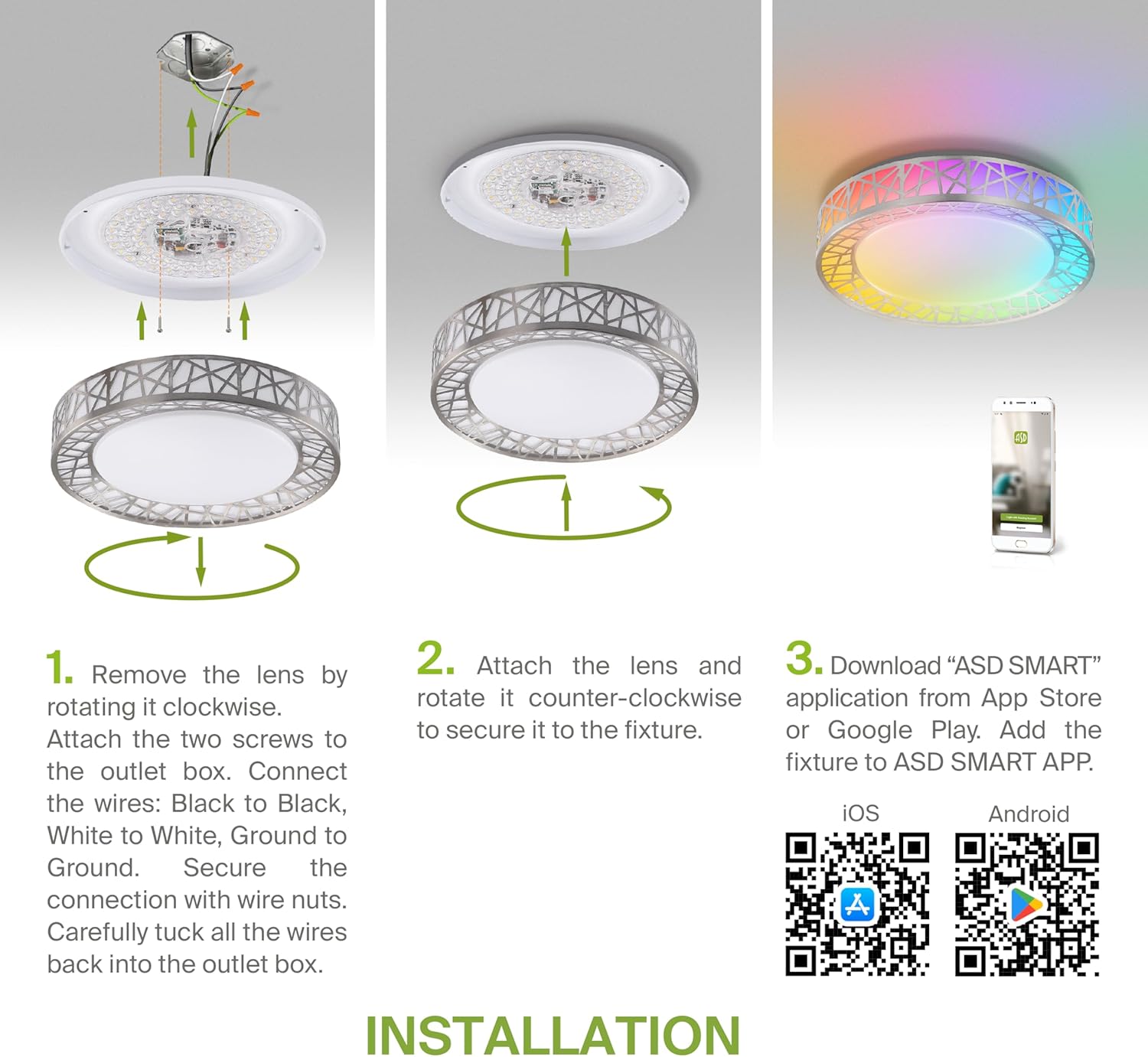
Figure 5.2: Complete installation overview including app download.
6. Awọn ilana Iṣiṣẹ
Your ASD Smart RGBW Flush Mount Ceiling Light offers multiple control methods:
6.1 Iṣakoso latọna jijin
Iṣakoso latọna jijin ti o wa ninu rẹ gba awọn iṣẹ ipilẹ laaye:
- Tan/Pa: Power the light on or off.
- Dimming: Adjust brightness levels smoothly.
- Atunse CCT: Change color temperature (e.g., from warm white to cool white).
- Àṣàyàn Àwọ̀ RGB: Cycle through or select specific RGB colors.
6.2 ASD SMART App Control
The ASD SMART app provides full control and advanced features:
- 16.7 Milionu awọn awọ: Choose any color from the full RGBW spectrum.
- Smooth Dimming & CCT: Precisely adjust brightness and color temperature (2700K-6500K).
- Lighting Patterns: Select pre-set or custom lighting scenes and effects.
- Iṣakojọpọ: Control multiple fixtures simultaneously.
- Iṣeto: Set timers for lights to turn on/off or change settings automatically.

Figure 6.1: RGBW color capabilities.

Figure 6.2: Control via remote and smart app.

Figure 6.3: Seamless dimming functionality.
6.3 Iṣakoso ohun (Alexa & Google Iranlọwọ)
The fixture is compatible with Amazon Alexa and Google Assistant for convenient voice commands:
- Ensure your ASD SMART app is linked to your Alexa or Google Home account.
- Use commands such as "Alexa, turn on the living room light" or "Hey Google, set the bedroom light to blue."

Figure 6.4: Compatibility with Alexa and Google Assistant.
7. Itọju
To ensure the longevity and optimal performance of your ceiling light:
- Ninu: Disconnect power before cleaning. Wipe the fixture with a soft, dry cloth. Do not use abrasive cleaners or solvents.
- Rirọpo Boolubu: Ohun èlò yìí ń lo ìmọ̀-ẹ̀rọ LED tí a ti ṣepọ̀, kò sì nílò àtúnṣe gílóòbù.
8. Laasigbotitusita
Ti o ba pade awọn ọran pẹlu ina aja rẹ, tọka si awọn iṣoro ti o wọpọ ati awọn ojutu wọnyi:
| Isoro | Owun to le Fa | Ojutu |
|---|
| Imọlẹ ko tan | Kò sí agbára, kò sí wáyà tí ó dẹ̀, kò sí yípadà tí ó bàjẹ́ | Check circuit breaker. Ensure all wire connections are secure. Test the wall switch. |
| Isakoṣo latọna jijin ko ṣiṣẹ | Dead battery, out of range, interference | Replace remote battery. Ensure you are within range. Remove any obstructions. |
| Ohun èlò náà kò le so mọ́ ìmọ́lẹ̀ | Incorrect Wi-Fi password, light not in pairing mode, 5GHz Wi-Fi network | Verify Wi-Fi password. Reset light to pairing mode (refer to app instructions). Ensure you are on a 2.4GHz Wi-Fi network. |
| Iṣakoso ohun ko fesi | App not linked to voice assistant, incorrect device name | Check linking in ASD SMART app and voice assistant app. Verify device name in voice assistant app. |
9. Atilẹyin ọja ati Support
ASD pese a 5-odun lopin atilẹyin ọja for this product, guaranteeing top quality and safety. The fixture is ETL certified, ensuring compliance with North American safety standards.
For technical support, warranty claims, or any questions not covered in this manual, please contact ASD customer service. Refer to the product packaging or the official ASD webojula fun alaye olubasọrọ.


