1. Ifihan
This manual provides essential information for the safe and efficient operation of the INVT GD10-0R7G-S2-B Single-Phase 230V 0.75KW VFD Frequency AC Drive. The GD10 series min-economy inverters are designed for small power OEM applications, offering advanced features such as vectorization V/F control, PID function, multi-step speed control, DC braking, and Modbus communication, all within a compact design. Please read this manual thoroughly before installation, operation, or maintenance.
2. Alaye Aabo
⚠ WARNING: Risk of electric shock.
- Read this manual completely before installing or operating the device.
- Wait at least 5 minutes after disconnecting power before proceeding with any work on the unit to allow capacitors to discharge.
⚠ WARNING: Hot surfaces.
- The surfaces of the base are hot during and after operation. Do not touch the device during operation or immediately after power-off.
Only qualified personnel should perform installation, wiring, and maintenance. Ensure all local and national electrical codes are followed.
3. Ọja Ipariview
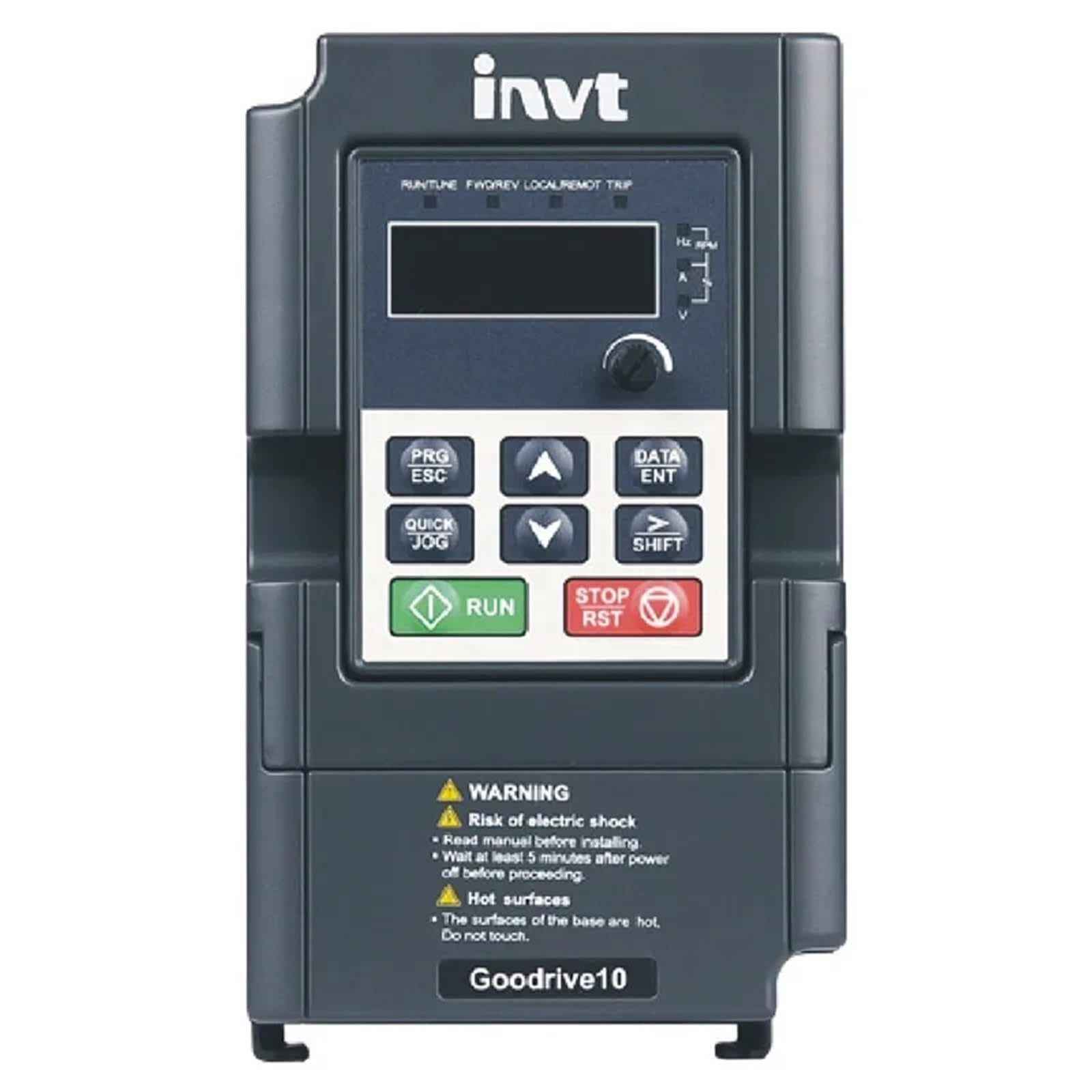
Figure 3.1: INVT GD10-0R7G-S2-B VFD Front Panel
The image displays the front panel of the INVT GD10-0R7G-S2-B VFD. It features a digital display for operational data, navigation buttons (PRG/ESC, DATA/ENT, QUICK JOG, SHIFT, UP, DOWN arrows), and dedicated RUN and STOP/RST buttons for direct control. Below the control interface, important safety warnings regarding electric shock and hot surfaces are clearly visible. The device is labeled "Goodrive10" at the bottom.
Awọn ẹya pataki:
- V/F control mode for versatile motor speed regulation.
- Natural cooling design, suitable for environments with cotton and dust, reducing maintenance needs.
- Compact, mini structure for less installation space.
- Advanced functions including vectorization V/F control, PID function, multi-step speed control, DC braking, and Modbus communication.
4. Eto ati fifi sori
Proper installation is critical for the safe and reliable operation of the VFD.
4.1. Iṣagbesori:
Mount the VFD in a vertical position on a flat, non-flammable surface, ensuring adequate ventilation. Maintain sufficient clearance around the unit for heat dissipation, especially given its natural cooling design.
4.2. Asopọmọra:
Connect the input power to the designated terminals. For the GD10-0R7G-S2-B model, ensure a single-phase 230V AC power supply. Connect the motor to the output terminals. All wiring must comply with local electrical codes and standards. Use appropriate wire gauges for the rated current.
- Iṣagbewọle Voltage: Single-phase 230V (±10%)
- Igbesiwọle Input: 50Hz or 60Hz (Allowed range: 47~63Hz)
- O wujade Voltage: Dogba si igbewọle voltage with deviation less than 5%
- Igbohunsafẹfẹ Ijade: 50Hz/60Hz (Fluctuation range: 5%)
Refer to the detailed wiring diagrams in the complete product manual for specific terminal connections and safety grounding instructions.
5. Awọn ilana Iṣiṣẹ
The VFD features an intuitive control panel for easy operation.
5.1. Control Panel Functions:
- Ifihan: Shows operational parameters such as frequency, current, voltage, and RPM.
- PRG/ESC: Enters/exits programming mode, or cancels current operation.
- DATA/ENT: Confirms parameter settings or enters data.
- ▲ (Up) / ▼ (Down): Navigates menus, adjusts parameter values.
- QUICK JOG: Initiates a quick jog operation (specific function depends on parameter settings).
- Iyipada: Shifts cursor position during parameter editing.
- Ṣiṣe: Bẹrẹ motor.
- STOP/RST: Stops the motor or resets fault conditions.
5.2. Isẹ Ipilẹ:
- Ensure the VFD is properly wired and powered on.
- The display will show the current operating status or default frequency.
- Tẹ awọn RUN button to start the motor.
- Lo awọn ▲ ati ▼ buttons to adjust the output frequency (and thus motor speed) if configured for panel control.
- Tẹ awọn STOP/RST bọtini lati da awọn motor.
For advanced settings, such as PID control, multi-step speed, or Modbus communication, refer to the detailed programming section of the full INVT GD10 series manual.
6. Itọju
Itọju deede ṣe idaniloju igbesi aye gigun ati iṣẹ aipe ti VFD rẹ.
- Ninu: Keep the VFD clean and free from dust and debris. Use a soft, dry cloth for cleaning. Do not use liquid cleaners.
- Afẹfẹ: Ensure that the ventilation openings are not obstructed to allow for proper natural cooling.
- Awọn isopọ: Periodically check all electrical connections for tightness. Loose connections can cause overheating and malfunction.
- Ayika: Operate the VFD within its specified environmental conditions (temperature, humidity, dust level).
- Ayewo: Visually inspect the unit for any signs of damage, discoloration, or unusual odors.
Always disconnect power and wait for at least 5 minutes before performing any maintenance.
7. Laasigbotitusita
If you encounter issues with your VFD, consider the following basic troubleshooting steps:
- Ko si Agbara: Check the input power supply and all circuit breakers. Ensure connections are secure.
- Mọto Ko Ṣiṣẹ: Verify that the RUN command is active. Check motor wiring and ensure the motor is not overloaded.
- Ìrìn Àjò Àpọ̀jù: Reduce the load on the motor. Check for mechanical issues with the motor or driven equipment. The VFD has an overload capability of 150% of rated current for 1 minute.
- Ariwo/ Gbigbọn Alailẹgbẹ: Check motor mounting, coupling, and VFD installation.
- Awọn aṣiṣe ifihan: If the display shows an error code, consult the comprehensive INVT GD10 series manual for specific fault code definitions and corrective actions.
If the problem persists after basic troubleshooting, contact qualified technical support. Do not attempt to repair the unit yourself.
8. Awọn pato
8.1. Rated Specifications (Single-Phase 230V GD10 Series)
| Awoṣe | Agbara Ijade (kW) | Iṣawọle lọwọlọwọ (A) | Lọwọlọwọ Ijade (A) |
|---|---|---|---|
| GD10-0R2G-S2-B | 0.2 | 4.9 | 1.6 |
| GD10-0R4G-S2-B | 0.4 | 6.5 | 2.5 |
| GD10-0R7G-S2-B | 0.75 | 9.3 | 4.2 |
| GD10-1R5G-S2-B | 1.5 | 15.7 | 7.5 |
| GD10-2R2G-S2-B | 2.2 | 24 | 11 |
8.2. Imọ ni pato
- Ipo Iṣakoso: Iṣakoso V / f
- Maximum Output Frequency: 200Hz
- Adjustable-Speed Ratio: 0.111111111
- Agbara Apọju: 150% ti iwọn lọwọlọwọ fun iṣẹju 1
- Analog Input Resolution: <=20mV
- Digital Input Resolution: <= 2ms
- Analog Input/Output: Input 0-10V or 0-20mA, Output 0-10V
8.3. Awọn pato ti ara
- Awọn iwọn idii: 1.18 x 0.79 x 0.39 inches
- Ìwọ̀n Nkan: 1.76 iwon (50 Giramu)
- Orukọ awoṣe: EFZRZYJ
- Olupese: EFZRZYJ
9. Atilẹyin ọja ati Support
For information regarding product warranty, please refer to the warranty card included with your purchase or contact the seller directly.
For technical support, troubleshooting assistance beyond this manual, or spare parts inquiries, please contact the manufacturer or your authorized distributor. Provide your product model number (GD10-0R7G-S2-B) and serial number (if applicable) when seeking support.