1. Ifihan
This manual provides essential instructions for the safe and efficient operation of your Minuteman ED10KTF Endeavor Series 10000VA Double Conversion True Sine Wave Online Uninterruptible Power Supply (UPS). The ED10KTF is designed to provide clean, stable, and reliable power protection for critical equipment, ensuring continuous operation during power fluctuations or outages.
Please read this manual thoroughly before installation and operation to ensure proper usage and to prevent damage to the unit or connected equipment. Keep this manual for future reference.
Awọn iṣọra Aabo
- Maṣe ṣii UPS casing. Ko si awọn ẹya ti olumulo-iṣẹ ninu. Tọkasi gbogbo iṣẹ si awọn oṣiṣẹ iṣẹ ti o peye.
- Ensure the UPS is connected to a grounded power outlet.
- Do not block ventilation openings. Maintain adequate clearance around the UPS for proper airflow.
- Avoid operating the UPS in environments with excessive dust, humidity, or extreme temperatures.
- Ge asopọ UPS kuro ni orisun agbara ṣaaju ṣiṣe eyikeyi itọju tabi mimọ.
2. Eto
2.1 Ṣiṣii silẹ
Carefully unpack the UPS and inspect it for any shipping damage. If any damage is found, do not install the unit and contact your dealer immediately. Retain the original packaging for future transport or storage.
2.2 Ibi
Place the UPS in a clean, dry, and well-ventilated area. Ensure the ambient temperature is within the specified operating range (typically 0°C to 40°C). Avoid direct sunlight or heat sources. Maintain at least 20 cm (8 inches) of clearance around the front, back, and sides of the unit for proper ventilation.
2.3 Awọn isopọ
- Asopọ agbara igbewọle: Connect the UPS input power cord to a dedicated, grounded electrical outlet. Ensure the voltage matches the UPS input requirements (208-240V).
- Output Device Connection: Connect your critical equipment to the output receptacles on the rear panel of the UPS. Do not overload the UPS beyond its rated capacity.
- Awọn ibudo Ibaraẹnisọrọ (Aṣayan): If applicable, connect communication cables (e.g., USB, RS-232, network card) to the appropriate ports for monitoring and management.
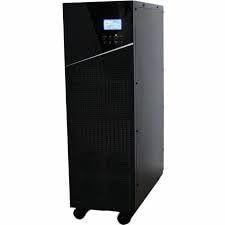
An image showing the Minuteman ED10KTF Endeavor Series 10000VA UPS, highlighting its tower design and front panel.
2.4 Ibẹrẹ Agbara-soke
After all connections are secure, press and hold the power button on the front panel for a few seconds until the UPS powers on. The LCD display will illuminate, and the UPS will perform a self-test. Allow the UPS to charge its batteries for at least 8 hours before connecting critical loads to ensure maximum runtime capability.
3. Awọn ilana Iṣiṣẹ
3.1 LCD Ifihan Loriview
The front panel LCD display provides real-time status information, including input/output voltage, battery level, load percentage, operating mode, and alarm conditions. Use the navigation buttons (if present) to cycle through different display screens and access settings.
3.2 Agbara Tan / Pa
- Lati Fi agbara: Press and hold the power button until the LCD display illuminates and the UPS starts.
- Lati Paarẹ: Press and hold the power button until the UPS shuts down. Ensure all connected equipment is safely powered off before shutting down the UPS.
3.3 Operating Modes and Indicators
The ED10KTF operates in Double Conversion Online mode, providing continuous, clean sine wave power. The LCD will indicate the current operating status, such as:
- Ipo deede: UPS is operating from utility power, charging batteries, and providing conditioned power to loads.
- Ipo Batiri: UPS is operating from battery power due to utility power failure. An audible alarm will typically sound.
- Ipo Fori: UPS is supplying utility power directly to the load, bypassing the inverter. This can occur during maintenance or internal fault conditions.
- Fault/Alarm: Indicates an internal issue or an abnormal operating condition. Refer to the troubleshooting section.
3.4 Key Awọn ẹya ara ẹrọ
- Double Conversion True Sine Wave Output: Provides the highest level of power protection by continuously converting AC to DC and then back to AC, isolating connected equipment from utility power disturbances and delivering a pure sine wave output.
- Asiko to gbooro: Offers significant backup time, typically 3 minutes at full load (9000W) and 9 minutes at half load (4500W), to allow for graceful shutdown or generator startup.
- Automatic Internal and Independent Battery Bypass: Ensures uninterrupted power to connected devices even during UPS maintenance or internal failures by automatically switching to bypass mode.
4. Itọju
4.1 Battery Care and Replacement
The UPS batteries are designed for a specific lifespan. Factors like ambient temperature and discharge frequency can affect battery life. It is recommended to perform a battery self-test periodically (if available via LCD or software) to assess battery health. When batteries reach the end of their service life, they should be replaced by qualified personnel. Always use genuine replacement batteries specified by the manufacturer.
4.2 Ninu
Ensure the UPS is powered off and disconnected from the AC input before cleaning. Use a soft, dry cloth to wipe the exterior of the unit. Do not use liquid or aerosol cleaners, as they may contain flammable substances or cause electrical shock.
4.3 Ayika riro
Operating the UPS within its specified temperature and humidity ranges will prolong its lifespan and ensure optimal performance. Avoid exposing the unit to direct sunlight, excessive heat, or moisture.
5. Laasigbotitusita
This section provides solutions to common issues you may encounter with your UPS. If the problem persists after attempting these solutions, contact technical support.
| Isoro | Owun to le Fa | Ojutu |
|---|---|---|
| UPS ko ni tan | No AC input power; Battery discharged; Power button not held long enough. | Check AC power cord connection and wall outlet; Allow UPS to charge for several hours; Press and hold power button for 3-5 seconds. |
| UPS beeps continuously in Normal Mode | Overload condition; Internal fault. | Reduce connected load; Check LCD for specific error codes and consult manual or support. |
| Akoko afẹyinti kukuru | Batteries not fully charged; Batteries nearing end of life; Overload. | Allow batteries to charge for 8+ hours; Consider battery replacement; Reduce connected load. |
| UPS is in Bypass Mode | Overload; Internal fault; Manual bypass activated. | Reduce load; Check LCD for fault codes; Ensure manual bypass switch (if present) is in the correct position. |
6. Awọn pato
- Awoṣe: ED10KTF
- Agbara: 10000VA / 9000W
- Iṣagbewọle Voltage: 208-240V AC
- O wujade Voltage: 208-240V AC (True Sine Wave)
- Topology: Double Ìyípadà Online
- Runtime (Full Load): 3 minutes (9000W)
- Runtime (Half Load): 9 minutes (4500W)
- Okunfa Fọọmu: Ile-iṣọ
- Ifihan: LCD
- Fori: Automatic Internal and Independent Battery Bypass
- Olupese: Minuteman
7. Atilẹyin ọja ati Support
7.1 atilẹyin ọja Alaye
This Minuteman UPS product is covered by a limited warranty. Please refer to the warranty card included with your product or visit the manufacturer's official webAaye fun alaye ofin ati ipo. Jeki ẹri rira rẹ fun awọn iṣeduro atilẹyin ọja.
7.2 Imọ Support
For technical assistance, troubleshooting beyond this manual, or warranty service, please contact Minuteman customer support. Have your model number (ED10KTF) and serial number ready when contacting support.
Contact information (example - please refer to your product documentation for actual contact details):
- Webojula: www.minutemanups.com
- Foonu: Tọkasi si website for regional support numbers
- Imeeli: Tọkasi si website for support email address


