1. Ifihan
This manual provides detailed instructions for the installation, operation, and maintenance of your EDISION CAM-100 Broadband TV Antenna Amplifier. The CAM-100 is designed to enhance Digital Terrestrial Television (DVB-T/T2) signals, featuring adjustable gain and integrated 5G LTE protection to ensure optimal reception quality.
2. Awọn ilana aabo
Please read these safety instructions carefully before installing or operating the device. Failure to follow these instructions may result in electric shock, fire, or damage to the product.
- Rii daju pe ipese agbara voltage ibaamu awọn ibeere pato lori ẹrọ.
- Ma ṣe fi ẹrọ naa han si ojo, ọrinrin, tabi awọn iwọn otutu to gaju.
- Yago fun gbigbe ẹrọ naa si nitosi awọn orisun ooru tabi ni imọlẹ orun taara.
- Ma ṣe ṣi ẹrọ naa casing. Tọkasi gbogbo iṣẹ si oṣiṣẹ oṣiṣẹ.
- Disconnect the power supply before making any connections or disconnections.
3. Package Awọn akoonu
Jẹrisi pe gbogbo awọn ohun kan wa ninu package:
- Ẹ̀rọ Atẹ́gùn CAM-100 Ampitanna
- Quick Bẹrẹ Itọsọna
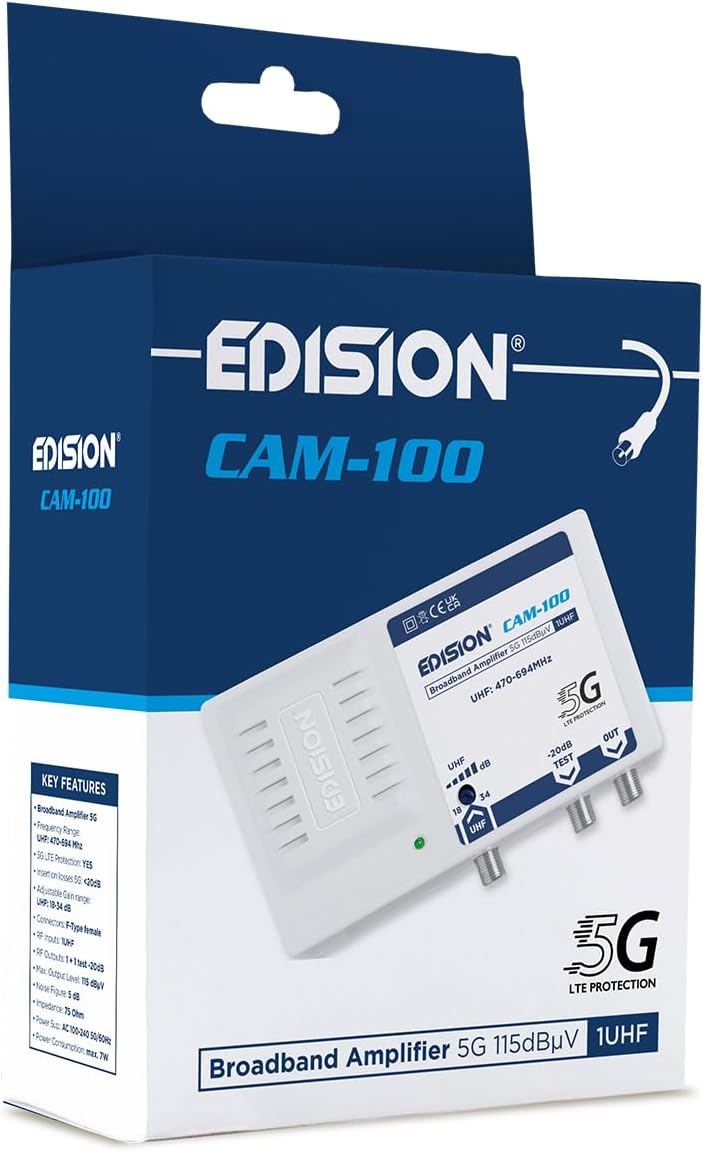
The EDISION CAM-100 amplifier presented in its retail box, showcasing the product branding and key features listed on the packaging.
4. Ọja Ipariview
The EDISION CAM-100 is a compact broadband amplifier designed for UHF signals. It features adjustable gain and a built-in 5G LTE filter.

The EDISION CAM-100 broadband amplifier, shown with its power plug, features a single UHF input, adjustable gain from 18-34dB, and two output ports (one main, one -20dB test port). It includes 5G LTE protection and operates within the UHF 470-694MHz frequency range.

Iwaju ti o sunmọ view of the EDISION CAM-100, clearly displaying the UHF input, the adjustable gain knob, the -20dB test output, and the main output port. The 5G LTE PROTECTION label is also visible.

The rear side of the EDISION CAM-100 amplifier, featuring keyhole slots for wall mounting, indicating easy installation.
5. Eto ati fifi sori
Follow these steps to properly install your EDISION CAM-100 ampolutọpa:
- Iṣagbesori: Choose a suitable indoor location for the amplifier, away from direct heat or moisture. Use the keyhole slots on the back of the unit to securely mount it to a wall or flat surface.
- Asopọmọra Antenna: Connect your outdoor UHF antenna cable to the UHF IN ibudo lori awọn amplifier. Rii daju pe asopọ wa ni aabo.
- TV Connections: Connect your television(s) to the Jade port(s) of the amplifier using coaxial cables. The main output provides the amplified signal. There is also a -20dB TEST port for signal measurement or connecting a single device with reduced signal.
- Asopọ agbara: Pulọọgi awọn amplifier's power cord into a standard AC 100-240V, 50/60Hz electrical outlet. The power indicator LED on the front of the unit should illuminate.
- Ṣatunṣe Ere: Turn the adjustable gain knob (labeled UHF dB) to set the desired amplification level. Start with a lower setting and gradually increase it until optimal signal quality is achieved on your television.

An illustrative diagram demonstrating a typical installation scenario for the EDISION CAM-100. It shows an outdoor UHF antenna connected to the amplifier, which then distributes the signal to multiple televisions indoors, including connections for a test point.
6. Awọn ilana Iṣiṣẹ
Once installed, the EDISION CAM-100 operates continuously when powered. The primary operational adjustment is the gain control.
- Atọka Agbara: A green LED on the front panel indicates that the amplifier is receiving power and is operational.
- Atunse Gba: Use the rotary knob to adjust the UHF signal gain between 18dB and 34dB. Adjust this setting while monitoring your TV's signal quality meter (if available) or picture quality. The goal is to achieve a strong, stable signal without over-amplification, which can cause distortion.
- Ijade Idanwo: The -20dB TEST output provides a reduced signal level, useful for connecting a single TV or for signal strength measurements without affecting the main output.
7. Itọju
The EDISION CAM-100 requires minimal maintenance to ensure long-term performance.
- Ninu: Máa fi aṣọ gbígbẹ tó rọ, tó sì rọ̀ mọ́ òde ẹ̀rọ náà lẹ́ẹ̀kọ̀ọ̀kan. Má ṣe lo àwọn ohun èlò ìfọmọ́ omi tàbí àwọn ohun èlò ìpara.
- Afẹfẹ: Ensure that the ventilation slots on the device are not obstructed to prevent overheating.
- Awọn isopọ: Lẹ́ẹ̀kọ̀ọ̀kan, ṣàyẹ̀wò gbogbo àwọn ìsopọ̀ okùn láti rí i dájú pé wọ́n wà ní ààbò àti pé wọn kò ní ìbàjẹ́.
8. Laasigbotitusita
If you experience issues with your EDISION CAM-100, refer to the following common problems and solutions:
| Isoro | Owun to le Fa | Ojutu |
|---|---|---|
| Ko si ina Atọka agbara | Ko si agbara si ẹrọ naa | Check power cord connection and wall outlet. Ensure the outlet is live. |
| No signal or weak signal on TV |
|
|
| Distorted picture or sound | Signal over-amplification or interference | Reduce the gain setting. Ensure the 5G LTE filter is effective; if interference persists, check for external sources. |
9. Imọ ni pato
| Ẹya ara ẹrọ | Sipesifikesonu |
|---|---|
| Awoṣe | CAM-100 (26-01-0403) |
| Iwọn Igbohunsafẹfẹ | UHF 470-694MHz |
| Iṣawọle | 1 UHF |
| Awọn abajade | 1 Main Output, 1 Test Output (-20dB) |
| Ere adijositabulu | 18-34 dB (UHF) |
| O pọju. Ipele Ijade | 115 dBµV |
| Àlẹmọ | 5G LTE Idaabobo |
| Ibi ti ina elekitiriki ti nwa | AC 100-240V, 50/60Hz |
| Awọn iwọn | 11 x 14 x 5 cm |
| Iwọn | 270 g |
| Awọn ẹrọ ibaramu | TV antenna, Televisions |
10. atilẹyin ọja Information
EDISION products are covered by a standard manufacturer's warranty against defects in materials and workmanship. Please refer to the warranty card included with your product or visit the official Edision webAaye fun alaye atilẹyin ọja ofin ati ipo. Jeki ẹri rira rẹ fun awọn iṣeduro atilẹyin ọja.
11. Atilẹyin
Fun iranlọwọ siwaju, atilẹyin imọ-ẹrọ, tabi si view additional products, please visit the official Edision store or contact customer service:
- Edision Store: Visit the Edision Store on Amazon
- Iṣẹ onibara: Refer to the contact information provided in your Quick Start Guide or on the official Edision webojula.


