Ọrọ Iṣaaju
This user manual provides detailed instructions for the FJFJOPK 4K Video Camera Camcorder, Model HDV-3051L. Please read this manual thoroughly before operating the device to ensure proper usage and to maximize its performance. Keep this manual for future reference.

Figure 1: FJFJOPK 4K Video Camera Camcorder with included accessories like external microphone, handheld stabilizer, and remote control.
Package Awọn akoonu
Daju pe gbogbo awọn ohun ti a ṣe akojọ rẹ si isalẹ wa ninu package rẹ. Ti awọn ohun kan ba nsọnu tabi bajẹ, jọwọ kan si atilẹyin alabara.
- Kamẹra Fidio 4K
- Amuduro Amusowo
- Isakoṣo latọna jijin
- Gbohungbohun
- Hood lẹnsi
- 32GB SD kaadi
- 2 x Awọn batiri gbigba agbara
- Ngba agbara USB
- Itọsọna olumulo
- Apo kamẹra
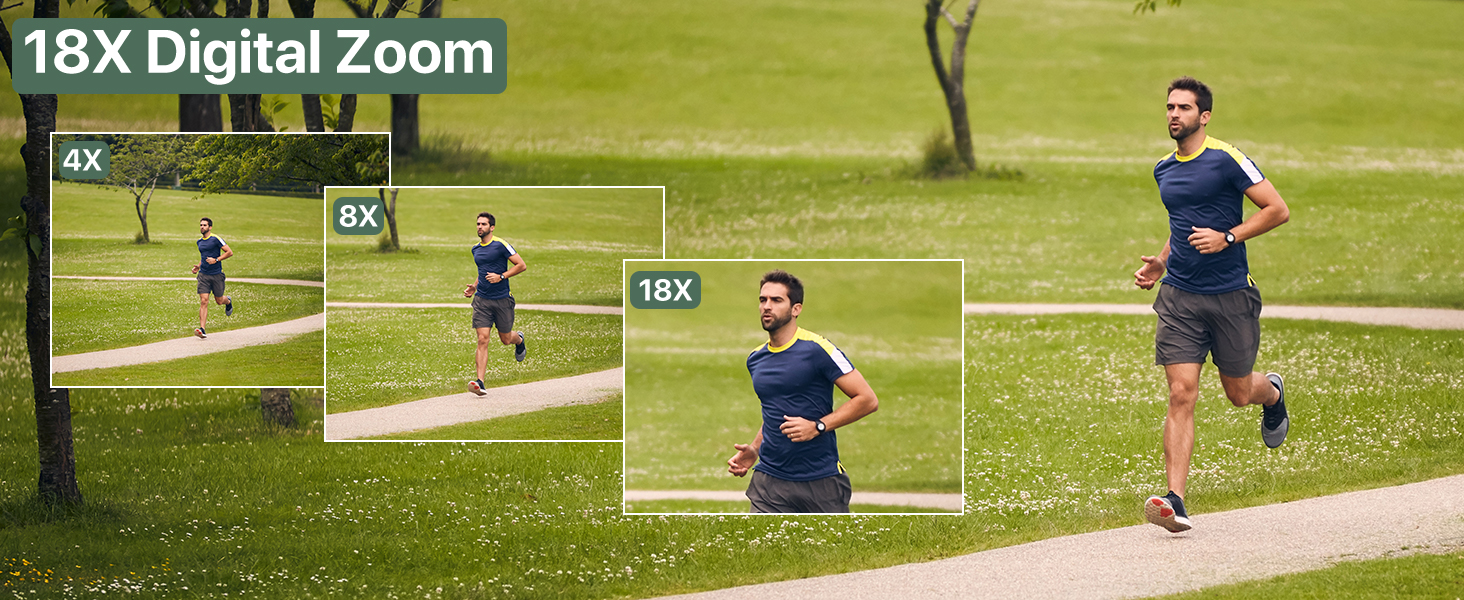
Figure 2: Visual representation of the complete packing list for the camcorder.
Eto Itọsọna
1. Fifi sori batiri
The camcorder uses two long-lasting rechargeable batteries. Ensure batteries are fully charged before first use.
- Wa yara batiri lori kamera kamẹra.
- Ṣii ideri iyẹwu batiri naa.
- Insert the charged batteries according to the polarity indicators inside the compartment.
- Pa ideri batiri naa ni aabo.

Figure 3: Proper insertion of batteries into the camcorder.
2. Fifi sori Kaadi SD
A 32GB SD card is included for immediate use. The camcorder supports SD cards for storing your videos and photos.
- Wa iho kaadi SD, ni deede nitosi yara batiri naa.
- Fi kaadi SD sii pẹlu awọn olubasọrọ irin ti o kọju si isalẹ titi ti yoo fi tẹ sinu ipo rẹ.
- To remove, gently press the card until it pops out.
3. Asopọmọra Awọn ẹya ẹrọ
Enhance your recording experience by attaching the included accessories.
- External Stereo Microphone: Attach the microphone to the hot shoe mount on top of the camcorder. Connect the microphone cable to the designated audio input port. This ensures clear audio capture.
- Handheld Stabilizer: The anti-shake handheld stabilizer can be attached to the bottom tripod mount of the camcorder. This accessory helps in achieving smooth and steady shots, especially during movement.
- Hood lẹnsi: Screw the lens hood onto the front of the camcorder's lens. The lens hood is designed to reduce glare and lens flare, improving image quality in bright outdoor conditions.

Figure 4: Handheld stabilizer attached for improved stability.

Figure 5: External microphone for enhanced audio recording.

Figure 6: The lens hood reduces glare for clearer outdoor shots.
Awọn ilana Iṣiṣẹ
1. Agbara lori / Paa
To power on the camcorder, open the LCD screen. To power off, close the LCD screen or press and hold the Power button.
2. Using the 3.0-inch Touch Screen
The camcorder features a 3.0-inch IPS touch screen that is 270° rotatable, allowing for versatile viewing angles, including selfie-angle recording.
- Lilọ kiri: Tap on-screen icons to navigate menus and settings.
- Yiyi: Gently rotate the screen to your desired angle for comfortable viewing or self-recording.

Figure 7: The 270° rotatable touch screen provides flexible viewawọn aṣayan ing ati gbigbasilẹ.
3. Gbigbasilẹ Awọn fidio ati Yaworan Awọn fọto
The camcorder supports 4K Ultra HD video recording and 64MP still image capture.
- Gbigbasilẹ fidio: Press the Record button to start and stop video recording. The camcorder captures every detail with stunning clarity.
- Yiya fọto: Switch to photo mode and press the Shutter button to take 64MP high-definition photos.
- 18X Sisun oni-nọmba: Use the zoom controls to magnify your subject up to 18 times. This feature allows for clear footage even from a distance.
- Iran Iran Night Activate IR Night Vision mode for clear recording in low-light conditions or complete darkness.

Figure 8: Experience superior image and video quality with 4K UHD and 64MP resolution.

Figure 9: The 18X digital zoom allows for detailed capture of distant subjects.

Figure 10: IR Night Vision provides clear visibility in low-light or dark environments.
4. Awọn ẹya ara ẹrọ ti ilọsiwaju
- Anti-Shake: The built-in anti-shake function, complemented by the handheld stabilizer, ensures smooth and stable footage even during dynamic movements.
- Fọtoyiya-Laipe: Capture stunning time-lapse videos by setting the desired interval in the camera settings.
- Ṣiṣawari Oju: The camcorder can detect faces in the frame, optimizing focus and exposure for portraits and group shots.
- One-Click Live Streaming: So kamẹra kamẹra pọ mọ kọmputa rẹ nipasẹ USB lati lo o bi webcam for live streaming.
- Gbigbasilẹ Lakoko Ngba agbara: The camcorder supports recording while connected to a power source, ideal for extended shooting sessions.
- Iṣakoso Latọna jijin Alailowaya: Use the included remote control for convenient wireless operation, perfect for self-recording or group shots.

Figure 11: Explore various shooting modes including anti-shake, slow motion, and time-lapse.

Figure 12: Continuous recording is possible while the camcorder is charging.
Itoju
- Ninu: Lo asọ ti o rọ, ti o gbẹ lati nu ara kamẹra mọ. Fun lẹnsi naa, lo asọ mimọ lẹnsi pataki ati ojutu. Yago fun awọn ohun elo abrasive.
- Ibi ipamọ: Store the camcorder in a cool, dry place away from direct sunlight and extreme temperatures. Remove batteries if storing for extended periods.
- Itọju Batiri: Fully charge batteries before storage and recharge them every few months to maintain their lifespan.
Laasigbotitusita
If you encounter issues with your camcorder, refer to the following common solutions:
| Isoro | Owun to le Fa | Ojutu |
|---|---|---|
| Kamẹra ko ṣiṣẹ. | Low or uncharged battery; incorrectly inserted battery. | Charge batteries fully. Ensure batteries are inserted correctly. |
| Aworan ti ko dara / didara fidio. | Idọti lẹnsi; ina ti ko to; eto ti ko tọ. | Clean the lens. Use IR Night Vision in low light. Adjust exposure settings. |
| Aṣiṣe kaadi SD. | SD card full; incorrectly inserted; incompatible card. | Paarẹ files or use a new SD card. Reinsert card correctly. Ensure card is compatible (up to 32GB). |
| No audio recording. | External microphone not connected properly or turned off. | Check microphone connection and ensure it is powered on if applicable. |
Awọn pato
| Ẹya ara ẹrọ | Ẹ̀kúnrẹ́rẹ́ |
|---|---|
| Brand | FJFJOPK |
| Nọmba awoṣe | HDV-3051L |
| Ipinnu Yaworan fidio | 4K |
| Fọto sensọ Technology | CMOS |
| Ipari Ifojusi ti o pọju | 64 millimeters |
| O pọju Iho | 7.36 f |
| Flash Memory Iru | SD (32GB pẹlu) |
| Fidio Yaworan kika | AVI |
| Iwon iboju | 3 Inches (270° Rotatable IPS Touch Screen) |
| Pataki Awọn ẹya ara ẹrọ | Anti-Shake, Image Stabilization, IR Night Vision, 18X Digital Zoom, External Microphone Support, Webcam Function, Time-Lapse, Face Detection, Recording While Charging, Wireless Remote Control |
| Iwọn Nkan | 2.05 iwon |
| Package Mefa | 7.48 x 5.87 x 4.21 inches |
Atilẹyin ọja ati Support
For warranty information and customer support, please refer to the warranty card included in your package or contact FJFJOPK customer service directly. Optional protection plans are available for purchase to extend coverage beyond the standard manufacturer's warranty.
- Eto Idaabobo Ọdun 2: Wa fun o gbooro sii agbegbe.
- Eto Idaabobo Ọdun 3: Wa fun o gbooro sii agbegbe.
- Idaabobo pipe: Eto oṣooṣu ibora ti o yẹ ti o kọja ati awọn rira iwaju.


