1. Ifihan
O ṣeun fun riraasing the IRRADIO IR-M5 Classic Portable Speaker. This manual provides essential information for the safe and efficient operation of your device. Please read it thoroughly before use and keep it for future reference.
2. Alaye Aabo
- Ma ṣe fi agbọrọsọ si awọn iwọn otutu to gaju tabi imọlẹ orun taara fun awọn akoko gigun.
- Yago fun sisọ tabi tẹriba agbọrọsọ si awọn ipa to lagbara.
- Do not disassemble, repair, or modify the device yourself. Refer to qualified service personnel.
- Jeki agbohunsoke kuro lati awọn ẹrọ iṣoogun, nitori o ni awọn oofa ninu.
- Rii daju pe ibudo gbigba agbara ti gbẹ ṣaaju asopọ okun gbigba agbara.
- This device is IPX7 water-resistant, meaning it can be submerged in up to 1 meter of water for 30 minutes. Do not intentionally submerge it for longer periods or deeper than specified.
3. Package Awọn akoonu
Jọwọ ṣayẹwo package fun awọn nkan wọnyi:
- IRRADIO IR-M5 Classic Portable Speaker
- Okun Ngba agbara USB
- Itọsọna olumulo
4. Ọja Ipariview
Mọ ararẹ pẹlu awọn paati ati awọn idari ti agbọrọsọ.

olusin 4.1: Iwaju view of the IRRADIO IR-M5 Classic speaker, showing the speaker grille, IRRADIO logo, and RGB LED light bar.
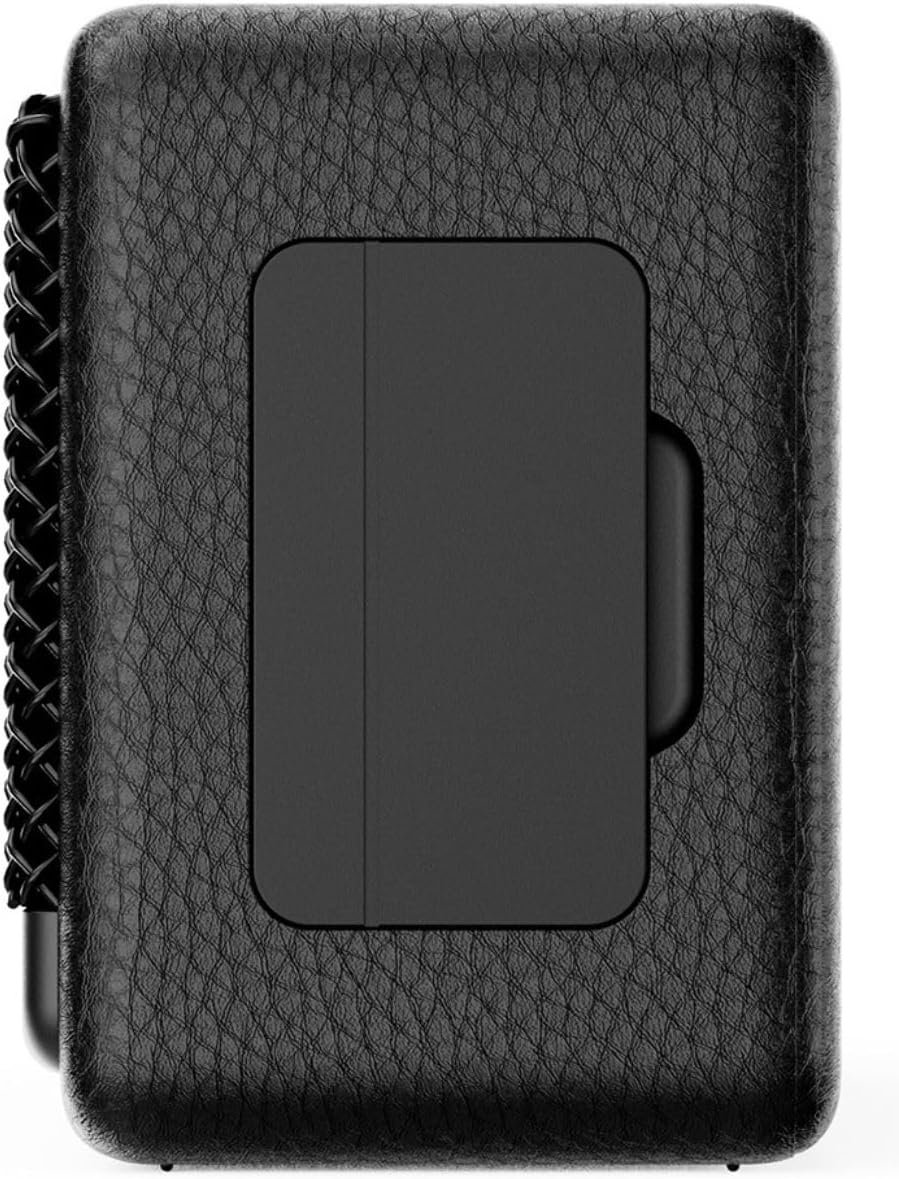
olusin 4.2: Pada view of the IRRADIO IR-M5 Classic speaker, highlighting the passive subwoofer panel.

olusin 4.3: Apa view of the IRRADIO IR-M5 Classic speaker, showing the integrated strap for portability.
Awọn iṣakoso ati awọn ibudo:
- Bọtini agbara: Tẹ mọlẹ lati tan/pa a.
- Iwọn didun Up/Orin atẹle: Tẹ kukuru fun iwọn didun soke, tẹ gun fun orin atẹle.
- Iwọn didun isalẹ/Orin ti tẹlẹ: Tẹ kukuru fun iwọn didun isalẹ, gun tẹ fun orin iṣaaju.
- Ṣiṣẹ/Duro/Bọtini ipe: Press to play/pause music or answer/end calls.
- Bọtini Ipo (M): Press to switch between Bluetooth and USB playback modes.
- RGB LED Button: Press to cycle through RGB lighting modes or turn off the lights.
- Ibudo Ngba agbara USB-C: Fun gbigba agbara si agbọrọsọ.
- Ibudo USB-A: For external USB music playback.
- AUX Input (3.5mm Mini Jack): Fun asopọ ohun afetigbọ.
5. Eto
5.1 Gbigba agbara si Agbọrọsọ
Before first use, fully charge the speaker. Connect the provided USB charging cable to the USB-C port on the speaker and the other end to a compatible USB power adapter (not included).
- Atọka LED yoo fihan ipo gbigba agbara.
- Gbigba agbara ni kikun gba to wakati mẹta.
5.2 Agbara Tan / Pa
- Lati tan-an, tẹ mọlẹ Bọtini Agbara titi ti o fi gbọ ohun ti o gbọ.
- Lati pa agbara, tẹ mọlẹ Bọtini Agbara lẹẹkansii titi ti agbọrọsọ yoo ti ku.
5.3 Sisopọ Bluetooth
- Tan agbohunsoke. Yoo tẹ ipo sisopọ pọ si Bluetooth laifọwọyi, tọka nipasẹ LED didan.
- Lori ẹrọ rẹ (foonuiyara, tabulẹti, kọǹpútà alágbèéká), mu Bluetooth ṣiṣẹ ki o wa awọn ẹrọ to wa.
- Select "IR-M5 Classic" from the list of devices.
- Once paired, the LED indicator will stop flashing and remain solid. You are now ready to play music.
6. Awọn ilana Iṣiṣẹ
6.1 Sisisẹsẹhin Orin
- Ipo Bluetooth: After successful pairing, play music from your connected device.
- Sisisẹsẹhin USB: Insert a USB drive with MP3/WAV files into the USB-A port. The speaker will automatically switch to USB mode and begin playback. Use the Mode button to switch if necessary.
- Ipo AUX: Connect an audio device using a 3.5mm AUX cable to the AUX input. The speaker will automatically switch to AUX mode.
6.2 Iṣakoso iwọn didun
- Press the Volume Up (+) button to increase volume.
- Press the Volume Down (-) button to decrease volume.
6.3 Lilọ kiri Orin
- Long press the Volume Up (+) button for the next track.
- Long press the Volume Down (-) button for the previous track.
6.4 Otitọ Alailowaya Sitẹrio (TWS) iṣẹ
To pair two IR-M5 Classic speakers for a stereo experience:
- Rii daju pe awọn agbohunsoke mejeeji wa ni titan ati pe ko sopọ si eyikeyi ẹrọ Bluetooth.
- Lori agbọrọsọ kan, tẹ bọtini Play/Sinmi ni ilopo. Yoo tẹ ipo sisopọ TWS sii.
- The speakers will automatically connect to each other. You will hear a confirmation sound.
- Once TWS paired, connect your device to one of the speakers via Bluetooth as described in section 5.3. Both speakers will now play in stereo.
6.5 RGB LED ina
Press the RGB LED button to cycle through different lighting modes or to turn the lights off.
7. Itọju
- Sọ agbọrọsọ mọ pẹlu asọ asọ ti o gbẹ. Ma ṣe lo abrasive ose tabi epo.
- Tọju agbohunsoke ni itura, ibi gbigbẹ nigbati o ko ba lo.
- If the speaker will not be used for an extended period, charge it every 3 months to maintain battery health.
8. Laasigbotitusita
| Isoro | Owun to le Fa | Ojutu |
|---|---|---|
| Agbọrọsọ ko ni tan. | Batiri kekere. | Gba agbara si agbọrọsọ ni kikun. |
| Ko le so pọ nipasẹ Bluetooth. | Agbọrọsọ ko si ni ipo sisopọ tabi ti sopọ tẹlẹ si ẹrọ miiran. | Ensure speaker is in pairing mode. Disconnect from other devices. Restart speaker and device. |
| Ko si ohun. | Iwọn ti o kere ju; Ipo titẹ sii ti ko tọ; ẹrọ ko dun. | Increase volume. Check input mode (Bluetooth/USB/AUX). Ensure source device is playing. |
| TWS sisopọ kuna. | Speakers are already connected to a device or each other. | Ensure both speakers are disconnected from all devices before initiating TWS pairing. |
9. Awọn pato
| Ẹya ara ẹrọ | Ẹ̀kúnrẹ́rẹ́ |
|---|---|
| Orukọ awoṣe | IR-M5 Alailẹgbẹ |
| Brand | IRRADIO |
| Agbara Ijade | 20W (Rated), 28W (Music) |
| Awọn awakọ | 2 x 50mm Full-Range, 1 x Passive Subwoofer |
| Idahun Igbohunsafẹfẹ | 85Hz - 20kHz |
| Ẹya Bluetooth | 5.4 |
| Alailowaya Ibiti | Titi di awọn mita 10 (laisi idilọwọ) |
| Agbara Batiri | 2000mAh (3.7V, 7.4 Wh) |
| Akoko Sisisẹsẹhin | Isunmọ. Awọn wakati 8 (ni iwọn 50%) |
| Akoko gbigba agbara | Isunmọ. wakati meji 3.5 |
| Omi Resistance | IPX7 |
| Awọn iwọn (L x W x H) | 17.4 x 8 x 5.3 cm (6.8 x 3.15 x 2.1 inches) |
| Iwọn | 506 giramu (0.506 kg) |
| Awọn ọna kika Audio atilẹyin | MP3, WAV |
10. Atilẹyin ọja ati Support
This product comes with a standard manufacturer's warranty. For detailed warranty terms and conditions, please refer to the warranty card included in your package or contact your local distributor. For technical support or service inquiries, please visit the official IRRADIO webojula tabi kan si wọn onibara iṣẹ.
Àkíyèsí: Àwọn ìlànà àti ìṣètò ọjà lè yípadà láìsí ìkìlọ̀ fún àtúnṣe.


