
1. Ifihan
The TrolMaster DSC-2 CO2 Control Device Module is an essential component for advanced environmental control systems, specifically designed to integrate with the Hydro-X system. This module enables precise management of CO2 supplementation and exhaust systems in controlled environments such as greenhouses and grow rooms. It is engineered to handle CO2 devices rated up to 10 amps at 230 volts, ensuring reliable and efficient operation.
The DSC-2 functions as a dedicated device station, providing a user-friendly interface for straightforward connection and control of standard CO2 equipment. Its robust design and seamless compatibility make it a versatile solution for maintaining optimal CO2 levels for plant growth.
2. Alaye Aabo
Please read all safety instructions carefully before installing or operating the DSC-2 module. Failure to follow these instructions may result in electric shock, fire, or other hazards.
- Aabo Itanna: Ensure the power supply matches the module's requirements (230V). Always disconnect power before making any connections or performing maintenance. Only qualified personnel should perform electrical installations.
- CO2 Safety: Carbon dioxide (CO2) can be dangerous in high concentrations. Ensure adequate ventilation in the controlled environment. Use CO2 sensors and alarms as part of your overall safety plan.
- Ayika fifi sori ẹrọ: Install the module in a dry, well-ventilated area, away from direct sunlight, high temperatures, and corrosive substances.
- Lilo ti a pinnu: This device is designed for controlling CO2 equipment in horticultural environments. Do not use it for purposes other than its intended use.
- Awọn ọmọde ati awọn ohun ọsin: Jeki ẹrọ naa kuro ni arọwọto awọn ọmọde ati awọn ohun ọsin.
3. Ọja Ipariview
The DSC-2 module is a compact and robust device designed for seamless integration into your Hydro-X environmental control system. It provides a dedicated output for managing CO2 devices.
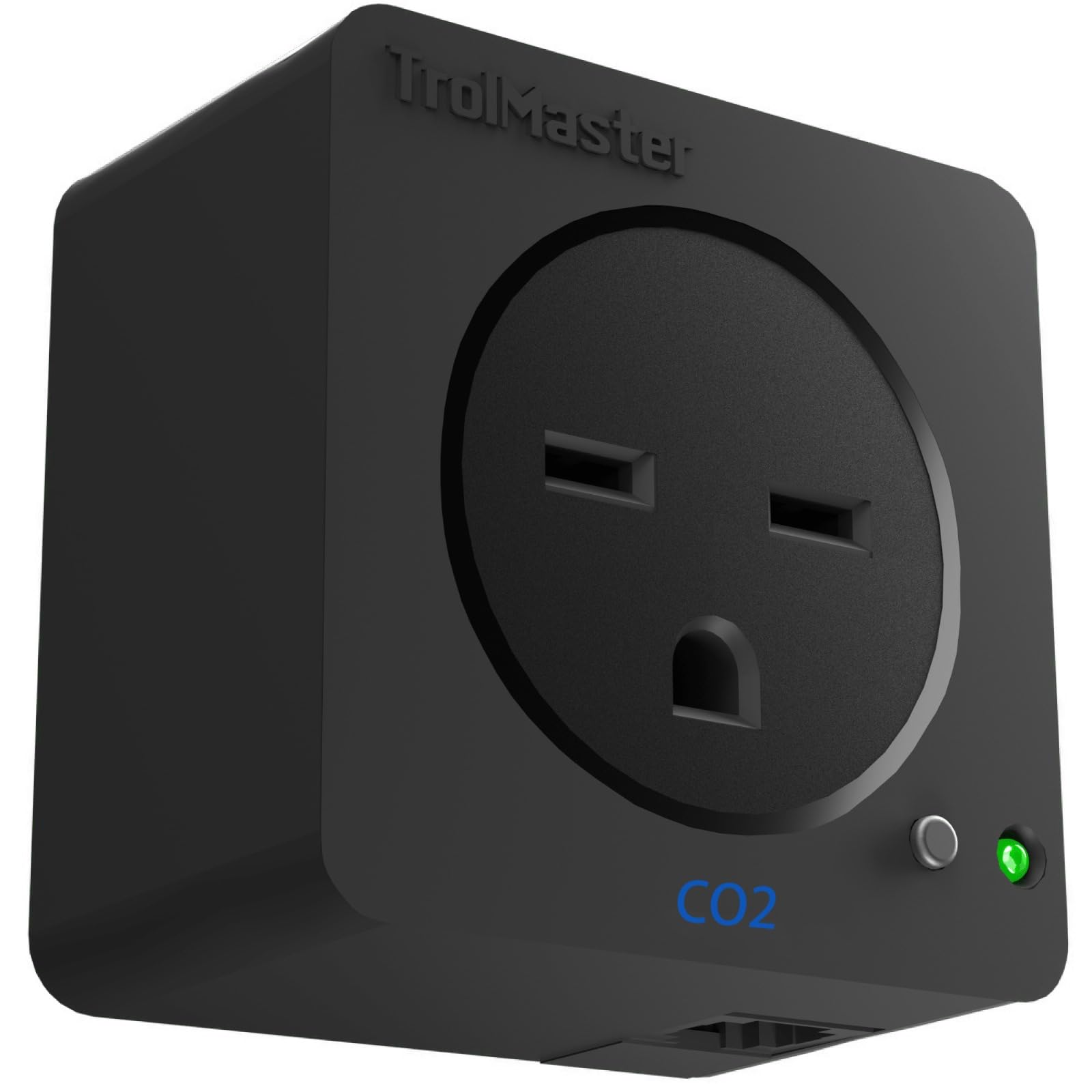
Nọmba 3.1: Iwaju view of the TrolMaster DSC-2 CO2 Control Device Module. This image shows the compact black rectangular unit with connection ports.
3.1 Package Awọn akoonu
- TrolMaster DSC-2 CO2 Control Device Module
- Iṣagbesori Hardware
- Afowoyi Olumulo (iwe-ipamọ yii)
3.2 Key Awọn ẹya ara ẹrọ
- Ibamu: Seamlessly connects with the TrolMaster Hydro-X system.
- Agbara Agbara: Supports CO2 devices up to 10 amps ni 230 folti.
- Dedicated Control: Functions as a dedicated device station for CO2 supplementation or exhaust.
- Ibarapọ Rọrun: User-friendly design for connecting standard CO2 equipment.
4. Eto ati fifi sori
Proper installation is crucial for the optimal performance and safety of your DSC-2 module. Follow these steps carefully.
4.1 Fifi sori ẹrọ Modulu naa
- Select a suitable location for mounting the DSC-2 module. Ensure it is within reach of your Hydro-X system and the CO2 device you intend to control.
- Use the provided mounting hardware to securely attach the module to a wall or other stable surface. Ensure the module is mounted vertically to allow for proper ventilation and cable management.
4.2 Connecting to the Hydro-X System
- Ensure your Hydro-X system is powered off before making any connections.
- Connect the DSC-2 module to an available device port on your Hydro-X controller using a TrolMaster control cable (sold separately, if not included with Hydro-X).
- Once connected, power on your Hydro-X system. The DSC-2 module should be automatically detected by the Hydro-X controller. Refer to your Hydro-X manual for device detection and configuration.

Nọmba 4.1: Pariview of TrolMaster control systems, including the Hydro-X. This image illustrates how the DSC-2 integrates into a larger environmental control setup.
4.3 Connecting CO2 Devices
- Ensure the CO2 device (e.g., CO2 generator, regulator, exhaust fan) is powered off.
- Plug the power cord of your CO2 device into the designated outlet on the DSC-2 module.
- Verify that the CO2 device's power requirements do not exceed the DSC-2's capacity (10 amps, 230 volts).
5. Awọn ilana Iṣiṣẹ
The DSC-2 module operates in conjunction with your TrolMaster Hydro-X controller. All control parameters and scheduling for CO2 supplementation or exhaust are managed through the Hydro-X system's interface.
5.1 Initial Configuration (via Hydro-X)
- Access the device settings on your Hydro-X controller.
- Locate the DSC-2 module in the list of detected devices.
- Configure the DSC-2 as either a CO2 supplementation device or a CO2 exhaust control, depending on your setup.
- Set your desired CO2 levels, operating schedules, and any associated sensor inputs (e.g., CO2 sensor, light sensor) within the Hydro-X system.
The DSC-2 module will then automatically activate or deactivate the connected CO2 device based on the parameters you have set in the Hydro-X controller. The operation mode is automatic, responding to the environmental conditions and programmed settings.
6. Itọju
The DSC-2 module is designed for minimal maintenance. Regular checks can help ensure its longevity and reliable performance.
- Ninu: Periodically wipe the exterior of the module with a soft, dry cloth to remove dust. Do not use harsh chemicals or abrasive cleaners.
- Ayẹwo USB: Regularly inspect all connected cables for any signs of wear, damage, or loose connections. Replace damaged cables immediately.
- Afẹfẹ: Ensure that the module's ventilation openings are not obstructed to prevent overheating.
- Awọn imudojuiwọn famuwia: Ṣayẹwo TrMaster website or your Hydro-X controller for any available firmware updates for the DSC-2 module. Follow the instructions provided for updating firmware.
7. Laasigbotitusita
If you encounter issues with your DSC-2 module, refer to the following common troubleshooting steps. For more complex problems, consult the Hydro-X system manual or contact TrolMaster support.
| Isoro | Owun to le Fa | Ojutu |
|---|---|---|
| Module not detected by Hydro-X | Loose cable connection, module not powered, Hydro-X port issue. | Check control cable connection. Ensure Hydro-X is powered. Try a different Hydro-X device port. Restart Hydro-X controller. |
| CO2 device not turning on/off | Incorrect Hydro-X settings, CO2 device malfunction, power issue. | Verify CO2 settings and schedule in Hydro-X. Check if the CO2 device works when plugged directly into a power outlet. Ensure DSC-2 has power. |
| Module indicator light off | No power to the module, internal fault. | Check all power connections. Ensure Hydro-X is providing power to the device port. If problem persists, contact support. |
8. Awọn pato
| Ẹya ara ẹrọ | Ẹ̀kúnrẹ́rẹ́ |
|---|---|
| Brand | TrolMaster |
| Orukọ awoṣe | DSC-2 |
| Ibamu | TrolMaster Hydro-X System |
| Voltage | 230V / 240 Volts |
| Amperage Agbara | 10 Amps |
| Wattage | 2300 watt |
| Ipo Isẹ | Laifọwọyi |
| Awọn iwọn Ọja (D x W x H) | 3"D x 3"W x 3"H |
| Iwọn Nkan | 16 iwon (1 iwon) |
| Àwọ̀ | Dudu |
| Yara Iru | Greenhouse, Grow Room |
| Awọn irinše to wa | Iṣagbesori Hardware |
9. Atilẹyin ọja ati Support
For warranty information, please refer to the documentation provided with your original purchase or visit the official TrolMaster website. TrolMaster products typically come with a limited warranty covering manufacturing defects.
If you require technical assistance, have questions about installation, operation, or troubleshooting that are not covered in this manual, please contact TrolMaster customer support. You can usually find contact information on the TrolMaster webaaye tabi nipasẹ alagbata ọja rẹ.
Òṣìṣẹ́ TrollMaster Webojula: www.trolmaster.com


