Ọrọ Iṣaaju
The LEFANT M330Pro is an advanced robot vacuum cleaner and floor washer designed to provide efficient and thorough cleaning for various floor types. Featuring dToF laser navigation, powerful 5000Pa suction, and smart obstacle avoidance, it offers a customized cleaning experience controlled via app and voice commands.
Ọja Awọn ẹya ara ẹrọ
- dToF Laser Navigation & 3-Level Mapping: Ensures accurate mapping and efficient cleaning paths, day or night. Supports multi-level mapping for complex home layouts.
- 3-in-1 Deep Cleaning: Sweeps, vacuums, and mops simultaneously, handling dust and stains effectively.
- Smart Carpet Recognition: Automatically increases suction power on carpets for deeper cleaning and reduces power on hard floors to save energy and reduce noise.
- Customized Cleaning Experience: The Lefant app allows for personalized cleaning plans, including room-specific modes, targeted cleaning for specific areas, and flexible zone editing.
- Apẹrẹ Iwapọ: With a slim 28 cm body, the M330Pro easily navigates under furniture like chairs, sofas, and beds.
- Asiko to gbooro: Equipped with a high-capacity battery, it operates for up to 150 minutes on a single charge, covering large homes and automatically returning to its charging station.
- Ohun elo Smart & Iṣakoso ohun: Control cleaning schedules, modes, and direction via the dedicated app. Compatible with Google Assistant and Amazon Alexa for voice commands.
- PSD Obstacle Avoidance: Advanced sensors detect and avoid obstacles to prevent collisions and ensure smooth operation.
Ṣeto
Connecting the LEFANT M330Pro Robot Vacuum Cleaner
Follow these steps to connect your robot vacuum cleaner to the Lefant app and your home network:
- Press and hold the start button for 3 seconds to power on the robot.
- Download the Lefant app from the App Store or Google Play Store. You can scan the QR code provided in the manual or on the product packaging.
- Press and hold the start button for 6 seconds until the light starts flashing, indicating network configuration mode.
- Open the Lefant app and add the M330Pro robot vacuum cleaner.
- Connect to a 2.4 GHz / 5 GHz Wi-Fi network.
- Duro fun asopọ lati pari.

Image: Detailed steps for connecting the Lefant M330 Pro to the mobile application and Wi-Fi network. The image shows the robot, a QR code for app download, and sequential screenshots of the app interface during the connection process.
Download the Lefant App: https://mobile.useerobot.com/#/pages/center/downloadLink/downloadLink
Nsopọ si Amazon Alexa
Integrate your M330Pro with Amazon Alexa for convenient voice control:
- Open the Lefant app, navigate to 'Mine', then 'Third-party voice service' to access the service.
- Register your voice account and password.
- Open the Alexa app, go to 'More' then 'Skills & Games'.
- Wa fun 'Smart Life'.
- Click on 'Enable to Use'.
- Select your region and enter the voice account and password from step 2.
- Duro fun asopọ lati pari.

Image: Step-by-step guide on how to connect the Lefant M330 Pro robot vacuum cleaner to Amazon Alexa for voice control, showing app screenshots for each stage ti ilana.
Controlling with Apple Watch
For added convenience, you can control your Lefant robot using your Apple Watch:
- Download the Lefant app and the Apple Watch app on your mobile phone.
- Pair your Apple Watch with your iPhone.
- Select the Lefant app on your Apple Watch.
- Remember to click on the Lefant app on your phone and log in.
- Once logged in, connect your robot.
- Return to your Apple Watch, from which you can now control your robot.
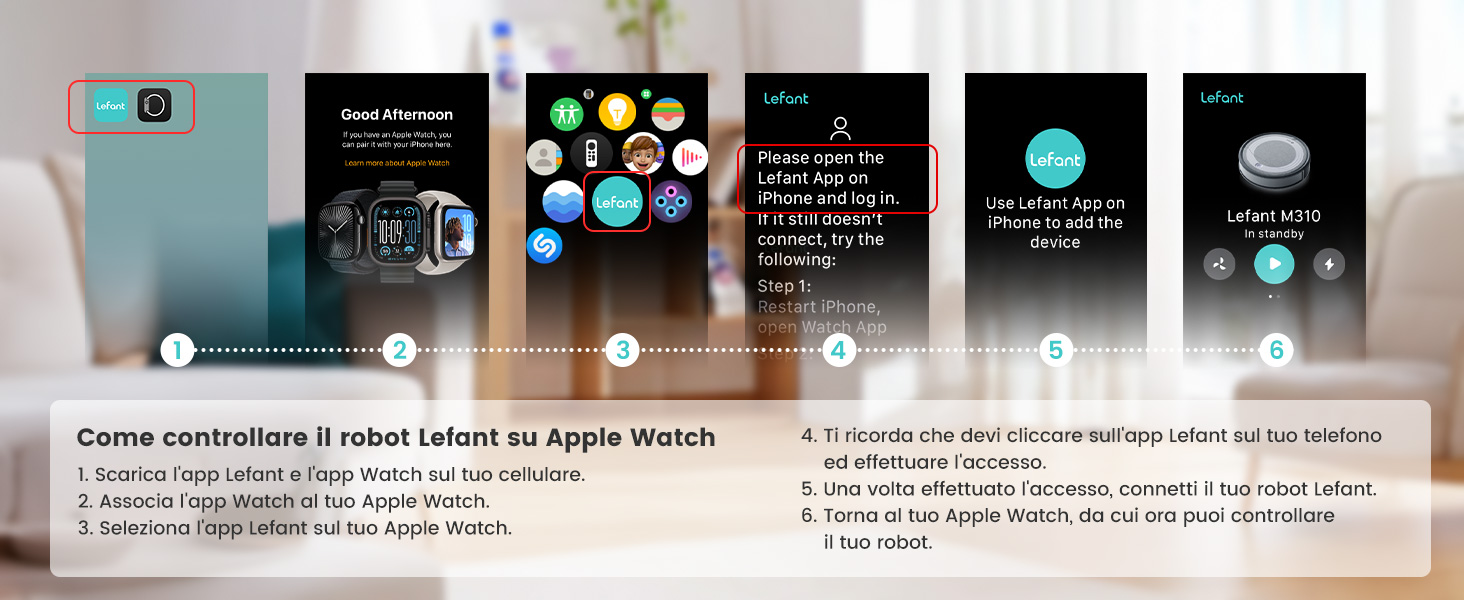
Image: Instructions for controlling the Lefant robot vacuum cleaner using an Apple Watch, illustrating the necessary app installations and pairing steps on both the iPhone and Apple Watch.
Ṣiṣẹ́ ẹ̀rọ ìfọṣọ robot
Cleaning Modes and Customization
The M330Pro offers various cleaning modes and customization options through the Lefant app:
- Ṣíṣe àwòrán onípele púpọ̀: The dToF laser navigation system creates precise maps of your home, supporting up to three levels.
- Awọn iṣe deede: Set specific cleaning schedules and modes for individual rooms or areas.
- Ìfọ̀kànbalẹ̀: Direct the robot to clean specific spots or zones for deep cleaning.
- Awọn agbegbe Ko-lọ: Define virtual boundaries to prevent the robot from entering certain areas, protecting fragile items or pet zones.
- Maṣe daamu Ipo: Schedule periods when the robot will not operate.

Image: Illustration of smart personalized cleaning, showing a multi-story house plan with different cleaning schedules set for various rooms, highlighting the 150 minutes of autonomy and 150 sqm maximum coverage.

Image: A visual representation of the Lefant app interface, showcasing various control options such as cleaning scheduling, personalized routines, do not disturb mode, no-go zones, zone-specific cleaning, smart mapping, suction control, and one-touch cleaning.
Obstacle Avoidance and Navigation
The M330Pro utilizes advanced PSD obstacle avoidance technology to navigate your home safely and efficiently, preventing collisions with furniture and other objects.

Image: Comparison of the Lefant M330 Pro's precise obstacle detection and avoidance (PSD technology) versus other robot vacuums that may collide with objects. The M330 Pro is shown navigating around toys and a sleeping dog.
Gbigba agbara Laifọwọyi
When the battery is low or cleaning is complete, the M330Pro will automatically return to its charging station to recharge, ensuring it's always ready for the next cleaning cycle.

Image: A collage illustrating key features of the Lefant M330 Pro, including its 200ml water tank, 150 minutes of runtime, 150 square meters of coverage, and the automatic recharge and resume function, showing the robot returning to its charging dock.
Itoju
Regular maintenance ensures optimal performance and extends the lifespan of your LEFANT M330Pro. Always power off the robot before performing any maintenance.
Ìmọ́tótó Àpò Inu àti Àlẹ̀mọ́
The M330Pro features a transparent 450ml dustbin for easy monitoring. Empty the dustbin after each cleaning cycle or when full. Clean the filters regularly to maintain strong suction power.
- Open the robot's top cover to access the dustbin.
- Yọ eruku kuro ki o si sọ awọn akoonu rẹ sinu apo idọti kan.
- Separate the filters from the dustbin and gently tap them to remove dust. For thorough cleaning, rinse the filters under running water if they are washable (refer to specific instructions in the full manual) and allow them to air dry completely before reinserting.
- Fi aṣọ gbígbẹ nu inu apoti idọti naa.
- Reassemble the filters and dustbin, then place them back into the robot.

Image: A visual comparison highlighting the Lefant M330 Pro's 450ml transparent dustbin, emphasizing visible dirt collection and less frequent emptying compared to a smaller 300ml dustbin in another model.
Water Tank and Mopping Pad Cleaning
If using the mopping function, ensure the 200ml water tank is filled with clean water. After mopping, empty any remaining water and clean the mopping pad.
- Yọ ojò omi kúrò nínú robot náà.
- Empty any leftover water.
- Detach the mopping pad and wash it thoroughly. Allow it to air dry completely.
- Wipe the water tank with a dry cloth.
- Reattach the dry mopping pad and reinsert the water tank.

Image: Depicts the Lefant M330 Pro's 3-in-1 cleaning capability (sweeping, vacuuming, mopping) and highlights its 200ml water reservoir, indicating 99% cleaning efficiency.
Brushless Suction Port
The M330Pro features a unique brushless suction port, which helps prevent hair tangles, especially useful for pet owners. Periodically check the suction port for any blockages and clear them as needed.

Image: Illustrates the unique brushless vacuum port design of the Lefant M330 Pro, comparing it to other models that may have traditional brushes, emphasizing its anti-tangle benefits.
Laasigbotitusita
If you encounter issues with your LEFANT M330Pro, refer to the following common problems and solutions:
| Isoro | Owun to le Fa | Ojutu |
|---|---|---|
| Robot ko bẹrẹ tabi dahun. | Batiri kekere; Pa agbara; Robot di. | Gba agbara si robot; Rii daju pe iyipada agbara wa ON; Ko eyikeyi idiwo kuro. |
| Robot loses map or navigation issues. | Environment changes; Sensors dirty; Software glitch. | Ensure consistent environment; Clean dToF laser and other sensors; Restart the robot and try re-mapping. |
| Ko dara afamora išẹ. | Full dustbin; Clogged filter; Blocked suction port. | Empty dustbin; Clean or replace filter; Clear any blockages from the suction port. |
| Water leakage during mopping. | Improper water tank installation; Damaged water tank. | Ensure water tank is correctly installed; Check for cracks or damage to the tank. |
| Robot ko le sopọ si Wi-Fi/app. | Incorrect Wi-Fi password; Router issues; Robot too far from router; Wrong Wi-Fi band (only 2.4GHz/5GHz supported). | Verify password; Restart router; Move robot closer to router; Ensure you are connecting to a compatible Wi-Fi band. |
| Robot di nigbagbogbo. | Small obstacles; Loose cables; Dark surfaces. | Clear small objects and cables; Use No-Go Zones for problematic areas; Ensure adequate lighting for navigation. |
Awọn pato
| Ẹya ara ẹrọ | Sipesifikesonu |
|---|---|
| Brand | LEFANT |
| Orukọ awoṣe | M330 Pro |
| Àwọ̀ | Grẹy |
| Ọja Mefa | 28 x 28 x 9.5 cm |
| Iwọn Nkan | 2.15 kilo |
| Dustbin Agbara | 450 milimita |
| Omi ojò Agbara | 200 milimita |
| Voltage | 220 Volts |
| Ohun elo | Ṣiṣu |
| Akoko ṣiṣe | Up to 150 minutes (2 hours and 30 minutes) |
| Awọn ẹrọ ibaramu | Smartphone (App Control), Amazon Alexa, Google Assistant |
| Pataki Awọn ẹya ara ẹrọ | Mapping, 5000Pa Suction, dToF Laser Navigation, PSD Obstacle Avoidance, 150min Autonomy, WiFi 2.4G/5G, Alexa, for Pet Hair and Mixed Floors |
| Niyanju Awọn ipele | Hard floor, Parquet, Tiles, Marble, Carpet |
Atilẹyin ọja ati Support
LEFANT products are designed for reliability and performance. For warranty information, please refer to the documentation included with your product or visit the official LEFANT website. If you require technical assistance, troubleshooting, or have questions about your M330Pro, please contact LEFANT customer support through the following channels:
- Osise Webojula: Visit the LEFANT official webaaye fun awọn FAQ, awọn orisun atilẹyin, ati alaye olubasọrọ.
- Lefant App: The app often includes a support section where you can find help or submit inquiries.
- Imeeli Atilẹyin: Tọkasi apoti ọja rẹ tabi osise naa webojula fun awọn onibara iṣẹ adirẹsi imeeli.
Please have your product model (M330 Pro) and purchase details ready when contacting support to ensure efficient service.


