1. Ọja Ipariview
The TECKNET KB005 is a versatile, ultra-slim, full-size wireless keyboard offering 4-mode connectivity (3 Bluetooth, 1 2.4G USB) for seamless switching between multiple devices. It features quiet scissor-switch keys, a 500mAh rechargeable battery providing up to 180 days of use, and an ergonomic design with adjustable tilt. Compatible with Windows, iOS, macOS, and Android, it includes 12 multimedia keys for enhanced productivity.

Image: The TECKNET KB005 keyboard highlighting its ability to connect to four different devices simultaneously via 2.4G and Bluetooth modes.
2. Ohun ti o wa ninu Apoti
- 1 x TECKNET KB005 Multi-Device Wireless Keyboard
- 1 x Itọsọna olumulo
- 1 x Okun Ngba agbara USB-C
3. Eto
3.1 Gbigba agbara akọkọ
Before first use, ensure your keyboard is fully charged. Connect the provided USB-C cable to the keyboard's charging port and a suitable power source. The charging indicator light will show the charging status.

Image: The keyboard's USB-C port connected to a charging cable, illustrating its quick charge capability for extended use.
3.2 2.4G Alailowaya Asopọ
- Wa olugba USB ti a fipamọ sinu apo ẹhin ti keyboard naa.
- Insert the USB receiver into an available USB-A port on your computer or device.
- Tan keyboard nipa lilo ON/OFF switch ti o wa ni ẹhin.
- Press the dedicated 2.4G channel button (often labeled with a wireless icon or '0') on the keyboard. The corresponding indicator light will illuminate.
- Kíábọ́ọ̀dì náà gbọ́dọ̀ so mọ́ ẹ̀rọ rẹ láìfọwọ́sí.
3.3 Bluetooth Asopọ (BT1, BT2, BT3)
- Tan-an keyboard nipa lilo ON/PA yipada.
- Press and hold one of the Bluetooth channel buttons (BT1, BT2, or BT3) for 3-5 seconds until the corresponding LED indicator light begins to flash rapidly. This indicates the keyboard is in pairing mode.
- On your device (e.g., smartphone, tablet, laptop), enable Bluetooth and search for available devices.
- Select "TK-KB005" from the list of found devices to initiate pairing.
- Once successfully paired, the LED indicator light on the keyboard will stop flashing and remain solid for a few seconds before turning off.
3.4 Àwọn Ẹ̀rọ Ìṣiṣẹ́ Yíyípadà
To ensure optimal key functionality across different operating systems, use the following shortcuts:
- For Android devices: Press Fn + Q
- For Windows devices: Press Fn + W
- For iOS devices: Press Fn + E
Note: Key differences may occur due to system variations. The system will generally switch automatically in Bluetooth mode, but use these shortcuts if keys are not functioning as expected.

Image: Instructions for switching keyboard layout to match Android, Windows, or iOS operating systems using the Fn key combinations.
4. Awọn ilana Iṣiṣẹ
4.1 Olona-Device Yipada
The TECKNET KB005 keyboard allows you to connect and seamlessly switch between up to four devices. Use the dedicated channel buttons (2.4G, BT1, BT2, BT3) located on the top right of the keyboard to instantly switch your active connection.
Video: Demonstration of the TECKNET KB005 keyboard's 4-device switching capability, showing how to effortlessly transition between connected devices.
4.2 Multimedia Awọn bọtini
The keyboard is equipped with 12 multimedia keys (F1-F12) that provide quick access to various functions. These keys can control media playback, volume, and other system functions, enhancing your productivity.
5. Gbigba agbara ati batiri
The TECKNET KB005 features a built-in 500mAh large-capacity rechargeable battery. A full 2-hour charge can provide up to 180 days of use, based on 2 hours of daily operation. The keyboard includes an automatic sleep mode that activates after 30 minutes of inactivity to conserve battery life. Simply press any key to instantly wake it up.

Image: Visual representation of the keyboard's 500mAh rechargeable battery, highlighting its auto-sleep and power-saving features.
Fidio: A finifini loriview of the TECKNET Bluetooth Wireless Keyboard, showcasing its rechargeable nature and key features.
6. Ergonomics ati Design
The keyboard features an ultra-slim profile, making it highly portable and comfortable for extended typing sessions. Its ergonomic design is crafted to fit the natural shape of your fingertips. The adjustable support allows you to customize the tilt angle between 3° and 7° to suit your preference, while five extended non-slip pads on the bottom ensure stability and prevent unwanted movement.
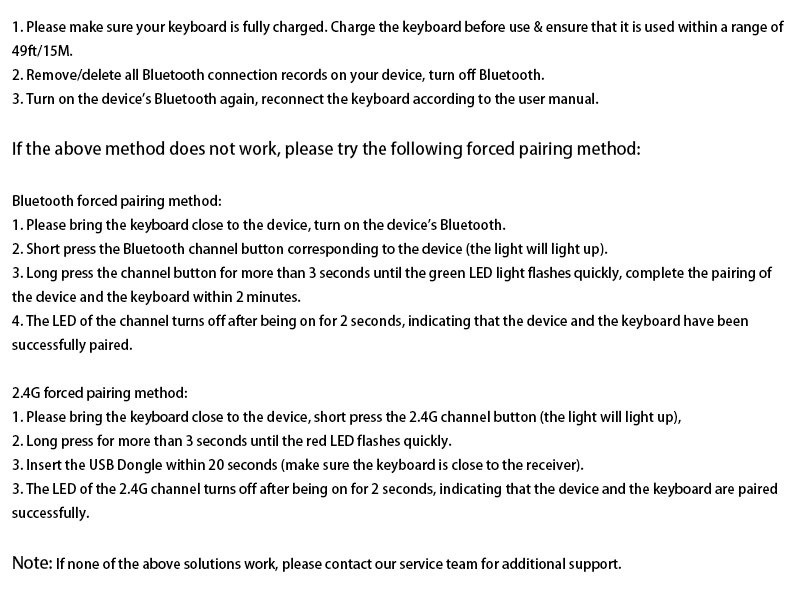
Image: The underside of the keyboard, detailing the adjustable support buckles, power switch, USB-C charging port, USB receiver storage, and five anti-slip pads.

Image: Highlighting the quiet typing experience of the keyboard, featuring a close-up of a scissor-switch key mechanism and a 'Reduce 90% Noise' label.
7. Ibamu
The TECKNET KB005 keyboard offers broad compatibility with a wide range of operating systems and devices, including:
- Windows
- iOS
- macOS
- Android
It is ideal for use with iPads, tablets, smartphones, laptops, desktops, and smart TVs. For devices without built-in Bluetooth, the included USB receiver provides a stable 2.4G wireless connection.

Image: The keyboard demonstrating its wide compatibility across multiple operating systems and device types.
8. Itọju
To ensure the longevity and optimal performance of your TECKNET KB005 keyboard, follow these maintenance guidelines:
- Keep the keyboard clean and dry. Avoid spilling liquids on it.
- Lo asọ rirọ, ti ko ni lint, die-die dampened with water or a mild cleaning solution, to wipe the surface and keys.
- Yẹra fun lilo awọn kẹmika ti o lewu, awọn olutọpa abrasive, tabi awọn nkanmimu.
- Ma ṣe fi bọtini itẹwe han si awọn iwọn otutu to gaju, oorun taara, tabi ọriniinitutu giga.
- Store the USB receiver in its designated slot on the back of the keyboard when not in use to prevent loss.
9. Laasigbotitusita
9.1 Gbogbogbo Asopọ Oran
- Please make sure your keyboard is fully charged. Charge the keyboard before use & ensure that it is used within a range of 49ft/15M.
- Remove/delete all Bluetooth connection records on your device, then turn off Bluetooth.
- Turn on the device's Bluetooth again, reconnect the keyboard according to the user manual.
If the above method does not work, please try the following forced pairing method:
9.2 Bluetooth Forced Pairing Method
- Please bring the keyboard close to the device, turn on the device's Bluetooth.
- Short press the Bluetooth channel button corresponding to the device (the light will light up).
- Long press the channel button for more than 3 seconds until the green LED light flashes quickly, complete the pairing of the device and the keyboard within 2 minutes.
- The LED of the channel turns off after being on for 2 seconds, indicating that the device and the keyboard have been successfully paired.
9.3 2.4G Forced Pairing Method
- Please bring the keyboard close to the device, short press the 2.4G channel button (the light will light up).
- Long press for more than 3 seconds until the red LED flashes quickly.
- Insert the USB Dongle within 20 seconds (make sure the keyboard is close to the receiver).
- The LED of the 2.4G channel turns off after being on for 2 seconds, indicating that the device and the keyboard are paired successfully.

Image: Detailed instructions for performing forced pairing for both Bluetooth and 2.4G connections to resolve connectivity issues.
9.4 Other Common Issues
- The battery may be low, please charge the keyboard wireless as soon as possible.
- This may be caused by computer lag, please restart your computer and reconnect the keyboard.
- The effective working distance of TECKNET's Bluetooth keyboard is 49 ft/15M, please make sure the distance between your device and the keyboard is within this range.
- The keyboard signal may be interfered, please try to stay away from metal obstacles or other radio signals.
- If you are using 2.4G to connect your device and the keyboard, please unplug the USB and re-insert it into the device.
- If the above measures still cannot solve your problem, please feel free to contact us, we will do our best to solve the problem for you.

Image: A comprehensive list of troubleshooting tips for common issues such as low battery, device lag, signal interference, and connection problems.
10. Awọn pato
| Ọja Mefa | 17.13 x 5.12 x 0.57 inches |
| Iwọn Nkan | 1.29 iwon |
| Nọmba Awoṣe Nkan | EKB01002BS03 |
| Awọn batiri | Batiri Lithium ion 1 nilo (pẹlu) |
| Asopọmọra Technology | Bluetooth, USB-A (2.4G) |
| Apejuwe Keyboard | Switch Between 4 Different Devices (2.4G Mode + 3 Bluetooth) |
| Pataki Awọn ẹya ara ẹrọ | 12 Multimedia Keys, 90% Noise Reduction, Ergonomic, Low-Profile Key, Rechargeable |
| Àwọ̀ | Dudu |
| Ohun elo | Ṣiṣu |
11. Atilẹyin ọja ati Support
TECKNET offers up to 3 years of support for the KB005 Multi-Device Wireless Keyboard (registration may be required). If you encounter any problems when using the keyboard, please contact our professional customer service team. We are committed to providing friendly and helpful assistance every step of the way.


