Ọrọ Iṣaaju
This manual provides essential instructions for the safe and effective use of your Panasonic HC-X1200 Camcorder. Please read this manual thoroughly before using the product and retain it for future reference. The Panasonic HC-X1200 is a high-performance camcorder designed for capturing stunning 4K video footage with advanced features for professional and enthusiast users.
Awọn ẹya pataki pẹlu:
- High-quality 4K Recording: Captures stunning 4K video at 60 frames per second, delivering sharp and detailed footage.
- 20x Awọn lẹnsi Sun-un Optical: Offers powerful zoom capability without losing image quality.
- Built-in Image Stabilization: Helps reduce camera shake for smoother, more stable video.
- Dual SD Card Slots: Supports continuous recording with automatic card switching.
- 3.5-inch LCD Touchscreen: Easy-to-use touchscreen for navigating settings and previewing Asokagba.
Ohun ti o wa ninu Apoti
Daju pe gbogbo awọn ohun ti a ṣe akojọ rẹ si isalẹ wa ninu package rẹ. Ti awọn ohun kan ba nsọnu tabi bajẹ, jọwọ kan si alagbata rẹ.
- Panasonic HC-X1200 Camcorder
- Power Adapter / Ṣaja
- Batiri gbigba agbara
- 32GB Kaadi Iranti
- Ga Šiše Memory Kaadi Reader
- Àlẹmọ UV
- 2-ni-1 Cleaning Pen
- Eruku fifun
- Deluxe Starter Apo
- ZeeTech MicroFiber Cleaning Cloth
- Cleaning Kit (general)

Aworan: Iwaju view of the Panasonic HC-X1200 Camcorder, showing the lens and viewoluwari.

Image: ZeeTech UV Filter, designed to protect the camcorder lens and reduce haze.

Image: A 2-in-1 cleaning pen, featuring a brush and a carbon cleaning tip for lenses.

Image: A dust blower, used for safely removing dust and debris from camera surfaces and lenses.
Ṣeto
- Gba agbara si Batiri naa: Connect the camcorder to the power adapter and plug it into an electrical outlet. The charging indicator will illuminate. Ensure the battery is fully charged before first use.
- Fi Batiri naa sori ẹrọ: Open the battery compartment cover on the camcorder. Insert the charged battery, ensuring it clicks into place. Close the cover securely.
- Fi Káàdì Ìrántí(àwọn) sí i: The HC-X1200 features dual SD card slots. Open the SD card slot cover. Insert the 32GB memory card (and an optional second card) into the slots until they click. Ensure the cards are inserted in the correct orientation. Close the cover.

Aworan: Apa view of the camcorder, highlighting the dual SD card slots.
- Attach UV Filter: Carefully screw the UV filter onto the front of the camcorder lens. This protects the lens and can reduce UV light.
- Agbara Tan: Slide the power switch to the "ON" position. The camcorder will start up, and the LCD screen will display the live view.
- Awọn Eto Ibẹrẹ: Follow the on-screen prompts to set the date, time, language, and other initial configurations.
Awọn ilana Iṣiṣẹ
Gbigbasilẹ ipilẹ
- Open LCD Screen: Flip open the 3.5-inch LCD touchscreen. This will often power on the camcorder automatically.
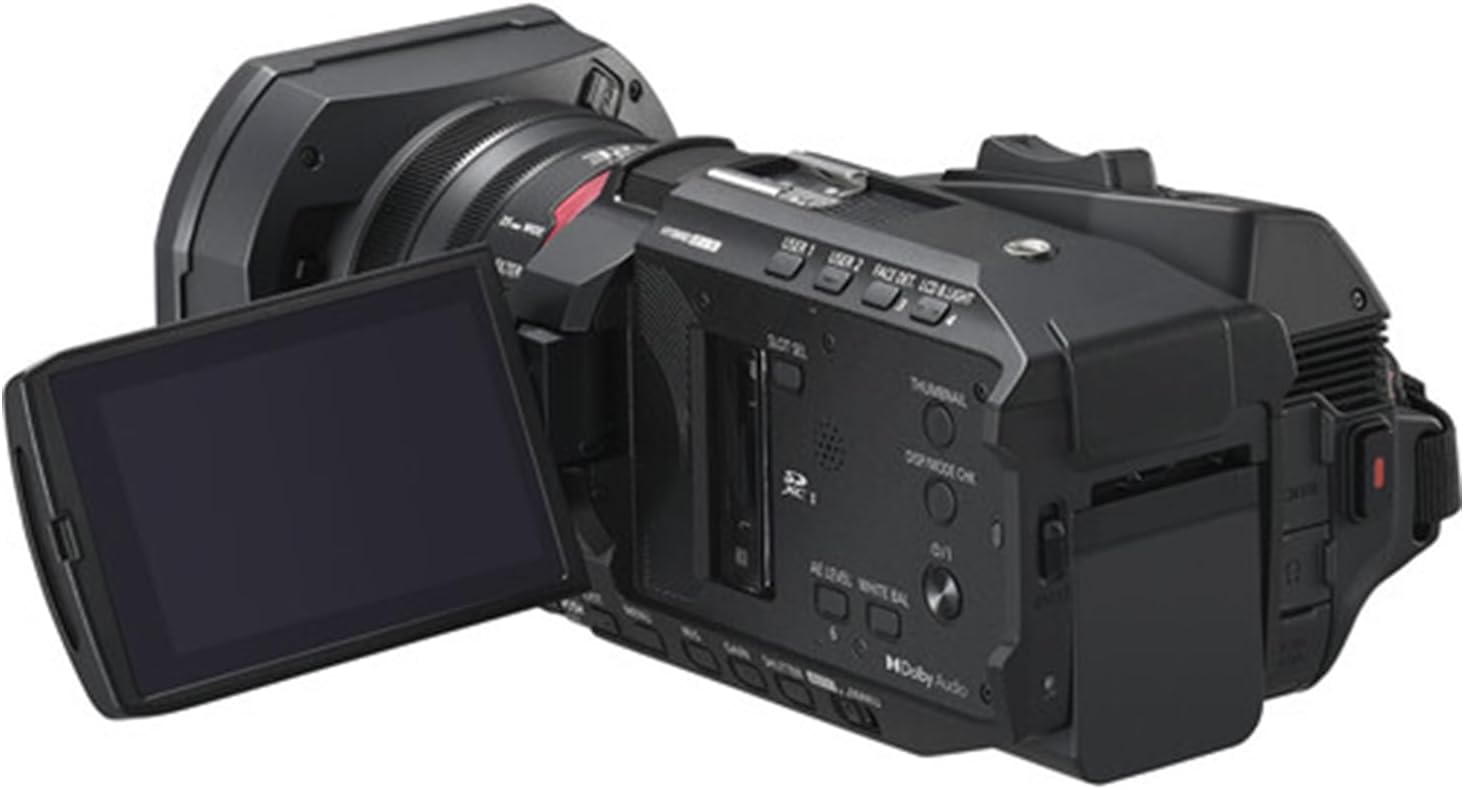
Image: The camcorder with its 3.5-inch LCD touchscreen rotated open for viewing.
- Yan Ipo Gbigbasilẹ: Use the menu on the LCD touchscreen to select your desired recording mode (e.g., 4K 60p).
- Ṣàtúnṣe Sún-ún: Use the zoom lever to zoom in or out. The 20x optical zoom allows for clear magnification without loss of quality.
- Idojukọ: The camcorder features autofocus. For manual focus, use the focus ring on the lens barrel.
- Bẹrẹ/Duro Gbigbasilẹ: Tẹ awọn REC Bẹrẹ/Duro bọtini lati bẹrẹ gbigbasilẹ. Tẹ lẹẹkansi lati da.
- Iduroṣinṣin aworan: The built-in image stabilization system automatically reduces camera shake. Ensure it is enabled in the settings for smoother footage, especially during handheld shooting.
Sisisẹsẹhin
- Tẹ Ipo Sisisẹsẹhin: Tẹ awọn PLAYDA button or select playback from the menu on the LCD screen.
- Select Video: Use the touchscreen or navigation buttons to select the video you wish to play.
- Ṣiṣẹ/Daduro: Tẹ awọn ERE/SINMI button on the screen to start or pause playback.
Itoju
- Fifọ lẹnsi naa: Use the provided 2-in-1 cleaning pen or microfiber cloth to gently clean the lens. For stubborn dust, use the dust blower first. Avoid touching the lens surface with your fingers.
- Ninu ara: Wipe the camcorder body with a soft, dry cloth. For tougher grime, slightly dampen awọn asọ pẹlu omi. Ma ṣe lo awọn olomi tabi awọn olutọpa abrasive.
- Itọju Batiri: Store batteries in a cool, dry place. If not using the camcorder for an extended period, remove the battery. Avoid fully discharging the battery frequently to prolong its lifespan.
- Ibi ipamọ: Store the camcorder in a dry, dust-free environment, away from extreme temperatures and direct sunlight. Use a protective case when transporting.
Laasigbotitusita
| Isoro | Owun to le Fa | Ojutu |
|---|---|---|
| Kamẹra ko ṣiṣẹ. | Batiri ko gba agbara tabi fi sii lọna ti ko tọ. | Ensure the battery is fully charged and correctly inserted. Check power adapter connection if using AC power. |
| Ko le ṣe igbasilẹ fidio. | Kaadi iranti ti kun, tiipa, tabi ko fi sii daradara. | Check memory card status. Ensure it has free space, is unlocked, and properly inserted. Format the card if necessary (this will erase all data). |
| Fidio footage is blurry or shaky. | Focus issue, image stabilization off, or excessive camera movement. | Check focus settings (autofocus or manual). Ensure image stabilization is enabled. Use a tripod or stable surface for recording. |
| LCD iboju jẹ òfo. | Camcorder is off, battery is dead, or screen brightness is too low. | Power on the camcorder. Charge or replace the battery. Adjust screen brightness in settings. |
Awọn pato
- Brand: Panasonic (Camcorder), ZeeTech (Bundle Provider)
- Orukọ awoṣe: HC-X1200
- Nọmba Awoṣe Nkan: X1200
- Imọ ọna sensọ Fọto: MOS
- Ipinnu Yiya fidio: 4K
- Ipari Ifojusi ti o pọju: 98.9 millimeters
- Irú Iranti Filaṣi: Sdhc
- Ọna kika fidio: MP4
- Iwọn iboju: 3.5 inches (iboju ifọwọkan LCD)
- Àwọ̀: Dudu
- Awọn batiri: 1 Nonstandard Battery required (included)
- Awọn eroja to wa: Cleaning Kit, 32GB Memory Card, High Speed Memory Card Reader, UV Filter, 2-in-1 Cleaning Pen, Dust Blower, Deluxe Starter Kit, MicroFiber Cleaning Cloth.
- Ọjọ Akọkọ Wa: Oṣu Kẹrin Ọjọ 24, Ọdun 2025
Atilẹyin ọja ati Support
The Panasonic HC-X1200 Camcorder is covered by the manufacturer's standard warranty. Please refer to the warranty card included in your original packaging for specific terms and conditions, including warranty period and coverage details.
For technical support, service, or warranty claims, please contact Panasonic customer service or your authorized retailer. Keep your proof of purchase for warranty validation.


