Ọrọ Iṣaaju
The Lefant M3 Max Robot Vacuum and Mop Combo is designed to provide efficient and automated cleaning for your home. This manual provides essential information for setting up, operating, and maintaining your device to ensure optimal performance.
Ohun ti o wa ninu Apoti
Your Lefant M3 Max package includes the following components:
- Rọ́bọ́ọ̀tì afẹ́fẹ́ (1)
- Ibùdókọ̀ oníṣẹ́-púpọ̀ (1)
- Ipìlẹ̀ Ibùdókọ̀ ojú omi (1)
- Okun agbara (1)
- Apo eruku (2)
- Fẹlẹ ẹgbẹ (2)
- Washable Mop (4)
- Mop Holder (2)
- Ajọ HEPA (2)
- Cleaning Fluid (1)
- Cleaning Tool (1)
- Ilana olumulo (1)

Image: All components included in the Lefant M3 Max package, including the robot vacuum, multifunctional dock, power cord, dust bags, side brushes, washable mops, mop holders, HEPA filters, cleaning fluid, cleaning tool, and user manual.
Video: Official unboxing guide for the Lefant M3/M3 Max Robot Vacuum, demonstrating how to safely remove all components from the packaging.
Ṣeto
Igbaradi Ibẹrẹ
Before first use, ensure all packaging materials and protective films are removed from the robot vacuum and the multifunctional dock. Install the side brushes by snapping them into place.
Ngba agbara si Robot Vacuum
Place the multifunctional dock against a wall with at least 0.5m clear space on both sides and 1.5m clear space in front. Connect the power cord to the dock and plug it into a compatible 3-prong outlet (110-127V 50-60Hz). Place the robot vacuum onto the charging contacts of the dock. Allow the robot to fully charge before its first cleaning cycle.
App and Voice Control Setup
Download the Lefant App from your app market. Follow the in-app instructions to add your M3 Max robot vacuum. Ensure your device is connected to a 2.4GHz/5GHz Wi-Fi network. For voice control, link your Lefant account with Google Home or Alexa through their respective apps.
Image: Step-by-step guide for connecting the Lefant M3 Max to the Lefant mobile application via Bluetooth and Wi-Fi.
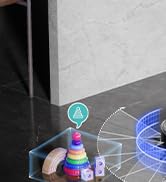
Image: Instructions for connecting the Lefant M3 Max to Amazon Alexa for voice control.
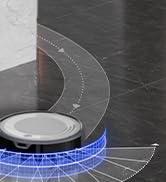
Image: Steps to control the Lefant M3 Max robot vacuum using an Apple Watch.
Awọn ilana Iṣiṣẹ
Lilọ kiri ati maapu
The M3 Max uses Precision LiDAR Laser Navigation for 360° real-time scanning, creating accurate home maps for efficient cleaning. It can store multi-floor layouts for up to 3 levels and automatically adapts to different spaces. Advanced Freemove Tech 3.0 enables precise obstacle avoidance, preventing collisions with furniture, cords, and other items. It also automatically avoids stairs and learns no-go zones.
Cleaning Modes and Features
- Fífàmọ́ra tó lágbára púpọ̀ 20,000Pa: Effectively lifts pet hair, dust, and debris from hard floors, tiles, and carpets.
- Complete Edge-to-Edge Cleaning: Side brushes reach 0 mm gaps for 100% corner coverage, and dual spinning mops clean within 1.85mm of edges.
- Smart Carpet Protection System: The robot automatically lifts its mop 9mm when detecting carpets or removes it completely for deep vacuuming. Customize modes via the Lefant App, including Mop Lift, Turbo Carpet Mode, Vac+Mop Combo, Carpet Avoidance, or Carpet Priority Cleaning. Set no-mop zones to protect rugs.
- Àwọn Mopì Oníyípo Méjì: With a powerful 200 RPM spinning speed, these mops deliver deep, efficient cleaning for tough stains.
App ati Iṣakoso ohun
Control your robot effortlessly through the Lefant app, Google Home, or Alexa with just a tap or voice command. The app allows for scheduling, setting no-go zones, targeted zone cleaning, and multi-floor mapping management.
Igbesi aye batiri
The 5,200mAh battery provides up to 220 minutes of quiet cleaning, suitable for areas up to 2,366 sq.ft (220m²). Schedule charging during off-peak hours for maximum efficiency.

Image: Close-up of the dual spinning mops, highlighting their 200 RPM speed for deep cleaning.

Image: Visual representation of the robot vacuum's 20,000Pa suction power effectively cleaning various debris like pet hair, food, and crumbs.
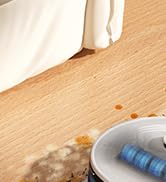
Image: The slim profile of the robot vacuum navigating under furniture and its 190° PSD precision obstacle detection system.
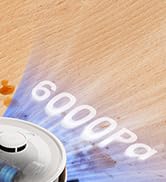
Image: The robot vacuum automatically lifting its mop by 9mm when transitioning from hard floor to carpet, demonstrating the Smart Carpet Protection System.
Image: Visual of the robot vacuum utilizing 360° LiDAR precision navigation to map a multi-level home environment.
Itoju
Hands-Free Docking Station
The multifunctional dock provides complete automation with an 8-week 3.2L dustbag, 2.5L water tank, and 113°F hot water mop washing. It features auto cool drying to prevent mop pad warping and built-in detergent dispensing for lasting freshness. The station's base is designed to be removed for quick and easy cleaning.
Tangle-Free Brush System
The Lefant M3 Max features a V-shaped dual-comb brush that actively gathers and cuts through hair, preventing clogs and tangles. This system reduces the need for frequent manual hair removal from the brush.
Regular Cleaning of Components
Regularly clean the dustbin, filters, side brushes, and mop pads to maintain optimal performance. Refer to the videos below for detailed cleaning instructions.

Aworan: Pariview of the multifunctional docking station, showcasing its self-emptying, auto mop washing, cool air drying, and self-refilling capabilities.

Aworan: Alaye view of the V-shaped dual-comb brush designed to prevent hair tangles during cleaning.
Video: Official guide on how to clean the Lefant M3/M3 Max Robot Vacuum, including the dustbin, filters, and brushes.
Video: Official instructions for cleaning the charging dock of the Lefant M3/M3 Max Robot Vacuum.
Laasigbotitusita
If you encounter any issues with your Lefant M3 Max, please refer to the detailed troubleshooting section in the full user manual (included in the box) or contact Lefant customer service for assistance.
- Robot ko gba agbara: Ensure the charging contacts on both the robot and the dock are clean and free of debris. Verify the power cord is securely plugged into the wall outlet and the dock.
- Iṣe mimọ ti ko dara: Check if the dustbin is full, filters are clogged, or brushes are tangled. Clean or replace components as necessary. Ensure the water tank is filled for mopping.
- Robot n di: Clear obstacles from the cleaning path. Use the app to set no-go zones around problem areas. Clean the obstacle avoidance sensors.
- Awọn oran Asopọmọra App: Ensure your Wi-Fi network is stable and the robot is within range. Re-pair the device if necessary.
Awọn pato
| Ẹya ara ẹrọ | Ẹ̀kúnrẹ́rẹ́ |
|---|---|
| Brand | Lefant |
| Orukọ awoṣe | Iye ti o ga julọ ti M3 |
| Agbara afamora | 20,000PA |
| Igbesi aye batiri | 220 minutes (5,200mAh) |
| Lilọ kiri Iru | Precision LiDAR Laser Navigation |
| Idena Idena | Freemove Tech 3.0 (190° PSD detection) |
| Irú Mop | Dual Spinning Mops (200 RPM) |
| Mop Lift | 9mm automatic lift on carpets |
| Dustbin Capacity (Dock) | 3.2L (up to 8 weeks) |
| Water Tank Capacity (Dock) | 2.5L (up to 2,366 sq.ft) |
| Asopọmọra | Bluetooth 5.0, Dual-band Wi-Fi (2.4GHz/5GHz) |
| Ọna Iṣakoso | App, Voice (Google Home, Alexa) |
| Ọja Mefa | 12.6"L x 12.6"W x 3.74"H |
| Iwọn Nkan | 29.5 iwon |
| Dada iṣeduro | Hard Floor, Wood, Tile, Carpet |
Atilẹyin ọja ati Support
Lefant provides excellent customer service. A dedicated customer support team offers prompt assistance and solutions to any queries, ensuring a satisfying post-purchase experience for all customers. Please refer to the full user manual for warranty details and contact information.


