1. Ifihan
The IRRADIO IR-203 Sound+ is a compact and portable wireless speaker designed for high-quality audio playback. Featuring Bluetooth 5.0 connectivity and a USB port for external media, it offers versatile listening options. Its robust design and long-lasting battery make it ideal for both home use and on-the-go entertainment.

Nọmba 1.1: IRRADIO IR-203 Sound+ Wireless Speaker. This image shows the speaker from an angled perspective, highlighting its compact size and fabric grille.
2. Alaye Aabo
Jọwọ ka gbogbo awọn ilana aabo ni pẹkipẹki ṣaaju lilo ẹrọ naa. Jeki iwe afọwọkọ yii fun itọkasi ọjọ iwaju.
- Ma ṣe fi agbọrọsọ si omi tabi ọrinrin ti o pọ ju. Ọja yii kii ṣe mabomire.
- Avoid extreme temperatures. Do not place near heat sources or in direct sunlight.
- Do not disassemble, repair, or modify the device. This will void the warranty and may cause damage or injury.
- Lo gbigba agbara pàtó kan voltage (DC 5V/2A).
- Jeki kuro ni arọwọto awọn ọmọde.
3. Package Awọn akoonu
Rii daju pe gbogbo awọn nkan wa ninu package:
- IRRADIO IR-203 Sound+ Wireless Speaker
- Okun Ngba agbara USB
- Afowoyi Olumulo (iwe-ipamọ yii)
4. Ọja Ipariview
4.1. Awọn iṣakoso ati awọn ibudo

Nọmba 4.1: Apa view of the speaker showing control buttons. From left to right: Mode button (M), Volume Down (-), Volume Up (+), Play/Pause/Next Track button (▶).

Nọmba 4.2: Pada view of the speaker showing connectivity ports. From left to right: TF (MicroSD) card slot, USB-A port, ON/OFF switch, DC 5V charging port.
The speaker features intuitive controls on its top edge and essential connectivity ports on its rear panel.
- Bọtini Ipo (M): Tẹ lati yipada laarin awọn ipo ṣiṣiṣẹsẹhin Bluetooth ati USB.
- Iwọn didun isalẹ (-): Tẹ lati dinku iwọn didun.
- Iwọn didun soke (+): Tẹ lati mu iwọn didun pọ si.
- Play/Pause/Next Track (▶): Press to play or pause audio. Long press to skip to the next track.
- Iho Kaadi TF: Insert a MicroSD card for direct audio playback.
- Ibudo USB-A: Fi awakọ filasi USB sii fun ṣiṣiṣẹsẹhin ohun taara.
- ON/PA Yipada: Slide to power the speaker on or off.
- Ibudo DC 5V: Connect the USB charging cable here to charge the speaker.
5. Eto
5.1. Gbigba agbara Agbọrọsọ
Before first use, fully charge the speaker. The battery capacity is 400 mAh.
- So okùn gbigba agbara USB ti a pese mọ ibudo DC 5V lori agbọrọsọ naa.
- Connect the other end of the USB cable to a compatible USB power adapter (DC 5V/2A recommended) or a computer USB port.
- Ìmọ́lẹ̀ àmì ìgbóná yóò tànmọ́lẹ̀ (àwọ̀ lè yàtọ̀) láti fihàn pé agbọ́hùnsọ náà ń gba agbára.
- Charging typically takes approximately 2 hours for a full charge. The indicator light will change or turn off once charging is complete.
A full charge provides approximately 2 hours and 40 minutes of continuous playback at 50% volume.
5.2. Agbara lori / Paa
To power on the speaker, slide the ON/OFF switch to the 'ON' position. You will hear an audible prompt. To power off, slide the switch to the 'OFF' position.
6. Awọn ilana Iṣiṣẹ
6.1. Sisopọ Bluetooth
The speaker uses Bluetooth 5.0 for stable wireless connection up to 10 meters.
- Ensure the speaker is powered on and in Bluetooth mode. If not, press the 'M' (Mode) button to switch to Bluetooth mode. The speaker will enter pairing mode, indicated by a flashing LED light and an audible prompt.
- Lori ẹrọ rẹ (foonuiyara, tabulẹti, kọǹpútà alágbèéká), mu Bluetooth ṣiṣẹ ki o wa awọn ẹrọ to wa.
- Select "IRRADIO IR-203 Sound+" from the list of found devices.
- Once paired, the speaker will provide an audible confirmation, and the LED light will stop flashing.
- O le mu ohun ṣiṣẹ bayi lati ẹrọ rẹ nipasẹ agbọrọsọ.
Akiyesi: Agbọrọsọ yoo gbiyanju laifọwọyi lati tun sopọ si ẹrọ ti a so pọ ti o kẹhin nigbati o ba tan.
6.2. Sisisẹsẹhin Kaadi USB/TF
The speaker supports direct audio playback from a USB flash drive or a MicroSD (TF) card.
- Insert a USB flash drive into the USB-A port or a MicroSD card into the TF card slot.
- The speaker will automatically switch to USB/TF card mode and begin playing audio files (MP3, WAV, etc.) from the inserted storage device. If it does not switch automatically, press the 'M' (Mode) button to select the correct mode.
- Use the Play/Pause/Next Track button (▶) to control playback.
6.3. Iṣakoso iwọn didun
Lo awọn bọtini '+' ati '-' lori agbọrọsọ lati ṣatunṣe iwọn didun. O tun le ṣakoso iwọn didun lati ẹrọ ti a ti sopọ.
7. Itọju
Lati rii daju igbesi aye gigun ati iṣẹ to dara julọ ti agbọrọsọ rẹ, tẹle awọn itọnisọna itọju wọnyi:
- Ninu: Lo aṣọ rírọrùn tí ó gbẹ láti nu ojú agbọ́rọ̀ náà. Má ṣe lo àwọn ohun ìfọṣọ, ọtí líle, tàbí àwọn ohun èlò ìfọ́mọ́ra kẹ́míkà.
- Ibi ipamọ: Nigbati o ko ba wa ni lilo fun awọn akoko ti o gbooro sii, tọju agbohunsoke ni itura, ibi gbigbẹ kuro lati orun taara ati awọn iwọn otutu to gaju.
- Itọju Batiri: Lati tọju igbesi aye batiri, yago fun gbigba agbara si batiri ni kikun nigbagbogbo. Gba agbara si agbọrọsọ nigbagbogbo, paapaa ti kii ṣe ni lilo.
8. Laasigbotitusita
If you encounter issues with your IRRADIO IR-203 Sound+ speaker, refer to the following common problems and solutions:
| Isoro | Owun to le Fa | Ojutu |
|---|---|---|
| Agbọrọsọ ko ni tan. | Batiri ti dinku. | Gba agbara fun agbọrọsọ naa fun o kere ju iṣẹju 30. |
| Ko si ohun. | Iwọn didun ti lọ silẹ tabi dakẹ. Ipo ti ko tọ ti yan. | Increase volume on both speaker and connected device. Press 'M' button to switch modes. |
| Ko le so pọ nipasẹ Bluetooth. | Agbọrọsọ ko si ni ipo sisopọ. Ẹrọ ti o jinna pupọ. kikọlu. | Ensure speaker is in Bluetooth pairing mode (flashing LED). Move device closer to speaker (within 10m). Turn off other Bluetooth devices. |
| Káàdì USB/TF kò ṣiṣẹ́. | Ti ko tọ file ìṣètò. A kò fi káàdì/wakọ̀ sí i dáadáa. | Ṣe idaniloju ohun afetigbọ files are in supported format (e.g., MP3). Reinsert the USB drive or TF card firmly. Press 'M' button to select USB/TF mode. |
Ti iṣoro naa ba wa lẹhin igbiyanju awọn solusan wọnyi, jọwọ kan si atilẹyin alabara.
9. Awọn pato
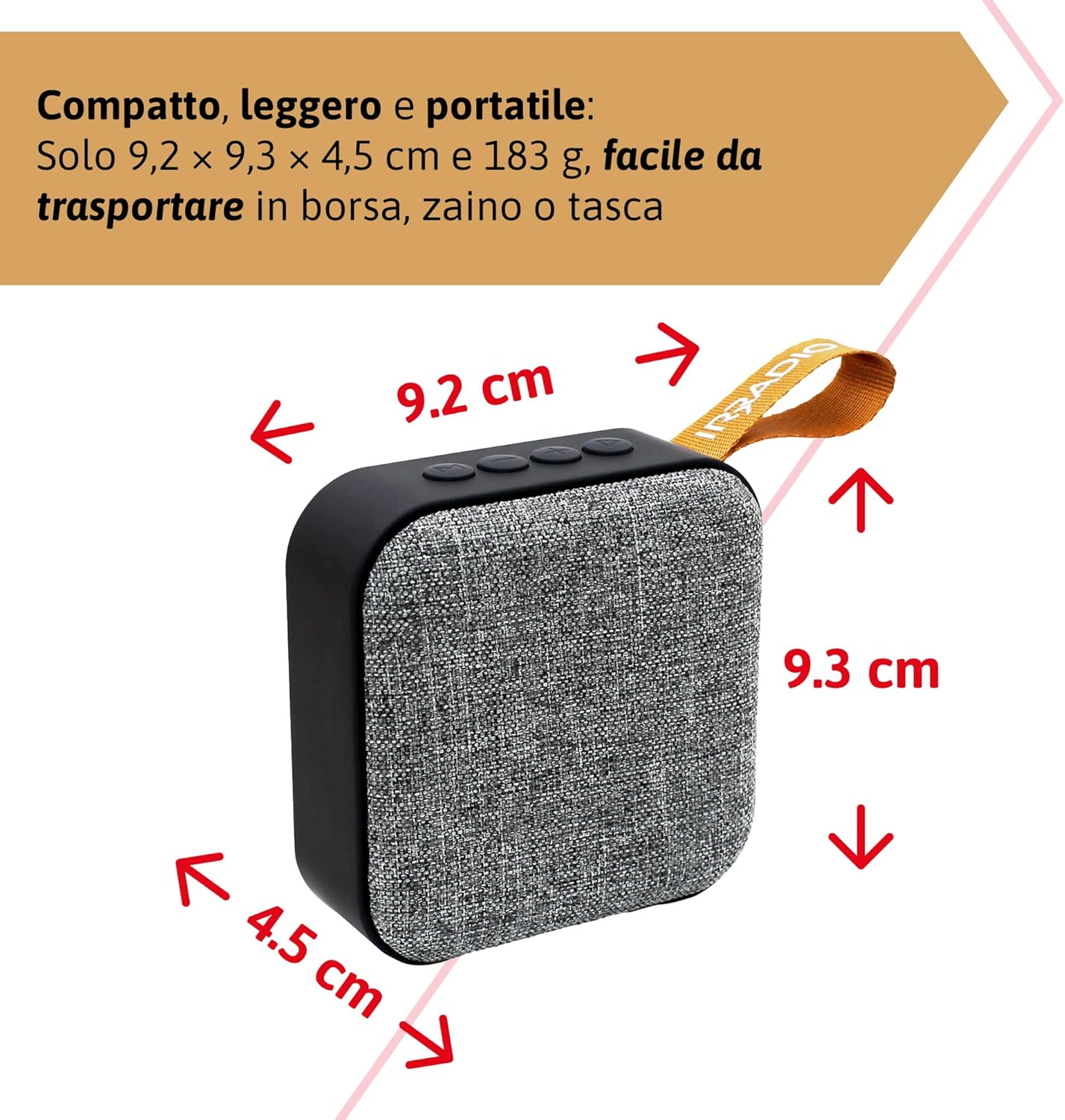
Nọmba 9.1: Dimensions of the IRRADIO IR-203 Sound+ speaker: 9.2 cm (width) x 9.3 cm (height) x 4.5 cm (depth).
| Ẹya ara ẹrọ | Ẹ̀kúnrẹ́rẹ́ |
|---|---|
| Orukọ awoṣe | IR-203 Sound+ |
| Nọmba Awoṣe Nkan | 550922126 |
| Brand | IRRADIO |
| Ọja Mefa | 9.2 x 9.3 x 4.5 cm |
| Iwọn | 183 giramu |
| Agbọrọsọ Iru | Woofer (Full Range 50mm Driver + Passive Radiator) |
| Max Agbọrọsọ o wu Power | 3.5 Wattis RMS |
| Asopọmọra Technology | Bluetooth 5.0, USB |
| Ijinna Gbigbe Alailowaya | Titi di awọn mita 10 (laisi awọn idiwọ) |
| Ipo Ijade Ohun | Sitẹrio |
| Agbara Batiri | 400 mAh (3.7V, 1.48 Wh) |
| Igbesi aye batiri | Approx. 2 hours 40 minutes (at 50% volume) |
| Akoko gbigba agbara | Isunmọ. wakati meji 2 |
| Gbigba agbara Input | DC 5V/2A |
| Awọn ẹrọ ibaramu | Smartphones, Tablets, Laptops, Desktop Computers, MP3 Players, USB Flash Drives |
| Àwọ̀ | Grẹy |
| Mabomire | Rara |
10. Atilẹyin ọja ati Support
10.1. atilẹyin ọja Information
For information regarding warranty and returns, please refer to the purchase platform's policies. Typically, products purchased on Amazon.it can be returned within 30 days of receipt if you change your mind. For defective or damaged products, specific return policies apply.
For specific information on purchases made through the Marketplace, please consult the relevant help page on the platform.
10.2. Onibara Support
For further assistance, technical support, or inquiries about your IRRADIO IR-203 Sound+ speaker, please visit the official IRRADIO store page:


