Ọrọ Iṣaaju
Welcome to the HONOR 400 Lite 5G Smartphone user manual. This guide provides essential information for setting up, operating, maintaining, and troubleshooting your new device. Please read this manual thoroughly to ensure optimal performance and longevity of your smartphone.
Ohun ti o wa ninu Apoti
Upon unboxing your HONOR 400 Lite, you should find the following items:
- Ọlá 400 Lite 5G Foonuiyara
- Okun USB
- SIM Ejector Ọpa
- Quick Bẹrẹ Itọsọna
- Kaadi atilẹyin ọja
Note: The specific contents may vary by region.
Ẹrọ ti pariview
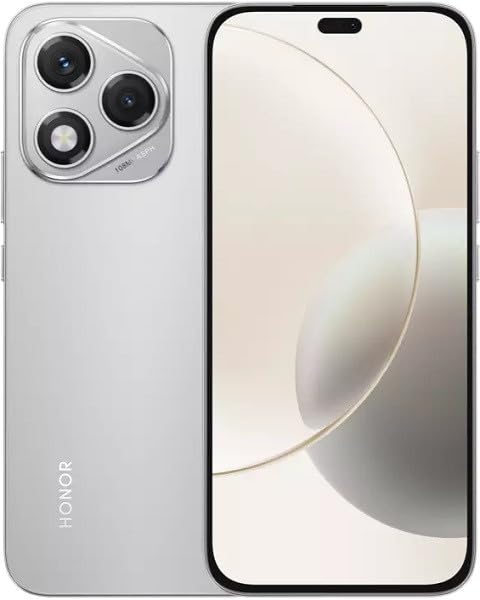
Image: The HONOR 400 Lite 5G Smartphone in Velvet Grey, showcasing its sleek design and camera module on the rear.
The HONOR 400 Lite features a 6.7-inch AMOLED display with a resolution of 1080 x 2412 pixels. The device is equipped with a powerful camera system, including a 108 MP main sensor. Its ergonomic design ensures a comfortable grip and easy access to all physical buttons and ports.
Ṣeto
1. Fifi sori kaadi SIM
- Wa atẹ kaadi SIM ni ẹgbẹ ẹrọ rẹ.
- Fi ohun elo SIM ejector sii sinu iho kekere ti o tẹle atẹ ki o tẹ ṣinṣin titi ti atẹ naa yoo jade.
- Place your Nano-SIM card(s) and/or eSIM (if applicable) into the tray with the gold contacts facing down, ensuring they are correctly aligned.
- Fi iṣọra tẹ atẹ naa pada sinu ẹrọ naa titi ti o fi tẹ sinu aaye.
Pataki: This smartphone is designed for GSM networks only and is not compatible with CDMA networks (e.g., Verizon, Sprint, US Cellular in the USA). Please verify network compatibility with your service provider before use.
2. Agbara akọkọ Lori
- Press and hold the Power button (usually on the right side) until the HONOR logo appears.
- Tẹle awọn itọsọna loju iboju lati pari iṣeto akọkọ, pẹlu yiyan ede, asopọ Wi-Fi, ati iṣeto akọọlẹ Google.
Ṣiṣẹ ẹrọ rẹ
Ifihan Awọn ẹya ara ẹrọ
The 6.7-inch AMOLED display offers vibrant colors and deep blacks. Utilize gestures for navigation, access quick settings by swiping down from the top, and customize your home screen layout and widgets to personalize your experience.
Lilo kamẹra
Your HONOR 400 Lite is equipped with a high-resolution 108 MP main camera. Open the Camera app to access various modes such as Photo, Video, Portrait, and more. Tap on the screen to focus and use the on-screen shutter button to capture images or start recording videos. Explore settings for advanced options like HDR and AI enhancements.
Batiri ati Ngba agbara
The device is powered by a 5230mAh non-removable battery. Use the provided USB cable to charge your device. Connect the USB-C end to your phone and the USB-A end to a compatible power adapter (not always included, check box contents) or computer USB port. For optimal charging speed, use a compatible fast charger.
Itoju
- Awọn imudojuiwọn sọfitiwia: Regularly check for and install system updates to ensure your device has the latest features, security patches, and performance improvements. Go to Settings > System & updates > Software update.
- Ninu: Lo asọ rirọ, ti ko ni lint lati nu iboju ati ara foonu rẹ mọ. Yago fun awọn kemikali lile tabi awọn ohun elo abrasive.
- Isakoso Ibi ipamọ: Lokọọkan ko ṣe pataki files ati awọn lw lati gba aaye ipamọ laaye ati ṣetọju iṣẹ ṣiṣe to dara julọ.
Laasigbotitusita
If you encounter issues with your HONOR 400 Lite, try the following common troubleshooting steps:
- Ohun elo Ko dahun: Tẹ mọlẹ bọtini Agbara fun bii iṣẹju-aaya 10 lati fi ipa mu tun bẹrẹ.
- Ohun elo jamba: Clear the app's cache and data (Settings > Apps > [App Name] > Storage > Clear cache/Clear data) or reinstall the app.
- Sisan Batiri: Check battery usage in Settings to identify power-hungry apps. Reduce screen brightness and disable unnecessary features like GPS or Wi-Fi when not in use.
- Awọn oran Nẹtiwọọki: Ensure your SIM card is correctly inserted. Try toggling Airplane Mode on and off. If issues persist, contact your network provider.
Awọn pato
| Orukọ awoṣe | Ọlá 400 Lite |
| Ifihan | 6.7 inches AMOLED, 1080 x 2412 awọn piksẹli |
| isise | Mediatek Dimensity 7025 Ultra (6 nm), Octa-core (2x2.5 GHz Cortex-A78 & 6x2.0 GHz Cortex-A55) |
| Àgbo | 12GB |
| Ibi ipamọ inu | 256GB (non-expandable) |
| Kamẹra ẹhin | 108 MP, f/1.8, (wide), 1/1.67", PDAF; 16 MP, f/2.5, (wide) |
| Eto isesise | Android 15 |
| Batiri | 5230mAh, ko le yọ kuro |
| Ibaramu Nẹtiwọọki | 2G, 3G, 4G, 5G (GSM Nikan) |
| Àwọ̀ | Velvet Grey |
| Pataki Awọn ẹya ara ẹrọ | SIM meji |
Atilẹyin ọja ati Support
Your HONOR 400 Lite smartphone comes with a standard manufacturer's warranty. Please refer to the included Warranty Card for detailed terms and conditions, including coverage period and service procedures. For technical support or further assistance, please visit the official HONOR support webojula tabi kan si wọn onibara iṣẹ.
Jeki ẹri rira rẹ fun awọn iṣeduro atilẹyin ọja.


