1. Ifihan
O ṣeun fun riraasing the ZEBRONICS Juke BAR 200A Soundbar. This manual provides essential information for the safe and correct operation of your device. Please read it thoroughly before use and retain it for future reference.
Package Awọn akoonu
- Pápá Ìró - Ẹyọ kan
- Subwoofer - ẹyọ kan
- Ìtọ́sọ́nà Kóòdù QR - Ẹyọ kan
- Adapta Agbara - ẹyọ kan
- Iṣakoso Latọna jijin - ẹyọ kan
2. Awọn ilana aabo
Lati rii daju iṣẹ ailewu ati yago fun ibajẹ, jọwọ ṣe akiyesi awọn iṣọra ailewu atẹle:
- Ma ṣe fi ẹrọ naa han si ojo tabi ọrinrin.
- Ma ṣe dina eyikeyi awọn ṣiṣi atẹgun.
- Gbe awọn ẹrọ lori kan idurosinsin, alapin dada.
- Lo adapter agbara ti olupese pese nikan.
- Maṣe ṣii casing; tọka gbogbo iṣẹ si oṣiṣẹ ti o peye.
- Jeki ẹrọ naa kuro ni orun taara, awọn orisun ooru, ati awọn aaye oofa to lagbara.
- Mọ pẹlu asọ gbigbẹ nikan.
3. Ọja Ipariview
The ZEBRONICS Juke BAR 200A is a compact soundbar system designed to enhance your audio experience. It features a soundbar with dual drivers and a dedicated subwoofer for powerful bass.
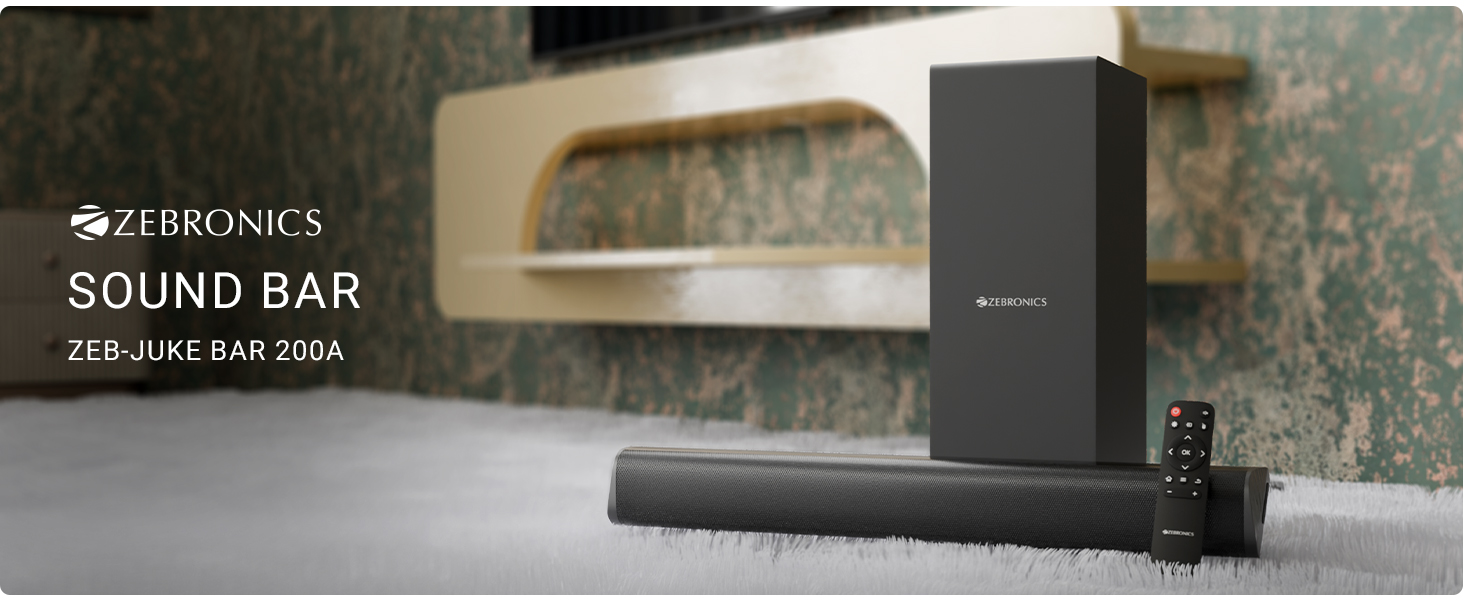
Nọmba 3.1: ZEBRONICS Juke BAR 200A Soundbar, Subwoofer, and Remote Control. This image displays the complete sound system, including the main soundbar unit, the separate subwoofer, and the remote control, providing a visual representation of all primary components.
Key Awọn ẹya ara ẹrọ
- Ìmújáde RMS 90W: Ó fúnni ní ohùn tó lágbára àti tó ṣe kedere.
- Dual Driver Soundbar: Equipped with 5.08cm x 2 drivers for balanced sound.
- 11.43cm Subwoofer: Provides deep, rich bass.
- Asopọmọra pupọ: Supports Bluetooth v5.1, HDMI ARC, and USB.
- Dolby Audio Decoding: Built-in Dolby Digital and Dolby Digital+ decoding for versatile audio.
- Ògiri Ògiri: Designed for flexible placement options.
- Isakoṣo latọna jijin: Full control over audio settings.

Nọmba 3.2: Soundbar Media and Volume Controls and Remote Control. This image highlights the physical control buttons on the soundbar for power, volume up, and volume down, alongside a detailed view of the included remote control, illustrating all available buttons for comprehensive audio management.

Nọmba 3.3: Soundbar Rear Panel with Connectivity Ports. This image provides a close-up view of the soundbar's rear panel, clearly labeling the HDMI ARC, USB, DC IN, and SW OUT ports, essential for understanding connection options.
4. Eto
4.1 Ibi
Place the soundbar on a stable surface in front of your television or mount it on the wall below your TV. Position the subwoofer on the floor, ideally near the soundbar, for optimal bass performance.
4.2 Nsopọ Subwoofer
Connect the subwoofer to the soundbar using the provided SW OUT cable. Ensure a secure connection.
4.3 Asopọ agbara
- So adapter agbara pọ mọ ibudo DC IN lori ọpa ohun.
- Pulọọgi ohun ti nmu badọgba agbara sinu iṣan ogiri ti o dara.
4.4 Awọn isopọ Ohun
Yan ọkan ninu awọn ọna wọnyi lati so orisun ohun rẹ pọ:
- HDMI ARC: For optimal audio quality and control, connect an HDMI cable from your TV's HDMI ARC port to the HDMI ARC port on the soundbar. This allows your TV remote to control the soundbar's volume.
- Bluetooth: For wireless connection, refer to the "Bluetooth Pairing" section in Operating Instructions.
- USB: Fi awakọ USB kan ti o ni ohun ti o ni ninu files sinu ibudo USB fun ṣiṣiṣẹsẹhin taara.
5. Awọn ilana Iṣiṣẹ
5.1 Agbara Tan / Pa
- Tẹ awọn Agbara bọ́tìnì lórí ọ̀pá ohùn tàbí ìṣàkóso láti tan tàbí pa ẹ̀rọ náà.
- The LED indicator on the soundbar will illuminate when powered on.
5.2 Aṣayan Ipo igbewọle
Tẹ awọn Iṣawọle button on the remote control to cycle through available input modes: Bluetooth (BT), HDMI ARC, and USB.
5.3 Sisopọ Bluetooth
- Turn on the soundbar and select Bluetooth mode. The LED indicator will flash, indicating pairing mode.
- Enable Bluetooth on your mobile device or computer and search for "ZEB-JUKE BAR 200A".
- Select the device to pair. Once connected, the LED indicator will glow steadily.
5.4 Iṣakoso iwọn didun
- Lo awọn Iwọn didun soke (+) ati Iwọn didun isalẹ (-) awọn bọtini lori ọpa ohun tabi iṣakoso latọna jijin lati ṣatunṣe iwọn didun.
- Tẹ awọn Pa ẹnu mọ́ button on the remote to mute or unmute the audio.
5.5 USB Sisisẹsẹhin
Fi awakọ filasi USB sinu ibudo USB. Ohun orin naa yoo yipada si ipo USB laifọwọyi yoo si bẹrẹ si mu ohun afetigbọ ti o baamu ṣiṣẹ. files. Use the remote control for playback functions (Play/Pause, Next/Previous Track).
6. Iṣagbesori Odi
The ZEBRONICS Juke BAR 200A is designed to be wall-mountable. Ensure you use appropriate screws and wall plugs for your wall type. It is recommended to consult a professional for wall mounting to prevent damage or injury.
- Measure the distance between the mounting holes on the back of the soundbar.
- Mark the corresponding positions on the wall.
- Lu awọn ihò ki o si fi awọn plọgi ogiri sii (ti o ba jẹ dandan).
- Secure the soundbar to the wall using suitable screws.
7. Itọju
- Ninu: Lo aṣọ rírọrùn tí ó gbẹ láti nu ojú ibi ìró ohùn àti subwoofer. Má ṣe lo àwọn ohun èlò ìfọmọ́ omi tàbí àwọn ohun èlò ìpara.
- Ibi ipamọ: Ti o ba tọju ẹyọ naa fun akoko ti o gbooro sii, ge asopọ kuro ni agbara ki o tọju rẹ si ibi ti o tutu, ti o gbẹ.
- Afẹfẹ: Rii daju pe awọn šiši fentilesonu ko ni idinamọ lati ṣe idiwọ igbona.
8. Laasigbotitusita
| Isoro | Owun to le Fa | Ojutu |
|---|---|---|
| Ko si agbara | Ohun ti nmu badọgba agbara ko ti sopọ tabi aṣiṣe iṣan. | Ṣayẹwo awọn asopọ agbara. Gbiyanju iṣan ti o yatọ. |
| Ko si ohun | Incorrect input mode, low volume, or incorrect cable connection. | Select the correct input mode. Increase volume. Check audio cables. |
| Bluetooth ko sopọ | Soundbar not in pairing mode, device too far, or previously paired. | Ensure soundbar is in BT pairing mode. Move device closer. Forget device on your phone and re-pair. |
| Isakoṣo latọna jijin ko ṣiṣẹ | Batiri kekere tabi idinamọ. | Replace remote batteries. Ensure no obstructions between remote and soundbar. |
9. Awọn pato
| Ẹya ara ẹrọ | Ẹ̀kúnrẹ́rẹ́ |
|---|---|
| Orukọ awoṣe | Zeb - Juke Bar 200A |
| Agbọrọsọ Iru | Pẹpẹ ohun pẹlu Subwoofer |
| Lapapọ Agbara Ijade | 90 Watts RMS (Soundbar: 20W x 2, Subwoofer: 50W) |
| Subwoofer Opin | 11.43 centimeters |
| Iwọn Awakọ Ohun-orin | 5.08cm x2 |
| Asopọmọra | Bluetooth v5.1, HDMI ARC, USB |
| Agbegbe Ohun ikanni | 2.1 |
| Iyipada ohun | Dolby Digital, Dolby Digital+ |
| Ọna Iṣakoso | Remote, Control Buttons |
| Ọja Mefa | 6.3D x 50W x 6.3H Sẹ́ǹtìmítà (Ìdáhùn ohùn) |
| Iwọn Nkan | 2.5 kg |
| Awọn irinše to wa | Sound Bar, Subwoofer, QR Code Guide, Power Adapter, Remote |
10. atilẹyin ọja Information
This product is covered by a manufacturer's warranty. Please refer to the QR Code Guide included in your package or visit the official ZEBRONICS website for detailed warranty terms and conditions. Retain your purchase receipt as proof of purchase for warranty claims.
For extended warranty options, please check with your retailer or the ZEBRONICS official channels.
11. Atilẹyin
For technical assistance, product inquiries, or service requests, please contact ZEBRONICS customer support:
- Osise Webojula: www.zebronics.com
- Iṣẹ onibara: Refer to the QR Code Guide or the official webojú òpó wẹ́ẹ̀bù fún ìwífún ìbánisọ̀rọ̀ tuntun (àwọn nọ́mbà fóònù, ìrànlọ́wọ́ ìmeeli).
Please have your product model number (Juke BAR 200A) and purchase details ready when contacting support.


