1. Ifihan
The ANRAN 5MP Q04 Solar Wireless Outdoor Security Camera is designed to provide reliable and comprehensive surveillance for your home. Featuring 5MP resolution, 360° Pan-Tilt-Zoom (PTZ) capabilities, PIR human detection, color night vision, and two-way audio, this camera offers advanced monitoring with the convenience of solar power. This manual will guide you through the installation, operation, and maintenance of your new security camera system.

Image: Two ANRAN 5MP Q04 Solar Wireless Outdoor Security Cameras, showcasing their design and integrated solar panels.
2. Package Awọn akoonu
Jọwọ rii daju pe gbogbo awọn ohun kan wa ninu apo rẹ:
- 2 x Wireless Camera with Fixed Solar Panel
- 2 x Okun USB
- 2 x Screw Pack (for mounting)
- 1 x Itọsọna olumulo

Image: A visual representation of all components included in the ANRAN Q04 security camera package.
3. Eto ati fifi sori
The ANRAN Q04 camera is designed for simple and permanent installation. Follow these steps to set up your camera:
- App Download and Account Creation: Download the ANRAN app from your device's app store (available on Google Play and Apple App Store). Create an account and log in.
- Ṣiṣẹ kamẹra ṣiṣẹ: The app provides voice guidance for connecting the wireless outdoor camera. Follow the in-app instructions to power on and connect your camera to your 2.4G WiFi network. The camera supports both 2.4G and 5Ghz WiFi for faster speeds and longer range.
- Iṣagbesori: Select an outdoor location that receives adequate daily sunlight for the fixed solar panel. Use the provided screw pack and mounting hole template to securely attach the camera to a wall or suitable surface. Ensure the camera has a clear line of sight to the area you wish to monitor.

Image: A person installing the ANRAN Q04 camera, highlighting its simple installation process with an integrated solar panel.
Video: An official ANRAN video demonstrating the features and setup of the Q04 Solar Security Camera.
4. Awọn ilana Iṣiṣẹ
4.1. 360-Degree PTZ Control
Utilize the ANRAN app to remotely control the camera's 360° Pan-Tilt-Zoom (PTZ) function. This allows you to monitor every corner of your property by rotating the camera to any point on the panorama with a simple tap.

Image: The ANRAN Q04 camera demonstrating its 360-degree pan and 90-degree tilt capabilities for comprehensive surveillance.
4.2. Intelligent Motion Detection and Alerts
The camera features a built-in infrared motion detection sensor capable of analyzing and recognizing persons, vehicles, pets, and packages. When a threat is detected, you will receive immediate mobile notifications. You can configure three alarm options:
- Itaniji siren
- Spotlight activation
- App iwifunni

Image: The ANRAN Q04 camera's AI human detection feature, showing a detected person and a mobile alert.
4.3. Awọ Night Vision
The 5MP resolution provides clear details day and night. The camera supports color night vision, allowing for enhanced visibility in low-light conditions.
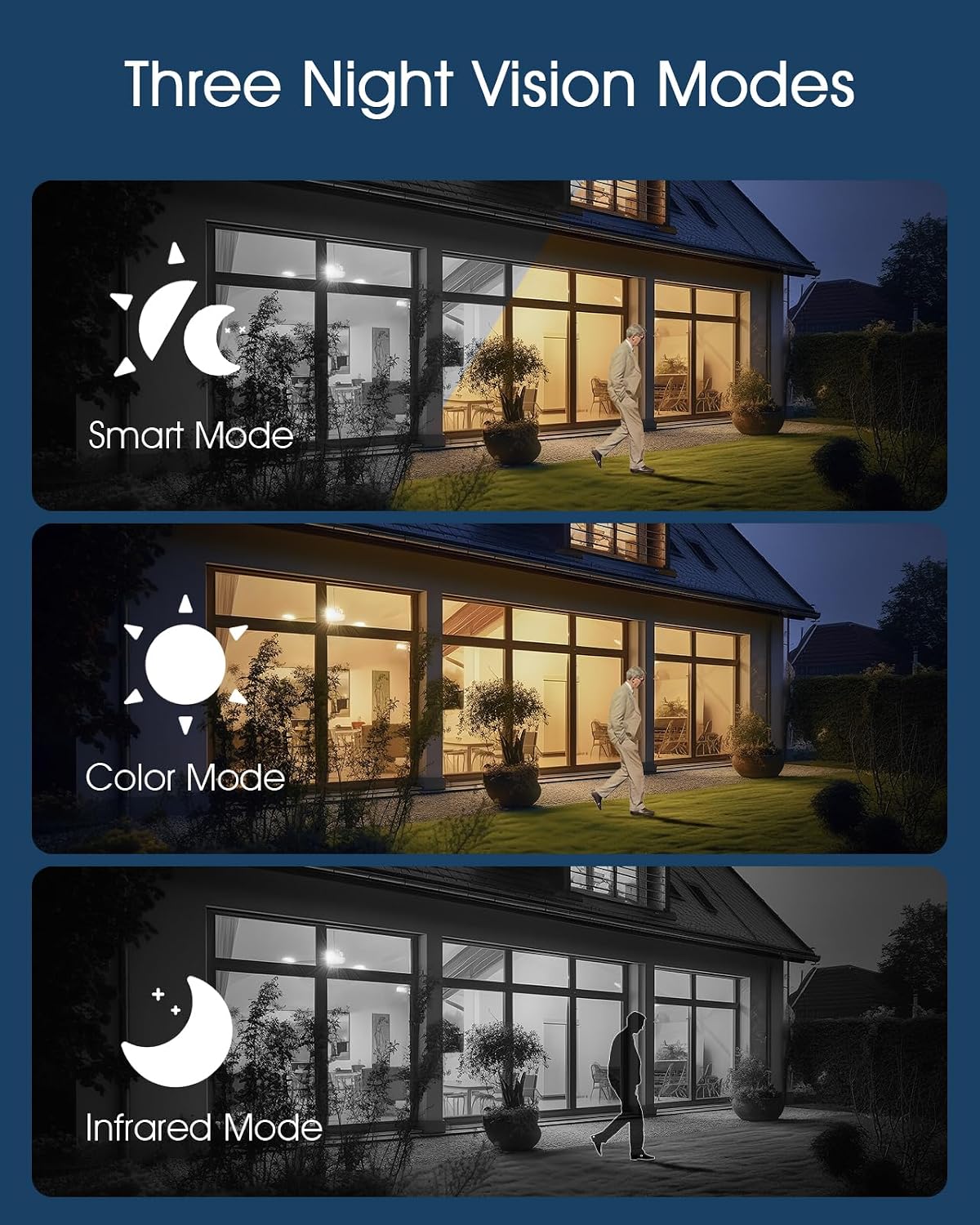
Image: Illustration of the three night vision modes available on the ANRAN Q04 camera: Smart, Color, and Infrared.
4.4. Meji-Ọna Ọrọ
Engage in real-time two-way audio communication through the ANRAN app. This feature allows you to listen and talk back anytime, anywhere, directly through the camera.

Image: A user interacting with the ANRAN Q04 camera via the mobile app, demonstrating the two-way audio communication feature.
4.5. Remote Access and Multi-User Sharing
Access your camera feed and controls remotely via the ANRAN app. The system also supports multi-user sharing, allowing authorized individuals to view ati ṣakoso kamẹra.
5. Power and Storage
5.1. Forever Power with Solar Panel
The integrated fixed solar panel ensures continuous power for your camera. Sufficient daily direct sunlight will keep the battery charged, eliminating the need for manual battery replacement and providing 365 days of surveillance.
5.2. Awọn aṣayan ipamọ
The camera offers two storage modes:
- Lifetime Free Cloud Storage: A base service records 6-second clips with 7 days of loop coverage permanently.
- Ibi ipamọ kaadi SD: Supports up to 128GB (SD card not included).

Image: The ANRAN Q04 camera highlighting its dual storage options: local MicroSD card (up to 128GB) and 7-day free trial cloud storage.
6. Itọju
To ensure the longevity and optimal performance of your ANRAN Q04 camera, consider the following maintenance tips:
- Ìfọ̀mọ́ Páẹ́lì Oorun: Periodically clean the solar panel surface to remove dust, dirt, or debris that may obstruct sunlight and reduce charging efficiency.
- Fifọ lẹnsi: Gently wipe the camera lens with a soft, clean cloth to ensure clear image quality. Avoid abrasive materials.
- Awọn imudojuiwọn famuwia: Regularly check the ANRAN app for firmware updates to ensure your camera has the latest features and security enhancements.
- Idaabobo Ayika: The camera has an IP66 waterproof and dustproof rating, designed to withstand harsh outdoor environments. However, extreme weather conditions may still impact performance.

Image: The ANRAN Q04 camera demonstrating its IP65 waterproof and dustproof rating, suitable for outdoor use in various weather conditions.
7. Laasigbotitusita
If you encounter any issues with your ANRAN Q04 camera, please refer to the following general troubleshooting steps:
- Awọn oran Asopọmọra: Ensure your camera is within range of your 2.4G WiFi network. Restart your router and the camera.
- Awọn iṣoro gbigba agbara: Verify that the solar panel is receiving direct sunlight and is free from obstructions.
- Iwari išipopada Ko Nfa: Check the motion detection sensitivity settings in the app. Ensure the detection area is correctly configured.
- Didara aworan: Clean the camera lens. Ensure your internet connection is stable for optimal streaming quality.
For more detailed troubleshooting or persistent issues, please contact ANRAN customer support.
8. Awọn pato
| Ẹya ara ẹrọ | Ẹ̀kúnrẹ́rẹ́ |
|---|---|
| Nọmba awoṣe | Q04 |
| Ipinnu Yaworan fidio | 5MP |
| Asopọmọra Technology | Wireless (2.4G Wi-Fi) |
| Orisun agbara | Agbara Oorun ati Agbara Batiri |
| Viewigun igun | 360 Degrees (PTZ) |
| Ibiti Iran Night | 50 Ẹsẹ |
| Pataki Awọn ẹya ara ẹrọ | 2-Way Audio, Night Vision, PTZ Technology, Upgraded 5MP Resolution, Weather Proof (IP66), PIR Human Detection, Smart Siren Alarm, Multi-user Sharing, Compatible with Alexa |
| Awọn aṣayan ipamọ | Lifetime Free Cloud Storage (6s/7-day loop), SD Card (up to 128GB, not included) |
| Awọn Iwọn Nkan (L x W x H) | 9 x 7 x 6 inches |
| Iwọn Nkan | 3.98 iwon |
9. Atilẹyin ọja ati Support
ANRAN offers a 2-odun atilẹyin ọja for the Q04 Solar Wireless Outdoor Security Camera. If you encounter any problems or require technical assistance, please contact ANRAN customer support. Our professional technical team and after-sales team are available to assist you within 24 hours on weekdays.
For support, please refer to the contact information provided in your user manual or visit the official ANRAN webojula.


