1. Ifihan
Thank you for choosing the Camtro M6 Outdoor Security Camera. This battery-powered wireless camera is designed to provide reliable outdoor surveillance with features such as 1080p video resolution, color night vision, two-way audio, and smart AI motion detection. This manual provides essential information for setting up, operating, and maintaining your camera to ensure optimal performance.
2. Package Awọn akoonu
Jọwọ rii daju pe gbogbo awọn ohun kan wa ninu apo rẹ:
- Camtro M6 Outdoor Security Camera
- Ilana itọnisọna
- Iṣagbesori skru
3. Ọja Ipariview
Familiarize yourself with the components of your Camtro M6 camera.

Nọmba 3.1: Iwaju view of the Camtro M6 Outdoor Security Camera, showing the lens, light, and motion sensor.
The Camtro M6 features a durable, weather-resistant design suitable for outdoor use. Key components include:
- Lẹnsi kamẹra: Captures 1080p high-definition video.
- Infrared LED / Spotlight: Provides illumination for night vision and color night vision.
- Sensọ išipopada: Detects movement for smart alerts.
- Gbohungbohun: Fun ibaraẹnisọrọ ohun afetigbọ ọna meji.
- Agbọrọsọ: Fun ibaraẹnisọrọ ohun ọna meji ati awọn itaniji.
- Ipilẹ iṣagbesori: For secure installation on walls or other surfaces.

Nọmba 3.2: Pariview of Camtro M6 features including AI Human Detection, Color Night Vision, Two-way Talk, and Cloud Storage.
4. Eto
Follow these steps to set up your Camtro M6 camera:
- Gba agbara si Kamẹra: Before initial use, fully charge the camera battery using the provided charging cable. A full charge ensures optimal battery life.
- Ṣe igbasilẹ ohun elo naa: Wa fun the official Camtro security camera app on your smartphone's app store (iOS or Android) and install it.
- Ṣẹda akọọlẹ kan: Ṣí àpù náà kí o sì tẹ̀lé àwọn ìlànà ojú ìbòjú láti ṣẹ̀dá àkọọ́lẹ̀ olùlò tuntun kan.
- Fi ẹrọ kun: In the app, select the option to add a new device. Follow the prompts to connect your camera to your Nẹtiwọọki Wi-Fi 2.4GHz. Ensure your phone is connected to a 2.4GHz network during setup. 5GHz Wi-Fi is not supported.
- Gbe Kamẹra naa: Choose a suitable outdoor location for mounting. Use the included mounting screws to securely attach the camera to a wall or other stable surface. Ensure the camera has a clear field of view and is within range of your Wi-Fi signal.
5. Awọn ilana Iṣiṣẹ
Once set up, you can access and control your camera through the mobile app.
5.1 Live View
Ṣí àpù náà kí o sì yan kámẹ́rà rẹ láti view the live feed. This allows you to monitor your property in real-time from anywhere.
5.2 Meji-Ona Audio

Nọmba 5.1: Illustration of the two-way audio function, allowing communication through the camera.
Tẹ àmì gbohùngbohùn nínú ìtàkùn ayélujára view to enable two-way audio. You can speak through your phone, and your voice will be projected through the camera's speaker. Similarly, you can hear audio from the camera's location.
5.3 Smart AI Motion Detection

Nọmba 5.2: The camera's AI Human Detection feature distinguishing between human movement and other objects.
The camera features AI-powered motion detection that can distinguish between humans, animals, and other moving objects. This reduces false alarms. You will receive push notifications on your smartphone when motion is detected. Adjust sensitivity settings within the app.
5.4 Ìran Aláwọ̀ Alẹ́
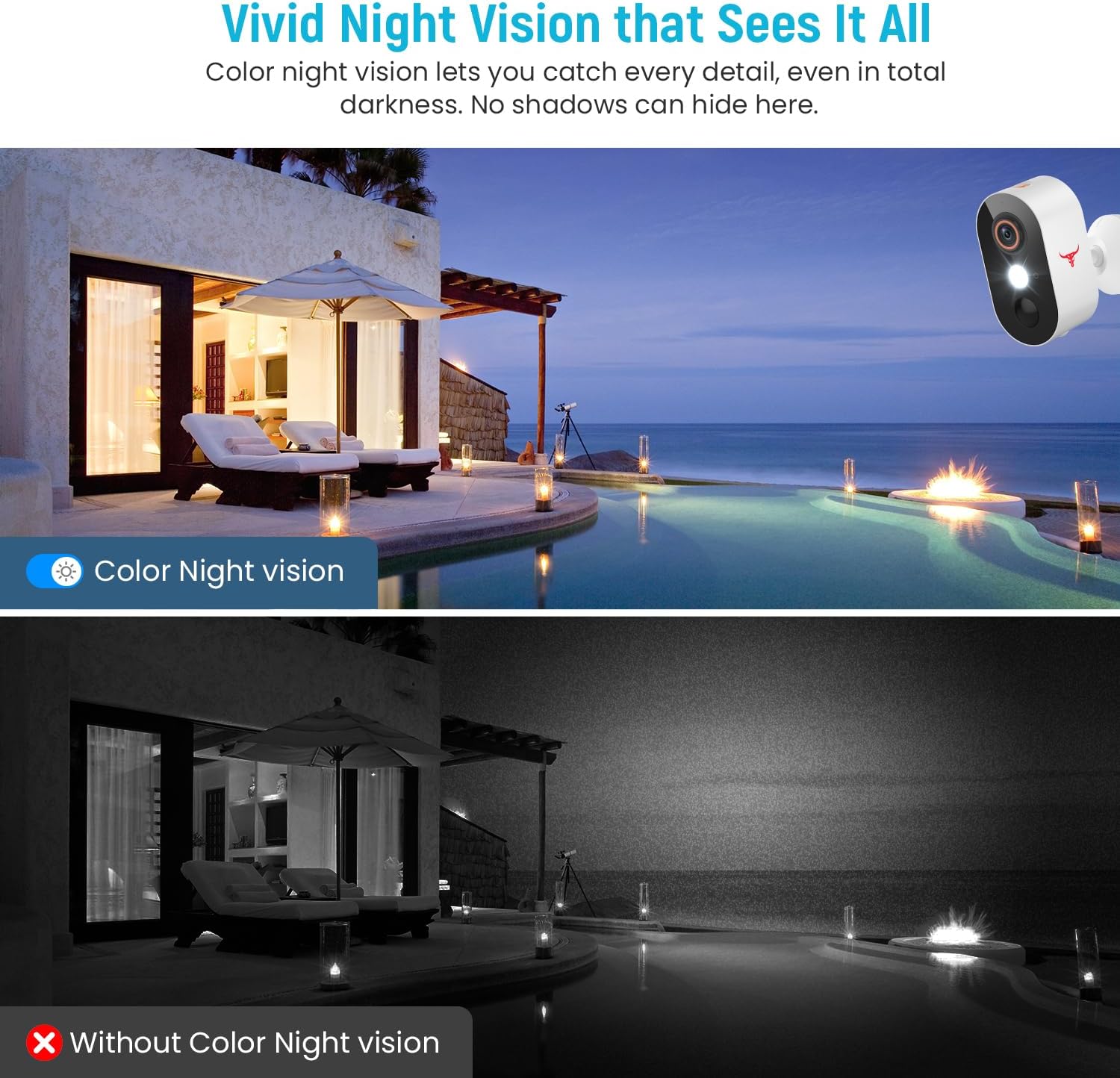
Nọmba 5.3: Comparison of color night vision and standard black and white night vision.
The Camtro M6 provides vivid color night vision, allowing you to see details in low-light conditions. The camera automatically switches to night vision mode when ambient light is insufficient.
5.5 Ibi ipamọ awọsanma

Nọmba 5.4: Visual representation of cloud storage for recorded video events.
The camera supports cloud storage for recording and reviewing video events. A subscription is required to access recorded footage. Please refer to the app for subscription options and details.
6. Itọju
Itọju deede ṣe idaniloju igbesi aye gigun ati iṣẹ to dara julọ ti kamẹra rẹ.
- Ngba agbara batiri: The camera is battery-powered. Monitor the battery level in the app and recharge the camera as needed. Battery life can vary based on usage and environmental factors.
- Ninu: Lokọọkan nu awọn lẹnsi kamẹra ati ile pẹlu asọ, damp aṣọ láti mú eruku àti ìdọ̀tí kúrò. Má ṣe lo àwọn kẹ́míkà líle.
- Awọn imudojuiwọn famuwia: Keep the camera's firmware updated through the app to access new features and improvements.

Nọmba 6.1: The Camtro M6 camera demonstrating its weather resistance against shine, rain, snow, and dust.
The camera is designed to withstand various weather conditions, operating effectively in temperatures ranging from 14°F to 140°F.
7. Laasigbotitusita
If you encounter issues with your Camtro M6 camera, refer to the following common problems and solutions:
| Isoro | Owun to le Fa | Ojutu |
|---|---|---|
| Kamẹra ko sopọ mọ Wi-Fi | Incorrect Wi-Fi password, 5GHz Wi-Fi network, weak signal | Ensure correct 2.4GHz Wi-Fi password. Confirm your router is broadcasting a 2.4GHz network. Move camera closer to the router. |
| Didara fidio ti ko dara | Weak Wi-Fi signal, dirty lens | Mu agbara ifihan Wi-Fi pọ si. Nu lẹnsi kamẹra naa. |
| Wiwa išipopada ko ṣiṣẹ tabi awọn itaniji eke pupọ ju | Incorrect sensitivity settings, camera placement | Adjust motion detection sensitivity in the app. Ensure camera is positioned to avoid unnecessary triggers (e.g., swaying branches). |
| Batiri n ṣan ni kiakia | Frequent motion events, continuous live view, low temperature | Reduce motion detection sensitivity. Limit continuous live viewing. Ensure camera is fully charged. |
| Ohùn ọ̀nà méjì tí kò yé kedere | Weak Wi-Fi signal, microphone/speaker obstruction | Check Wi-Fi connection. Ensure microphone and speaker are clear of obstructions. |
8. Awọn pato
Detailed technical specifications for the Camtro M6 Outdoor Security Camera:
- Awoṣe: M6
- Lilo inu ile/ita gbangba: Ita gbangba
- Awọn ẹrọ ibaramu: Foonuiyara (iOS, Android)
- Orisun Agbara: Agbara Batiri
- Ilana Asopọmọra: Wi-Fi (2.4GHz nikan)
- Iru fifi sori: Ògiri Ògiri
- Ipinnu Yiya fidio: 1080p
- Awọn Iwọn Nkan (L x W x H): 2.8 x 1.7 x 3.4 inches
- Ìwọ̀n Nkan: 6.6 iwon (0.41 iwon)
- Awọn batiri: 2 Batiri ti kii ṣe deede (pẹlu)
- Ọna kika fidio: MP4
- Ẹya Pataki: Motion Sensor, Color Night Vision, 2-Way Audio
- Awọn Lilo Niyanju Fun Ọja: Ita gbangba Aabo
9. Atilẹyin ọja ati Support
For warranty information and technical support, please refer to the contact details provided with your purchase or visit the official Camtro webAaye ayelujara. Ẹgbẹ iṣẹ alabara wa wa lati ṣe iranlọwọ pẹlu eyikeyi ibeere tabi awọn iṣoro ti o le pade.


