1. Ọja Ipariview
The VIGX AI-Powered Adjustable Exoskeleton is a lightweight, wearable lower limb support device designed to assist users during various physical activities such as hiking, fitness, rehabilitation, and general outdoor mobility. It features AI-driven assistance, app control, and a modular, foldable design for portability.
Awọn ẹya pataki:
- Apẹrẹ iwuwo fẹẹrẹ: Weighs approximately 1.8kg, making it highly portable.
- Ibamu ti o le ṣatunṣe: Flexible waist belt and adjustable thigh straps accommodate various body types.
- AI Intention Recognition: Automatically adjusts support based on user activity (walking, running, climbing) and terrain.
- Ohun elo Alagbeka Iṣakoso: Bluetooth 5.1 connectivity for iOS/Android app to track data and customize modes.
- Batiri Ifarada Gigun: Provides support for up to 10,000 steps on a single charge, with a 1.5-hour recharge time.
- Ikole Modulu: Legs can be easily attached and detached for compact storage.

Aworan 1.1: Iwaju view of the VIGX AI-Powered Adjustable Exoskeleton, showcasing its compact design and vibrant accents.

Image 1.2: Illustration highlighting the lightweight nature (1.8kg) and flexible waist belt of the VIGX Exoskeleton, designed for comfort and adaptability.
2. Awọn ilana iṣeto
2.1 Package Awọn akoonu
Ṣaaju ki o to tẹsiwaju, rii daju pe gbogbo awọn eroja wa nibẹ:
- VIGX Exoskeleton Main Unit (waist belt with integrated electronics)
- Left and Right Leg Modules
- Ngba agbara USB
- Afowoyi Olumulo (iwe-ipamọ yii)
2.2 Apejọ
The VIGX Exoskeleton features a modular design for easy assembly.
- Align each leg module with the corresponding attachment points on the main waist unit.
- Gently push until you hear a click, indicating the module is securely locked in place.
- Ensure both leg modules are firmly attached before use.

Image 2.1: Depiction of the exoskeleton's modular construction, showing how the leg poles can be folded and detached for compact storage (36x14x12cm).
2.3 Ngba agbara si Batiri naa
The exoskeleton is equipped with a rechargeable lithium battery.
- Wa ibudo gbigba agbara lori ẹyọ akọkọ.
- Connect the provided charging cable to the port and a suitable power source.
- The charging indicator light will illuminate. A full charge typically takes 1.5 hours.
- Ge asopọ ṣaja ni kete ti o ti gba agbara ni kikun.
2.4 Sizing and Adjustment
Proper fit is essential for comfort and performance.
- Waist Measurement: Measure your waist circumference one finger below the navel.
- Thigh Measurement: Ṣe iwọn iyipo itan rẹ.
- Yan Iwọn: Refer to the sizing chart below to choose the appropriate exoskeleton size.
| Iwọn | Ayika ẹgbẹ-ikun | Thigh Circumference |
|---|---|---|
| S | 70-85 cm | 32-42 cm |
| M | 83-100 cm | 40-58 cm |
| L | 98-125 cm | 40-58 cm |
- Wearing the Exoskeleton: Secure the waist belt snugly around your waist. Adjust the thigh straps to ensure the leg modules are positioned correctly and comfortably on your thighs.
2.5 App fifi sori ati so pọ
The VIGX app is available for iOS and Android devices.
- Download the VIGX app from your device's app store.
- Rii daju pe Bluetooth ti ṣiṣẹ lori ẹrọ alagbeka rẹ.
- Power on the VIGX Exoskeleton.
- Open the VIGX app and follow the on-screen instructions to pair with your device via Bluetooth 5.1.
3. Awọn ilana Iṣiṣẹ
3.1 Titan / Pa a
- Agbara Tan: Press and hold the power button on the main unit until the indicator lights illuminate.
- Agbara Pa: Tẹ bọtini agbara naa ki o si di mu titi ti awọn ina ifihan yoo fi pa.
3.2 Awọn ọna ṣiṣe
The exoskeleton offers different modes to suit various activities:
- Ipo Standard: Provides general assistance for daily activities and walking.
- Ipo Amọdaju: Designed for more intense activities, potentially targeting specific muscle groups or providing higher torque assistance.
Modes can be switched via the mobile application.

Image 3.1: A user performing fitness exercises, demonstrating the exoskeleton's application in a fitness setting, potentially utilizing Fitness Mode for enhanced efficiency.
3.3 AI Intention Recognition
The VIGX Exoskeleton utilizes AI to detect your movement intentions and adapt its support accordingly.
- Assistance Adaptive: The system adjusts power output based on your effort.
- Speed Adaptive: Support levels change with your walking, running, or climbing speed (up to 10 km/h).
- Terrain Adaptive: The AI recognizes changes in terrain, such as inclines or stairs, and optimizes assistance. For example, it can reduce energy consumption on stairs by 15% and fatigue on long walks by 30%.

Image 3.2: Diagram illustrating the AI Intention Recognition feature, showing how the exoskeleton adapts to walking, climbing, and running based on assistance, speed, and terrain.
3.4 Using the Mobile Application
The VIGX app provides detailed control and monitoring features:
- Iṣẹ-ṣiṣe Tọpa: Monitor steps, mileage, and calories burned.
- Ṣatunṣe Awọn paramita: Customize power levels and sports modes.
- View Data išipopada: Access detailed reports on your movement.
- Ipo Yipada: Easily switch between Standard and Fitness modes.
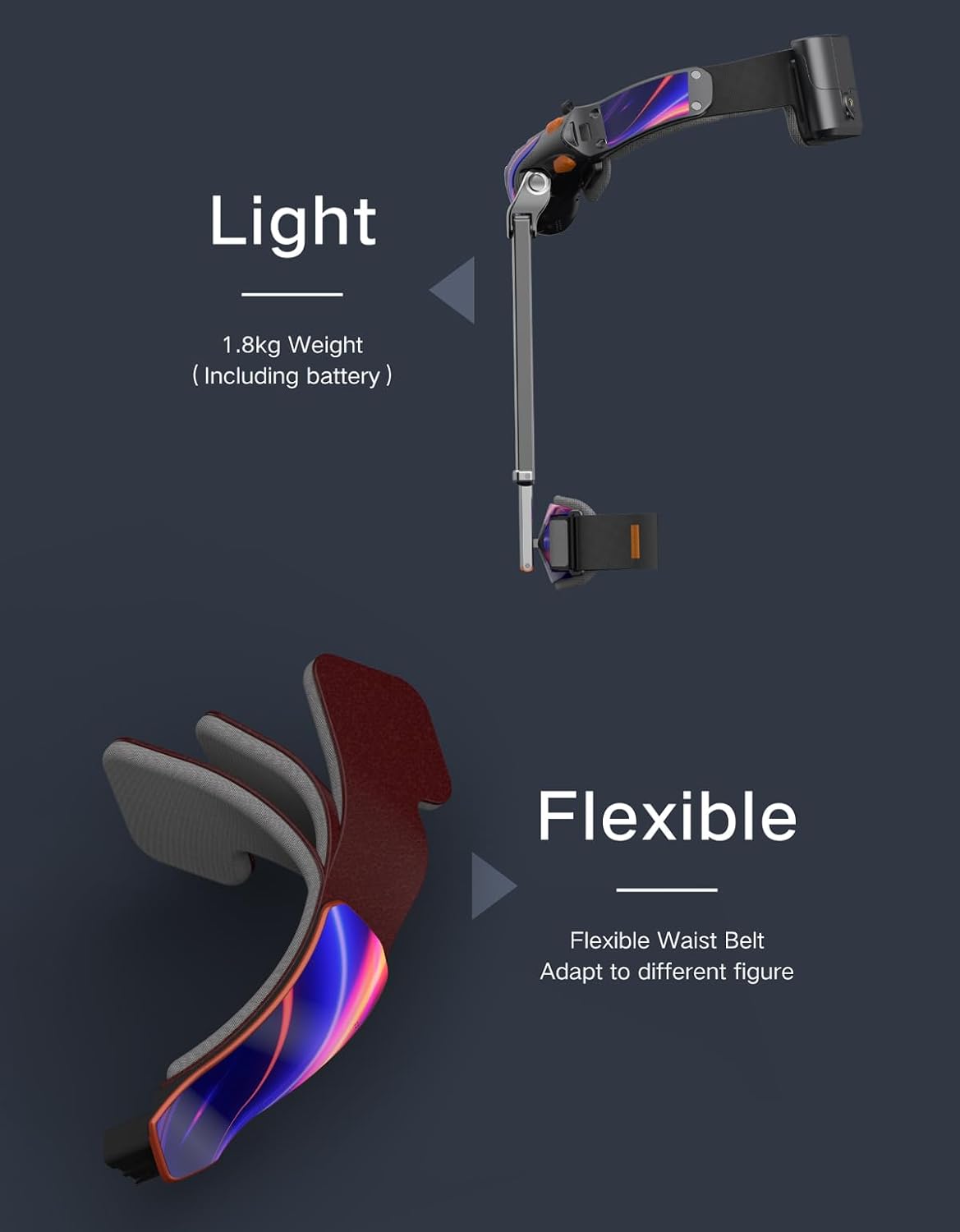
Image 3.3: Screenshot of the VIGX mobile application interface, displaying activity tracking (steps, runtime), power levels, and options for mode switching and parameter adjustment.
3.5 Awọn oju iṣẹlẹ Ohun elo
The VIGX Exoskeleton is suitable for a variety of uses:
- Irin-ajo: Provides support on trails and inclines.
- Amọdaju: Enhances workouts and rehabilitation exercises.
- Nrin: Reduces fatigue during long walks or daily errands.
- Àtẹ̀gùn Gígun: Offers assistance for ascending and descending stairs.

Image 3.4: Collage depicting various application scenarios for the VIGX Exoskeleton, including fitness, running, walking, and climbing stairs.
4. Itọju
4.1 Ninu
- Wipe the exoskeleton's surfaces with a damp asọ.
- Maṣe lo awọn kemikali lile tabi awọn afọmọ abrasive.
- Rí i dájú pé ẹ̀rọ náà gbẹ pátápátá kí o tó fi pamọ́ tàbí kí o tó lò ó.
4.2 Ibi ipamọ
- Store the exoskeleton in a cool, dry place away from direct sunlight.
- For compact storage, detach the leg modules and fold the main frame.
4.3 batiri Itọju
- Gba agbara batiri nigbagbogbo, paapaa ti ko ba si ni lilo nigbagbogbo, lati ṣetọju ilera batiri.
- Yago fun gbigba agbara si batiri ni kikun fun awọn akoko ti o gbooro sii.
- Ma ṣe fi batiri han si awọn iwọn otutu to gaju.
5. Laasigbotitusita
5.1 wọpọ oran
| Isoro | Owun to le Fa | Ojutu |
|---|---|---|
| Ẹrọ naa ko ṣiṣẹ | Batiri kekere; Bọtini agbara ko tẹ ni deede | Charge the battery; Press and hold the power button firmly |
| Ko le sopọ si app | Bluetooth off; Device not in pairing mode; App issue | Ensure Bluetooth is on; Restart exoskeleton and app; Reinstall app |
| Insufficient assistance | Incorrect mode; Low battery; Improper fit | Switch to appropriate mode (e.g., Fitness); Charge battery; Adjust straps for snug fit |
| korọrun fit | Incorrect size; Straps too tight/loose | Verify size with chart; Adjust waist belt and thigh straps for comfort |
6. Imọ ni pato
| Ẹya ara ẹrọ | Sipesifikesonu |
|---|---|
| Awoṣe | AI-Powered Adjustable Exoskeleton |
| Iwọn | 1.8 kg (pẹlu batiri) |
| Dimensions ti ṣe pọ | 36 x 14 x 12 cm |
| Batiri Iru | Lithium ion (1 nilo, pẹlu) |
| Akoko gbigba agbara | Isunmọ. wakati meji 1.5 |
| Ifarada | Up to 10,000 steps |
| Max Speed Assistance | Titi di 10 km / h |
| Torque Ijade | 10 Nm |
| Asopọmọra | Bluetooth 5.1 (iOS/Android App) |
| Olupese | VIGX |
| Ilu isenbale | China |
| ASIN | B0F9FYFMGW |
| GTIN | 00850070755412 |
7. Alaye Aabo
- Read all instructions before using the VIGX Exoskeleton.
- Ensure the device is properly fitted and secured before each use.
- Do not use the exoskeleton if any part is damaged or malfunctioning.
- Consult a medical professional before use if you have any pre-existing medical conditions or are undergoing rehabilitation.
- Jeki kuro ni arọwọto awọn ọmọde.
- Do not attempt to modify or disassemble the device beyond the modular components.
- Avoid exposing the device to water or extreme environmental conditions.
AlAIgBA Ofin: Iṣakojọpọ ọja gidi ati awọn ohun elo le ni alaye diẹ sii ati oriṣiriṣi ninu ju eyiti o han lori wa webojula. A ṣeduro pe ki o maṣe gbarale alaye ti o gbekalẹ nikan ati pe o nigbagbogbo ka awọn akole, awọn ikilọ, ati awọn itọnisọna ṣaaju lilo tabi jẹ ọja kan.
8. Atilẹyin ọja ati Support
For product support, technical assistance, or warranty inquiries, please contact VIGX customer service through the official webaaye tabi alaye olubasọrọ ti a pese pẹlu iwe rira rẹ.


