1. Ifihan
This manual provides detailed instructions for the safe and efficient use of your Gembird TWST-01-W Transparent Bluetooth Earbuds. These earbuds feature a unique transparent design, offering up to 4 hours of listening time per charge. Key functionalities include automatic music muting for incoming calls, an LCD battery indicator, and a color-changing backlight. Please read this manual thoroughly before operating the device.
2. Package Awọn akoonu
Rii daju pe gbogbo awọn nkan ti o wa ni isalẹ wa ninu apo rẹ:
- Gembird TWST-01-W Transparent Bluetooth Earbuds (Left and Right)
- Ngba agbara Case
- Okùn gbigba agbara tabi Asopọ
- Ilana itọnisọna
3. Ọja Ipariview
Familiarize yourself with the components of your Gembird TWST-01-W earbuds.

Nọmba 3.1: The Gembird TWST-01-W Transparent Bluetooth Earbuds shown within their charging case. The case features a clear design, revealing the internal components and an LCD display indicating battery levels for both earbuds (L and R) and the case itself.
Awọn ẹya pataki:
- Apẹrẹ ti o han gbangba: Unique clear housing for both earbuds and charging case.
- Fífetísílẹ̀ Gígùn: Up to 4 hours of continuous listening per charge.
- Isakoso ipe: Automatically mutes music for incoming calls.
- Atọka Batiri: LCD display on the charging case shows battery levels.
- Imọlẹ Atẹyin Yiyi: Charging case features a color-changing backlight.
- Iṣakoso Fọwọkan: Intuitive touch-sensitive controls for various functions.
- Alatako omi: A ṣe é láti kojú ìfọ́ àti òógùn.
4. Eto
4.1 Gbigba agbara akọkọ
Ṣaaju lilo akọkọ, gba agbara ni kikun awọn agbekọri ati apoti gbigba agbara.
- Gbe awọn afikọti mejeeji sinu ọran gbigba agbara.
- Connect the charging cable to the charging port on the case and to a USB power source.
- The LCD display on the case will show the charging status. Allow sufficient time for a full charge.

Nọmba 4.1: Apa view of the Gembird TWST-01-W charging case, highlighting its transparent construction and the integrated LCD battery display. The charging port is typically located at the bottom or rear of the case.
4.2 Sisopọ Bluetooth
Lati so agbekọri rẹ pọ mọ ẹrọ kan:
- Rii daju pe awọn agbekọri ti gba agbara ati gbe sinu apoti gbigba agbara.
- Ṣí àpótí ìgbara. Àwọn agbekọri náà yóò wọ inú ipò ìsopọ̀ láìfọwọ́sí (tí àwọn ìmọ́lẹ̀ tó ń tàn lórí àwọn agbekọri náà fi hàn).
- Lori ẹrọ rẹ (foonuiyara, tabulẹti, ati bẹbẹ lọ), lọ si awọn eto Bluetooth ki o tan-an Bluetooth.
- Wa fun available devices and select "Gembird TWST-01-W" from the list.
- Ni kete ti a ti sopọ, awọn afikọti yoo tọka si isọdọkan aṣeyọri (fun apẹẹrẹ, itọsi ohun tabi ina duro).
- Fun lilo atẹle, awọn agbekọri yoo sopọ laifọwọyi si ẹrọ ti o so pọ ti o kẹhin nigbati o ba yọ kuro ninu ọran naa.
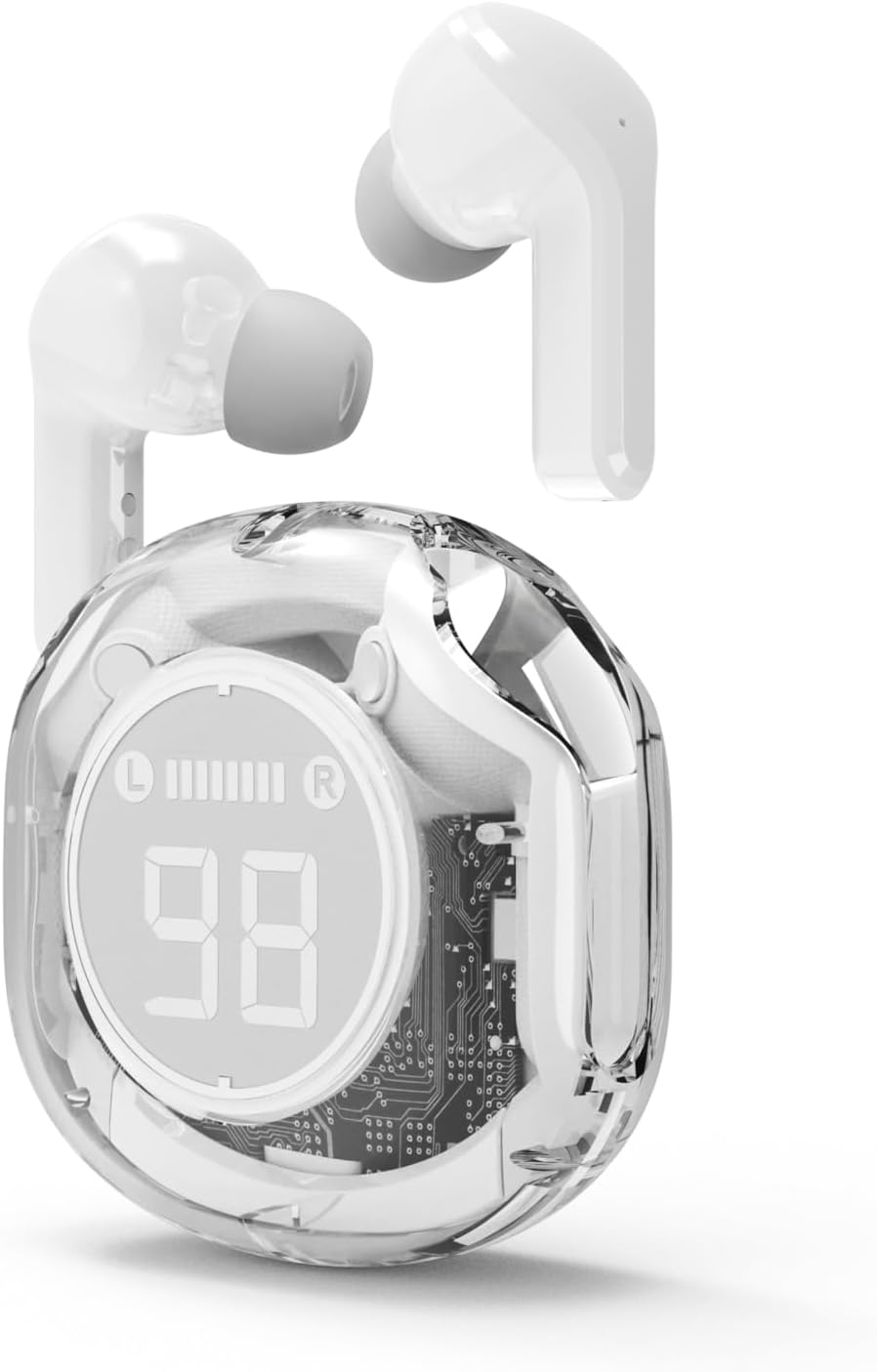
Nọmba 4.2: The Gembird TWST-01-W Transparent Bluetooth Earbuds shown outside their charging case, ready for use or pairing. The transparent design of the earbuds themselves is visible.
5. Awọn ilana Iṣiṣẹ
The Gembird TWST-01-W earbuds utilize touch controls. Specific gestures may vary slightly; refer to the quick start guide included in your package for precise commands.
| Išẹ | Iṣe (Iṣakoso Ifọwọkan) |
|---|---|
| Agbara Tan | Yọ kuro ninu apoti gbigba agbara. |
| Agbara Paa | Fi pada sinu apoti gbigba agbara. |
| Mu ṣiṣẹ/Danu Orin duro | Fọwọ ba ẹyọkan lori boya agbekọri. |
| Next Track | Fọwọ ba lẹẹmeji lori agbekọri ọtun. |
| Ti tẹlẹ Track | Fọwọ ba lẹẹmeji lori agbekọri osi. |
| Idahun/Pari Ipe | Tẹ ẹyọkan lori boya agbekọri lakoko ipe ti nwọle. |
| Kọ Ipe | Tẹ mọlẹ boya agbekọri fun iṣẹju meji 2 lakoko ipe ti nwọle. |
| Mu Oluranlọwọ Ohun ṣiṣẹ | Triple tap on either earbud (functionality depends on device support). |
Note: Touch control sensitivity and specific functions may vary. Experiment to find the optimal touch points.
6. Gbigba agbara
6.1 Ngba agbara si Awọn Agbekọri
To charge the earbuds, simply place them into their designated slots within the charging case. Ensure the charging contacts align. The LCD display on the case will show the individual battery levels of the left (L) and right (R) earbuds.
6.2 Gbigba agbara si ọran naa
When the charging case battery is low, connect the provided charging cable to the case's charging port and to a standard USB power adapter (not included) or a computer's USB port. The LCD display will show the charging progress of the case. The color-changing backlight indicates active charging.
A full charge for the case typically takes a few hours. The earbuds provide up to 4 hours of listening time, and the fully charged case can provide multiple additional charges, extending total playback time.
7. Itọju
7.1 Ninu
- Lo asọ ti o gbẹ, asọ ti ko ni lint lati nu afikọti ati apoti gbigba agbara.
- Maṣe lo awọn afọmọ abrasive, ọti-lile, tabi awọn nkan ti kemikali.
- Rọra nu awọn olubasọrọ gbigba agbara lori mejeeji agbekọri ati ọran naa lati rii daju asopọ to dara.
7.2 Ibi ipamọ
- Tọju awọn agbekọri naa sinu apoti gbigba agbara wọn nigbati ko si ni lilo lati daabobo wọn ati jẹ ki wọn gba agbara.
- Yago fun titoju ni awọn iwọn otutu to gaju (gbona tabi otutu) tabi ni awọn agbegbe ọriniinitutu giga.
7.3 Omi Resistance
The earbuds are water resistant, meaning they can withstand splashes and sweat. They are not designed for submersion in water. Do not use them while swimming or showering. Ensure the earbuds are dry before placing them back into the charging case to prevent damage.
8. Laasigbotitusita
Ti o ba pade awọn iṣoro, gbiyanju awọn ojutu wọnyi:
| Isoro | Ojutu |
|---|---|
| Earbuds ko so pọ |
|
| Ko si ohun lati agbekọri kan |
|
| Awọn ọran gbigba agbara |
|
| Didara ohun afetigbọ |
|
9. Awọn pato
| Ẹya ara ẹrọ | Ẹ̀kúnrẹ́rẹ́ |
|---|---|
| Awoṣe | TWST-01-W |
| Brand | Gembird |
| Ohun elo | Ṣiṣu |
| Iwọn | 80 g |
| Batiri Iru | Lithium Ion (1 AAAA battery included) |
| Akoko gbigbọ | Titi di wakati 4 fun idiyele kan |
| Ọna Iṣakoso | Fọwọkan |
| Agbọrọsọ Opin | 5 cm |
| Omi Resistance | Water resistant (splash and sweat proof) |
| Asopọmọra | Bluetooth (USB fun gbigba agbara) |
| Iṣeduro Lilo | Ninu ile |
10. Atilẹyin ọja ati Support
Your Gembird TWST-01-W Transparent Bluetooth Earbuds come with a mẹta-odun atilẹyin ọja lodi si awọn abawọn iṣelọpọ. Atilẹyin ọja yii bo awọn abawọn ninu awọn ohun elo ati iṣẹ-ṣiṣe labẹ lilo deede.
For warranty claims or technical support, please contact your retailer or the official Gembird support channels. Keep your proof of purchase for warranty validation.


