1. Ifihan
This manual provides detailed instructions for the safe and effective operation of your KAIWEETS KF01-EU Network and Cable Tester. This multifunction device is designed for cable tracking, cable pairing, telephone line testing, voltage and polarity detection, and continuity tests. It is an essential tool for network and telecommunications professionals.
Please read this manual thoroughly before using the device and retain it for future reference.
2. Alaye Aabo
- Always ensure power is cut off from metallic wires before tracing to prevent damage to the device and ensure user safety.
- Má ṣe gbìyànjú láti tún ẹ̀rọ náà ṣe tàbí láti ṣe àtúnṣe rẹ̀. Tọ́ka gbogbo iṣẹ́ ìtọ́jú náà sí àwọn òṣìṣẹ́ tó mọ̀ nípa rẹ̀.
- Use only the specified battery type (9V 6F22) and ensure correct polarity during installation.
- Jeki ẹrọ naa kuro ni omi, ọrinrin, ati awọn iwọn otutu to gaju.
- Tọju ẹrọ naa ni ibi gbigbẹ, ti o tutu nigbati ko si ni lilo.
3. Package Awọn akoonu
Daju pe gbogbo awọn nkan wa ninu apo rẹ:
- KAIWEETS KF01-EU Cable Tracer (Transmitter and Receiver)
- Itọsọna olumulo
- RJ11 Alligator Clip Cable (Black) × 1
- RJ45 Adapter Cable (Black) × 1
- 9V 6F22 Battery × 2
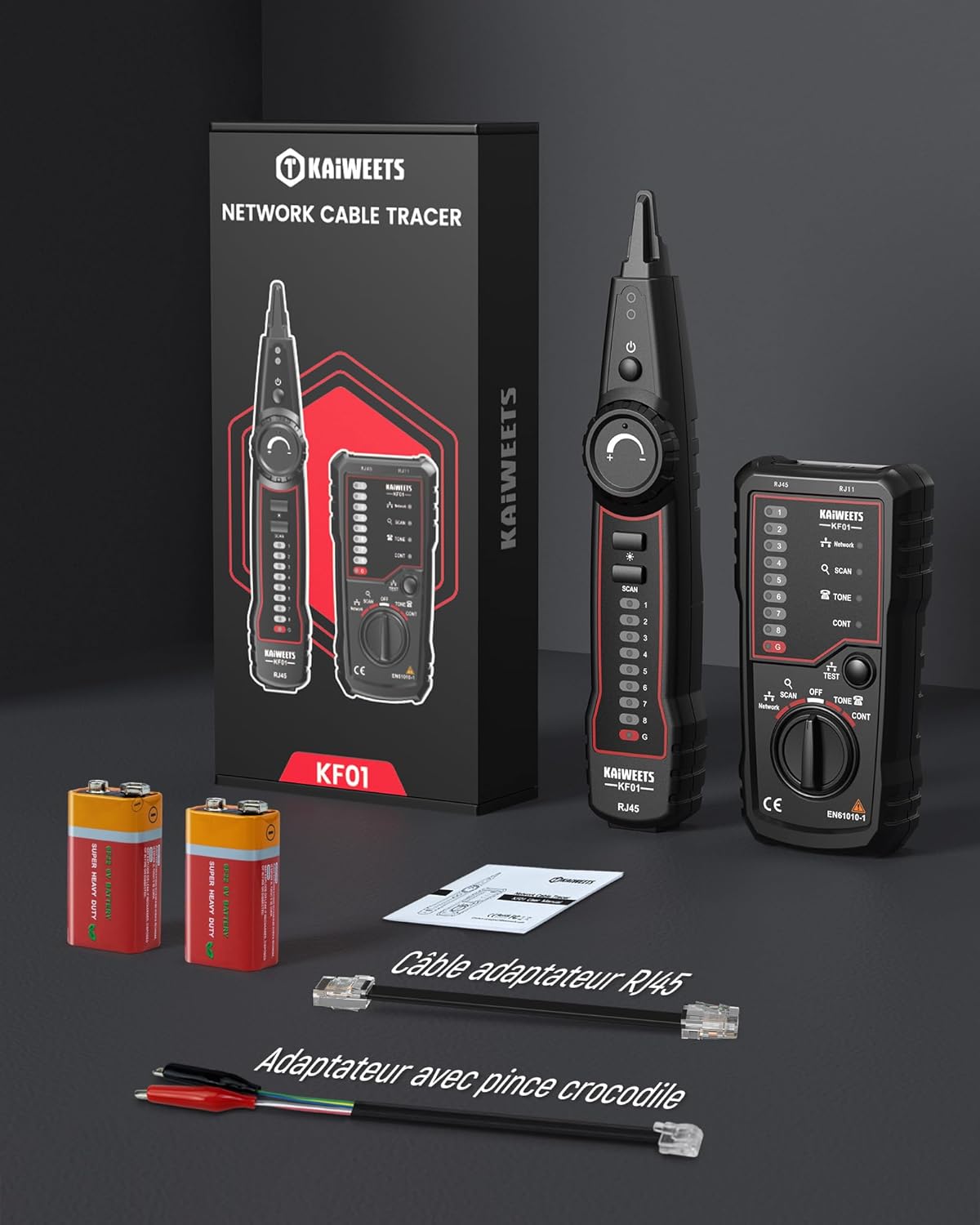
Image: The KAIWEETS KF01-EU cable tracer kit, including the main unit, receiver, RJ45 cable, RJ11 alligator clip cable, and two 9V batteries, all neatly arranged with the product packaging.
4. Ọja Ipariview
The KAIWEETS KF01-EU is a versatile tool designed for comprehensive network and telecommunication cable testing. It consists of a main transmitter unit and a detachable receiver unit.
Awọn ẹya pataki:
- Iṣẹ ṣiṣe lọpọlọpọ: Combines cable tracking, cable pairing, telephone line testing, voltage/polarity detection, and continuity testing.
- Wide Cable Compatibility: Supports RJ11, RJ45, telephone, and other metallic cables.
- Cable Fault Detection: Identifies open circuits, short circuits, wiring faults, and reversed connections.
- Iwọn ti o le ṣatunṣe: For signal optimization and interference reduction during tracing.
- Filaṣi LED ti a ṣepọ: For operation in dimly lit or confined spaces.
- Long Test Range: Effective cable tracing up to 300 meters.

Image: Detailed diagram labeling the components of the KAIWEETS KF01-EU cable tester, including the probe, LED light, signal indicator, power switch, volume adjustment knob, light switch, scan switch, wiring LED indicators, pairing indicators, test button, and function selection knob.
5. Eto ati Batiri sori
5.1 Fifi sori batiri
- Locate the battery compartments on both the main transmitter unit and the receiver unit.
- Ṣii awọn ideri batiri.
- Insert one 9V 6F22 battery into each unit, ensuring correct polarity (+/-).
- Pa awọn ideri batiri ni aabo.
5.2 Ibẹrẹ Agbara Lori
Turn on both the transmitter and receiver units using their respective power switches. The LED indicators should illuminate briefly, indicating the devices are ready for operation.
6. Awọn ilana Iṣiṣẹ
6.1 Cable Tracing (Wire Tracking)
This function helps locate a specific cable within a bundle or wall.
- Aabo Lakọkọ: Before tracing metallic wires, ensure all power to the cables is disconnected to prevent damage to the device.
- Connect the RJ45 or RJ11 cable from the transmitter to the cable you wish to trace. For non-standard cables, use the RJ11 alligator clip cable.
- Turn on the transmitter unit.
- Turn on the receiver unit and adjust the volume knob to a comfortable level.
- Move the receiver's probe along the suspected path of the cable. The receiver will emit an audible tone, which will be strongest when the probe is directly over the target cable.
- Use the LED flashlight on the receiver for better visibility in dark areas.

Image: A hand holding the KAIWEETS KF01-EU receiver unit, tracing a network cable within a bundle of cables. The receiver's LED light is illuminated, indicating its use in identifying a specific cable.
6.2 Network Cable Testing (RJ45/RJ11)
This function checks for open circuits, short circuits, wiring faults, and reversed connections in network cables.
- Connect one end of the RJ45 or RJ11 cable to the transmitter's corresponding port.
- Connect the other end of the cable to the receiver's corresponding port.
- Tan awọn ẹya mejeeji.
- On the receiver, select the "TEST" mode using the function selection knob.
- Observe the LED indicators on both units. They will light up sequentially, indicating the status of each wire pair.
- Itumọ ti awọn LED:
- Sequential illumination on both units: Correct wiring.
- No illumination for a specific pair: Open circuit.
- Multiple LEDs illuminating simultaneously or in an incorrect sequence: Short circuit or wiring fault.
- LEDs illuminating out of order: Reversed connection.

Image: The KAIWEETS KF01-EU transmitter and receiver units connected to an RJ45 network cable, performing a cable test. The LED indicators on both devices are visible, showing the status of the wire pairs.
6.3 Idanwo Laini Foonu
This function allows for checking the status of telephone lines (idle, ringing, talking) and identifying TIP and RING polarity.
- Connect the RJ11 alligator clip cable to the RJ11 port on the transmitter unit.
- Connect the alligator clips to the telephone line wires (TIP and RING).
- Turn on the transmitter unit.
- Observe the LED indicators and listen for audible signals to determine the line status:
- Laišišẹ: Specific LED pattern or continuous tone.
- Ohun orin ipe: Flashing LED pattern or intermittent tone.
- Sọrọ: Different LED pattern or tone.
- The device will also indicate the polarity of the TIP and RING lines.

Image: The KAIWEETS KF01-EU main unit connected to a telephone line via the RJ11 alligator clip cable, demonstrating the telephone line testing function. A landline phone is visible in the background.
6.4 Continuity, Voltage, and Polarity Tests
These tests are typically performed using the RJ11 alligator clip cable for various metallic conductors.
- Connect the alligator clips to the conductors you wish to test.
- Turn on the transmitter unit.
- Select the appropriate mode (e.g., "CONT" for continuity) using the function selection knob.
- Observe the indicators for continuity, voltage presence, and polarity.
7. Itọju
7.1 Ninu
- Mu ese ẹrọ rẹ jẹ pẹlu asọ, asọ gbigbẹ.
- Ma ṣe lo abrasive ose tabi epo.
7.2 Batiri Rirọpo
- Replace batteries when the low battery indicator appears or when the device's performance degrades.
- Always replace both 9V batteries simultaneously for optimal performance.
- Sọ awọn batiri ti a lo ni ibamu si awọn ilana agbegbe.
7.3 Ibi ipamọ
- Tí o bá ń tọ́jú ẹ̀rọ náà fún ìgbà pípẹ́, yọ àwọn bátìrì náà kúrò kí ó má baà jò.
- Tọju ni itura, aye gbigbẹ, kuro lati orun taara ati awọn iwọn otutu to gaju.
8. Laasigbotitusita
| Isoro | Owun to le Fa | Ojutu |
|---|---|---|
| Ẹrọ naa ko ṣiṣẹ. | Awọn batiri ti ku tabi ti fi sori ẹrọ ti ko tọ. | Ṣayẹwo polarity batiri; ropo awọn batiri. |
| No signal during cable tracing. | Transmitter not connected, receiver volume too low, or cable is damaged. | Ensure proper connection, increase receiver volume, check cable integrity. |
| Incorrect cable test results. | Poor connection, damaged cable, or incorrect mode selected. | Ensure secure connections, inspect cable for damage, verify correct test mode. |
| Interference during tracing. | External electromagnetic interference. | Adjust receiver volume, try tracing from a different angle, or move away from strong electrical fields. |
9. Awọn pato
- Awoṣe: KF01-EU
- Olupese: KAIWEETS
- Awọn iwọn Ọja (L x W x H): 23.5 x 15.2 x 4.7 cm
- Ìwúwo: 340 giramu
- Orisun Agbara: 2 x 9V 6F22 Batteries (included)
- Awọn oriṣi USB ti o ni atilẹyin: RJ11, RJ45, Telephone, other metallic cables
- Max. Test Range: Ti o to awọn mita 300
- Ibamu: CE, EN 61010-1, RoHS
10. Atilẹyin ọja ati Support
KAIWEETS offers up to 36 months of customer service and technical support for the KF01-EU Network and Cable Tester. For assistance, please contact KAIWEETS customer support through their official channels or the retailer where the product was purchased.
Jọwọ ṣe idaduro ẹri rira rẹ fun awọn iṣeduro atilẹyin ọja.


